Introduction: Prompt engineering has emerged as one of the most critical skills in the AI era. The difference between a mediocre AI response and an exceptional one often comes down to how you structure your prompt. After years of working with large language models across production systems, I’ve distilled the most effective techniques into this comprehensive guide. Whether you’re building chatbots, code assistants, or complex reasoning systems, mastering these patterns will dramatically improve your results.
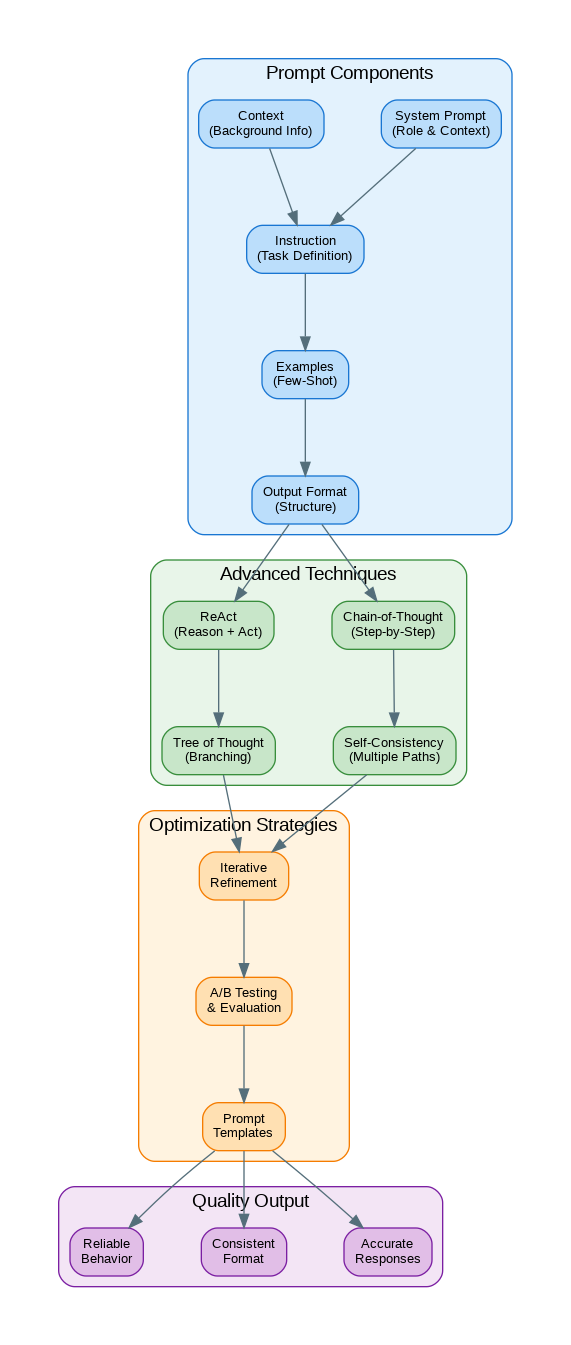
The Anatomy of an Effective Prompt
Every well-crafted prompt consists of five key components that work together to guide the model toward your desired output. Understanding these components is the foundation of effective prompt engineering.
# The Five Components of an Effective Prompt

prompt_template = """
# 1. SYSTEM PROMPT (Role & Context)
You are an expert Python developer with 15 years of experience in building
scalable web applications. You prioritize clean, maintainable code and
follow PEP 8 guidelines strictly.

# 2. CONTEXT (Background Information)
The user is building a FastAPI application that needs to handle 10,000
concurrent requests. The application uses PostgreSQL for persistence
and Redis for caching.

# 3. INSTRUCTION (Task Definition)
Review the following code and suggest optimizations for performance
and maintainability. Focus on:
- Database connection pooling
- Async/await patterns
- Error handling
- Code organization

# 4. EXAMPLES (Few-Shot Learning)
Example of good async database access:
```python
async def get_user(user_id: int) -> User:
    async with get_db_session() as session:
        result = await session.execute(
            select(User).where(User.id == user_id)
        )
        return result.scalar_one_or_none()
```

# 5. OUTPUT FORMAT (Structure)
Provide your response in the following format:
1. Summary of issues found (bullet points)
2. Optimized code with comments explaining changes
3. Performance impact estimate

User's code:
{user_code}
"""
Chain-of-Thought Prompting
Chain-of-Thought (CoT) prompting encourages the model to break down complex problems into intermediate reasoning steps. This technique dramatically improves accuracy on math, logic, and multi-step reasoning tasks.
from openai import OpenAI

client = OpenAI()

# Without Chain-of-Thought (often incorrect)
basic_prompt = """
A store has 45 apples. They sell 12 in the morning and receive a
shipment of 30 more. Then they sell 18 in the afternoon.
How many apples do they have?
"""

# With Chain-of-Thought (much more accurate)
cot_prompt = """
A store has 45 apples. They sell 12 in the morning and receive a
shipment of 30 more. Then they sell 18 in the afternoon.
How many apples do they have?

Let's solve this step by step:
1. Start with the initial count
2. Subtract morning sales
3. Add the shipment
4. Subtract afternoon sales
5. State the final answer

Show your work for each step.
"""

response = client.chat.completions.create(
    model="gpt-4o",
    messages=[{"role": "user", "content": cot_prompt}],
    temperature=0.1  # Lower temperature for reasoning tasks
)

print(response.choices[0].message.content)

# Zero-shot CoT (just add "Let's think step by step")
zero_shot_cot = """
A farmer has 3 fields. Each field has 4 rows of crops.
Each row has 25 plants. How many plants does the farmer have in total?

Let's think step by step.
"""
Few-Shot Learning Patterns
Few-shot learning provides examples that demonstrate the desired input-output pattern. The model learns from these examples to generalize to new inputs.
# Few-Shot Classification Example
classification_prompt = """
Classify the sentiment of customer reviews as POSITIVE, NEGATIVE, or NEUTRAL.

Examples:
Review: "This product exceeded my expectations! Fast shipping too."
Sentiment: POSITIVE

Review: "Arrived broken and customer service was unhelpful."
Sentiment: NEGATIVE

Review: "It works as described. Nothing special but does the job."
Sentiment: NEUTRAL

Review: "The quality is okay but the price is too high for what you get."
Sentiment: NEGATIVE

Now classify this review:
Review: "{user_review}"
Sentiment:
"""

# Few-Shot Code Generation
code_generation_prompt = """
Convert natural language descriptions to Python functions.

Example 1:
Description: Calculate the factorial of a number
```python
def factorial(n: int) -> int:
    if n <= 1:
        return 1
    return n * factorial(n - 1)
```

Example 2:
Description: Check if a string is a palindrome
```python
def is_palindrome(s: str) -> bool:
    cleaned = s.lower().replace(" ", "")
    return cleaned == cleaned[::-1]
```

Example 3:
Description: Find the nth Fibonacci number
```python
def fibonacci(n: int) -> int:
    if n <= 1:
        return n
    a, b = 0, 1
    for _ in range(2, n + 1):
        a, b = b, a + b
    return b
```

Now generate code for:
Description: {user_description}
```python
"""</code></pre>
<!-- /wp:code -->

<!-- wp:heading -->
<h2>ReAct Pattern for Tool Use</h2>
<!-- /wp:heading -->

<!-- wp:paragraph -->
<p>The ReAct (Reasoning + Acting) pattern combines reasoning with action-taking, making it ideal for agents that need to use tools or interact with external systems.</p>
<!-- /wp:paragraph -->

<!-- wp:code -->
<pre class="wp-block-code"><code>react_prompt = """
You are an AI assistant that can use tools to help answer questions.

Available tools:
- search(query): Search the web for information
- calculate(expression): Evaluate mathematical expressions
- get_weather(city): Get current weather for a city

Use this format:
Thought: [Your reasoning about what to do next]
Action: [tool_name(parameters)]
Observation: [Result from the tool]
... (repeat Thought/Action/Observation as needed)
Thought: I now have enough information to answer
Final Answer: [Your complete answer]

Question: What is the population of Tokyo multiplied by the average
temperature there today in Celsius?

Thought: I need to find two pieces of information: Tokyo's population
and today's temperature. Let me start with the population.
Action: search("Tokyo population 2024")
Observation: Tokyo's population is approximately 13.96 million people.

Thought: Now I need to get the current temperature in Tokyo.
Action: get_weather("Tokyo")
Observation: Current weather in Tokyo: 18°C, partly cloudy.

Thought: Now I can calculate the result.
Action: calculate("13960000 * 18")
Observation: 251,280,000

Thought: I now have enough information to answer.
Final Answer: Tokyo's population (approximately 13.96 million) multiplied
by today's temperature (18°C) equals 251,280,000.
"""</code></pre>
<!-- /wp:code -->

<!-- wp:heading -->
<h2>Structured Output with JSON Mode</h2>
<!-- /wp:heading -->

<!-- wp:code -->
<pre class="wp-block-code"><code>from openai import OpenAI
from pydantic import BaseModel
import json

client = OpenAI()

# Method 1: JSON mode with explicit schema
json_prompt = """
Extract information from the following job posting and return it as JSON.

Schema:
{
    "title": "string",
    "company": "string",
    "location": "string",
    "salary_range": {"min": number, "max": number, "currency": "string"},
    "requirements": ["string"],
    "benefits": ["string"],
    "remote": boolean
}

Job Posting:
{job_posting}

Return only valid JSON, no additional text.
"""

response = client.chat.completions.create(
    model="gpt-4o",
    messages=[{"role": "user", "content": json_prompt.format(
        job_posting="Senior Python Developer at TechCorp..."
    )}],
    response_format={"type": "json_object"}
)

data = json.loads(response.choices[0].message.content)

# Method 2: Structured Outputs with Pydantic (OpenAI)
class JobPosting(BaseModel):
    title: str
    company: str
    location: str
    salary_min: int
    salary_max: int
    requirements: list[str]
    remote: bool

response = client.beta.chat.completions.parse(
    model="gpt-4o",
    messages=[
        {"role": "system", "content": "Extract job posting information."},
        {"role": "user", "content": job_posting_text}
    ],
    response_format=JobPosting
)

job = response.choices[0].message.parsed
print(f"Title: {job.title}, Remote: {job.remote}")</code></pre>
<!-- /wp:code -->

<!-- wp:heading -->
<h2>Self-Consistency for Improved Accuracy</h2>
<!-- /wp:heading -->

<!-- wp:code -->
<pre class="wp-block-code"><code>from collections import Counter
from openai import OpenAI

client = OpenAI()

def self_consistent_answer(question: str, num_samples: int = 5) -> str:
    """
    Generate multiple reasoning paths and return the most common answer.
    Significantly improves accuracy on complex reasoning tasks.
    """
    prompt = f"""
    {question}

    Think through this step by step and provide your final answer
    on the last line in the format: "ANSWER: [your answer]"
    """

    answers = []
    for _ in range(num_samples):
        response = client.chat.completions.create(
            model="gpt-4o",
            messages=[{"role": "user", "content": prompt}],
            temperature=0.7  # Higher temperature for diverse reasoning
        )

        # Extract the answer from the response
        text = response.choices[0].message.content
        if "ANSWER:" in text:
            answer = text.split("ANSWER:")[-1].strip()
            answers.append(answer)

    # Return the most common answer
    if answers:
        most_common = Counter(answers).most_common(1)[0][0]
        return most_common
    return "Unable to determine answer"

# Example usage
question = """
In a class of 30 students, 18 play soccer, 15 play basketball,
and 10 play both. How many students play neither sport?
"""

answer = self_consistent_answer(question, num_samples=5)
print(f"Most consistent answer: {answer}")</code></pre>
<!-- /wp:code -->

<!-- wp:heading -->
<h2>Prompt Templates and Management</h2>
<!-- /wp:heading -->

<!-- wp:code -->
<pre class="wp-block-code"><code>from string import Template
from typing import Dict, Any
import yaml

class PromptManager:
    """Manage and version prompt templates."""

    def __init__(self, templates_path: str = "prompts.yaml"):
        with open(templates_path) as f:
            self.templates = yaml.safe_load(f)

    def get_prompt(self, name: str, **kwargs) -> str:
        """Get a prompt template and fill in variables."""
        template = self.templates.get(name)
        if not template:
            raise ValueError(f"Template '{name}' not found")

        return Template(template["content"]).safe_substitute(**kwargs)

    def get_system_prompt(self, name: str) -> str:
        """Get the system prompt for a template."""
        template = self.templates.get(name)
        return template.get("system", "You are a helpful assistant.")

# prompts.yaml example:
"""
code_review:
  system: |
    You are a senior software engineer conducting code reviews.
    Focus on security, performance, and maintainability.
  content: |
    Review the following $language code:

    ```$language
    $code
    ```

    Provide feedback on:
    1. Security vulnerabilities
    2. Performance issues
    3. Code style and best practices
    4. Suggested improvements

summarize:
  system: You are an expert at creating concise summaries.
  content: |
    Summarize the following $doc_type in $length sentences:

    $content

    Focus on the key points and main takeaways.
"""

# Usage
manager = PromptManager("prompts.yaml")
prompt = manager.get_prompt(
    "code_review",
    language="python",
    code="def foo(): pass"
)
Common Pitfalls and How to Avoid Them
Pitfall 1: Vague Instructions – Be specific about what you want. Instead of “Write good code,” say “Write a Python function that handles edge cases, includes type hints, and has docstrings.”
Pitfall 2: Missing Context – Always provide relevant background. The model doesn’t know your codebase, your users, or your constraints unless you tell it.
Pitfall 3: Inconsistent Examples – Ensure your few-shot examples follow the same format and quality you expect in the output.
Pitfall 4: Ignoring Temperature – Use low temperature (0.1-0.3) for factual/analytical tasks, higher (0.7-0.9) for creative tasks.
References
- OpenAI Prompt Engineering Guide: https://platform.openai.com/docs/guides/prompt-engineering
- Anthropic Prompt Engineering: https://docs.anthropic.com/en/docs/build-with-claude/prompt-engineering
- Chain-of-Thought Paper: https://arxiv.org/abs/2201.11903
- ReAct Paper: https://arxiv.org/abs/2210.03629
Conclusion
Effective prompt engineering is both an art and a science. The techniques covered here—from basic component structure to advanced patterns like Chain-of-Thought and ReAct—form a toolkit that will serve you across any LLM application. Remember that prompts should be iterated and tested just like code. Start with a clear structure, add examples when needed, and continuously refine based on results. The investment in crafting quality prompts pays dividends in more accurate, consistent, and useful AI outputs.
Discover more from C4: Container, Code, Cloud & Context
Subscribe to get the latest posts sent to your email.