Introduction: Google Cloud Functions provides a fully managed, event-driven serverless compute platform that scales automatically from zero to millions of invocations. This comprehensive guide explores Cloud Functions’ enterprise capabilities, from HTTP triggers and event-driven architectures to security controls, VPC connectivity, and cost optimization. After building serverless architectures across all major cloud providers, I’ve found Cloud Functions delivers exceptional developer experience with its automatic scaling, pay-per-use pricing, and deep integration with GCP services. Organizations should leverage Cloud Functions for event processing, API backends, and data transformation while implementing proper security controls, connection pooling, and cold start optimization from the start.
Cloud Functions Architecture: Gen 1 vs Gen 2
Cloud Functions offers two generations with distinct architectures. Gen 1 functions run on a proprietary infrastructure optimized for simple event handlers with fast cold starts. Gen 2 functions are built on Cloud Run, providing longer timeouts (up to 60 minutes vs 9 minutes), larger instances (up to 16GB RAM, 4 vCPUs), concurrency (up to 1000 concurrent requests per instance), and traffic splitting for gradual rollouts. For new projects, Gen 2 is the recommended choice unless you need Gen 1’s faster cold starts for latency-sensitive workloads.
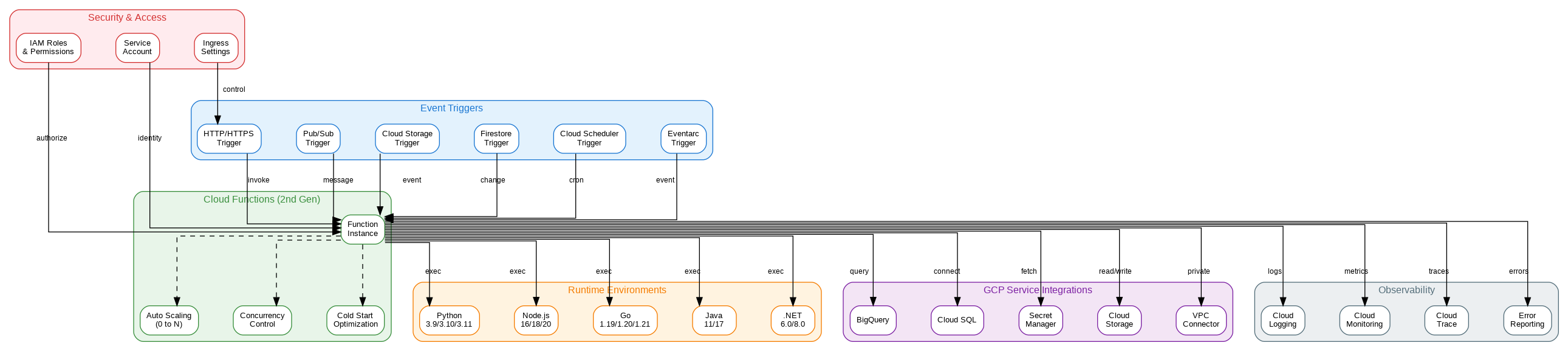
Cloud Functions supports multiple trigger types. HTTP triggers expose functions as HTTPS endpoints with automatic TLS certificate management. Event triggers respond to events from Pub/Sub, Cloud Storage, Firestore, and other GCP services through Eventarc. CloudEvents format provides a standardized event schema across all trigger types, simplifying event handling logic. Gen 2 functions can also use direct Pub/Sub triggers for lower latency than Eventarc-based triggers.
The execution environment provides a stateless, ephemeral container with a writable /tmp directory (limited to instance memory). Global variables persist across invocations on the same instance, enabling connection pooling and caching. However, functions should never rely on state persistence—design for statelessness with external storage for any data that must survive instance recycling.
Security and Networking
Cloud Functions integrates with IAM for authentication and authorization. HTTP functions can require authentication (invoker must have cloudfunctions.functions.invoke permission) or allow unauthenticated access for public APIs. Service account identity controls what resources the function can access—always use dedicated service accounts with minimal permissions rather than the default compute service account.
VPC connector enables functions to access resources in your VPC network, including private Cloud SQL instances, Memorystore, and internal load balancers. Configure egress settings to route all traffic through the VPC (for compliance requirements) or only private IP traffic (for cost optimization). Serverless VPC Access connectors scale automatically but incur additional costs—size appropriately for your traffic patterns.
Secret Manager integration provides secure access to sensitive configuration without embedding secrets in code or environment variables. Reference secrets directly in function configuration, and they’re injected at runtime. Secret versions enable rotation without redeploying functions. For the highest security, combine Secret Manager with VPC Service Controls to prevent secret exfiltration.
Production Terraform Configuration
Here’s a comprehensive Terraform configuration for Cloud Functions with enterprise security, VPC connectivity, and event triggers:
# Cloud Functions Enterprise Configuration
terraform {
  required_version = ">= 1.5.0"
  required_providers {
    google = { source = "hashicorp/google", version = "~> 5.0" }
  }
}

variable "project_id" { type = string }
variable "region" { type = string, default = "us-central1" }

# Service account for function
resource "google_service_account" "function_sa" {
  account_id   = "cloud-function-sa"
  display_name = "Cloud Function Service Account"
}

# Minimal IAM permissions
resource "google_project_iam_member" "function_permissions" {
  for_each = toset([
    "roles/secretmanager.secretAccessor",
    "roles/cloudsql.client",
    "roles/pubsub.publisher"
  ])

  project = var.project_id
  role    = each.value
  member  = "serviceAccount:${google_service_account.function_sa.email}"
}

# VPC connector for private network access
resource "google_vpc_access_connector" "connector" {
  name          = "function-connector"
  region        = var.region
  network       = google_compute_network.vpc.name
  ip_cidr_range = "10.8.0.0/28"

  min_instances = 2
  max_instances = 10
}

resource "google_compute_network" "vpc" {
  name                    = "function-vpc"
  auto_create_subnetworks = false
}

resource "google_compute_subnetwork" "subnet" {
  name          = "function-subnet"
  ip_cidr_range = "10.0.0.0/24"
  region        = var.region
  network       = google_compute_network.vpc.id
}

# Secret for database credentials
resource "google_secret_manager_secret" "db_password" {
  secret_id = "db-password"

  replication {
    auto {}
  }
}

resource "google_secret_manager_secret_version" "db_password" {
  secret      = google_secret_manager_secret.db_password.id
  secret_data = "your-secure-password"
}

# Storage bucket for function source
resource "google_storage_bucket" "function_source" {
  name     = "${var.project_id}-function-source"
  location = var.region

  uniform_bucket_level_access = true
}

# Function source archive
resource "google_storage_bucket_object" "function_zip" {
  name   = "function-source-${filemd5("${path.module}/function.zip")}.zip"
  bucket = google_storage_bucket.function_source.name
  source = "${path.module}/function.zip"
}

# Gen 2 HTTP Function
resource "google_cloudfunctions2_function" "http_function" {
  name     = "http-api"
  location = var.region

  build_config {
    runtime     = "python311"
    entry_point = "handle_request"

    source {
      storage_source {
        bucket = google_storage_bucket.function_source.name
        object = google_storage_bucket_object.function_zip.name
      }
    }
  }

  service_config {
    max_instance_count    = 100
    min_instance_count    = 1  # Keep warm to reduce cold starts
    available_memory      = "512Mi"
    available_cpu         = "1"
    timeout_seconds       = 60
    service_account_email = google_service_account.function_sa.email

    vpc_connector                  = google_vpc_access_connector.connector.id
    vpc_connector_egress_settings  = "PRIVATE_RANGES_ONLY"
    ingress_settings               = "ALLOW_ALL"

    environment_variables = {
      PROJECT_ID = var.project_id
      LOG_LEVEL  = "INFO"
    }

    secret_environment_variables {
      key        = "DB_PASSWORD"
      project_id = var.project_id
      secret     = google_secret_manager_secret.db_password.secret_id
      version    = "latest"
    }
  }
}

# Allow unauthenticated access (for public API)
resource "google_cloud_run_service_iam_member" "public_access" {
  location = google_cloudfunctions2_function.http_function.location
  service  = google_cloudfunctions2_function.http_function.name
  role     = "roles/run.invoker"
  member   = "allUsers"
}

# Pub/Sub topic for events
resource "google_pubsub_topic" "events" {
  name = "function-events"
}

# Gen 2 Event-driven Function
resource "google_cloudfunctions2_function" "event_function" {
  name     = "event-processor"
  location = var.region

  build_config {
    runtime     = "python311"
    entry_point = "process_event"

    source {
      storage_source {
        bucket = google_storage_bucket.function_source.name
        object = google_storage_bucket_object.function_zip.name
      }
    }
  }

  service_config {
    max_instance_count    = 50
    available_memory      = "256Mi"
    timeout_seconds       = 300
    service_account_email = google_service_account.function_sa.email
  }

  event_trigger {
    trigger_region = var.region
    event_type     = "google.cloud.pubsub.topic.v1.messagePublished"
    pubsub_topic   = google_pubsub_topic.events.id
    retry_policy   = "RETRY_POLICY_RETRY"
  }
}

# Cloud Storage trigger function
resource "google_cloudfunctions2_function" "storage_function" {
  name     = "storage-processor"
  location = var.region

  build_config {
    runtime     = "python311"
    entry_point = "process_file"

    source {
      storage_source {
        bucket = google_storage_bucket.function_source.name
        object = google_storage_bucket_object.function_zip.name
      }
    }
  }

  service_config {
    max_instance_count    = 20
    available_memory      = "1Gi"
    timeout_seconds       = 540
    service_account_email = google_service_account.function_sa.email
  }

  event_trigger {
    trigger_region        = var.region
    event_type            = "google.cloud.storage.object.v1.finalized"
    retry_policy          = "RETRY_POLICY_RETRY"
    service_account_email = google_service_account.function_sa.email

    event_filters {
      attribute = "bucket"
      value     = google_storage_bucket.data_bucket.name
    }
  }
}

resource "google_storage_bucket" "data_bucket" {
  name     = "${var.project_id}-data-input"
  location = var.region
}
Python Implementation Patterns
This Python implementation demonstrates enterprise patterns for Cloud Functions including connection pooling, structured logging, and graceful error handling:
"""Cloud Functions - Enterprise Python Implementation"""
import functions_framework
from flask import Request, jsonify
from google.cloud import pubsub_v1, storage, secretmanager
from cloudevents.http import CloudEvent
import google.cloud.logging
import logging
import os
from functools import lru_cache
from typing import Dict, Any

# Initialize Cloud Logging
client = google.cloud.logging.Client()
client.setup_logging()
logger = logging.getLogger(__name__)

# Connection pooling - reuse across invocations
@lru_cache(maxsize=1)
def get_pubsub_client():
    """Cached Pub/Sub client for connection reuse."""
    return pubsub_v1.PublisherClient()

@lru_cache(maxsize=1)
def get_storage_client():
    """Cached Storage client for connection reuse."""
    return storage.Client()

@lru_cache(maxsize=1)
def get_secret(secret_id: str) -> str:
    """Retrieve secret from Secret Manager with caching."""
    client = secretmanager.SecretManagerServiceClient()
    project_id = os.environ.get("PROJECT_ID")
    name = f"projects/{project_id}/secrets/{secret_id}/versions/latest"
    response = client.access_secret_version(request={"name": name})
    return response.payload.data.decode("UTF-8")

# HTTP Function
@functions_framework.http
def handle_request(request: Request) -> Dict[str, Any]:
    """HTTP endpoint with structured response."""
    logger.info("Processing HTTP request", extra={
        "method": request.method,
        "path": request.path,
        "user_agent": request.headers.get("User-Agent")
    })

    try:
        if request.method == "POST":
            data = request.get_json(silent=True) or {}

            # Validate input
            if "message" not in data:
                return jsonify({"error": "Missing 'message' field"}), 400

            # Publish to Pub/Sub
            publisher = get_pubsub_client()
            topic_path = publisher.topic_path(
                os.environ["PROJECT_ID"],
                "function-events"
            )

            future = publisher.publish(
                topic_path,
                data["message"].encode("utf-8"),
                source="http-function"
            )
            message_id = future.result(timeout=30)

            logger.info(f"Published message: {message_id}")
            return jsonify({
                "status": "success",
                "message_id": message_id
            })

        elif request.method == "GET":
            return jsonify({
                "status": "healthy",
                "version": os.environ.get("K_REVISION", "unknown")
            })

        else:
            return jsonify({"error": "Method not allowed"}), 405

    except Exception as e:
        logger.exception("Request processing failed")
        return jsonify({"error": str(e)}), 500

# Pub/Sub Event Function
@functions_framework.cloud_event
def process_event(cloud_event: CloudEvent) -> None:
    """Process Pub/Sub messages with retry handling."""
    import base64

    logger.info("Processing event", extra={
        "event_id": cloud_event["id"],
        "event_type": cloud_event["type"],
        "source": cloud_event["source"]
    })

    try:
        # Decode Pub/Sub message
        message_data = base64.b64decode(
            cloud_event.data["message"]["data"]
        ).decode("utf-8")

        attributes = cloud_event.data["message"].get("attributes", {})

        logger.info(f"Message content: {message_data}")

        # Process message (your business logic here)
        result = process_business_logic(message_data, attributes)

        logger.info("Event processed successfully", extra={"result": result})

    except Exception as e:
        logger.exception("Event processing failed")
        # Re-raise to trigger retry
        raise

def process_business_logic(data: str, attributes: Dict) -> Dict:
    """Business logic placeholder."""
    return {"processed": True, "data_length": len(data)}

# Cloud Storage Event Function
@functions_framework.cloud_event
def process_file(cloud_event: CloudEvent) -> None:
    """Process new files in Cloud Storage."""
    data = cloud_event.data
    bucket_name = data["bucket"]
    file_name = data["name"]

    logger.info(f"Processing file: gs://{bucket_name}/{file_name}")

    # Skip non-data files
    if not file_name.endswith((".json", ".csv", ".parquet")):
        logger.info(f"Skipping non-data file: {file_name}")
        return

    try:
        storage_client = get_storage_client()
        bucket = storage_client.bucket(bucket_name)
        blob = bucket.blob(file_name)

        # Download and process
        content = blob.download_as_bytes()

        # Process based on file type
        if file_name.endswith(".json"):
            import json
            records = json.loads(content)
            logger.info(f"Processed {len(records)} JSON records")
        elif file_name.endswith(".csv"):
            import csv
            import io
            reader = csv.DictReader(io.StringIO(content.decode()))
            records = list(reader)
            logger.info(f"Processed {len(records)} CSV records")

        # Move to processed folder
        processed_blob = bucket.blob(f"processed/{file_name}")
        bucket.copy_blob(blob, bucket, processed_blob.name)
        blob.delete()

        logger.info(f"Moved file to processed/{file_name}")

    except Exception as e:
        logger.exception(f"Failed to process file: {file_name}")
        raise
Cost Optimization and Performance
Cloud Functions pricing includes invocations, compute time (GB-seconds and GHz-seconds), and networking. The free tier provides 2 million invocations and 400,000 GB-seconds per month. Beyond free tier, optimize costs by right-sizing memory allocation—functions are billed for allocated memory, not used memory. Use minimum instances strategically: keeping one instance warm eliminates cold starts but incurs continuous charges.
Cold start optimization is critical for latency-sensitive workloads. Minimize dependencies to reduce deployment package size. Use lazy initialization for heavy clients—initialize on first use rather than at module load. Gen 2 functions support concurrency, allowing a single instance to handle multiple requests simultaneously, reducing the need for new instances and associated cold starts.
Connection pooling dramatically improves performance for functions that access databases or external services. Initialize clients at module scope (outside the function handler) to reuse connections across invocations. For Cloud SQL, use the Cloud SQL Python Connector with connection pooling. For HTTP clients, use requests.Session() or httpx.Client() for connection reuse.
Key Takeaways and Best Practices
Cloud Functions excels for event-driven workloads, API backends, and data processing pipelines with its automatic scaling and pay-per-use pricing. Use Gen 2 functions for new projects to benefit from longer timeouts, larger instances, and concurrency support. Implement connection pooling for any function that accesses databases or external services to maximize performance and minimize cold start impact.
Security requires dedicated service accounts with minimal permissions, VPC connectivity for private resource access, and Secret Manager for sensitive configuration. The Terraform and Python examples provided here establish patterns for production-ready Cloud Functions deployments that scale from occasional triggers to millions of daily invocations while maintaining security and cost efficiency.
Discover more from C4: Container, Code, Cloud & Context
Subscribe to get the latest posts sent to your email.