Introduction: Cloud Spanner represents a breakthrough in database technology—the world’s first horizontally scalable, strongly consistent relational database that spans continents while maintaining ACID transactions. This comprehensive guide explores Spanner’s enterprise capabilities, from its TrueTime-based consistency model to multi-region configurations and automatic sharding. After architecting globally distributed systems across multiple database technologies, I’ve found Spanner uniquely solves the CAP theorem trade-offs that plague traditional distributed databases. Organizations should leverage Spanner for mission-critical workloads requiring global scale, strong consistency, and five-nines availability while implementing proper schema design and cost governance from the start.
Spanner Architecture: TrueTime and Global Consistency
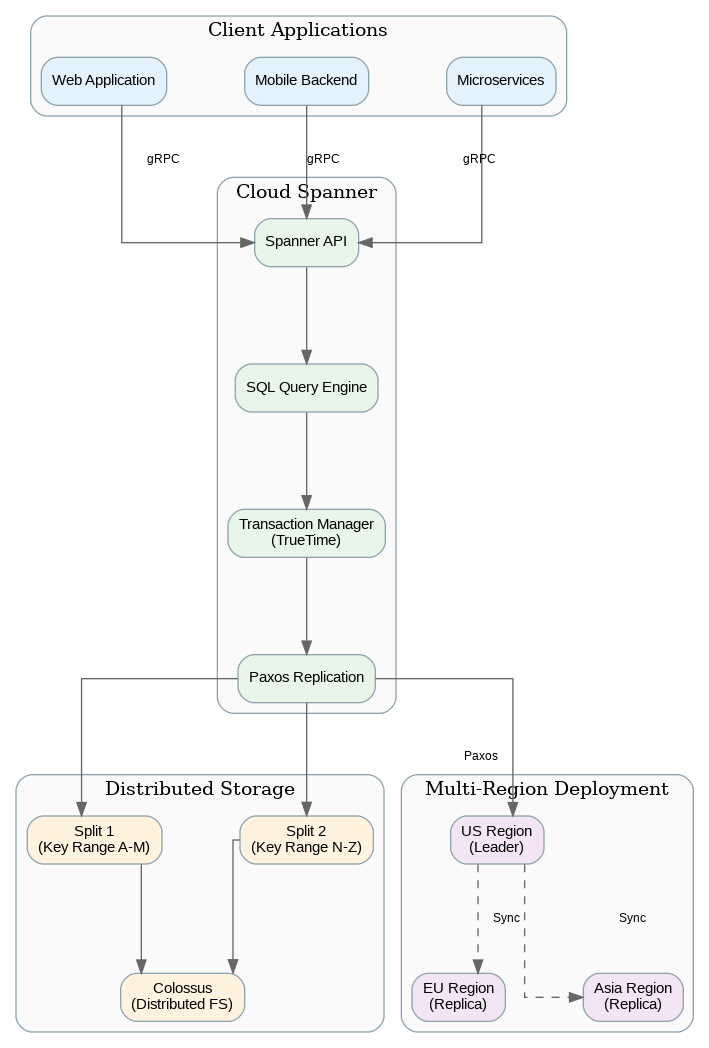
Spanner’s revolutionary architecture achieves what was previously thought impossible: strong consistency across globally distributed data without sacrificing availability. The secret lies in TrueTime, Google’s globally synchronized clock infrastructure using GPS receivers and atomic clocks in every data center. TrueTime provides bounded clock uncertainty, enabling Spanner to order transactions globally without coordination overhead.
Data is automatically sharded across nodes using a hierarchical key structure. Tables are organized into interleaved hierarchies where child rows are physically co-located with their parent rows, optimizing for common access patterns. This interleaving eliminates cross-node joins for related data while maintaining the flexibility of a relational model. Understanding interleaving is crucial for Spanner schema design—poorly designed schemas can result in hot spots and degraded performance.
Spanner offers three configuration types: regional, dual-region, and multi-region. Regional instances provide the lowest latency and cost for workloads confined to a single geography. Multi-region configurations replicate data across continents, providing sub-100ms read latency globally and automatic failover during regional outages. The trade-off is higher write latency (typically 200-400ms) due to cross-region consensus requirements.
Schema Design and Data Modeling
Effective Spanner schema design differs significantly from traditional relational databases. Primary key selection directly impacts data distribution—sequential keys (auto-increment IDs, timestamps) create hot spots as all writes concentrate on a single node. Use UUIDs, hash-prefixed keys, or bit-reversed sequences to distribute writes evenly across the cluster.
Interleaved tables co-locate parent and child rows, enabling efficient joins without network round trips. Design your schema hierarchy based on access patterns—if you always query orders with their line items, interleave line items under orders. However, interleaving creates tight coupling; deleting a parent row cascades to all interleaved children. For loosely coupled relationships, use foreign keys instead of interleaving.
Secondary indexes in Spanner are implemented as separate tables, meaning indexed columns are physically copied. This has cost and consistency implications—large indexed columns increase storage costs and write latency. Use STORING clauses to include frequently accessed columns in indexes, avoiding base table lookups. NULL_FILTERED indexes exclude null values, reducing index size for sparse columns.
Production Terraform Configuration
Here’s a comprehensive Terraform configuration for Cloud Spanner with multi-region setup and proper IAM controls:
# Cloud Spanner Enterprise Configuration
terraform {
  required_version = ">= 1.5.0"
  required_providers {
    google = { source = "hashicorp/google", version = "~> 5.0" }
  }
}

variable "project_id" { type = string }
variable "instance_name" { type = string, default = "production" }

# Multi-region Spanner instance
resource "google_spanner_instance" "main" {
  name             = var.instance_name
  config           = "nam-eur-asia1"  # Multi-region: US, Europe, Asia
  display_name     = "Production Spanner Instance"
  processing_units = 1000  # 1 node equivalent

  autoscaling_config {
    autoscaling_limits {
      min_processing_units = 1000
      max_processing_units = 10000
    }
    autoscaling_targets {
      high_priority_cpu_utilization_percent = 65
      storage_utilization_percent           = 90
    }
  }

  labels = {
    environment = "production"
    team        = "platform"
  }
}

# Production database
resource "google_spanner_database" "main" {
  instance = google_spanner_instance.main.name
  name     = "production"

  version_retention_period = "7d"
  deletion_protection      = true

  ddl = [
    <<-SQL
      CREATE TABLE Users (
        UserId STRING(36) NOT NULL,
        Email STRING(255) NOT NULL,
        CreatedAt TIMESTAMP NOT NULL OPTIONS (allow_commit_timestamp=true),
        UpdatedAt TIMESTAMP OPTIONS (allow_commit_timestamp=true),
        Metadata JSON
      ) PRIMARY KEY (UserId)
    SQL,
    <<-SQL
      CREATE TABLE Orders (
        UserId STRING(36) NOT NULL,
        OrderId STRING(36) NOT NULL,
        Status STRING(20) NOT NULL,
        TotalAmount NUMERIC NOT NULL,
        CreatedAt TIMESTAMP NOT NULL OPTIONS (allow_commit_timestamp=true)
      ) PRIMARY KEY (UserId, OrderId),
        INTERLEAVE IN PARENT Users ON DELETE CASCADE
    SQL,
    <<-SQL
      CREATE TABLE OrderItems (
        UserId STRING(36) NOT NULL,
        OrderId STRING(36) NOT NULL,
        ItemId STRING(36) NOT NULL,
        ProductId STRING(36) NOT NULL,
        Quantity INT64 NOT NULL,
        UnitPrice NUMERIC NOT NULL
      ) PRIMARY KEY (UserId, OrderId, ItemId),
        INTERLEAVE IN PARENT Orders ON DELETE CASCADE
    SQL,
    <<-SQL
      CREATE INDEX OrdersByStatus ON Orders(Status)
        STORING (TotalAmount, CreatedAt)
    SQL,
    <<-SQL
      CREATE UNIQUE INDEX UsersByEmail ON Users(Email)
    SQL
  ]
}

# Database IAM
resource "google_spanner_database_iam_member" "readers" {
  instance = google_spanner_instance.main.name
  database = google_spanner_database.main.name
  role     = "roles/spanner.databaseReader"
  member   = "group:analysts@example.com"
}

resource "google_spanner_database_iam_member" "writers" {
  instance = google_spanner_instance.main.name
  database = google_spanner_database.main.name
  role     = "roles/spanner.databaseUser"
  member   = "serviceAccount:${google_service_account.app_sa.email}"
}

# Service account for application
resource "google_service_account" "app_sa" {
  account_id   = "spanner-app"
  display_name = "Spanner Application Service Account"
}

# Backup schedule
resource "google_spanner_backup_schedule" "daily" {
  instance = google_spanner_instance.main.name
  database = google_spanner_database.main.name
  name     = "daily-backup"

  retention_duration = "2592000s"  # 30 days

  spec {
    cron_spec {
      text = "0 2 * * *"  # Daily at 2 AM
    }
  }

  full_backup_spec {}
}
Python SDK for Spanner Operations
This Python implementation demonstrates enterprise patterns for Spanner operations including transactions, batching, and connection pooling:
"""Cloud Spanner Manager - Enterprise Python Implementation"""
from dataclasses import dataclass
from typing import List, Dict, Any, Optional
from google.cloud import spanner
from google.cloud.spanner_v1 import param_types
import uuid
import logging

logging.basicConfig(level=logging.INFO)
logger = logging.getLogger(__name__)

@dataclass
class User:
    user_id: str
    email: str
    metadata: Dict[str, Any] = None

@dataclass
class Order:
    order_id: str
    user_id: str
    status: str
    total_amount: float

class SpannerManager:
    """Enterprise Spanner client with connection pooling and transactions."""

    def __init__(self, project_id: str, instance_id: str, database_id: str):
        self.client = spanner.Client(project=project_id)
        self.instance = self.client.instance(instance_id)
        self.database = self.instance.database(database_id)

    def create_user(self, email: str, metadata: Dict = None) -> User:
        """Create user with generated UUID."""
        user_id = str(uuid.uuid4())

        def insert_user(transaction):
            transaction.insert(
                table="Users",
                columns=["UserId", "Email", "CreatedAt", "Metadata"],
                values=[(
                    user_id,
                    email,
                    spanner.COMMIT_TIMESTAMP,
                    spanner.JsonObject(metadata) if metadata else None
                )]
            )

        self.database.run_in_transaction(insert_user)
        logger.info(f"Created user {user_id}")
        return User(user_id, email, metadata)

    def get_user_with_orders(self, user_id: str) -> Dict:
        """Fetch user with all orders in single read."""
        with self.database.snapshot() as snapshot:
            # Read user
            user_result = snapshot.read(
                table="Users",
                columns=["UserId", "Email", "Metadata"],
                keyset=spanner.KeySet(keys=[[user_id]])
            )
            user_row = list(user_result)[0] if user_result else None

            if not user_row:
                return None

            # Read orders (interleaved, so efficient)
            orders_result = snapshot.execute_sql(
                """SELECT OrderId, Status, TotalAmount, CreatedAt
                   FROM Orders
                   WHERE UserId = @user_id
                   ORDER BY CreatedAt DESC""",
                params={"user_id": user_id},
                param_types={"user_id": param_types.STRING}
            )

            return {
                "user": {
                    "user_id": user_row[0],
                    "email": user_row[1],
                    "metadata": dict(user_row[2]) if user_row[2] else None
                },
                "orders": [
                    {"order_id": r[0], "status": r[1],
                     "total": float(r[2]), "created": r[3]}
                    for r in orders_result
                ]
            }

    def create_order_with_items(self, user_id: str, items: List[Dict]) -> str:
        """Create order with items in single transaction."""
        order_id = str(uuid.uuid4())
        total = sum(item["quantity"] * item["unit_price"] for item in items)

        def create_order(transaction):
            # Insert order
            transaction.insert(
                table="Orders",
                columns=["UserId", "OrderId", "Status", "TotalAmount", "CreatedAt"],
                values=[(user_id, order_id, "pending", total, spanner.COMMIT_TIMESTAMP)]
            )

            # Insert items
            item_rows = [
                (user_id, order_id, str(uuid.uuid4()),
                 item["product_id"], item["quantity"], item["unit_price"])
                for item in items
            ]
            transaction.insert(
                table="OrderItems",
                columns=["UserId", "OrderId", "ItemId", "ProductId", "Quantity", "UnitPrice"],
                values=item_rows
            )

        self.database.run_in_transaction(create_order)
        logger.info(f"Created order {order_id} with {len(items)} items")
        return order_id

    def batch_read_users(self, user_ids: List[str]) -> List[User]:
        """Efficient batch read using KeySet."""
        with self.database.snapshot() as snapshot:
            keyset = spanner.KeySet(keys=[[uid] for uid in user_ids])
            results = snapshot.read(
                table="Users",
                columns=["UserId", "Email", "Metadata"],
                keyset=keyset
            )
            return [
                User(r[0], r[1], dict(r[2]) if r[2] else None)
                for r in results
            ]

    def update_order_status(self, user_id: str, order_id: str,
                           new_status: str) -> bool:
        """Update order status with optimistic locking."""
        def update(transaction):
            # Read current status
            result = transaction.execute_sql(
                """SELECT Status FROM Orders
                   WHERE UserId = @user_id AND OrderId = @order_id""",
                params={"user_id": user_id, "order_id": order_id},
                param_types={
                    "user_id": param_types.STRING,
                    "order_id": param_types.STRING
                }
            )

            current = list(result)
            if not current:
                raise ValueError("Order not found")

            # Update
            transaction.update(
                table="Orders",
                columns=["UserId", "OrderId", "Status"],
                values=[(user_id, order_id, new_status)]
            )

        try:
            self.database.run_in_transaction(update)
            return True
        except Exception as e:
            logger.error(f"Failed to update order: {e}")
            return False
Cost Management and Performance Optimization
Spanner pricing is based on compute (nodes/processing units), storage, and network egress. A single node costs approximately $0.90/hour for regional instances and $3.00/hour for multi-region configurations. Storage costs $0.30/GB/month. For most workloads, compute costs dominate—optimize by right-sizing instances and enabling autoscaling with appropriate thresholds.
Query optimization significantly impacts both performance and cost. Use query plans (EXPLAIN) to identify full table scans and missing indexes. Parameterized queries enable plan caching, reducing CPU overhead for repeated queries. Batch operations (BatchDML, mutations) reduce round trips and transaction overhead compared to individual statements.
Read-only transactions and stale reads reduce contention and improve throughput. For analytics queries that can tolerate slightly stale data, use bounded staleness reads (e.g., 15 seconds) to read from any replica without coordination. This is particularly effective for multi-region deployments where strong reads require cross-region consensus.
Key Takeaways and Best Practices
Cloud Spanner excels for mission-critical workloads requiring global scale, strong consistency, and high availability. Design schemas with distributed primary keys to avoid hot spots—never use sequential IDs. Leverage interleaved tables for hierarchical data accessed together, but use foreign keys for loosely coupled relationships. Enable autoscaling with CPU thresholds around 65% to handle traffic spikes without over-provisioning.
For global deployments, choose multi-region configurations that align with your user distribution. Accept higher write latency as the trade-off for global availability and disaster recovery. Use stale reads for analytics and reporting workloads to reduce costs and improve throughput. The Terraform and Python examples provided here establish patterns for production-ready Spanner deployments that scale from gigabytes to petabytes while maintaining strong consistency guarantees.
Discover more from C4: Container, Code, Cloud & Context
Subscribe to get the latest posts sent to your email.