Introduction: Google Cloud Dataflow provides a fully managed, serverless data processing service built on Apache Beam that unifies batch and streaming pipelines. This comprehensive guide explores Dataflow’s enterprise capabilities, from pipeline design patterns and windowing strategies to autoscaling, cost optimization, and production monitoring. After building data pipelines processing terabytes daily across multiple cloud providers, I’ve found Dataflow delivers exceptional value for organizations needing unified batch and streaming processing with automatic resource management. Organizations should leverage Dataflow’s Streaming Engine, FlexRS for cost optimization, and native BigQuery integration while implementing proper pipeline testing and monitoring from the start.
Dataflow Architecture: Apache Beam and Unified Processing
Dataflow executes Apache Beam pipelines, providing a unified programming model for batch and streaming data processing. The same pipeline code can process bounded datasets (batch) or unbounded streams with minimal changes. This portability extends beyond Dataflow—Beam pipelines can run on Apache Flink, Spark, or other runners, though Dataflow provides the deepest integration with GCP services and the most mature autoscaling capabilities.
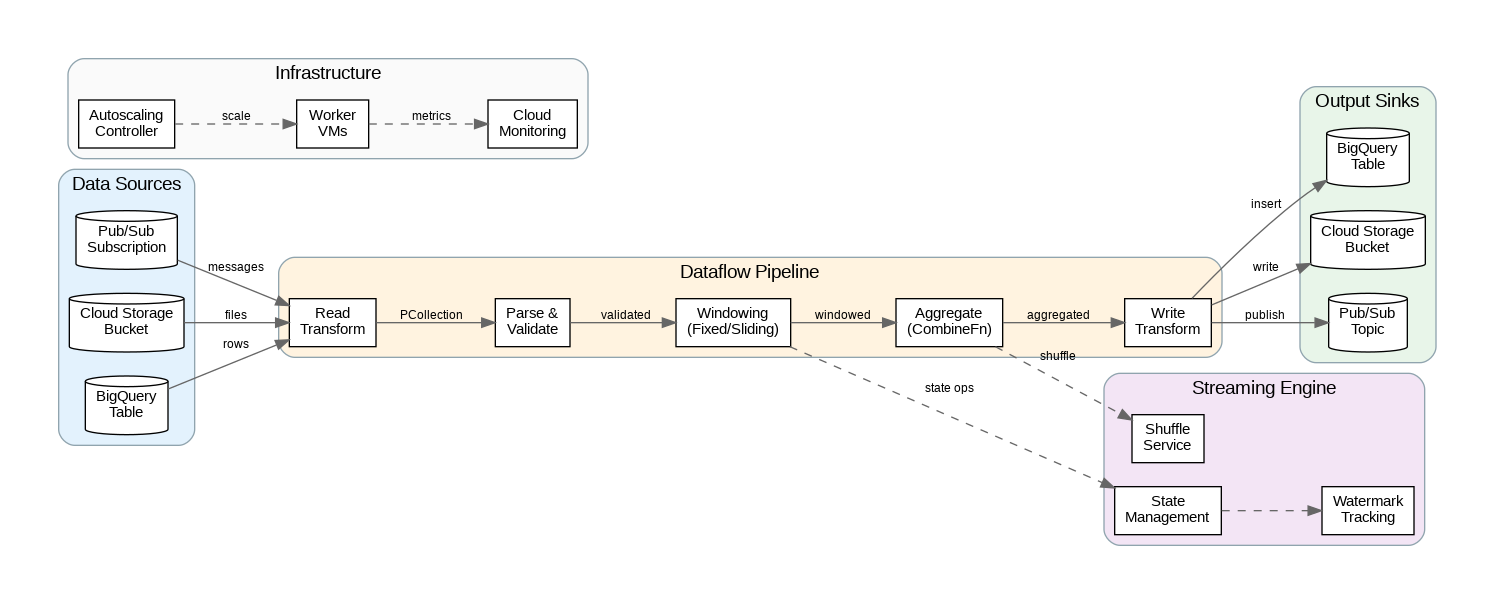
The Dataflow service manages all infrastructure automatically. Workers scale up and down based on pipeline throughput, with Streaming Engine offloading state management and shuffling to Google’s infrastructure rather than worker VMs. This separation improves reliability (state survives worker failures) and reduces costs (smaller workers needed). For batch pipelines, FlexRS (Flexible Resource Scheduling) uses preemptible VMs and intelligent scheduling to reduce costs by up to 40%.
Pipeline execution follows a directed acyclic graph (DAG) of transforms. PCollections represent data at each stage, while PTransforms define operations like Map, Filter, GroupByKey, and CoGroupByKey. Dataflow optimizes the execution graph through fusion (combining transforms to reduce serialization) and dynamic work rebalancing (redistributing work from slow workers to fast ones).
Streaming Patterns: Windows, Triggers, and Watermarks
Streaming pipelines require windowing to group unbounded data into finite chunks for aggregation. Fixed windows divide time into non-overlapping intervals (e.g., 5-minute windows). Sliding windows overlap, enabling moving averages (e.g., 5-minute windows every 1 minute). Session windows group events by activity gaps, ideal for user session analysis. Global windows collect all data into a single window, useful with custom triggers.
Watermarks track event-time progress, indicating when all data up to a certain timestamp has arrived. Dataflow uses watermarks to determine when windows can close and emit results. Late data (events arriving after their window’s watermark) can be handled through allowed lateness settings—late data triggers updated results for already-closed windows. Understanding watermark behavior is essential for balancing latency (emit results quickly) against completeness (wait for late data).
Triggers control when windows emit results. The default trigger fires when the watermark passes the window end. Early triggers emit speculative results before the window closes, providing low-latency approximate answers. Late triggers handle data arriving after the watermark. Accumulation modes determine whether late firings replace previous results (discarding) or add to them (accumulating).
Production Terraform Configuration
Here’s a comprehensive Terraform configuration for Dataflow with enterprise networking, security, and monitoring:
# Dataflow Enterprise Configuration
terraform {
  required_version = ">= 1.5.0"
  required_providers {
    google = { source = "hashicorp/google", version = "~> 5.0" }
  }
}

variable "project_id" { type = string }
variable "region" { type = string, default = "us-central1" }

# Service account for Dataflow workers
resource "google_service_account" "dataflow_sa" {
  account_id   = "dataflow-worker"
  display_name = "Dataflow Worker Service Account"
}

# IAM permissions for Dataflow
resource "google_project_iam_member" "dataflow_permissions" {
  for_each = toset([
    "roles/dataflow.worker",
    "roles/bigquery.dataEditor",
    "roles/bigquery.jobUser",
    "roles/pubsub.subscriber",
    "roles/pubsub.publisher",
    "roles/storage.objectAdmin",
    "roles/secretmanager.secretAccessor"
  ])

  project = var.project_id
  role    = each.value
  member  = "serviceAccount:${google_service_account.dataflow_sa.email}"
}

# VPC for Dataflow workers
resource "google_compute_network" "dataflow_vpc" {
  name                    = "dataflow-vpc"
  auto_create_subnetworks = false
}

resource "google_compute_subnetwork" "dataflow_subnet" {
  name          = "dataflow-subnet"
  ip_cidr_range = "10.0.0.0/24"
  region        = var.region
  network       = google_compute_network.dataflow_vpc.id

  private_ip_google_access = true
}

# Firewall for Dataflow worker communication
resource "google_compute_firewall" "dataflow_internal" {
  name    = "dataflow-internal"
  network = google_compute_network.dataflow_vpc.name

  allow {
    protocol = "tcp"
    ports    = ["12345-12346"]  # Dataflow shuffle ports
  }

  source_ranges = ["10.0.0.0/24"]
  target_tags   = ["dataflow"]
}

# Cloud Storage for staging and temp
resource "google_storage_bucket" "dataflow_staging" {
  name     = "${var.project_id}-dataflow-staging"
  location = var.region

  uniform_bucket_level_access = true

  lifecycle_rule {
    condition {
      age = 7
    }
    action {
      type = "Delete"
    }
  }
}

resource "google_storage_bucket" "dataflow_temp" {
  name     = "${var.project_id}-dataflow-temp"
  location = var.region

  uniform_bucket_level_access = true

  lifecycle_rule {
    condition {
      age = 1
    }
    action {
      type = "Delete"
    }
  }
}

# Pub/Sub for streaming input
resource "google_pubsub_topic" "input_topic" {
  name = "dataflow-input"
}

resource "google_pubsub_subscription" "input_subscription" {
  name  = "dataflow-input-sub"
  topic = google_pubsub_topic.input_topic.name

  ack_deadline_seconds       = 600
  message_retention_duration = "604800s"  # 7 days

  expiration_policy {
    ttl = ""  # Never expire
  }

  retry_policy {
    minimum_backoff = "10s"
    maximum_backoff = "600s"
  }
}

# BigQuery dataset for output
resource "google_bigquery_dataset" "dataflow_output" {
  dataset_id = "dataflow_output"
  location   = var.region

  default_table_expiration_ms = null

  access {
    role          = "OWNER"
    user_by_email = google_service_account.dataflow_sa.email
  }
}

# Dataflow Flex Template (for custom containers)
resource "google_storage_bucket_object" "flex_template" {
  name   = "templates/streaming-pipeline.json"
  bucket = google_storage_bucket.dataflow_staging.name
  content = jsonencode({
    image = "gcr.io/${var.project_id}/dataflow-streaming:latest"
    sdkInfo = {
      language = "PYTHON"
    }
    metadata = {
      name        = "Streaming Pipeline"
      description = "Enterprise streaming data pipeline"
      parameters = [
        {
          name        = "input_subscription"
          label       = "Input Pub/Sub Subscription"
          helpText    = "Pub/Sub subscription to read from"
          isOptional  = false
        },
        {
          name        = "output_table"
          label       = "Output BigQuery Table"
          helpText    = "BigQuery table to write results"
          isOptional  = false
        }
      ]
    }
  })
}

# Monitoring alert for pipeline failures
resource "google_monitoring_alert_policy" "dataflow_failures" {
  display_name = "Dataflow Pipeline Failures"
  combiner     = "OR"

  conditions {
    display_name = "Pipeline Failed"

    condition_threshold {
      filter          = "resource.type=\"dataflow_job\" AND metric.type=\"dataflow.googleapis.com/job/is_failed\""
      duration        = "0s"
      comparison      = "COMPARISON_GT"
      threshold_value = 0

      aggregations {
        alignment_period   = "60s"
        per_series_aligner = "ALIGN_MAX"
      }
    }
  }

  notification_channels = []  # Add notification channel IDs

  alert_strategy {
    auto_close = "604800s"
  }
}
Python Apache Beam Pipeline Implementation
This Python implementation demonstrates enterprise patterns for Dataflow including streaming aggregations, BigQuery output, and error handling:
"""Dataflow Streaming Pipeline - Enterprise Python Implementation"""
import apache_beam as beam
from apache_beam.options.pipeline_options import PipelineOptions, StandardOptions
from apache_beam.transforms.window import FixedWindows, SlidingWindows
from apache_beam.transforms.trigger import AfterWatermark, AfterProcessingTime, AccumulationMode
from apache_beam.io.gcp.bigquery import BigQueryDisposition, WriteToBigQuery
import json
import logging
from datetime import datetime
from typing import Dict, Any, Iterable

logging.basicConfig(level=logging.INFO)
logger = logging.getLogger(__name__)

class ParseMessage(beam.DoFn):
    """Parse and validate incoming messages."""

    def process(self, element: bytes) -> Iterable[Dict[str, Any]]:
        try:
            data = json.loads(element.decode('utf-8'))

            # Validate required fields
            required = ['event_id', 'timestamp', 'user_id', 'event_type']
            if not all(k in data for k in required):
                logger.warning(f"Missing required fields: {data}")
                return

            # Parse timestamp
            data['event_timestamp'] = datetime.fromisoformat(
                data['timestamp'].replace('Z', '+00:00')
            )

            yield data

        except json.JSONDecodeError as e:
            logger.error(f"JSON parse error: {e}")
        except Exception as e:
            logger.error(f"Parse error: {e}")

class EnrichEvent(beam.DoFn):
    """Enrich events with additional context."""

    def setup(self):
        # Initialize connections (called once per worker)
        self.enrichment_cache = {}

    def process(self, element: Dict) -> Iterable[Dict]:
        # Add processing metadata
        element['processed_at'] = datetime.utcnow().isoformat()
        element['pipeline_version'] = '1.0.0'

        # Enrich with cached data
        user_id = element.get('user_id')
        if user_id in self.enrichment_cache:
            element['user_segment'] = self.enrichment_cache[user_id]
        else:
            element['user_segment'] = 'unknown'

        yield element

class AggregateMetrics(beam.CombineFn):
    """Combine function for metric aggregation."""

    def create_accumulator(self):
        return {
            'count': 0,
            'sum_value': 0.0,
            'min_value': float('inf'),
            'max_value': float('-inf'),
            'unique_users': set()
        }

    def add_input(self, accumulator, element):
        accumulator['count'] += 1
        value = element.get('value', 0)
        accumulator['sum_value'] += value
        accumulator['min_value'] = min(accumulator['min_value'], value)
        accumulator['max_value'] = max(accumulator['max_value'], value)
        accumulator['unique_users'].add(element.get('user_id'))
        return accumulator

    def merge_accumulators(self, accumulators):
        merged = self.create_accumulator()
        for acc in accumulators:
            merged['count'] += acc['count']
            merged['sum_value'] += acc['sum_value']
            merged['min_value'] = min(merged['min_value'], acc['min_value'])
            merged['max_value'] = max(merged['max_value'], acc['max_value'])
            merged['unique_users'].update(acc['unique_users'])
        return merged

    def extract_output(self, accumulator):
        count = accumulator['count']
        return {
            'event_count': count,
            'total_value': accumulator['sum_value'],
            'avg_value': accumulator['sum_value'] / count if count > 0 else 0,
            'min_value': accumulator['min_value'] if count > 0 else 0,
            'max_value': accumulator['max_value'] if count > 0 else 0,
            'unique_users': len(accumulator['unique_users'])
        }

class FormatForBigQuery(beam.DoFn):
    """Format aggregated results for BigQuery."""

    def process(self, element, window=beam.DoFn.WindowParam):
        key, metrics = element

        yield {
            'event_type': key,
            'window_start': window.start.to_utc_datetime().isoformat(),
            'window_end': window.end.to_utc_datetime().isoformat(),
            'event_count': metrics['event_count'],
            'total_value': metrics['total_value'],
            'avg_value': metrics['avg_value'],
            'min_value': metrics['min_value'],
            'max_value': metrics['max_value'],
            'unique_users': metrics['unique_users'],
            'processed_at': datetime.utcnow().isoformat()
        }

def run_pipeline(argv=None):
    """Main pipeline execution."""

    class CustomOptions(PipelineOptions):
        @classmethod
        def _add_argparse_args(cls, parser):
            parser.add_argument('--input_subscription', required=True)
            parser.add_argument('--output_table', required=True)
            parser.add_argument('--window_size', default=300, type=int)

    options = CustomOptions(argv)
    options.view_as(StandardOptions).streaming = True

    # BigQuery schema
    table_schema = {
        'fields': [
            {'name': 'event_type', 'type': 'STRING'},
            {'name': 'window_start', 'type': 'TIMESTAMP'},
            {'name': 'window_end', 'type': 'TIMESTAMP'},
            {'name': 'event_count', 'type': 'INTEGER'},
            {'name': 'total_value', 'type': 'FLOAT'},
            {'name': 'avg_value', 'type': 'FLOAT'},
            {'name': 'min_value', 'type': 'FLOAT'},
            {'name': 'max_value', 'type': 'FLOAT'},
            {'name': 'unique_users', 'type': 'INTEGER'},
            {'name': 'processed_at', 'type': 'TIMESTAMP'}
        ]
    }

    with beam.Pipeline(options=options) as p:
        # Read from Pub/Sub
        messages = (
            p
            | 'ReadPubSub' >> beam.io.ReadFromPubSub(
                subscription=options.input_subscription
            )
            | 'ParseMessages' >> beam.ParDo(ParseMessage())
            | 'EnrichEvents' >> beam.ParDo(EnrichEvent())
        )

        # Aggregate by event type in fixed windows
        aggregated = (
            messages
            | 'WindowIntoFixed' >> beam.WindowInto(
                FixedWindows(options.window_size),
                trigger=AfterWatermark(
                    early=AfterProcessingTime(60),  # Early results every minute
                    late=AfterProcessingTime(300)   # Late results every 5 minutes
                ),
                accumulation_mode=AccumulationMode.ACCUMULATING,
                allowed_lateness=3600  # Accept late data up to 1 hour
            )
            | 'KeyByEventType' >> beam.Map(lambda x: (x['event_type'], x))
            | 'AggregateMetrics' >> beam.CombinePerKey(AggregateMetrics())
            | 'FormatForBQ' >> beam.ParDo(FormatForBigQuery())
        )

        # Write to BigQuery
        aggregated | 'WriteToBigQuery' >> WriteToBigQuery(
            options.output_table,
            schema=table_schema,
            write_disposition=BigQueryDisposition.WRITE_APPEND,
            create_disposition=BigQueryDisposition.CREATE_IF_NEEDED
        )

if __name__ == '__main__':
    run_pipeline()
Cost Optimization and Monitoring
Dataflow pricing includes worker compute time (vCPU-hours and GB-hours), Streaming Engine (for streaming pipelines), and shuffle (for batch pipelines). FlexRS reduces batch costs by 40% through preemptible VMs and flexible scheduling—ideal for pipelines without strict SLAs. For streaming, right-size workers based on actual CPU and memory utilization rather than over-provisioning.
Autoscaling behavior significantly impacts costs. Set appropriate maxNumWorkers to prevent runaway scaling during traffic spikes. Use autoscalingAlgorithm=THROUGHPUT_BASED for streaming pipelines to scale based on backlog rather than CPU. Monitor system lag (time behind real-time) and data freshness to ensure autoscaling keeps up with input volume without over-provisioning.
Pipeline monitoring through Cloud Monitoring provides visibility into throughput, latency, and errors. Key metrics include system lag (streaming), elements processed, and worker utilization. Set alerts for system lag exceeding SLA thresholds and for pipeline failures. Use Dataflow’s built-in job metrics UI for real-time debugging during development.
Key Takeaways and Best Practices
Dataflow excels for unified batch and streaming data processing with its automatic resource management and deep GCP integration. Use Apache Beam’s unified model to write pipelines that work for both batch backfills and real-time streaming. Implement proper windowing and trigger strategies to balance latency against completeness for streaming workloads.
Enable Streaming Engine for all streaming pipelines to improve reliability and reduce costs. Use FlexRS for batch pipelines without strict timing requirements. The Terraform and Python examples provided here establish patterns for production-ready Dataflow deployments that scale from megabytes to petabytes while maintaining cost efficiency and operational visibility.
Discover more from C4: Container, Code, Cloud & Context
Subscribe to get the latest posts sent to your email.