Introduction: Microsoft Azure AI Foundry (formerly Azure AI Studio) represents Microsoft’s unified platform for building, evaluating, and deploying generative AI applications. Announced at Microsoft Ignite 2024, AI Foundry consolidates Azure’s AI capabilities into a single, cohesive experience that spans model selection, prompt engineering, evaluation, fine-tuning, and production deployment. With access to Azure OpenAI models, Meta Llama, Mistral, Cohere, and hundreds of open-source models, AI Foundry provides enterprise teams with the tools needed to build responsible AI applications at scale. This comprehensive guide covers everything from project setup to production deployment with Prompt Flow.
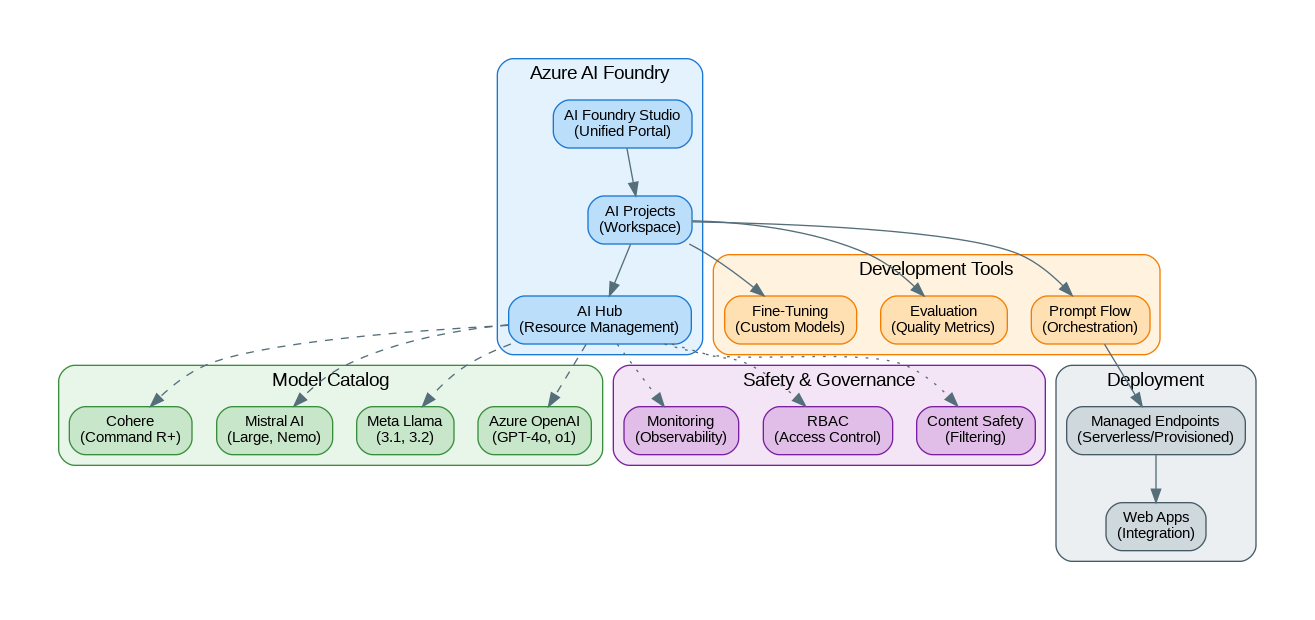
Capabilities and Features
Azure AI Foundry provides comprehensive capabilities for enterprise AI development:
- Model Catalog: 1,800+ models including Azure OpenAI, Meta Llama, Mistral, Cohere, and Hugging Face
- Prompt Flow: Visual orchestration for building LLM workflows with code and no-code options
- Evaluation: Built-in metrics for quality, safety, and groundedness assessment
- Fine-Tuning: Customize models with your data using supervised and RLHF techniques
- Content Safety: Configurable filters for harmful content, PII, and jailbreak detection
- AI Hub: Centralized resource management with RBAC and governance
- Managed Endpoints: Serverless and provisioned deployment options
- Tracing & Monitoring: End-to-end observability with Azure Monitor integration
- VS Code Integration: Develop locally with full AI Foundry capabilities
- GitHub Copilot Integration: Seamless developer experience across tools
Getting Started
Set up your Azure AI Foundry environment:
# Install Azure AI SDK
pip install azure-ai-projects azure-ai-inference azure-identity

# Install Prompt Flow
pip install promptflow promptflow-azure

# Login to Azure
az login

# Create AI Hub (via Azure CLI)
az ml workspace create --kind hub \
    --resource-group my-rg \
    --name my-ai-hub \
    --location eastus

# Create AI Project
az ml workspace create --kind project \
    --resource-group my-rg \
    --name my-ai-project \
    --hub-id /subscriptions/{sub}/resourceGroups/my-rg/providers/Microsoft.MachineLearningServices/workspaces/my-ai-hub
Working with the Model Catalog
Access and deploy models from the AI Foundry catalog:
from azure.ai.projects import AIProjectClient
from azure.ai.inference import ChatCompletionsClient
from azure.ai.inference.models import SystemMessage, UserMessage
from azure.identity import DefaultAzureCredential

# Initialize project client
project = AIProjectClient(
    credential=DefaultAzureCredential(),
    subscription_id="your-subscription-id",
    resource_group_name="my-rg",
    project_name="my-ai-project"
)

# Get connection to deployed model
connection = project.connections.get("my-gpt4o-deployment")

# Create inference client
client = ChatCompletionsClient(
    endpoint=connection.endpoint_url,
    credential=DefaultAzureCredential()
)

# Chat completion
response = client.complete(
    messages=[
        SystemMessage(content="You are a helpful AI assistant."),
        UserMessage(content="Explain Azure AI Foundry in simple terms")
    ],
    model="gpt-4o",
    temperature=0.7,
    max_tokens=1000
)

print(response.choices[0].message.content)

# Streaming response
stream = client.complete(
    messages=[UserMessage(content="Write a poem about cloud computing")],
    model="gpt-4o",
    stream=True
)

for chunk in stream:
    if chunk.choices and chunk.choices[0].delta.content:
        print(chunk.choices[0].delta.content, end="", flush=True)
Building with Prompt Flow
Create orchestrated AI workflows with Prompt Flow:
# flow.dag.yaml - Define your flow structure
inputs:
  question:
    type: string
    default: "What is Azure AI Foundry?"

outputs:
  answer:
    type: string
    reference: ${generate_response.output}

nodes:
  - name: retrieve_context
    type: python
    source:
      type: code
      path: retrieve.py
    inputs:
      question: ${inputs.question}

  - name: generate_response
    type: llm
    source:
      type: code
      path: generate.jinja2
    inputs:
      deployment_name: gpt-4o
      context: ${retrieve_context.output}
      question: ${inputs.question}
    connection: azure_openai_connection
# retrieve.py - Custom retrieval node
from promptflow import tool
from azure.search.documents import SearchClient
from azure.identity import DefaultAzureCredential
@tool
def retrieve_context(question: str) -> str:
"""Retrieve relevant context from Azure AI Search."""
search_client = SearchClient(
endpoint="https://my-search.search.windows.net",
index_name="documents",
credential=DefaultAzureCredential()
)
results = search_client.search(
search_text=question,
top=5,
select=["content", "title"]
)
context = "\n\n".join([
f"**{r['title']}**\n{r['content']}"
for r in results
])
return context{# generate.jinja2 - LLM prompt template #}
system:
You are a helpful assistant that answers questions based on the provided context.
Always cite your sources and be accurate.
user:
Context:
{{context}}
Question: {{question}}
Please provide a comprehensive answer based on the context above.# Run the flow locally
from promptflow import PFClient
pf = PFClient()
# Test the flow
result = pf.test(
flow="./my-flow",
inputs={"question": "How do I deploy a model in AI Foundry?"}
)
print(result["answer"])
# Run batch evaluation
results = pf.run(
flow="./my-flow",
data="./test_data.jsonl"
)
# Deploy to Azure
pf.flows.create_or_update(
flow="./my-flow",
name="my-rag-flow",
workspace="my-ai-project"
)Evaluation and Quality Metrics
Evaluate your AI applications with built-in metrics:
from azure.ai.evaluation import (
    GroundednessEvaluator,
    RelevanceEvaluator,
    CoherenceEvaluator,
    FluencyEvaluator,
    SimilarityEvaluator,
    F1ScoreEvaluator
)
from azure.ai.projects import AIProjectClient
from azure.identity import DefaultAzureCredential

# Initialize evaluators
project = AIProjectClient(
    credential=DefaultAzureCredential(),
    subscription_id="your-sub",
    resource_group_name="my-rg",
    project_name="my-ai-project"
)

# Get model connection for evaluation
model_config = project.connections.get("gpt-4o-evaluator")

# Create evaluators
groundedness = GroundednessEvaluator(model_config=model_config)
relevance = RelevanceEvaluator(model_config=model_config)
coherence = CoherenceEvaluator(model_config=model_config)

# Evaluate a single response
result = groundedness(
    response="Azure AI Foundry is Microsoft's unified AI platform.",
    context="Azure AI Foundry provides tools for building AI applications."
)
print(f"Groundedness score: {result['groundedness']}")

# Batch evaluation
from azure.ai.evaluation import evaluate

eval_results = evaluate(
    data="./evaluation_data.jsonl",
    evaluators={
        "groundedness": groundedness,
        "relevance": relevance,
        "coherence": coherence
    },
    evaluator_config={
        "groundedness": {"column_mapping": {"response": "answer", "context": "context"}},
        "relevance": {"column_mapping": {"response": "answer", "query": "question"}},
        "coherence": {"column_mapping": {"response": "answer"}}
    }
)

print(f"Average groundedness: {eval_results.metrics['groundedness.groundedness']}")
print(f"Average relevance: {eval_results.metrics['relevance.relevance']}")
print(f"Average coherence: {eval_results.metrics['coherence.coherence']}")
Content Safety and Guardrails
from azure.ai.contentsafety import ContentSafetyClient
from azure.ai.contentsafety.models import AnalyzeTextOptions, TextCategory
from azure.identity import DefaultAzureCredential

# Initialize Content Safety client
client = ContentSafetyClient(
    endpoint="https://my-content-safety.cognitiveservices.azure.com/",
    credential=DefaultAzureCredential()
)

# Analyze text for harmful content
def check_content_safety(text: str) -> dict:
    request = AnalyzeTextOptions(
        text=text,
        categories=[
            TextCategory.HATE,
            TextCategory.SELF_HARM,
            TextCategory.SEXUAL,
            TextCategory.VIOLENCE
        ]
    )

    response = client.analyze_text(request)

    results = {}
    for category in response.categories_analysis:
        results[category.category] = {
            "severity": category.severity,
            "safe": category.severity <= 2  # 0-2 is generally safe
        }

    return results

# Check before sending to LLM
user_input = "How do I build a chatbot?"
safety_check = check_content_safety(user_input)

if all(cat["safe"] for cat in safety_check.values()):
    # Safe to process
    response = client.complete(messages=[UserMessage(content=user_input)])
else:
    # Block harmful content
    print("Content blocked due to safety concerns")
Fine-Tuning Models
from azure.ai.ml import MLClient
from azure.ai.ml.entities import (
    FineTuningJob,
    FineTuningVertical,
    AzureOpenAIFineTuning
)
from azure.identity import DefaultAzureCredential

# Initialize ML client
ml_client = MLClient(
    credential=DefaultAzureCredential(),
    subscription_id="your-sub",
    resource_group_name="my-rg",
    workspace_name="my-ai-project"
)

# Prepare training data (JSONL format)
# {"messages": [{"role": "system", "content": "..."}, {"role": "user", "content": "..."}, {"role": "assistant", "content": "..."}]}

# Create fine-tuning job
fine_tuning_job = FineTuningJob(
    name="gpt4o-custom-finetune",
    display_name="GPT-4o Custom Fine-tune",
    experiment_name="fine-tuning-experiments",
    task=FineTuningVertical.CHAT_COMPLETION,
    model="gpt-4o-2024-08-06",
    training_data="azureml://datastores/workspaceblobstore/paths/training_data.jsonl",
    validation_data="azureml://datastores/workspaceblobstore/paths/validation_data.jsonl",
    hyperparameters={
        "n_epochs": 3,
        "batch_size": 4,
        "learning_rate_multiplier": 1.0
    }
)

# Submit job
job = ml_client.jobs.create_or_update(fine_tuning_job)
print(f"Fine-tuning job submitted: {job.name}")

# Monitor progress
ml_client.jobs.stream(job.name)
Production Deployment
from azure.ai.ml import MLClient
from azure.ai.ml.entities import (
    ManagedOnlineEndpoint,
    ManagedOnlineDeployment,
    Model,
    Environment
)
from azure.identity import DefaultAzureCredential

ml_client = MLClient(
    credential=DefaultAzureCredential(),
    subscription_id="your-sub",
    resource_group_name="my-rg",
    workspace_name="my-ai-project"
)

# Create managed endpoint
endpoint = ManagedOnlineEndpoint(
    name="my-ai-endpoint",
    description="Production AI endpoint",
    auth_mode="key"
)

ml_client.online_endpoints.begin_create_or_update(endpoint).result()

# Deploy Prompt Flow
deployment = ManagedOnlineDeployment(
    name="blue",
    endpoint_name="my-ai-endpoint",
    model=Model(path="./my-flow"),
    instance_type="Standard_DS3_v2",
    instance_count=2,
    environment_variables={
        "AZURE_OPENAI_ENDPOINT": "https://my-openai.openai.azure.com/"
    }
)

ml_client.online_deployments.begin_create_or_update(deployment).result()

# Test the endpoint
import requests

endpoint_url = ml_client.online_endpoints.get("my-ai-endpoint").scoring_uri
api_key = ml_client.online_endpoints.get_keys("my-ai-endpoint").primary_key

response = requests.post(
    endpoint_url,
    headers={"Authorization": f"Bearer {api_key}", "Content-Type": "application/json"},
    json={"question": "What is Azure AI Foundry?"}
)

print(response.json())
Benchmarks and Performance
Azure AI Foundry performance characteristics:
| Operation | Latency (p50) | Latency (p99) | Cost |
|---|---|---|---|
| GPT-4o (Serverless) | 1.5s | 4s | $2.50/M input, $10/M output |
| GPT-4o (Provisioned) | 0.8s | 2s | $0.06/PTU/hour |
| Llama 3.1 70B | 2s | 5s | $0.00268/1K tokens |
| Mistral Large | 1.8s | 4.5s | $4/M input, $12/M output |
| Prompt Flow (RAG) | 3-5s | 10s | Compute + model costs |
| Evaluation (per sample) | 2s | 5s | Model costs only |
When to Use Azure AI Foundry
Best suited for:
- Enterprise teams with existing Azure investments
- Applications requiring comprehensive governance and compliance
- Multi-model strategies with unified management
- Teams needing visual workflow orchestration (Prompt Flow)
- Projects requiring built-in evaluation and safety tools
- Organizations with strict data residency requirements
Consider alternatives when:
- Building with AWS ecosystem (use AWS Bedrock)
- Need direct API access without Azure overhead (use provider APIs)
- Require maximum flexibility in orchestration (use LangChain/LangGraph)
- Cost-sensitive prototyping (direct APIs may be cheaper)
References and Documentation
- Official Documentation: https://learn.microsoft.com/azure/ai-studio/
- AI Foundry Portal: https://ai.azure.com/
- Prompt Flow Documentation: https://microsoft.github.io/promptflow/
- Azure AI SDK: https://github.com/Azure/azure-sdk-for-python/tree/main/sdk/ai
- Model Catalog: https://ai.azure.com/explore/models
Conclusion
Azure AI Foundry represents Microsoft's most comprehensive offering for enterprise AI development. By unifying model access, orchestration, evaluation, and deployment into a single platform, it significantly reduces the complexity of building production AI applications. The combination of Prompt Flow for visual development, built-in evaluation metrics, and enterprise-grade safety controls makes it particularly attractive for regulated industries. For organizations already invested in the Azure ecosystem, AI Foundry provides the most integrated and governed path to deploying generative AI at scale.
Discover more from C4: Container, Code, Cloud & Context
Subscribe to get the latest posts sent to your email.