Introduction: BigQuery stands as Google Cloud’s crown jewel—a serverless, petabyte-scale data warehouse that has fundamentally changed how enterprises approach analytics. This comprehensive guide explores BigQuery’s enterprise capabilities, from columnar storage and slot-based execution to advanced features like BigQuery ML, BI Engine, and real-time streaming. After architecting data platforms across all major cloud providers, I’ve found BigQuery consistently delivers the best combination of performance, cost-efficiency, and ease of use for analytical workloads. Organizations should leverage BigQuery’s separation of storage and compute, automatic optimization, and seamless integration with GCP’s data ecosystem while implementing proper data governance and cost controls from day one.
BigQuery Architecture: Understanding Dremel and Colossus
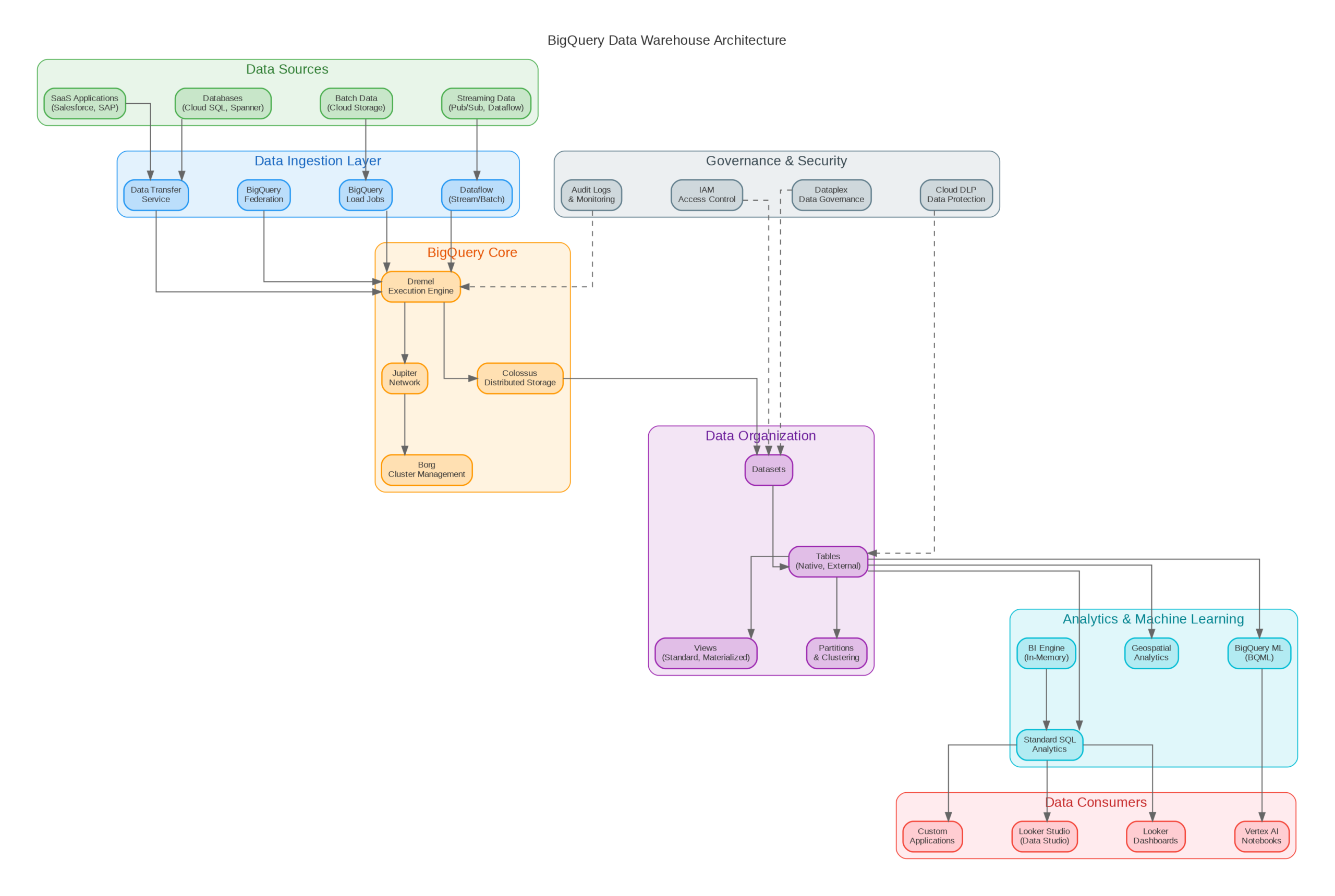
BigQuery’s architecture separates storage (Colossus) from compute (Dremel), enabling independent scaling and true serverless operation. Colossus, Google’s distributed file system, stores data in a columnar format called Capacitor, optimized for analytical queries that typically access a subset of columns. Dremel, the query execution engine, dynamically allocates compute resources (slots) based on query complexity and available capacity.
This architecture delivers several enterprise advantages. Storage costs remain constant regardless of query volume—you pay only for data stored, not for idle compute capacity. Query performance scales automatically; complex queries receive more slots while simple queries complete quickly with minimal resources. The separation also enables features like time travel (querying historical snapshots) and fail-safe recovery without additional configuration.
BigQuery’s query optimizer automatically handles partitioning, clustering, and join optimization. Partition pruning eliminates scanning irrelevant data partitions, while clustering physically co-locates related rows for efficient range scans. The optimizer rewrites queries to minimize data shuffling and leverages cached results when possible. In my experience, well-designed schemas with appropriate partitioning and clustering reduce query costs by 50-80% compared to unoptimized tables.
Data Modeling and Schema Design
Effective BigQuery schema design differs significantly from traditional OLTP databases. Denormalization is preferred over normalized schemas—joins are expensive at petabyte scale, while storage is cheap. Nested and repeated fields (STRUCT and ARRAY types) enable storing related data together without joins, dramatically improving query performance for hierarchical data like user events or order line items.
Partitioning strategy depends on your query patterns. Time-based partitioning (by day, month, or year) suits event data where queries typically filter by date range. Integer range partitioning works for data with natural numeric keys like customer IDs. Ingestion-time partitioning automatically partitions data based on load time, useful when source data lacks a natural partition key. Always partition tables larger than 1GB to enable partition pruning.
Clustering complements partitioning by sorting data within partitions. Choose clustering columns based on filter and aggregation patterns—columns frequently used in WHERE clauses and GROUP BY operations benefit most. BigQuery supports up to four clustering columns, with diminishing returns beyond the first two. Re-clustering happens automatically during data loads, maintaining optimal data organization without manual maintenance.
Production Terraform Configuration
Here’s a comprehensive Terraform configuration for BigQuery datasets, tables, and access controls following enterprise best practices:
# BigQuery Enterprise Configuration
terraform {
  required_version = ">= 1.5.0"
  required_providers {
    google = { source = "hashicorp/google", version = "~> 5.0" }
  }
}

variable "project_id" { type = string }
variable "region" { type = string, default = "US" }

# Analytics Dataset with proper access controls
resource "google_bigquery_dataset" "analytics" {
  dataset_id    = "analytics"
  friendly_name = "Analytics Data Warehouse"
  description   = "Production analytics dataset"
  location      = var.region

  default_table_expiration_ms     = null  # No auto-expiration
  default_partition_expiration_ms = 7776000000  # 90 days

  labels = {
    environment = "production"
    team        = "data-engineering"
  }

  access {
    role          = "OWNER"
    user_by_email = "data-admin@example.com"
  }

  access {
    role           = "READER"
    group_by_email = "analysts@example.com"
  }

  access {
    role          = "WRITER"
    special_group = "projectWriters"
  }
}

# Partitioned and clustered events table
resource "google_bigquery_table" "events" {
  dataset_id = google_bigquery_dataset.analytics.dataset_id
  table_id   = "events"

  time_partitioning {
    type          = "DAY"
    field         = "event_timestamp"
    expiration_ms = 7776000000  # 90 days
  }

  clustering = ["user_id", "event_type"]

  schema = jsonencode([
    {
      name = "event_id"
      type = "STRING"
      mode = "REQUIRED"
    },
    {
      name = "event_timestamp"
      type = "TIMESTAMP"
      mode = "REQUIRED"
    },
    {
      name = "user_id"
      type = "STRING"
      mode = "REQUIRED"
    },
    {
      name = "event_type"
      type = "STRING"
      mode = "REQUIRED"
    },
    {
      name = "properties"
      type = "JSON"
      mode = "NULLABLE"
    },
    {
      name = "device"
      type = "RECORD"
      mode = "NULLABLE"
      fields = [
        { name = "type", type = "STRING" },
        { name = "os", type = "STRING" },
        { name = "browser", type = "STRING" }
      ]
    }
  ])

  labels = {
    data_classification = "internal"
  }
}

# Scheduled query for daily aggregations
resource "google_bigquery_data_transfer_config" "daily_aggregation" {
  display_name           = "Daily Event Aggregation"
  location               = var.region
  data_source_id         = "scheduled_query"
  schedule               = "every day 02:00"
  destination_dataset_id = google_bigquery_dataset.analytics.dataset_id

  params = {
    destination_table_name_template = "daily_metrics_{run_date}"
    write_disposition               = "WRITE_TRUNCATE"
    query                           = <<-SQL
      SELECT
        DATE(event_timestamp) as date,
        event_type,
        COUNT(*) as event_count,
        COUNT(DISTINCT user_id) as unique_users
      FROM `${var.project_id}.analytics.events`
      WHERE DATE(event_timestamp) = @run_date
      GROUP BY 1, 2
    SQL
  }
}

# Reservation for predictable pricing (optional)
resource "google_bigquery_reservation" "production" {
  name              = "production-slots"
  location          = var.region
  slot_capacity     = 500
  edition           = "ENTERPRISE"
  ignore_idle_slots = false
}
Python SDK for BigQuery Operations
This Python implementation demonstrates enterprise patterns for BigQuery operations including parameterized queries, streaming inserts, and cost estimation:
"""BigQuery Manager - Enterprise Python Implementation"""
from dataclasses import dataclass
from typing import List, Dict, Any, Optional
from google.cloud import bigquery
from google.cloud.bigquery import SchemaField, LoadJobConfig
import pandas as pd
import logging

logging.basicConfig(level=logging.INFO)
logger = logging.getLogger(__name__)

@dataclass
class QueryResult:
    rows: List[Dict[str, Any]]
    total_bytes_processed: int
    estimated_cost: float
    cache_hit: bool

class BigQueryManager:
    COST_PER_TB = 5.0  # On-demand pricing

    def __init__(self, project_id: str):
        self.project_id = project_id
        self.client = bigquery.Client(project=project_id)

    def execute_query(self, query: str, params: Dict = None,
                      dry_run: bool = False) -> QueryResult:
        """Execute query with cost estimation and caching."""
        job_config = bigquery.QueryJobConfig(
            dry_run=dry_run,
            use_query_cache=True,
            query_parameters=self._build_params(params) if params else []
        )

        query_job = self.client.query(query, job_config=job_config)

        if dry_run:
            bytes_processed = query_job.total_bytes_processed
            return QueryResult(
                rows=[],
                total_bytes_processed=bytes_processed,
                estimated_cost=self._calculate_cost(bytes_processed),
                cache_hit=False
            )

        results = list(query_job.result())
        return QueryResult(
            rows=[dict(row) for row in results],
            total_bytes_processed=query_job.total_bytes_processed,
            estimated_cost=self._calculate_cost(query_job.total_bytes_processed),
            cache_hit=query_job.cache_hit
        )

    def _build_params(self, params: Dict) -> List:
        """Convert dict to BigQuery query parameters."""
        bq_params = []
        for name, value in params.items():
            if isinstance(value, str):
                bq_params.append(bigquery.ScalarQueryParameter(name, "STRING", value))
            elif isinstance(value, int):
                bq_params.append(bigquery.ScalarQueryParameter(name, "INT64", value))
            elif isinstance(value, float):
                bq_params.append(bigquery.ScalarQueryParameter(name, "FLOAT64", value))
        return bq_params

    def _calculate_cost(self, bytes_processed: int) -> float:
        """Calculate query cost based on bytes processed."""
        tb_processed = bytes_processed / (1024 ** 4)
        return round(tb_processed * self.COST_PER_TB, 4)

    def stream_insert(self, table_id: str, rows: List[Dict]) -> List[Dict]:
        """Insert rows via streaming API with error handling."""
        table_ref = self.client.get_table(table_id)
        errors = self.client.insert_rows_json(table_ref, rows)

        if errors:
            logger.error(f"Streaming insert errors: {errors}")
        else:
            logger.info(f"Inserted {len(rows)} rows to {table_id}")

        return errors

    def load_from_gcs(self, table_id: str, gcs_uri: str,
                      schema: List[SchemaField] = None) -> bigquery.LoadJob:
        """Load data from GCS with automatic schema detection."""
        job_config = LoadJobConfig(
            autodetect=schema is None,
            schema=schema,
            source_format=bigquery.SourceFormat.PARQUET,
            write_disposition=bigquery.WriteDisposition.WRITE_APPEND
        )

        load_job = self.client.load_table_from_uri(
            gcs_uri, table_id, job_config=job_config
        )
        load_job.result()  # Wait for completion

        logger.info(f"Loaded {load_job.output_rows} rows to {table_id}")
        return load_job

# Usage example
if __name__ == "__main__":
    bq = BigQueryManager("my-project")

    # Dry run to estimate cost
    result = bq.execute_query(
        "SELECT * FROM `project.dataset.table` WHERE date = @date",
        params={"date": "2024-01-01"},
        dry_run=True
    )
    print(f"Estimated cost: ${result.estimated_cost}")
Cost Management and Optimization
BigQuery offers two pricing models: on-demand and capacity-based (slots). On-demand pricing charges $5 per TB scanned, making costs directly proportional to query volume and data size. Capacity pricing provides dedicated slots at fixed monthly costs, ideal for predictable workloads exceeding 500TB monthly scans. Most organizations benefit from starting with on-demand pricing and transitioning to slots as usage patterns stabilize.
Query optimization directly impacts costs. Use SELECT with specific columns instead of SELECT *—BigQuery's columnar storage means you pay only for columns accessed. Partition pruning requires explicit date filters in WHERE clauses; functions like DATE(timestamp_column) prevent pruning. Materialize frequently-used aggregations as tables or materialized views rather than recomputing them in every query.
Implement cost controls at multiple levels. Project-level quotas limit daily bytes scanned, preventing runaway queries from consuming budget. Custom quotas per user or service account enable chargeback and prevent individual users from impacting others. BI Engine provides in-memory caching for dashboards, reducing costs for repetitive queries while improving response times from seconds to milliseconds.
Key Takeaways and Best Practices
BigQuery excels for analytical workloads requiring petabyte-scale processing without infrastructure management. Design schemas with denormalization and nested fields to minimize joins. Implement partitioning on all tables larger than 1GB, and add clustering for frequently filtered columns. Use dry runs to estimate query costs before execution, and implement project-level quotas to prevent budget overruns.
For real-time analytics, combine streaming inserts with BigQuery's sub-second query latency. BI Engine accelerates dashboard queries, while BigQuery ML enables training models directly on warehouse data without data movement. As your usage grows, evaluate capacity pricing for cost predictability and consider BigQuery Editions for advanced features like workload management and data governance. The Terraform and Python examples provided here establish patterns for production-ready BigQuery deployments.
Discover more from C4: Container, Code, Cloud & Context
Subscribe to get the latest posts sent to your email.