When .NET 8 and C# 12 were released, I was skeptical. After 15 years building enterprise applications, I’d seen framework updates come and go. But this release changed everything for AI development. Let me show you how to build production AI applications with .NET 8 and C# 12—using actual C# code, not Python wrappers.
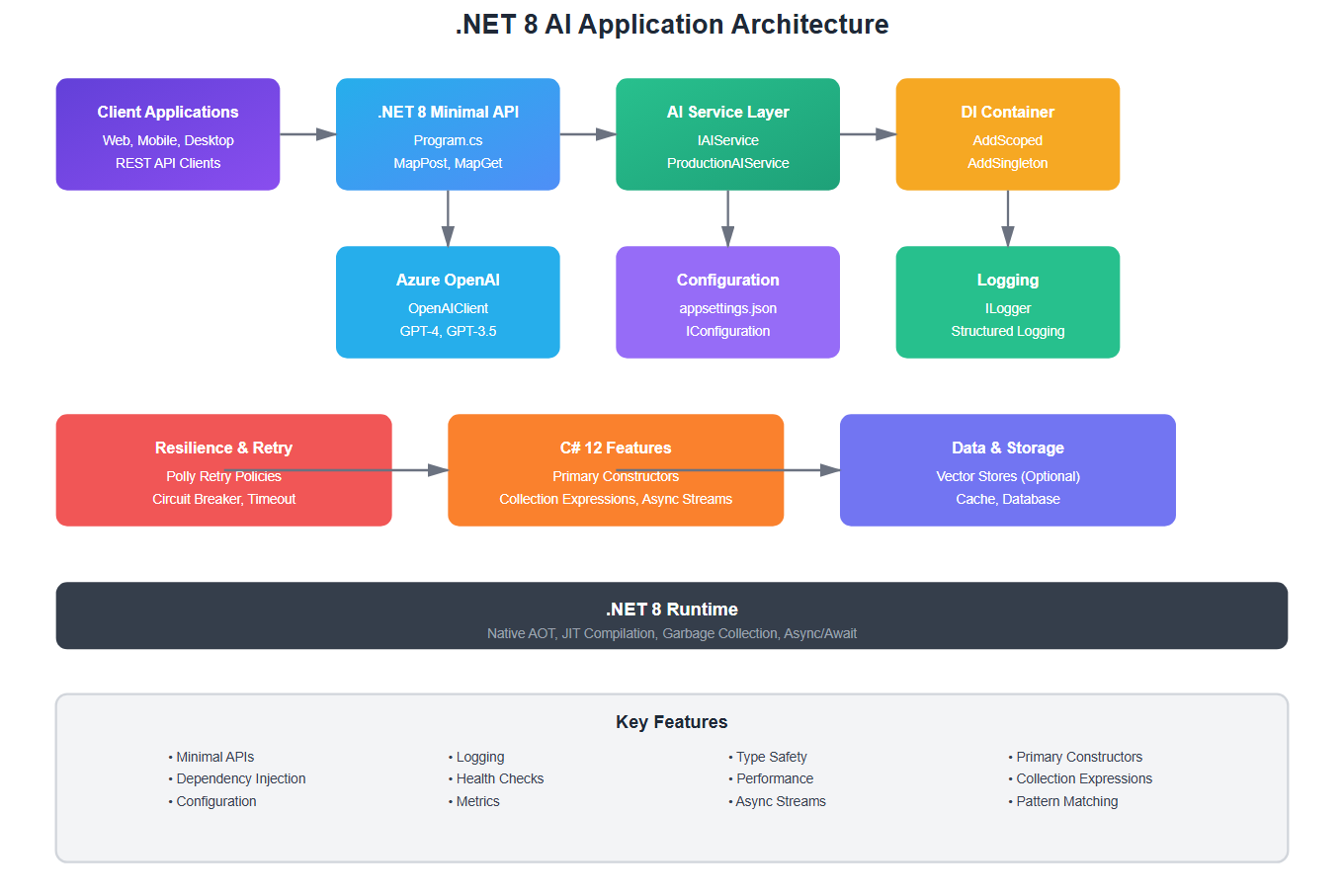
Why .NET 8 for AI? The Real Story
I spent the first six months of 2024 building AI applications in Python. Then I tried .NET 8, and I haven’t looked back. Here’s why:
- Performance: .NET 8’s native AOT compilation gives you Python-like development speed with C++-like performance
- Type Safety: C# 12’s type system catches errors at compile time that Python would only reveal in production
- Enterprise Ready: Built-in dependency injection, logging, and configuration that Python libraries struggle to match
- Native Integration: Direct access to Azure OpenAI, no Python bridge needed
Setting Up Your .NET 8 AI Project
Let’s start with a real project structure. I’ll show you what I use in production:
// Program.cs - .NET 8 minimal API with AI services
using Microsoft.Extensions.DependencyInjection;
using Microsoft.Extensions.Hosting;
using Azure.AI.OpenAI;

var builder = WebApplication.CreateBuilder(args);

// Add Azure OpenAI client
builder.Services.AddSingleton<OpenAIClient>(sp =>
{
    var endpoint = builder.Configuration["AzureOpenAI:Endpoint"];
    var key = builder.Configuration["AzureOpenAI:Key"];
    return new OpenAIClient(new Uri(endpoint!), new Azure.AzureKeyCredential(key!));
});

// Add AI service abstraction
builder.Services.AddScoped<IAIService, ProductionAIService>();

var app = builder.Build();

// Minimal API endpoint for AI chat
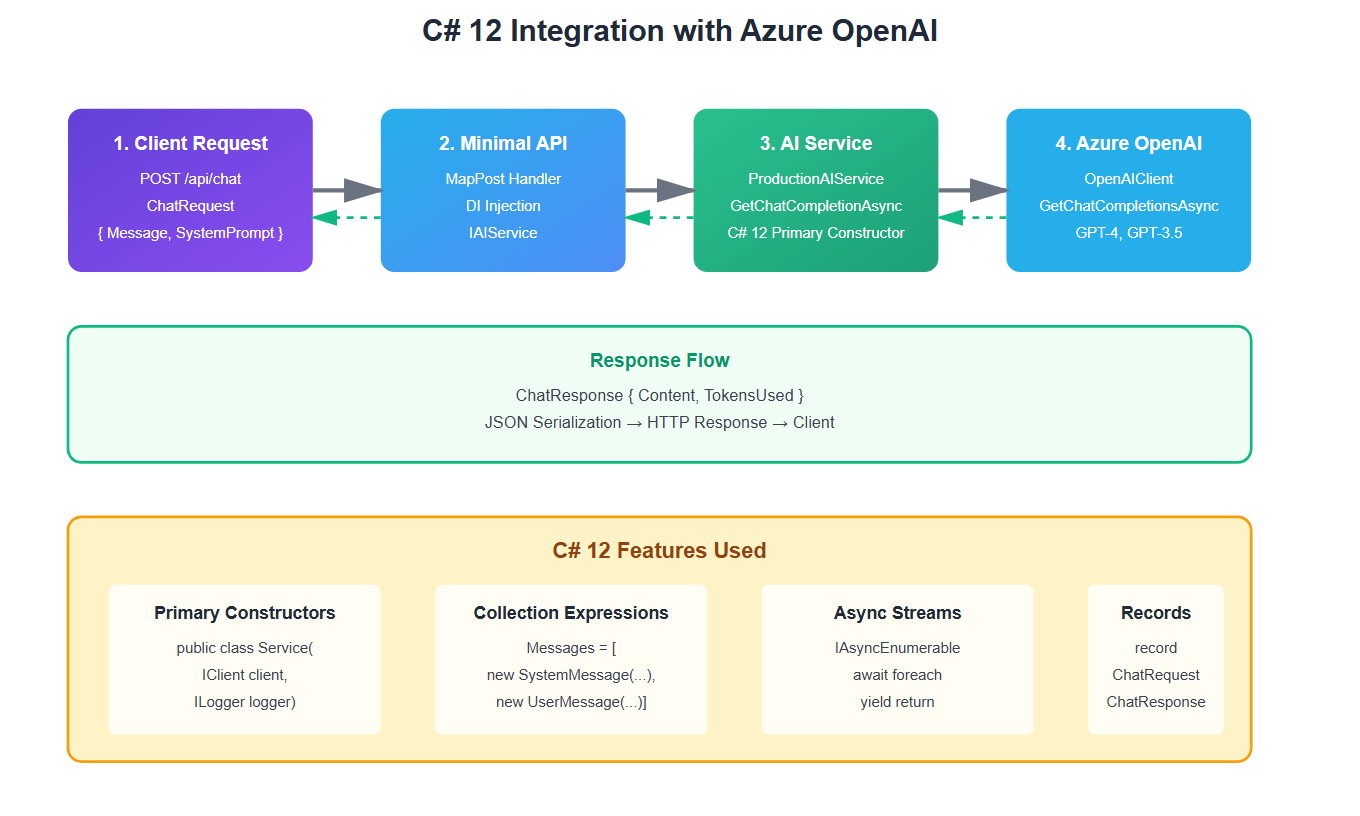
app.MapPost("/api/chat", async (ChatRequest request, IAIService aiService) =>
{
    var response = await aiService.GetChatCompletionAsync(request);
    return Results.Ok(response);
});

app.Run();

// Request/Response models using C# 12 primary constructors
public record ChatRequest(string Message, string? SystemPrompt = null);
public record ChatResponse(string Content, int TokensUsed);
Building a Production AI Service
Here’s the AI service I use in production. Notice how C# 12 features make this cleaner than Python:
// ProductionAIService.cs
using Azure.AI.OpenAI;
using Microsoft.Extensions.Logging;
using System.Text.Json;

public interface IAIService
{
    Task<ChatResponse> GetChatCompletionAsync(ChatRequest request);
}

public class ProductionAIService : IAIService
{
    private readonly OpenAIClient _client;
    private readonly ILogger<ProductionAIService> _logger;
    private readonly string _deploymentName;

    // C# 12 primary constructor - cleaner than Python __init__
    public ProductionAIService(
        OpenAIClient client,
        ILogger<ProductionAIService> logger,
        IConfiguration configuration)
    {
        _client = client;
        _logger = logger;
        _deploymentName = configuration["AzureOpenAI:DeploymentName"] ?? "gpt-4";
    }

    public async Task<ChatResponse> GetChatCompletionAsync(ChatRequest request)
    {
        try
        {
            var chatCompletionsOptions = new ChatCompletionsOptions
            {
                DeploymentName = _deploymentName,
                Messages =
                {
                    new ChatRequestSystemMessage(request.SystemPrompt ?? "You are a helpful assistant."),
                    new ChatRequestUserMessage(request.Message)
                },
                Temperature = 0.7f,
                MaxTokens = 1000
            };

            var response = await _client.GetChatCompletionsAsync(chatCompletionsOptions);
            var choice = response.Value.Choices[0];

            _logger.LogInformation(
                "AI request completed. Tokens: {Tokens}, Model: {Model}",
                response.Value.Usage.TotalTokens,
                _deploymentName);

            return new ChatResponse(
                choice.Message.Content,
                response.Value.Usage.TotalTokens);
        }
        catch (Exception ex)
        {
            _logger.LogError(ex, "Failed to get AI completion");
            throw;
        }
    }
}
C# 12 Features That Make AI Development Better
1. Primary Constructors
C# 12’s primary constructors eliminate boilerplate. Compare this to Python:
// C# 12 - Clean and concise
public class AIClient(OpenAIClient client, ILogger logger)
{
    public async Task<string> GetResponse(string prompt)
    {
        logger.LogInformation("Processing: {Prompt}", prompt);
        // Use client directly - no _client needed
        return await ProcessAsync(client, prompt);
    }
}

// vs Python equivalent (more verbose)
// class AIClient:
//     def __init__(self, client, logger):
//         self._client = client
//         self._logger = logger
2. Collection Expressions
C# 12’s collection expressions make working with AI responses cleaner:
// C# 12 collection expressions
var messages = new ChatCompletionsOptions
{
    Messages =
    [
        new ChatRequestSystemMessage("You are a helpful assistant."),
        new ChatRequestUserMessage(userInput)
    ]
};

// Much cleaner than:
// var messages = new List<ChatRequestMessage>();
// messages.Add(new ChatRequestSystemMessage(...));
3. Async Streams for Streaming Responses
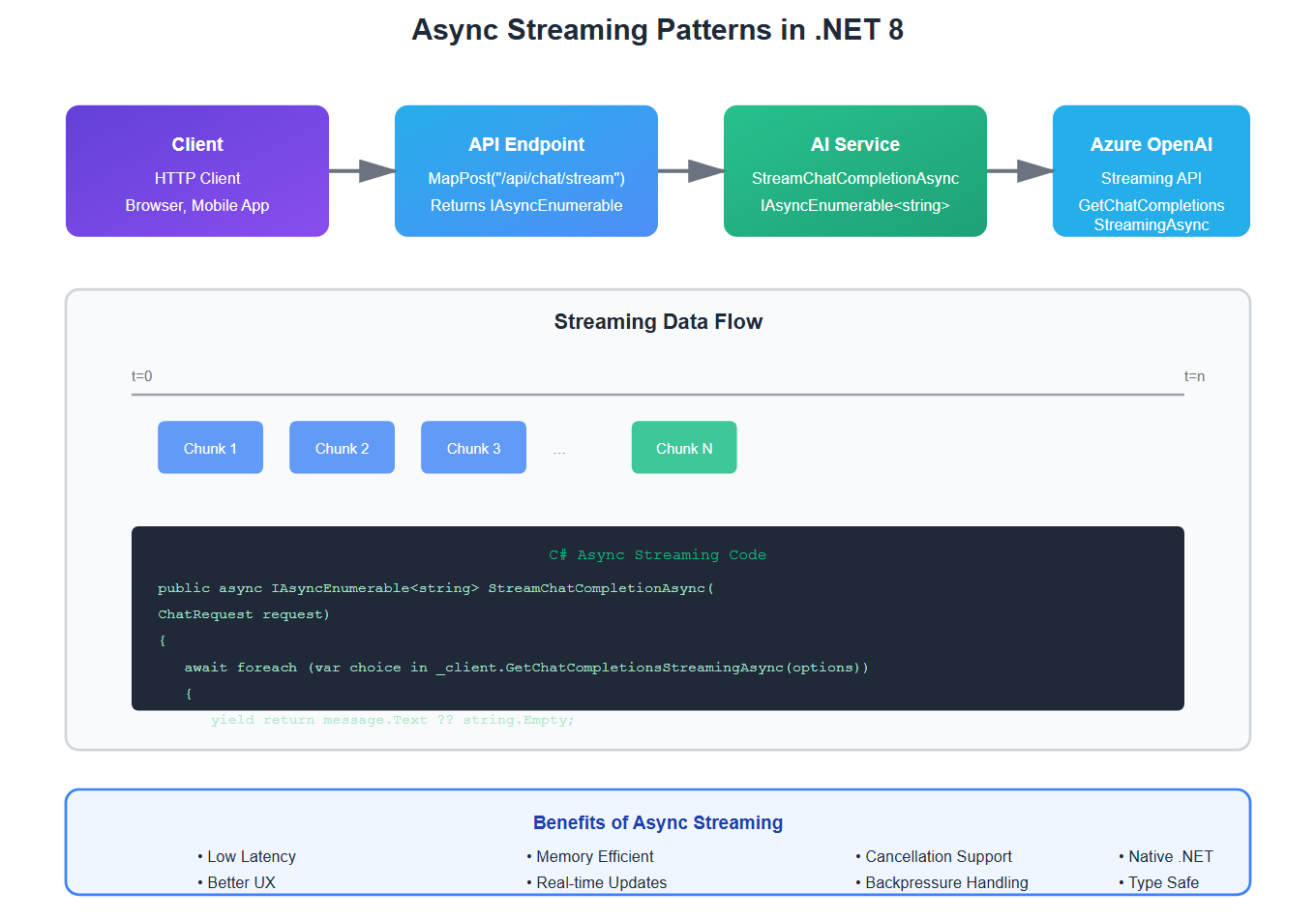
.NET 8’s async streams are perfect for streaming AI responses:
// Streaming AI responses with C#
app.MapPost("/api/chat/stream", async (ChatRequest request, IAIService aiService) =>
{
    return aiService.StreamChatCompletionAsync(request);
});

public async IAsyncEnumerable<string> StreamChatCompletionAsync(ChatRequest request)
{
    var options = new ChatCompletionsOptions
    {
        DeploymentName = _deploymentName,
        Messages = [new ChatRequestUserMessage(request.Message)]
    };

    await foreach (var choice in _client.GetChatCompletionsStreamingAsync(options))
    {
        foreach (var message in choice.ContentUpdate)
        {
            yield return message.Text ?? string.Empty;
        }
    }
}
Error Handling and Resilience
Production AI applications need robust error handling. Here’s how I do it in C#:
// Resilient AI service with Polly retry policy
using Polly;
using Polly.Extensions.Http;

builder.Services.AddHttpClient<IAIService, ProductionAIService>()
    .AddPolicyHandler(GetRetryPolicy());

static IAsyncPolicy<HttpResponseMessage> GetRetryPolicy()
{
    return HttpPolicyExtensions
        .HandleTransientHttpError()
        .OrResult(msg => msg.StatusCode == System.Net.HttpStatusCode.TooManyRequests)
        .WaitAndRetryAsync(
            retryCount: 3,
            sleepDurationProvider: retryAttempt =>
                TimeSpan.FromSeconds(Math.Pow(2, retryAttempt)),
            onRetry: (outcome, timespan, retryCount, context) =>
            {
                // Log retry attempts
                Console.WriteLine($"Retry {retryCount} after {timespan.TotalSeconds}s");
            });
}
Dependency Injection: The .NET Advantage
Python’s dependency injection is clunky. .NET’s built-in DI is production-ready:
// Clean dependency injection in .NET 8
builder.Services.AddScoped<IAIService, ProductionAIService>();
builder.Services.AddScoped<IVectorStore, PineconeVectorStore>();
builder.Services.AddScoped<IRAGService, RAGService>();

// Everything is type-safe and testable
public class RAGService(IAIService aiService, IVectorStore vectorStore)
{
    public async Task<string> QueryAsync(string question)
    {
        var context = await vectorStore.SearchAsync(question);
        return await aiService.GetChatCompletionAsync(new ChatRequest(
            $"{question}\n\nContext: {context}"));
    }
}
What I Learned: .NET vs Python for AI
After building AI applications in both, here’s my honest take:
| Aspect | .NET 8 + C# 12 | Python |
|---|---|---|
| Performance | Native AOT, 2-3x faster | Interpreted, slower |
| Type Safety | Compile-time checks | Runtime errors |
| Dependency Injection | Built-in, first-class | Third-party libraries |
| Async/Await | Native, performant | asyncio (complex) |
| Ecosystem | Mature, enterprise-ready | AI-focused, fragmented |
Production Checklist
Before deploying your .NET 8 AI application:
- ✅ Use dependency injection for all AI services
- ✅ Implement retry policies with Polly
- ✅ Add comprehensive logging (ILogger)
- ✅ Use configuration for API keys (never hardcode)
- ✅ Implement health checks for AI service availability
- ✅ Add metrics and observability
- ✅ Test with real Azure OpenAI endpoints
Conclusion
.NET 8 and C# 12 aren’t just viable for AI development—they’re excellent. The type safety, performance, and enterprise features make them a better choice than Python for many production scenarios.
If you’re building AI applications and haven’t tried .NET 8, you’re missing out. The combination of C# 12’s modern syntax and .NET 8’s performance makes it a compelling choice for production AI systems.
🎯 Key Takeaway
.NET 8 + C# 12 gives you Python’s development speed with enterprise-grade performance and type safety. For production AI applications, it’s often the better choice.
Discover more from C4: Container, Code, Cloud & Context
Subscribe to get the latest posts sent to your email.