
On this page
Analytics work often fails at the last step. The data is right, the dashboard is thorough, and the meeting ends with the question nobody planned for: what should we do differently? Data storytelling is the discipline of answering that question first, then showing only the evidence needed to trust the answer.
This article sets out a structure for presenting findings, how to choose a chart from the question being asked, how to design a chart so its point is obvious, and the honesty checks that keep a story from becoming spin. The sample code turns those design choices into a reusable chart function.
Start from the decision
Before opening a notebook, write down who will read the work and which decision it informs: whether to fund a campaign, change a staffing rota, retire a product, investigate a region. The decision decides what counts as a finding. A 3 per cent drop is noise for one question and the headline for another.
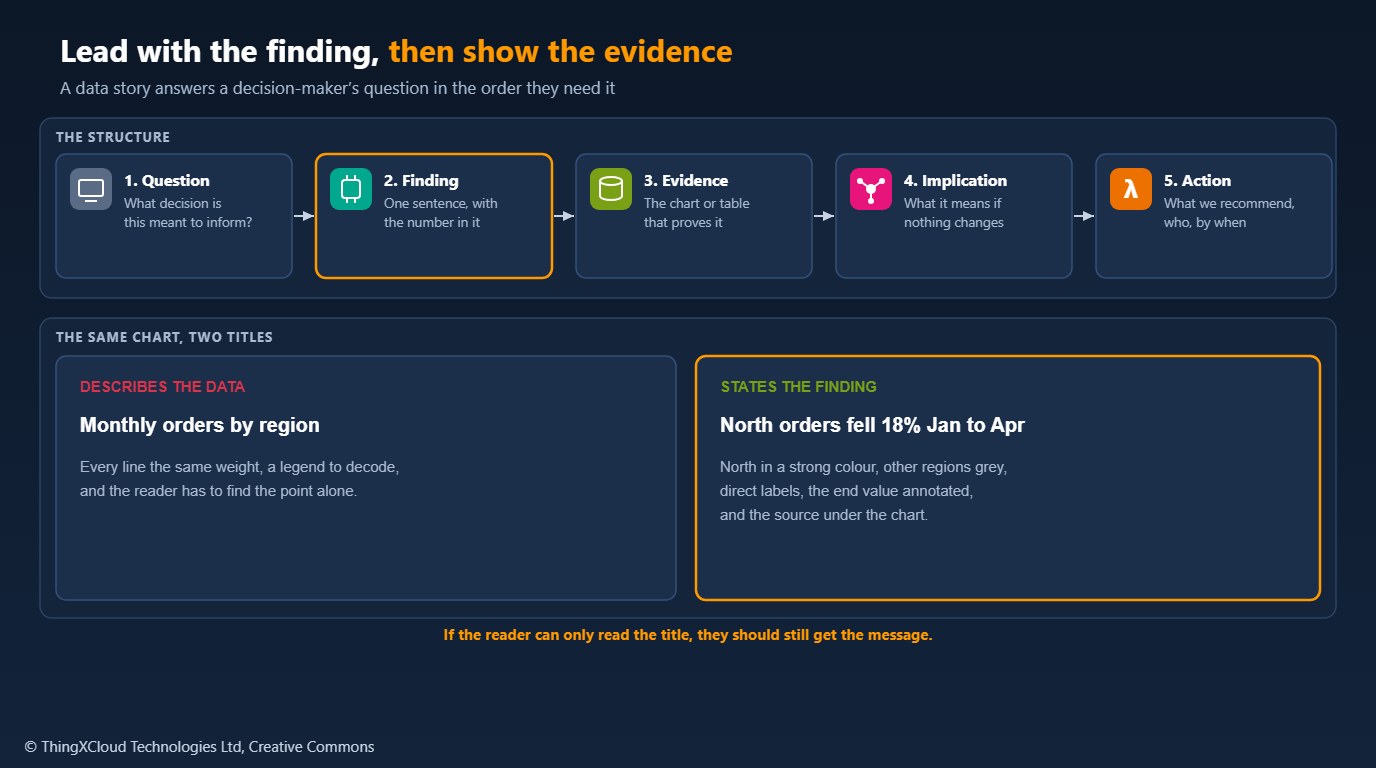
A data story then follows five parts. Question: the decision in one line. Finding: one sentence with the number in it, such as “North region orders fell 18 per cent between January and April while the other regions grew”. Evidence: the one chart or table that proves the finding, plus any check the audience will ask for (is it seasonal, is it one customer). Implication: what happens if nothing changes. Action: what you recommend, who should do it, and by when, or what further analysis would settle the question.
Executives read the first two parts and skim the rest; analysts check the evidence. Ordering the material this way serves both. Putting the method first and the finding on the last slide serves neither.
Choose the chart from the question
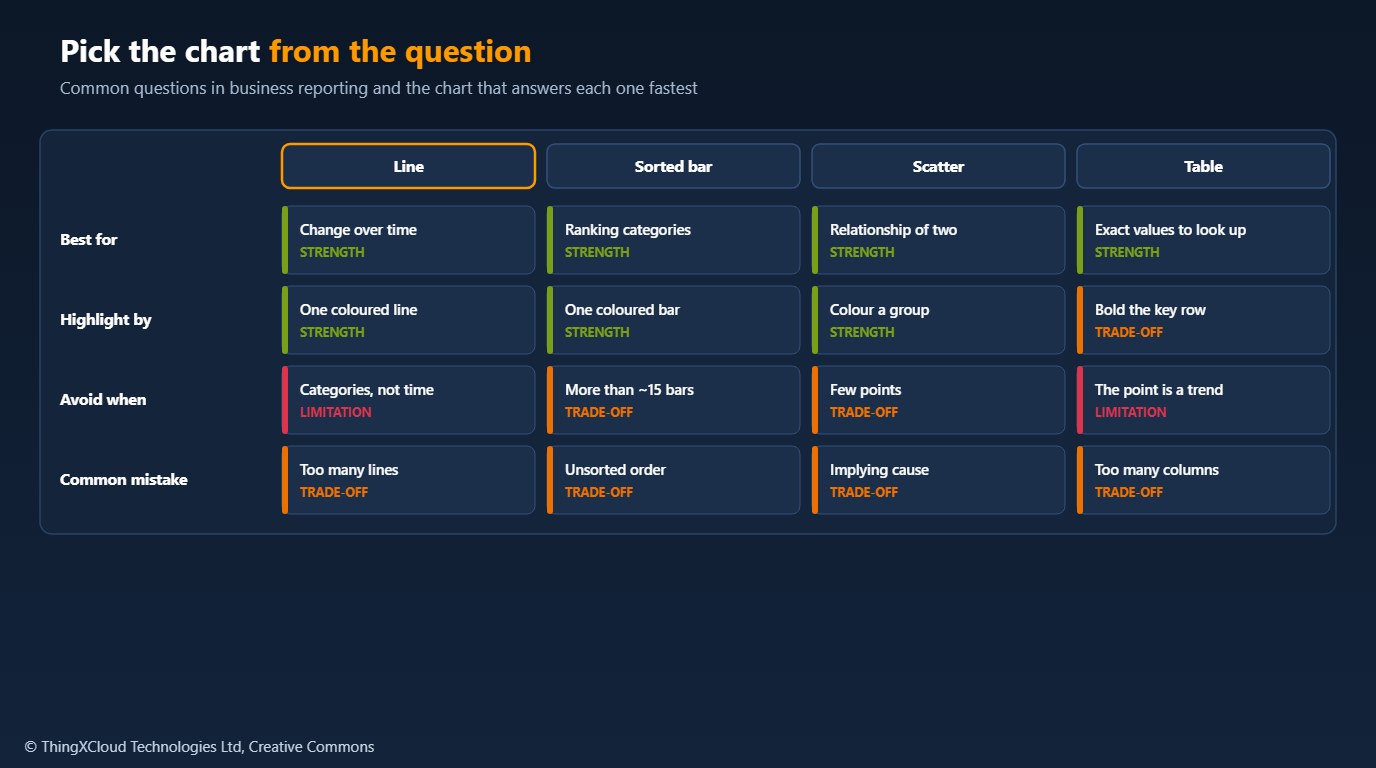
%%{init: {'theme': 'base', 'themeVariables': {'primaryColor': '#FFF3E0', 'primaryTextColor': '#232F3E', 'primaryBorderColor': '#FF9900', 'lineColor': '#232F3E', 'clusterBkg': '#F8FAFC', 'clusterBorder': '#CBD5E1', 'edgeLabelBackground': '#FFFFFF', 'nodeTextColor': '#232F3E'}}}%%
flowchart TD
    A["What is the question?"] --> B{"How did it change<br/>over time?"}
    B -- "Yes" --> L["Line chart,<br/>one series highlighted"]
    B -- "No" --> C{"Which is bigger<br/>or ranks highest?"}
    C -- "Yes" --> S["Bar chart,<br/>sorted by value"]
    C -- "No" --> D{"Do two measures<br/>move together?"}
    D -- "Yes" --> P["Scatter plot,<br/>label the outliers"]
    D -- "No" --> T["Small table,<br/>key row in bold"]
    classDef aws fill:#FFF3E0,stroke:#FF9900,stroke-width:2px,color:#232F3E
    classDef ok fill:#F0FFF4,stroke:#1D8102,stroke-width:2px,color:#145202
    class A,B,C,D aws
    class L,S,P,T ok
Pie charts, dual axes and 3D effects make comparisons harder than the alternatives above, so they need a specific reason. When a reader needs exact values to look up, a table is better than any chart.
Design the chart so the point is obvious
- Title with the finding. “North orders fell 18% Jan to Apr”, not “Orders by region”. A reader who sees only the title still gets the message.
- Highlight one thing. One series or bar in a strong colour, everything else grey. If everything is highlighted, nothing is.
- Label directly. Put series names at the end of their lines instead of in a legend the reader has to decode.
- Remove what does not carry data. Borders, heavy gridlines, background fills and redundant axis labels.
- Annotate the number that matters, with its change, at the point where it happens.
- Do not rely on colour alone. Pair colour with labels, line weight or position, and use a palette that people with common colour-vision deficiencies can distinguish.
- Show the source and the period, so the chart can be checked and reused.
The sample encodes those choices in one function. It writes the headline from the data, draws context series in grey and the focus series in a colour-blind-safe blue, labels lines directly and annotates the end value:
"""Build an insight-first line chart: the title states the finding, one series
is highlighted, the rest are context, and the point that matters is annotated.

The same data drawn with library defaults usually has a generic title, a
legend the reader must decode and equal emphasis on every line. This module
makes the deliberate choices explicit so they can be reviewed and tested.
"""
from __future__ import annotations

from dataclasses import dataclass

import matplotlib

matplotlib.use("Agg")                          # render without a display
import matplotlib.pyplot as plt                # noqa: E402

FOCUS = "#0072B2"      # Okabe-Ito blue: distinguishable with common colour-vision deficiencies
CONTEXT = "#B0B0B0"
TEXT = "#333333"


@dataclass(frozen=True)
class Finding:
    series: str
    start: float
    end: float

    @property
    def change(self) -> float:
        return self.end - self.start

    @property
    def pct_change(self) -> float:
        if self.start == 0:
            raise ValueError("percentage change from zero is undefined")
        return self.change / abs(self.start) * 100


def headline(f: Finding, metric: str, period: str) -> str:
    """A title that states the finding, e.g. 'North region orders fell 18% in Q1'."""
    if abs(f.pct_change) < 1:
        return f"{f.series} {metric} held steady {period}"
    direction = "rose" if f.change > 0 else "fell"
    return f"{f.series} {metric} {direction} {abs(f.pct_change):.0f}% {period}"


def insight_chart(x: list, series: dict[str, list[float]], focus: str, metric: str,
                  period: str, unit: str = "", source: str = "", path: str | None = None):
    if focus not in series:
        raise KeyError(f"focus series {focus!r} not in data")
    for name, ys in series.items():
        if len(ys) != len(x):
            raise ValueError(f"{name}: {len(ys)} values for {len(x)} x positions")

    f = Finding(focus, series[focus][0], series[focus][-1])
    fig, ax = plt.subplots(figsize=(8, 4.5), dpi=100)

    for name, ys in series.items():                  # context first, so focus draws on top
        if name != focus:
            ax.plot(x, ys, color=CONTEXT, linewidth=1.5)
            ax.annotate(name, (x[-1], ys[-1]), xytext=(6, 0), textcoords="offset points",
                        va="center", color=CONTEXT, fontsize=9)
    ax.plot(x, series[focus], color=FOCUS, linewidth=3)
    ax.annotate(focus, (x[-1], f.end), xytext=(6, 0), textcoords="offset points",
                va="center", color=FOCUS, fontsize=10, fontweight="bold")
    ax.annotate(f"{f.end:,.0f}{unit} ({f.pct_change:+.0f}%)", (x[-1], f.end), xytext=(-10, 14 if f.change >= 0 else -18),
                textcoords="offset points", ha="right", color=FOCUS, fontsize=10)

    ax.set_title(headline(f, metric, period), loc="left", fontsize=13, fontweight="bold", color=TEXT)
    for side in ("top", "right"):
        ax.spines[side].set_visible(False)
    ax.tick_params(colors=TEXT, labelsize=9)
    ax.grid(axis="y", color="#E5E5E5", linewidth=0.8)
    ax.set_axisbelow(True)
    if source:
        fig.text(0.01, 0.01, f"Source: {source}", fontsize=8, color="#666666")
    fig.tight_layout()
    if path:
        fig.savefig(path)
return fig, ax, fTeams produce the charts their tools make easiest. Putting the house style (title as finding, one highlight, direct labels, source line) into a shared function or report template does more than any style guide.
Keep the story honest
A story selects; the risk is that it selects too much. Before presenting, check that the finding survives a different time window, that one large customer or one data-quality problem does not explain it, and that the axis does not exaggerate the change (bar charts start at zero; a line chart may not, but say so). State the uncertainty when it matters: the sample size, a confidence interval, or simply “two months of data”. Separate what the data shows from what you infer about why.
A scatter plot that shows two measures moving together invites a causal story. Unless the analysis was designed to test cause (an experiment, a natural comparison), present it as an association and recommend how to test it.
Charts and tables shared in decks travel further than the data platform’s access controls. Present aggregates, suppress small groups that could identify individuals, and check that drill-downs in shared dashboards respect the viewer’s permissions. Accessibility rules apply too: WCAG 1.4.1 requires that colour is not the only way information is conveyed.
insight_chart.py was tested with Python 3.12, matplotlib==3.8.4, numpy==1.26.4 and pytest==8.2.0: four tests cover the headline wording for rises, falls and flat series, rejection of a percentage change from zero, and the rendered chart’s title, colours, line order and width, direct labels, absent legend and source note. The example chart in the repository was rendered with the same versions.
Key takeaways
- Start from the decision the work informs; it defines what counts as a finding.
- Order the material as question, finding, evidence, implication, action.
- Choose the chart from the question: line for change, sorted bar for ranking, scatter for relationships, table for lookup.
- Title charts with the finding, highlight one thing, label directly and show the source.
- Check the finding against other windows and outliers, state uncertainty, and do not present association as cause.
What is the chart or slide that changed a decision in your organisation, and what made it work? Share it in the comments.
The complete sample for this article is on GitHub: nithinmohantk/blog-samples-working-repo/insight-first-charts. Clone it with git clone https://github.com/nithinmohantk/blog-samples-working-repo.git and open the insight-first-charts folder. Its README says how to run it and what has been verified.
Glossary
- Data story
- A presentation of analysis ordered around a finding and the decision it informs.
- Headline title
- A chart title that states the conclusion rather than describing the data.
- Direct labelling
- Naming series on the chart itself instead of in a legend.
- Context series
- Data shown in a muted colour to give comparison for the highlighted series.
- Colour-vision deficiency
- Reduced ability to distinguish some colours, affecting a significant share of readers.
References & Further Reading
- → Understanding Success Criterion 1.4.1: Use of Color— WCAG 2.1: colour must not be the only visual means of conveying information
- → Sample code for this article— Insight-first chart function and tests
Discover more from C4: Container, Code, Cloud & Context
Subscribe to get the latest posts sent to your email.
