Security is a shared responsibility in AWS. This guide covers AWS security services including IAM deep dive, KMS encryption, WAF, Shield, and security monitoring—with production-ready configurations.
AWS Security Services Overview
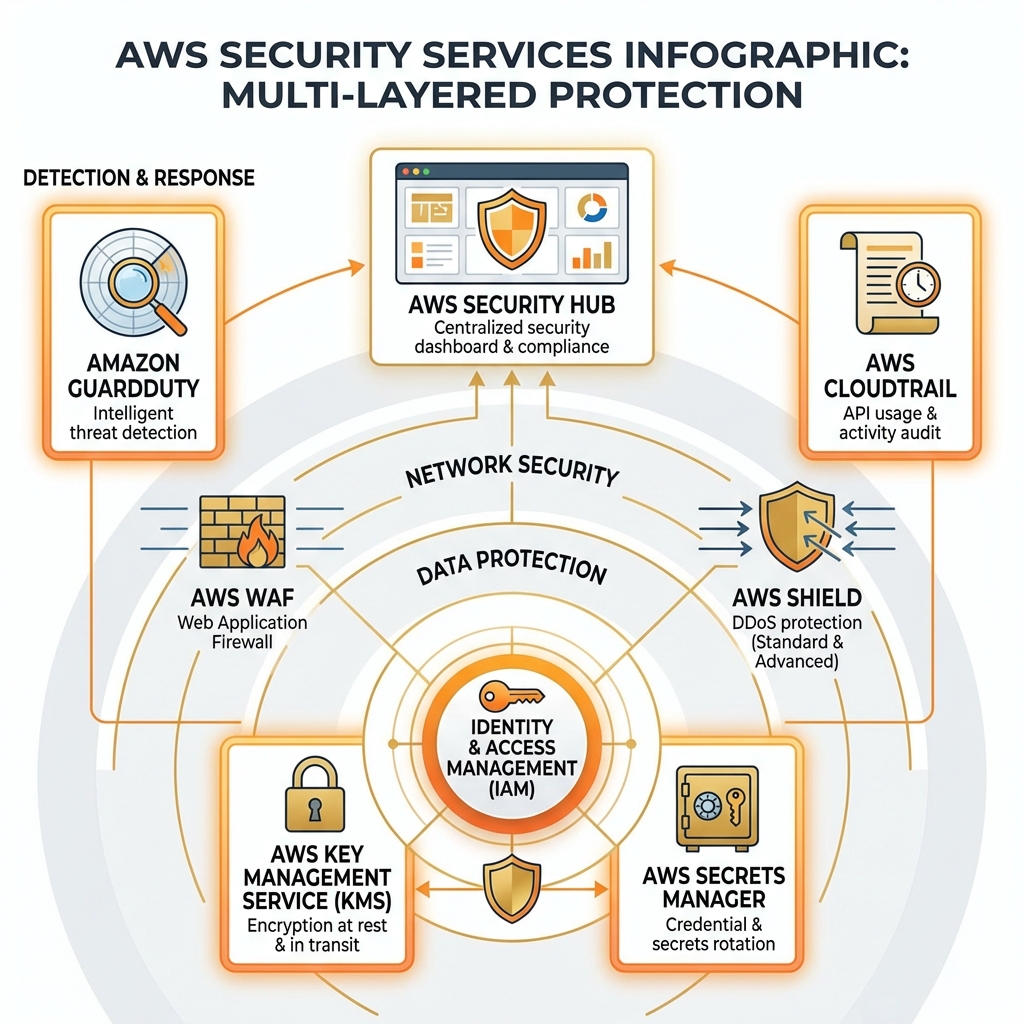
AWS security is organized in layers: identity (IAM), data protection (KMS, Secrets Manager), network security (WAF, Shield, Security Groups), and detection (GuardDuty, Security Hub, CloudTrail).
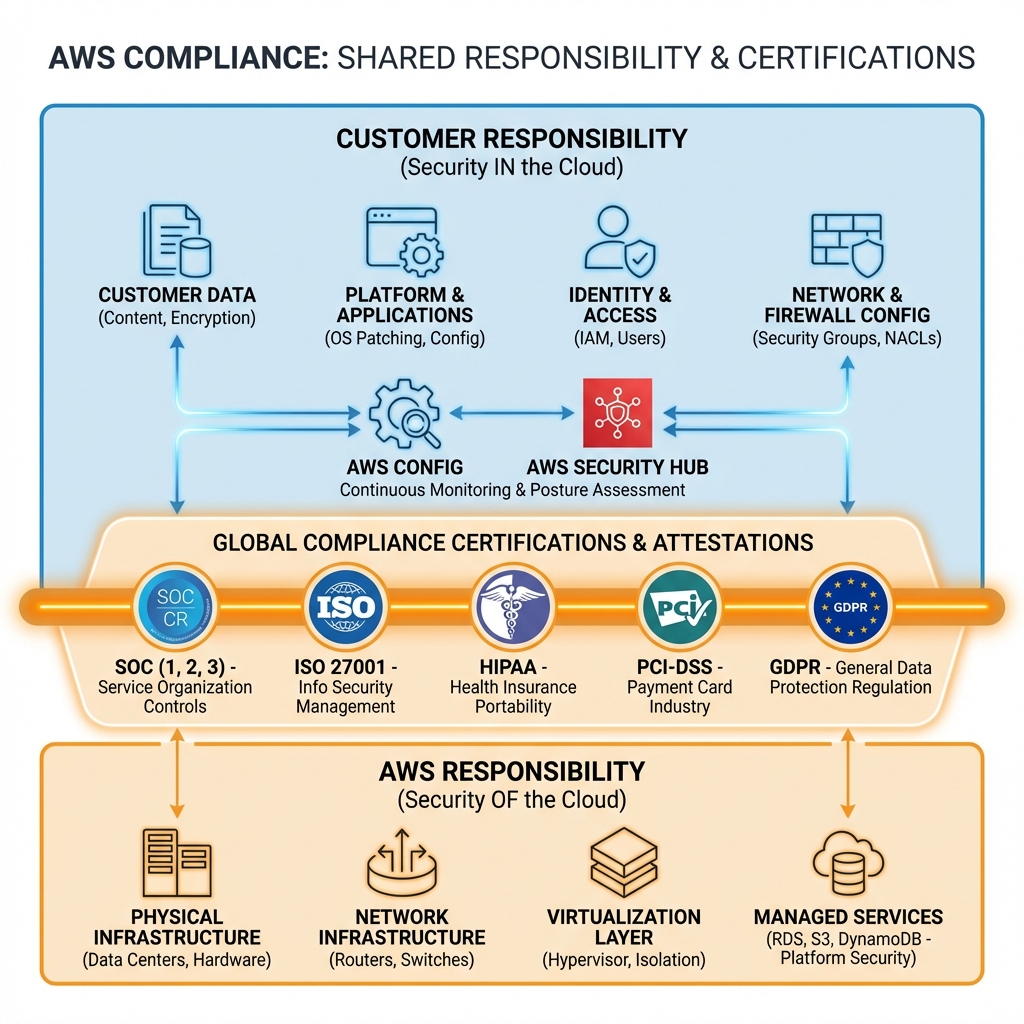
AWS Shared Responsibility Model
Understanding who is responsible for what is fundamental to AWS security. AWS secures the cloud infrastructure; you secure what you put in the cloud.
AWS KMS (Key Management Service)
KMS is the central service for encryption key management. It integrates with all AWS services that support encryption at rest.
Key Types & Use Cases
| Key Type | Management | Cost | Use Case |
|---|---|---|---|
| AWS Managed | AWS creates & manages | Free | Default encryption (S3, EBS) |
| Customer Managed (CMK) | You create & control | $1/month + API calls | Custom key policies, rotation |
| Imported Keys | Bring your own key | $1/month + API calls | Regulatory requirements |
| CloudHSM Key | FIPS 140-2 Level 3 | $1.60/hr per HSM | PCI-DSS, strict compliance |
KMS with AWS CDK
// AWS CDK: KMS key with key policy
import * as cdk from 'aws-cdk-lib';
import * as kms from 'aws-cdk-lib/aws-kms';
import * as iam from 'aws-cdk-lib/aws-iam';

export class KmsStack extends cdk.Stack {
  public readonly key: kms.Key;

  constructor(scope: cdk.App, id: string, props?: cdk.StackProps) {
    super(scope, id, props);

    // Customer managed key with automatic rotation
    this.key = new kms.Key(this, 'DataEncryptionKey', {
      description: 'KMS key for data encryption',
      enableKeyRotation: true,  // Automatic annual rotation
      rotationPeriod: cdk.Duration.days(365),
      pendingWindow: cdk.Duration.days(7),
      removalPolicy: cdk.RemovalPolicy.RETAIN,

      // Key policy
      policy: new iam.PolicyDocument({
        statements: [
          // Allow root account full access
          new iam.PolicyStatement({
            sid: 'Enable IAM policies',
            effect: iam.Effect.ALLOW,
            principals: [new iam.AccountRootPrincipal()],
            actions: ['kms:*'],
            resources: ['*'],
          }),
          // Allow specific roles to encrypt/decrypt
          new iam.PolicyStatement({
            sid: 'Allow application encryption',
            effect: iam.Effect.ALLOW,
            principals: [new iam.ArnPrincipal(`arn:aws:iam::${this.account}:role/ApplicationRole`)],
            actions: [
              'kms:Encrypt',
              'kms:Decrypt',
              'kms:GenerateDataKey*',
              'kms:DescribeKey',
            ],
            resources: ['*'],
            conditions: {
              StringEquals: {
                'kms:ViaService': `s3.${this.region}.amazonaws.com`,
              },
            },
          }),
        ],
      }),
    });

    // Create alias
    new kms.Alias(this, 'KeyAlias', {
      aliasName: 'alias/data-encryption',
      targetKey: this.key,
    });
  }
}
AWS WAF (Web Application Firewall)
WAF protects web applications from common exploits like SQL injection, XSS, and bot attacks. It integrates with CloudFront, ALB, and API Gateway.
WAF with Terraform
# Terraform: WAF with managed rule groups
resource "aws_wafv2_web_acl" "main" {
  name        = "production-waf"
  description = "WAF for production workloads"
  scope       = "REGIONAL"  # or CLOUDFRONT

  default_action {
    allow {}
  }

  # AWS Managed Rules - Core Rule Set
  rule {
    name     = "AWSManagedRulesCommonRuleSet"
    priority = 1

    override_action {
      none {}
    }

    statement {
      managed_rule_group_statement {
        name        = "AWSManagedRulesCommonRuleSet"
        vendor_name = "AWS"
      }
    }

    visibility_config {
      cloudwatch_metrics_enabled = true
      metric_name                = "CommonRuleSet"
      sampled_requests_enabled   = true
    }
  }

  # SQL Injection Protection
  rule {
    name     = "AWSManagedRulesSQLiRuleSet"
    priority = 2

    override_action {
      none {}
    }

    statement {
      managed_rule_group_statement {
        name        = "AWSManagedRulesSQLiRuleSet"
        vendor_name = "AWS"
      }
    }

    visibility_config {
      cloudwatch_metrics_enabled = true
      metric_name                = "SQLiRuleSet"
      sampled_requests_enabled   = true
    }
  }

  # Rate limiting
  rule {
    name     = "RateLimiting"
    priority = 3

    action {
      block {}
    }

    statement {
      rate_based_statement {
        limit              = 2000
        aggregate_key_type = "IP"
      }
    }

    visibility_config {
      cloudwatch_metrics_enabled = true
      metric_name                = "RateLimiting"
      sampled_requests_enabled   = true
    }
  }

  visibility_config {
    cloudwatch_metrics_enabled = true
    metric_name                = "ProductionWAF"
    sampled_requests_enabled   = true
  }
}

# Associate with ALB
resource "aws_wafv2_web_acl_association" "alb" {
  resource_arn = aws_lb.main.arn
  web_acl_arn  = aws_wafv2_web_acl.main.arn
}- Start with AWS Managed Rules (Core, SQL injection, Known bad inputs)
- Use Count mode first to test rules before blocking
- Enable logging to S3 or CloudWatch for analysis
- Add rate limiting to prevent brute force attacks
- Create IP reputation lists for known bad actors
AWS Shield
Shield provides DDoS protection. Shield Standard is free and automatic; Shield Advanced provides 24/7 DDoS Response Team access and cost protection.
| Feature | Shield Standard | Shield Advanced |
|---|---|---|
| Cost | Free | $3,000/month + data |
| Layer 3/4 Protection | ✅ | ✅ Enhanced |
| Layer 7 Protection | Basic | ✅ Advanced + WAF |
| DDoS Response Team | ❌ | ✅ 24/7 |
| Cost Protection | ❌ | ✅ Scaling credits |
| Best For | All workloads | High-value, critical apps |
AWS Secrets Manager
Secrets Manager stores and rotates secrets like database credentials, API keys, and OAuth tokens. It integrates with RDS for automatic rotation.
// AWS CDK: Secrets Manager with automatic rotation
import * as cdk from 'aws-cdk-lib';
import * as secretsmanager from 'aws-cdk-lib/aws-secretsmanager';
import * as rds from 'aws-cdk-lib/aws-rds';

export class SecretsStack extends cdk.Stack {
  constructor(scope: cdk.App, id: string, props?: cdk.StackProps) {
    super(scope, id, props);

    // Create secret with automatic rotation
    const dbSecret = new secretsmanager.Secret(this, 'DbSecret', {
      secretName: 'prod/database/credentials',
      description: 'RDS database credentials',
      generateSecretString: {
        secretStringTemplate: JSON.stringify({ username: 'admin' }),
        generateStringKey: 'password',
        excludeCharacters: ' %+~`#$&*()|[]{}:;<>?!'/@"\',
        passwordLength: 32,
      },
    });

    // Enable rotation (for RDS, Lambda rotator is auto-created)
    dbSecret.addRotationSchedule('RotationSchedule', {
      automaticallyAfter: cdk.Duration.days(30),
      rotateImmediatelyOnUpdate: false,
    });

    // API key secret (manual rotation)
    const apiSecret = new secretsmanager.Secret(this, 'ApiSecret', {
      secretName: 'prod/api/key',
      secretStringValue: cdk.SecretValue.unsafePlainText('replace-me'),
    });
  }
}
Security Monitoring: GuardDuty & Security Hub
# Terraform: Enable GuardDuty and Security Hub
resource "aws_guardduty_detector" "main" {
  enable = true

  datasources {
    s3_logs {
      enable = true
    }
    kubernetes {
      audit_logs {
        enable = true
      }
    }
    malware_protection {
      scan_ec2_instance_with_findings {
        ebs_volumes {
          enable = true
        }
      }
    }
  }

  finding_publishing_frequency = "FIFTEEN_MINUTES"
}

# Security Hub
resource "aws_securityhub_account" "main" {}

resource "aws_securityhub_standards_subscription" "cis" {
  depends_on    = [aws_securityhub_account.main]
  standards_arn = "arn:aws:securityhub:::ruleset/cis-aws-foundations-benchmark/v/1.4.0"
}

resource "aws_securityhub_standards_subscription" "aws_foundational" {
  depends_on    = [aws_securityhub_account.main]
  standards_arn = "arn:aws:securityhub:${data.aws_region.current.name}::standards/aws-foundational-security-best-practices/v/1.0.0"
}- GuardDuty: ~$4/million CloudTrail events
- Security Hub: $0.0010/check (first 10,000) + findings
- WAF: $5/month/WebACL + $1/million requests
- Secrets Manager: $0.40/secret/month + $0.05/10K API calls
- KMS: $1/key/month + $0.03/10K requests
Key Takeaways
- ✅ Enable KMS encryption everywhere – S3, EBS, RDS, Secrets Manager
- ✅ Use WAF for all public endpoints – Start with AWS Managed Rules
- ✅ Enable GuardDuty in all accounts – Low cost, high value threat detection
- ✅ Centralize with Security Hub – Single pane of glass for security findings
- ✅ Rotate secrets automatically – Never use static credentials
- ✅ Enable CloudTrail everywhere – Organization trail for all accounts
Conclusion
AWS security requires a defense-in-depth approach. Use IAM for identity, KMS for encryption, WAF and Shield for network protection, and GuardDuty for threat detection. Security Hub ties everything together. In Part 6, we’ll cover DevOps and Infrastructure as Code with CDK, CloudFormation, and Terraform.
References
- AWS Shared Responsibility Model
- AWS KMS Developer Guide
- AWS WAF Developer Guide
- Amazon GuardDuty User Guide
Discover more from C4: Container, Code, Cloud & Context
Subscribe to get the latest posts sent to your email.