Amazon Web Services (AWS) is the world’s most comprehensive and widely adopted cloud platform, offering over 200 fully featured services from data centers globally. This foundational guide covers the essential concepts every developer and architect needs to master before building on AWS.
This is Part 1 of a 6-part series covering AWS Cloud Platform for developers.
- Part 1 (this article): Fundamentals – Account Structure, IAM, Regions
- Part 2: Compute Services – EC2, Lambda, ECS, EKS
- Part 3: Storage & Databases – S3, RDS, DynamoDB
- Part 4: Networking – VPC, Route 53, CloudFront
- Part 5: Security & Compliance – KMS, WAF, Shield
- Part 6: DevOps & IaC – CDK, CloudFormation, Terraform
AWS Global Infrastructure
AWS operates the world’s largest cloud infrastructure, spanning multiple geographic locations. Understanding this infrastructure is crucial for designing highly available, fault-tolerant applications.
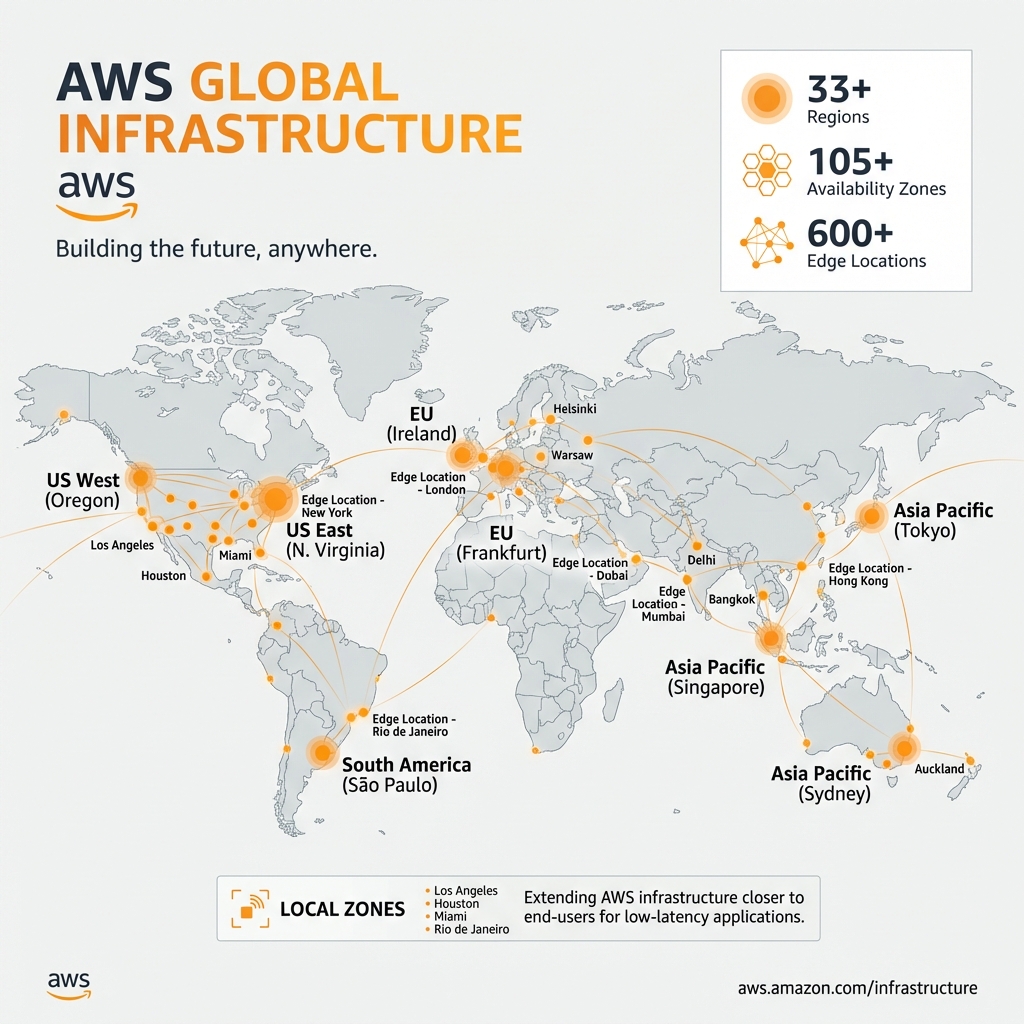
Regions
A Region is a physical location around the world where AWS clusters data centers. Each Region is completely independent and isolated from other Regions for maximum fault isolation.
Key Considerations:
- Data residency – Data never leaves a Region unless you explicitly enable replication
- Latency – Choose Regions closest to your users
- Service availability – Not all services are available in all Regions
- Pricing – Costs vary by Region (US regions are typically cheapest)
Availability Zones (AZs)
Each Region contains multiple Availability Zones (typically 3-6). AZs are physically separated data centers within a Region, connected by high-bandwidth, low-latency networking.
# AWS CLI: List all regions
aws ec2 describe-regions --query "Regions[].RegionName" --output table

# List AZs in current region
aws ec2 describe-availability-zones --query "AvailabilityZones[].ZoneName" --output table

# Example output for us-east-1:
# us-east-1a, us-east-1b, us-east-1c, us-east-1d, us-east-1e, us-east-1fAlways deploy production workloads across multiple AZs. Use at least 2 AZs for high availability, 3 for critical workloads. AZ IDs (e.g., use1-az1) are consistent across accounts, while AZ names (e.g., us-east-1a) may map to different physical AZs in different accounts.
Edge Locations & Local Zones
Edge Locations: Points of presence for CloudFront CDN and Route 53 DNS. Over 600 locations globally for caching content close to end users.
Local Zones: Extension of Regions that place compute, storage, and database services closer to large population centers. Ideal for applications requiring single-digit millisecond latency.
AWS Account Structure & Organizations
For enterprise deployments, a multi-account strategy using AWS Organizations is essential. This provides security isolation, cost allocation, and governance at scale.
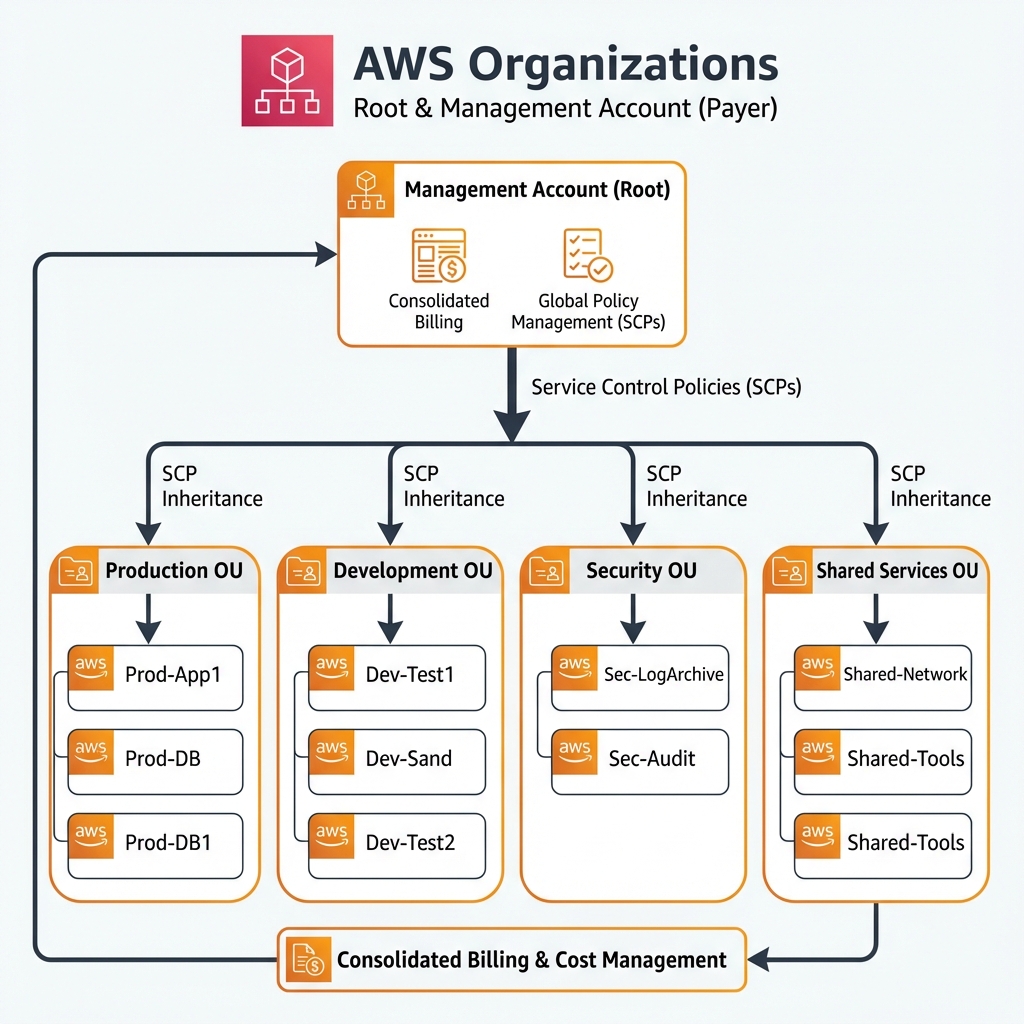
Organizational Units (OUs)
OUs group accounts for policy application. A typical enterprise structure includes:
| OU | Purpose | Example Accounts |
|---|---|---|
| Security | Centralized security services | Log Archive, Security Tooling, Audit |
| Infrastructure | Shared infrastructure | Network Hub, Shared Services, DNS |
| Workloads | Application accounts | App1-Prod, App1-Dev, App2-Prod |
| Sandbox | Developer experimentation | Developer sandboxes, POCs |
Service Control Policies (SCPs)
SCPs define the maximum permissions for accounts in an organization. They don’t grant permissions—they set guardrails that IAM policies cannot exceed.
// Example SCP: Prevent disabling CloudTrail
{
  "Version": "2012-10-17",
  "Statement": [
    {
      "Sid": "ProtectCloudTrail",
      "Effect": "Deny",
      "Action": [
        "cloudtrail:DeleteTrail",
        "cloudtrail:StopLogging",
        "cloudtrail:UpdateTrail"
      ],
      "Resource": "*",
      "Condition": {
        "StringNotEquals": {
          "aws:PrincipalArn": "arn:aws:iam::*:role/SecurityAuditRole"
        }
      }
    },
    {
      "Sid": "DenyRegions",
      "Effect": "Deny",
      "NotAction": [
        "iam:*",
        "organizations:*",
        "support:*"
      ],
      "Resource": "*",
      "Condition": {
        "StringNotEquals": {
          "aws:RequestedRegion": ["us-east-1", "us-west-2", "eu-west-1"]
        }
      }
    }
  ]
}
Setting Up Organizations with Terraform
# Terraform: AWS Organizations setup
resource "aws_organizations_organization" "org" {
  feature_set = "ALL"

  enabled_policy_types = [
    "SERVICE_CONTROL_POLICY",
    "TAG_POLICY"
  ]
}

# Create OUs
resource "aws_organizations_organizational_unit" "security" {
  name      = "Security"
  parent_id = aws_organizations_organization.org.roots[0].id
}

resource "aws_organizations_organizational_unit" "workloads" {
  name      = "Workloads"
  parent_id = aws_organizations_organization.org.roots[0].id
}

resource "aws_organizations_organizational_unit" "prod" {
  name      = "Production"
  parent_id = aws_organizations_organizational_unit.workloads.id
}

# Create member account
resource "aws_organizations_account" "prod_app" {
  name      = "production-app"
  email     = "aws-prod-app@example.com"
  parent_id = aws_organizations_organizational_unit.prod.id

  role_name = "OrganizationAccountAccessRole"

  lifecycle {
    ignore_changes = [role_name]
  }
}
AWS Identity and Access Management (IAM)
IAM is the foundation of AWS security. It controls who can access what resources and under what conditions. Understanding IAM is critical for every AWS practitioner.
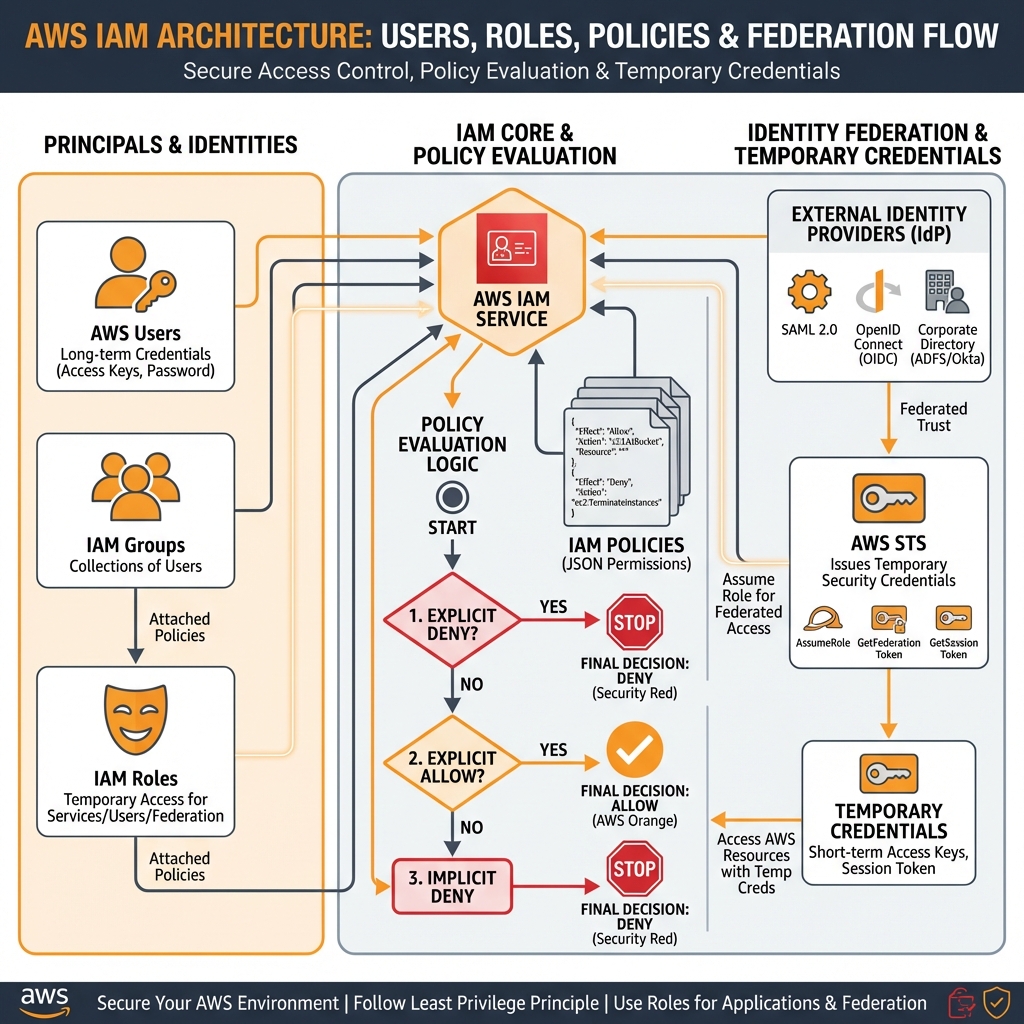
IAM Principals
Users: Long-term credentials for humans. Best practice: Use IAM Identity Center (SSO) instead of IAM users for human access.
Groups: Collections of users for easier permission assignment. Users can belong to multiple groups.
Roles: Temporary credentials for applications, services, or federated users. Always prefer roles over long-term credentials.
IAM Policy Evaluation Logic
AWS evaluates policies in a specific order. Understanding this flow is essential for troubleshooting access issues:
- Explicit Deny – If any policy explicitly denies, access is denied (final)
- Organizations SCP – SCP must allow the action
- Resource-based Policy – Check if resource allows access
- Identity-based Policy – Check if principal has permission
- Session Policy – For assumed roles with session policies
- Permissions Boundary – Maximum permissions the principal can have
- Implicit Deny – If not explicitly allowed, access is denied
Creating IAM Roles with AWS CDK
// AWS CDK (TypeScript): Creating IAM roles with least privilege
import * as cdk from 'aws-cdk-lib';
import * as iam from 'aws-cdk-lib/aws-iam';
import * as lambda from 'aws-cdk-lib/aws-lambda';

export class IamStack extends cdk.Stack {
  constructor(scope: cdk.App, id: string, props?: cdk.StackProps) {
    super(scope, id, props);

    // Create a role for Lambda functions
    const lambdaRole = new iam.Role(this, 'LambdaExecutionRole', {
      assumedBy: new iam.ServicePrincipal('lambda.amazonaws.com'),
      description: 'Execution role for data processing Lambda',
      maxSessionDuration: cdk.Duration.hours(1),
    });

    // Add managed policy for basic Lambda execution
    lambdaRole.addManagedPolicy(
      iam.ManagedPolicy.fromAwsManagedPolicyName('service-role/AWSLambdaBasicExecutionRole')
    );

    // Add inline policy with least privilege
    lambdaRole.addToPolicy(new iam.PolicyStatement({
      effect: iam.Effect.ALLOW,
      actions: [
        's3:GetObject',
        's3:PutObject',
      ],
      resources: ['arn:aws:s3:::my-bucket/*'],
      conditions: {
        'StringEquals': {
          's3:x-amz-acl': 'bucket-owner-full-control'
        }
      }
    }));

    // Add DynamoDB access
    lambdaRole.addToPolicy(new iam.PolicyStatement({
      effect: iam.Effect.ALLOW,
      actions: [
        'dynamodb:GetItem',
        'dynamodb:PutItem',
        'dynamodb:Query',
      ],
      resources: [
        `arn:aws:dynamodb:${this.region}:${this.account}:table/MyTable`,
        `arn:aws:dynamodb:${this.region}:${this.account}:table/MyTable/index/*`,
      ],
    }));
  }
}
CloudFormation IAM Role Template
# CloudFormation: IAM Role with trust policy
AWSTemplateFormatVersion: '2010-09-09'
Description: IAM Role for EC2 instances with S3 and DynamoDB access

Parameters:
  Environment:
    Type: String
    AllowedValues: [dev, staging, prod]

Resources:
  EC2InstanceRole:
    Type: AWS::IAM::Role
    Properties:
      RoleName: !Sub '${Environment}-ec2-instance-role'
      AssumeRolePolicyDocument:
        Version: '2012-10-17'
        Statement:
          - Effect: Allow
            Principal:
              Service: ec2.amazonaws.com
            Action: sts:AssumeRole
      ManagedPolicyArns:
        - arn:aws:iam::aws:policy/AmazonSSMManagedInstanceCore
      Policies:
        - PolicyName: S3Access
          PolicyDocument:
            Version: '2012-10-17'
            Statement:
              - Effect: Allow
                Action:
                  - s3:GetObject
                  - s3:ListBucket
                Resource:
                  - !Sub 'arn:aws:s3:::${Environment}-data-bucket'
                  - !Sub 'arn:aws:s3:::${Environment}-data-bucket/*'

  EC2InstanceProfile:
    Type: AWS::IAM::InstanceProfile
    Properties:
      InstanceProfileName: !Sub '${Environment}-ec2-profile'
      Roles:
        - !Ref EC2InstanceRole

Outputs:
  RoleArn:
    Value: !GetAtt EC2InstanceRole.Arn
    Export:
Name: !Sub '${Environment}-EC2RoleArn'- 5,000 IAM users per account
- 10 groups per user
- 10 managed policies per user/role/group
- 6,144 characters per inline policy
- 2,048 characters for role trust policy
- 1,000 roles per account (can request increase)
AWS Services Landscape
AWS offers 200+ services. Here’s an overview of the core services organized by category that every developer should know.
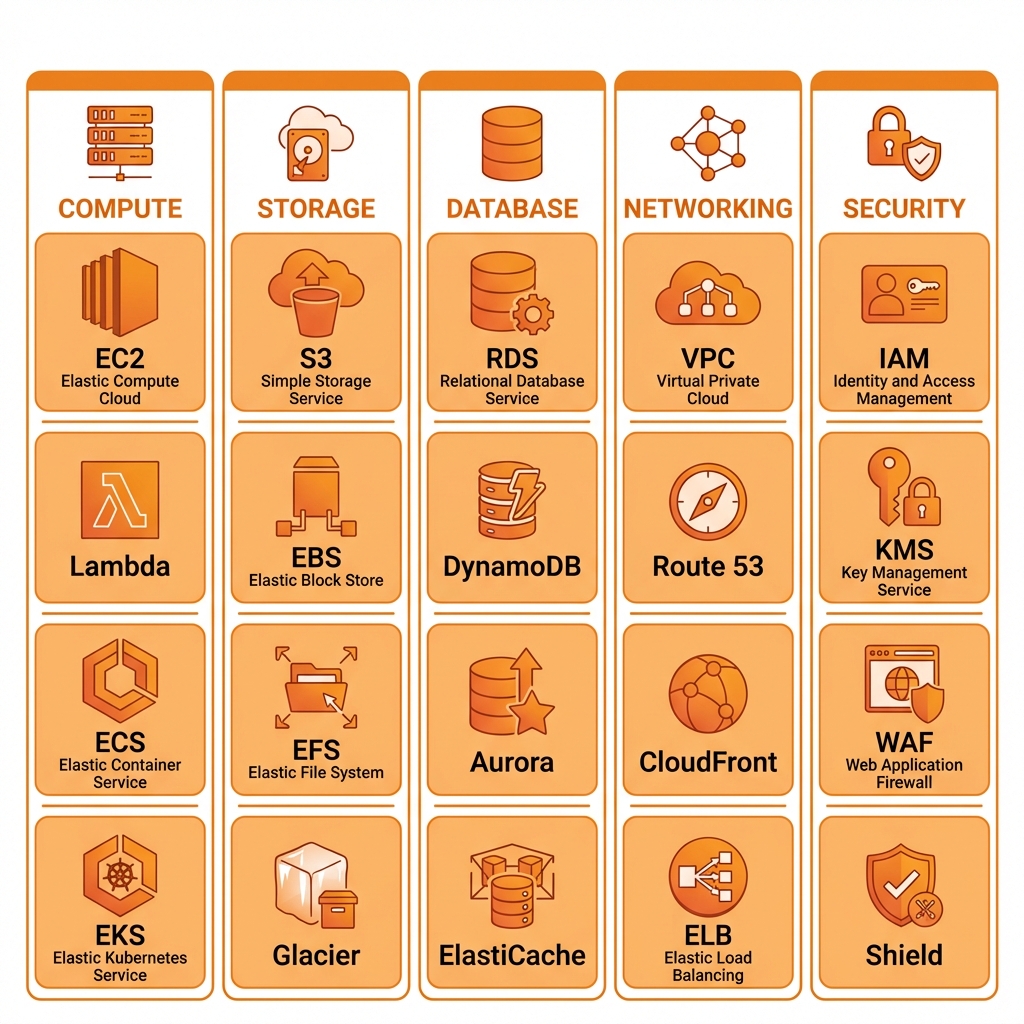
Compute vs. Managed Services Comparison
| Aspect | EC2 | Lambda | ECS/Fargate | EKS |
|---|---|---|---|---|
| You Manage | OS, Runtime, App | Code only | Container, App | K8s config, App |
| Pricing | Per hour/second | Per invocation + duration | Per vCPU/memory/hour | $0.10/hr + EC2/Fargate |
| Scaling | Auto Scaling Groups | Automatic (1000s) | Service Auto Scaling | HPA/VPA/Karpenter |
| Max Duration | Unlimited | 15 minutes | Unlimited | Unlimited |
| Best For | Legacy, full control | Event-driven, APIs | Microservices | Complex K8s workloads |
Getting Started: AWS CLI & SDK Setup
Every developer needs to configure AWS CLI and SDKs properly. Here’s how to set up a secure, multi-profile configuration.
# Install AWS CLI v2
curl "https://awscli.amazonaws.com/awscli-exe-linux-x86_64.zip" -o "awscliv2.zip"
unzip awscliv2.zip
sudo ./aws/install

# Configure named profiles
aws configure --profile dev
# Enter: Access Key, Secret Key, Region (us-east-1), Output format (json)

aws configure --profile prod
# Enter production credentials

# Use SSO for better security (recommended)
aws configure sso --profile prod-sso
# SSO start URL: https://my-company.awsapps.com/start
# SSO Region: us-east-1
# Account ID: 123456789012
# Role name: AdministratorAccess

# Set default profile
export AWS_PROFILE=dev

# Verify configuration
aws sts get-caller-identity
# ~/.aws/config - Multi-account setup with role assumption
[profile dev]
region = us-east-1
output = json
[profile prod]
region = us-east-1
role_arn = arn:aws:iam::123456789012:role/ProductionAdmin
source_profile = dev
mfa_serial = arn:aws:iam::111111111111:mfa/myuser
duration_seconds = 3600
[profile prod-readonly]
region = us-east-1
role_arn = arn:aws:iam::123456789012:role/ReadOnlyAccess
source_profile = dev
# SSO profile (recommended for enterprise)
[profile prod-sso]
sso_start_url = https://my-company.awsapps.com/start
sso_region = us-east-1
sso_account_id = 123456789012
sso_role_name = AdministratorAccess
region = us-east-1Key Takeaways
- ✅ Use multiple AZs – Deploy across at least 2 AZs for high availability
- ✅ Multi-account strategy – Use AWS Organizations with OUs for isolation and governance
- ✅ Roles over users – Prefer IAM roles with temporary credentials over IAM users with long-term keys
- ✅ Least privilege – Grant minimum permissions required; use conditions to further restrict
- ✅ SCPs as guardrails – Implement SCPs to prevent dangerous actions across the organization
- ✅ Use SSO – Configure IAM Identity Center for human access instead of IAM users
Conclusion
AWS fundamentals—understanding global infrastructure, multi-account strategies, and IAM—form the foundation for everything you’ll build on the platform. Master these concepts before diving into specific services. In Part 2, we’ll explore AWS compute services including EC2, Lambda, ECS, and EKS with hands-on examples using CDK and Terraform.
References
- AWS Global Infrastructure
- AWS Organizations Getting Started
- IAM Policy Evaluation Logic
- AWS Well-Architected Framework
- AWS CDK Developer Guide
Discover more from C4: Container, Code, Cloud & Context
Subscribe to get the latest posts sent to your email.