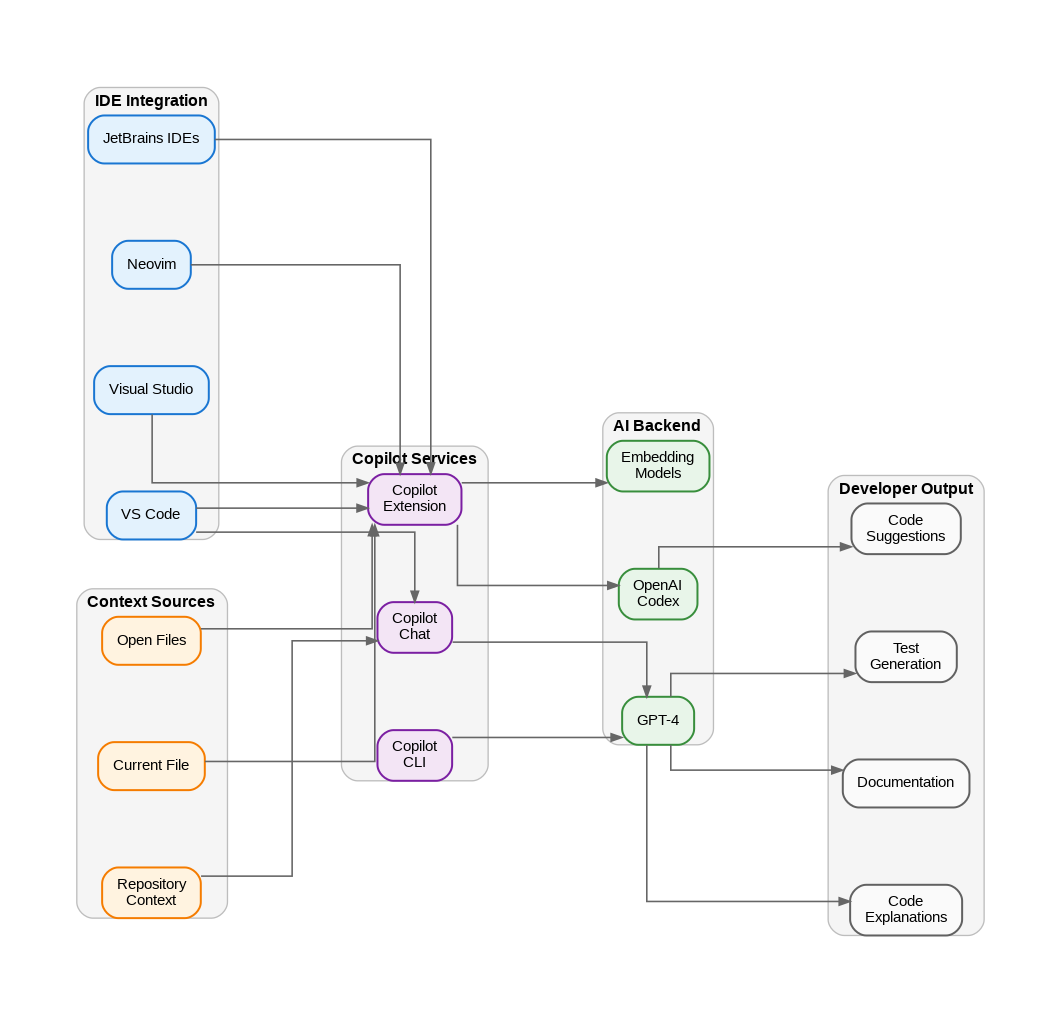
GitHub Copilot has fundamentally changed how I approach software development. After integrating it into my daily workflow over the past year, I want to share practical insights on maximizing its value while understanding its limitations. As someone who has been writing code for over two decades, I initially approached AI-assisted development with skepticism, but Copilot has earned its place in my toolkit.
Understanding the Architecture
GitHub Copilot operates on a sophisticated architecture that combines IDE integration, cloud-based AI processing, and contextual understanding. The system analyzes your current file, open tabs, project structure, and coding patterns to generate relevant suggestions. What makes it particularly effective is its ability to understand not just syntax, but semantic intent based on comments, function names, and surrounding code context.
The underlying model, based on OpenAI’s Codex (and now GPT-4 variants), has been trained on billions of lines of public code. This gives it broad knowledge across programming languages, frameworks, and common patterns. However, this also means it can occasionally suggest outdated patterns or code that doesn’t align with your project’s specific conventions.
Where Copilot Excels
In my experience, Copilot delivers the most value in several specific scenarios. Boilerplate code generation is where it truly shines – writing CRUD operations, API endpoints, data transfer objects, and configuration files becomes significantly faster. I’ve seen 40-60% time savings on these repetitive tasks.
Test generation is another strong suit. When you write a function and then start typing a test file, Copilot often generates comprehensive test cases that cover edge cases you might have overlooked. It understands testing frameworks like Jest, pytest, xUnit, and NUnit remarkably well.
Documentation and comments benefit tremendously from Copilot. Start typing a docstring or XML comment, and it generates accurate descriptions of parameters, return values, and function behavior. This has improved my team’s documentation consistency significantly.
When to Use What: Copilot vs. Traditional Development
Understanding when to rely on Copilot versus traditional development approaches is crucial for maximizing productivity. For greenfield projects with well-established patterns, Copilot accelerates development substantially. For complex algorithmic work or security-critical code, I recommend writing manually and using Copilot only for suggestions you carefully review.
Use Copilot heavily for: boilerplate code, test scaffolding, documentation, regex patterns, SQL queries, and API integrations with well-documented services. Use it cautiously for: authentication logic, cryptographic operations, financial calculations, and any code handling sensitive data. Always review suggestions in these areas line by line.
Enterprise Considerations
For enterprise adoption, GitHub Copilot Business and Enterprise tiers address key concerns. Code suggestions are not retained for training, IP indemnification is provided, and organization-wide policies can be enforced. The ability to exclude specific repositories or file patterns from Copilot’s context is essential for projects with proprietary algorithms or sensitive business logic.
Integration with existing development workflows is straightforward. Copilot works seamlessly with Visual Studio, VS Code, JetBrains IDEs, and Neovim. The chat feature in Copilot Chat adds another dimension, allowing you to ask questions about code, request refactoring suggestions, and get explanations of complex code blocks.
Practical Tips for Maximum Value
After extensive use, I’ve developed several practices that maximize Copilot’s effectiveness. Write clear, descriptive function names and comments before implementation – Copilot uses these as context for better suggestions. Keep related files open in your editor to provide broader context. Use the Tab key judiciously; don’t accept suggestions without reading them.
Learn the keyboard shortcuts for cycling through alternative suggestions. Often the second or third suggestion is more appropriate than the first. Use Copilot Chat for complex refactoring tasks or when you need to understand unfamiliar code. The inline chat feature is particularly useful for targeted modifications.
GitHub Copilot represents a genuine productivity multiplier when used thoughtfully. It doesn’t replace the need for deep technical knowledge – in fact, it amplifies the value of experienced developers who can quickly evaluate and refine its suggestions. As AI-assisted development continues to evolve, the developers who master these tools while maintaining strong fundamentals will have a significant advantage.
Discover more from C4: Container, Code, Cloud & Context
Subscribe to get the latest posts sent to your email.