After two decades of building enterprise applications, I’ve witnessed the evolution from monolithic deployments to microservices, and now to serverless architectures. Azure Functions represents a fundamental shift in how we think about compute—moving from “always-on” infrastructure to truly event-driven, pay-per-execution models. This transformation isn’t just about cost savings; it’s about building systems that scale automatically and respond to business events in real-time.
Understanding Serverless Computing
Serverless doesn’t mean “no servers”—it means you don’t manage them. Azure Functions abstracts away infrastructure concerns, letting you focus entirely on business logic. The platform handles provisioning, scaling, patching, and availability. You write code that responds to events, and Azure ensures it runs when needed, scales to meet demand, and costs nothing when idle.
The serverless model excels in scenarios with variable workloads, event-driven processing, and microservices architectures. I’ve seen organizations reduce operational overhead by 60-70% while improving time-to-market for new features. The key is understanding when serverless fits and when traditional compute models remain appropriate.
Triggers and Event Sources
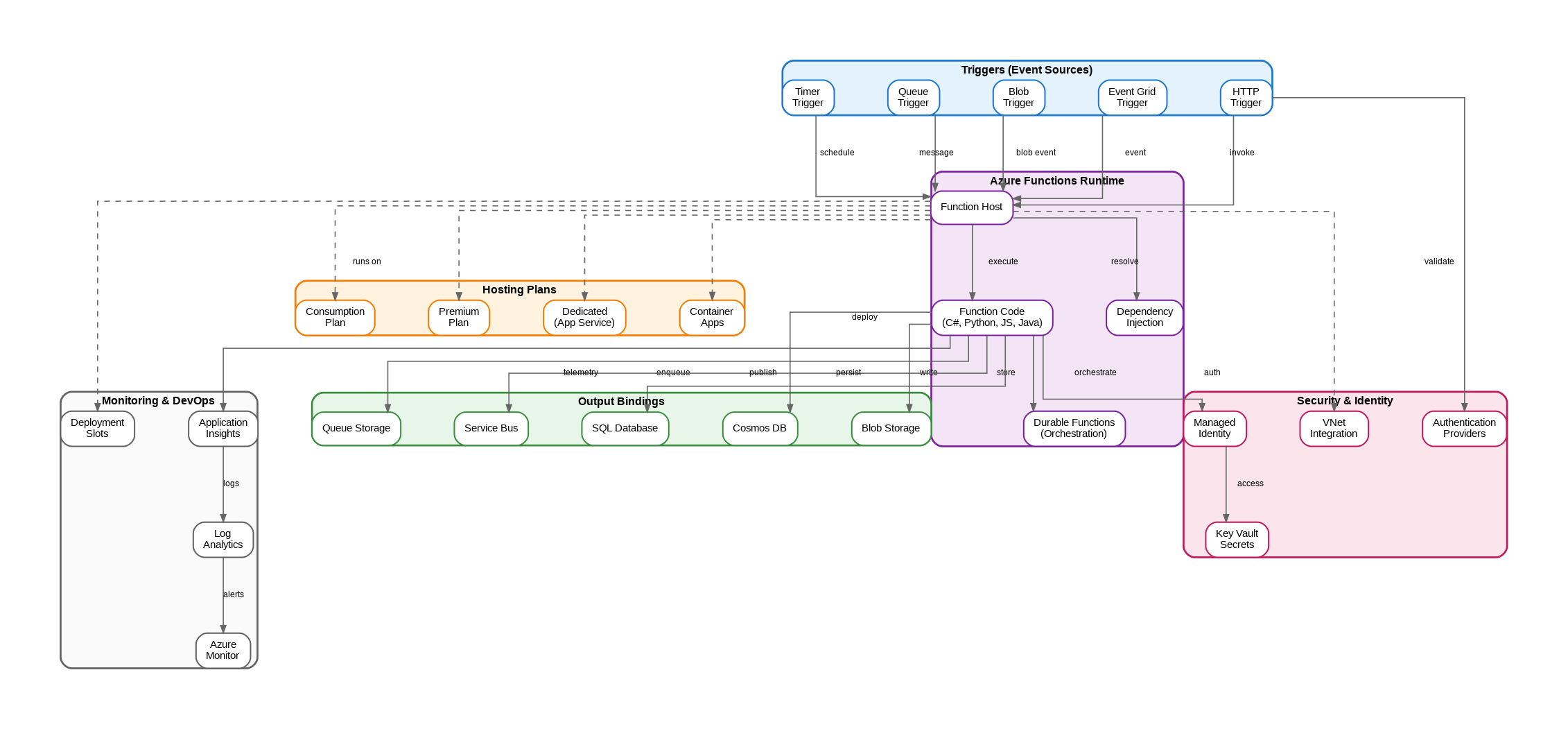
Azure Functions supports a rich ecosystem of triggers that initiate function execution. HTTP triggers enable REST APIs and webhooks. Timer triggers handle scheduled tasks like batch processing and cleanup jobs. Queue triggers process messages from Azure Storage Queues or Service Bus. Blob triggers respond to file uploads in Azure Storage. Event Grid triggers integrate with Azure’s event routing service for reactive architectures.
The trigger model fundamentally changes how you architect systems. Instead of polling for changes or maintaining long-running processes, your code activates only when events occur. This event-driven approach naturally leads to loosely coupled, highly scalable systems that respond to business events in near real-time.
Input and Output Bindings
Bindings are Azure Functions’ secret weapon for productivity. They declaratively connect your functions to external services without writing boilerplate connection code. Input bindings read data from sources like Cosmos DB, Blob Storage, or SQL Database. Output bindings write results to queues, databases, or notification services. This declarative approach reduces code complexity and eliminates common integration bugs.
Consider a function that processes uploaded images: a Blob trigger activates on upload, an input binding reads metadata from Cosmos DB, the function processes the image, and output bindings write the result to another blob container while sending a notification through Service Bus. What would require dozens of lines of connection management code becomes a few attribute decorations.
Hosting Plans: When to Use What
Choosing the right hosting plan significantly impacts cost, performance, and capabilities. The Consumption Plan offers true pay-per-execution pricing with automatic scaling from zero to thousands of instances. It’s ideal for variable workloads, development environments, and cost-sensitive scenarios. However, cold starts can add latency to the first request after idle periods.
The Premium Plan eliminates cold starts by keeping instances warm, supports VNet integration for enterprise networking requirements, and provides more powerful compute options. Choose Premium when you need consistent low latency, private network access, or longer execution times beyond the Consumption Plan’s limits.
The Dedicated (App Service) Plan runs functions on your existing App Service infrastructure. This makes sense when you have underutilized App Service capacity or need predictable pricing for high-volume workloads. You lose automatic scaling to zero but gain cost predictability and full App Service features.
Azure Container Apps hosting brings functions to Kubernetes-based infrastructure, enabling scenarios that require custom containers, sidecar patterns, or integration with Dapr for distributed application building blocks.
Durable Functions for Complex Workflows
Standard functions are stateless and short-lived. Durable Functions extend the model to support long-running, stateful workflows. The framework manages state persistence, checkpointing, and replay automatically. You write orchestrator functions that coordinate multiple activity functions, handling patterns like fan-out/fan-in, human interaction workflows, and saga patterns for distributed transactions.
I’ve implemented Durable Functions for order processing pipelines that span days, approval workflows requiring human intervention, and ETL processes that coordinate dozens of parallel operations. The programming model feels natural—you write sequential code, and the framework handles the complexity of distributed execution.
Security and Identity
Enterprise serverless deployments require robust security. Managed Identity eliminates credential management by letting functions authenticate to Azure services using Azure AD. Key Vault integration securely stores connection strings and API keys. Authentication providers enable OAuth/OpenID Connect for HTTP-triggered functions. VNet integration isolates functions within your private network.
Apply the principle of least privilege rigorously. Each function should have only the permissions it needs. Use separate managed identities for different functions when they require different access levels. Implement proper input validation—serverless doesn’t mean security-less.
Monitoring and Operations
Application Insights provides comprehensive monitoring for Azure Functions. Track execution counts, duration, success rates, and dependencies. Set up alerts for failures, performance degradation, or unusual patterns. Use distributed tracing to follow requests across multiple functions and services.
Log Analytics enables advanced querying and long-term retention of function logs. Azure Monitor integrates functions into your broader observability strategy. Deployment slots support blue-green deployments and A/B testing for production changes.
Practical Tips for Success
Keep functions focused and small. Each function should do one thing well. This improves testability, maintainability, and scaling characteristics. Use dependency injection for cleaner code and easier testing. Implement proper error handling with retry policies and dead-letter queues for failed messages.
Design for idempotency—functions may execute multiple times due to retries or at-least-once delivery guarantees. Use correlation IDs to track requests across distributed systems. Implement circuit breakers for external service calls to prevent cascade failures.
Azure Functions has matured into a production-ready platform that powers mission-critical workloads across industries. Whether you’re building APIs, processing events, or orchestrating complex workflows, serverless architecture offers compelling benefits when applied thoughtfully to appropriate use cases.
Discover more from C4: Container, Code, Cloud & Context
Subscribe to get the latest posts sent to your email.