Enterprise data integration has evolved from simple ETL batch jobs to sophisticated orchestration platforms that handle diverse data sources, complex transformations, and real-time processing requirements. Azure Data Factory represents Microsoft’s cloud-native answer to these challenges, providing a fully managed data integration service that scales from simple copy operations to enterprise-grade data pipelines. Having designed and implemented data integration solutions across numerous organizations, I’ve come to appreciate both the power and the nuances of building effective ADF solutions.
Understanding the Data Factory Architecture
Azure Data Factory operates on a fundamentally different model than traditional ETL tools. Rather than executing transformations on a central server, ADF orchestrates data movement and transformation across distributed compute resources. The service itself is stateless—it coordinates activities but delegates actual data processing to integration runtimes, Spark clusters, or external compute services.
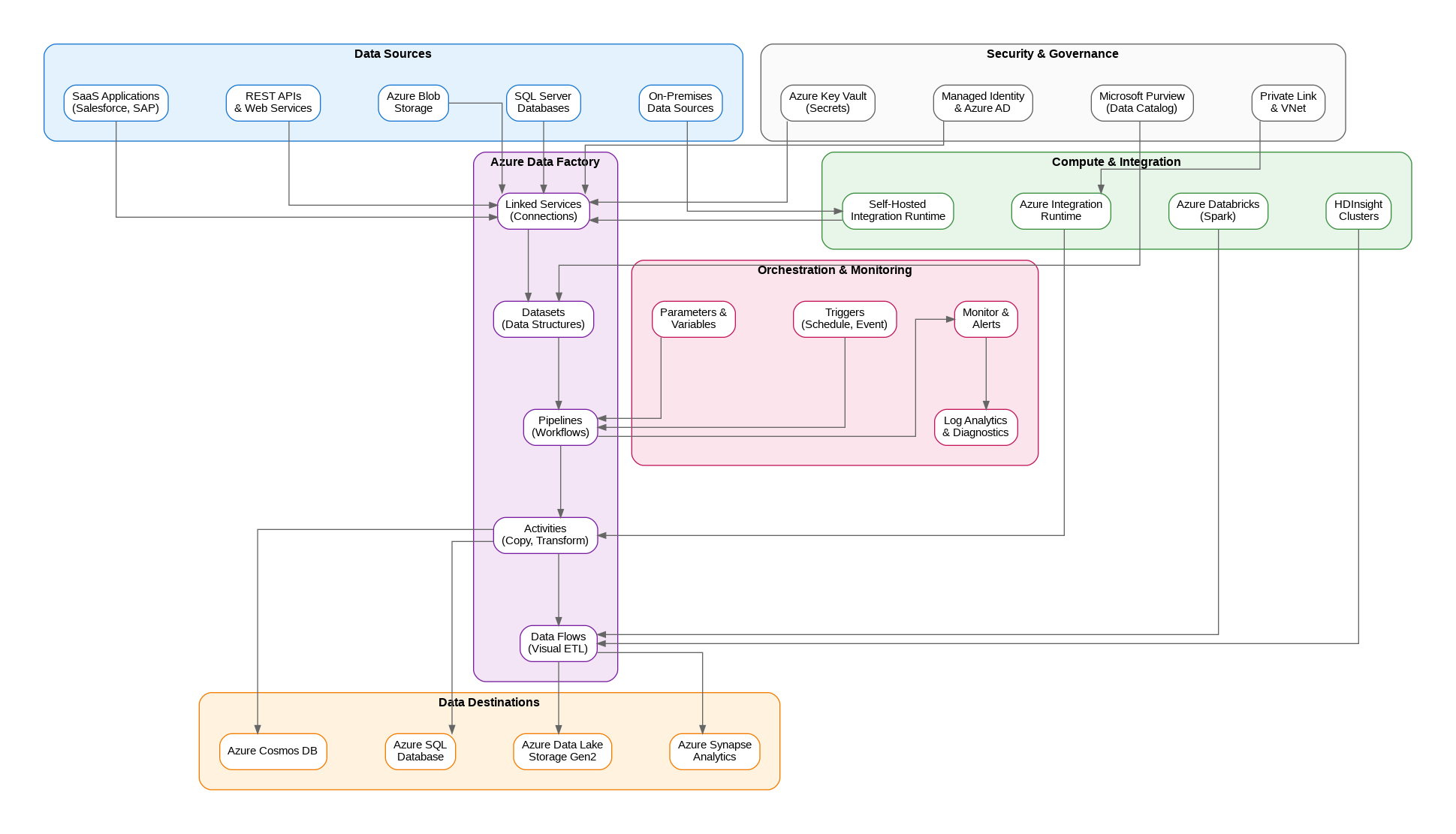
The core building blocks include linked services that define connections to data stores and compute resources, datasets that represent data structures within those stores, and pipelines that orchestrate activities operating on those datasets. This separation of concerns enables reusability—a single linked service can support multiple datasets, and datasets can be shared across pipelines.
Integration Runtimes: The Execution Engine
Integration runtimes provide the compute infrastructure for data movement and transformation. Azure Integration Runtime handles cloud-to-cloud scenarios with auto-scaling capabilities and global availability. Self-hosted Integration Runtime bridges on-premises data sources with cloud destinations, running on your infrastructure while maintaining secure outbound connections to ADF.
The choice between integration runtime types significantly impacts architecture decisions. Self-hosted runtimes require careful capacity planning—they process data locally before transmitting to cloud destinations. For high-volume scenarios, I typically deploy multiple nodes in a high-availability configuration, distributing workload across machines while providing failover capability.
Data Flows: Visual ETL at Scale
Mapping Data Flows bring visual transformation capabilities to ADF, executing on managed Spark clusters. This approach democratizes complex transformations—business analysts can design transformation logic visually while the platform handles cluster provisioning, scaling, and optimization. The visual designer generates Spark code that executes on Azure Databricks or HDInsight clusters.
Data flow performance depends heavily on cluster configuration. Debug clusters provide interactive development experience but incur costs during idle time. Production workloads benefit from auto-termination settings and right-sized cluster configurations. I’ve found that starting with smaller clusters and scaling based on actual workload characteristics produces better cost efficiency than over-provisioning from the start.
Pipeline Orchestration Patterns
Effective pipeline design requires understanding ADF’s execution model. Activities within a pipeline can execute sequentially or in parallel based on dependency definitions. The ForEach activity enables iteration over collections, while the If Condition and Switch activities provide branching logic. These control flow activities, combined with variables and parameters, enable sophisticated orchestration scenarios.
Master-child pipeline patterns prove essential for complex workflows. A master pipeline orchestrates multiple child pipelines, passing parameters and handling cross-pipeline dependencies. This modular approach improves maintainability and enables independent testing of pipeline components. Execute Pipeline activities invoke child pipelines either synchronously or asynchronously, depending on whether the parent needs to wait for completion.
Triggers and Scheduling
ADF supports multiple trigger types for pipeline execution. Schedule triggers execute pipelines at defined intervals—hourly, daily, or custom cron expressions. Tumbling window triggers provide time-slice processing with built-in retry and dependency capabilities, ideal for processing data in discrete time windows. Event-based triggers respond to blob storage events, enabling reactive data processing when new files arrive.
Trigger design impacts both reliability and cost. Tumbling window triggers maintain state across executions, automatically retrying failed windows and respecting dependencies between windows. This behavior proves invaluable for time-series data processing where each window depends on successful completion of previous windows.
Monitoring and Observability
ADF’s built-in monitoring provides pipeline run history, activity details, and trigger execution logs. Integration with Azure Monitor enables alerting on pipeline failures, long-running activities, or resource utilization thresholds. Log Analytics integration captures detailed diagnostic information for troubleshooting and performance analysis.
For enterprise deployments, I recommend implementing custom monitoring dashboards that aggregate metrics across multiple data factories. Azure Monitor workbooks provide flexible visualization capabilities, while Power BI can create executive-level dashboards showing data pipeline health and throughput metrics.
Security and Governance
Data Factory security encompasses identity management, network isolation, and data protection. Managed Identity eliminates credential management for Azure resource access—the data factory authenticates using its Azure AD identity rather than stored credentials. For non-Azure resources, Azure Key Vault integration provides secure secret storage with automatic rotation capabilities.
Network security options include Managed Virtual Network with private endpoints, isolating data factory traffic from public internet. Private Link connections to data sources ensure data never traverses public networks. These configurations add complexity but prove essential for regulated industries with strict data residency and network isolation requirements.
Integration with Microsoft Purview
Microsoft Purview integration brings data governance capabilities to ADF pipelines. Lineage tracking automatically captures data movement and transformation relationships, providing end-to-end visibility into data flows across the organization. This integration proves invaluable for compliance requirements and impact analysis when source systems change.
Data catalog integration enables discovery of datasets and pipelines across the organization. Business users can search for data assets, understand their lineage, and request access through governed workflows. This self-service capability reduces the burden on data engineering teams while maintaining appropriate access controls.
Cost Optimization Strategies
ADF pricing combines data integration units for copy activities, pipeline orchestration charges, and data flow cluster costs. Understanding these components enables targeted optimization. Copy activities benefit from parallelism tuning—increasing DIU allocation speeds transfers but increases costs proportionally. Finding the optimal balance requires testing with representative data volumes.
Data flow costs dominate many ADF budgets. Cluster warm-up time adds latency and cost to each execution. Time-to-live settings keep clusters running between executions, reducing warm-up overhead for frequently executing pipelines. Reserved capacity pricing provides significant discounts for predictable workloads.
Implementation Best Practices
Source control integration through Azure DevOps or GitHub enables version control, code review, and CI/CD automation. The Git integration model separates development from production—changes flow through pull requests and automated deployment pipelines. This approach prevents ad-hoc production changes and provides audit trails for compliance.
Parameterization enables environment-agnostic pipeline definitions. Connection strings, file paths, and processing parameters should flow from linked service and dataset parameters rather than hard-coded values. This practice simplifies promotion across development, staging, and production environments.
Looking Forward
Azure Data Factory continues evolving with enhanced Spark integration, improved monitoring capabilities, and tighter integration with the broader Azure data platform. For solutions architects building enterprise data integration solutions, ADF provides the foundation for scalable, maintainable data pipelines that can grow from departmental solutions to enterprise-wide data platforms while maintaining operational simplicity and governance compliance.
Discover more from C4: Container, Code, Cloud & Context
Subscribe to get the latest posts sent to your email.