The Databricks Difference
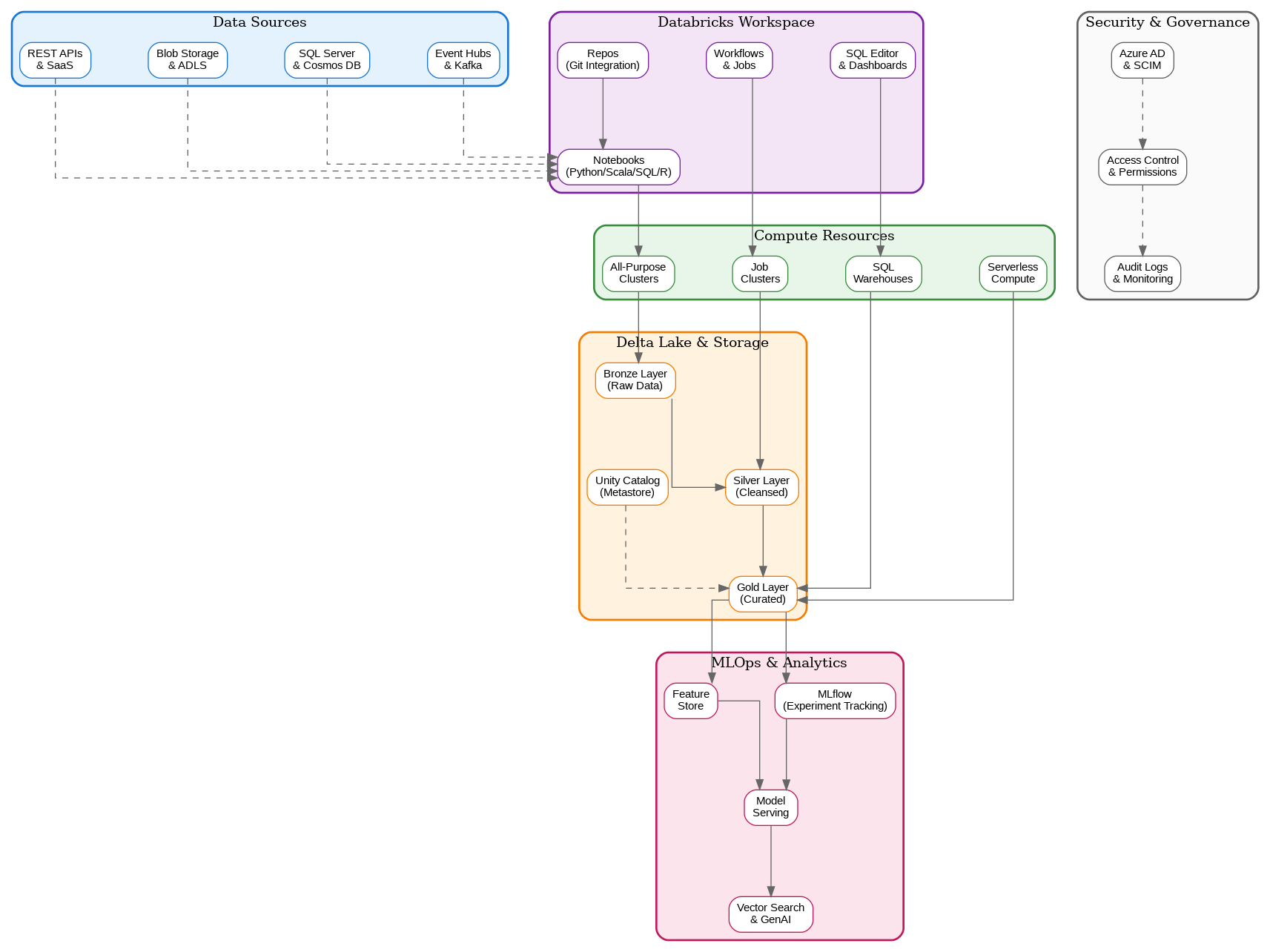
Azure Databricks isn’t simply Apache Spark running on Azure—it’s a first-party Azure service developed in partnership between Microsoft and Databricks, the company founded by the original creators of Apache Spark. This partnership delivers deep integration with Azure services, enterprise security features, and performance optimizations that distinguish it from generic Spark deployments. The platform provides a unified workspace where data engineers, data scientists, and analysts collaborate on shared projects using notebooks, SQL queries, and automated workflows.Workspace Architecture
The Databricks workspace serves as the central hub for all development activities. Notebooks support multiple languages—Python, Scala, SQL, and R—within the same document, enabling polyglot development that matches the diverse skills of modern data teams. Git integration through Repos enables version control workflows familiar to software engineers, bringing engineering discipline to data projects. The workspace also provides SQL Editor and dashboards for business analysts who prefer SQL-based exploration.Compute Resources
Databricks offers multiple compute options tailored to different workload patterns. All-purpose clusters support interactive development and exploration, scaling dynamically based on workload demands. Job clusters spin up for specific workflow executions and terminate automatically upon completion, optimizing costs for production workloads. SQL warehouses provide optimized compute for BI and SQL analytics workloads, with serverless options that eliminate cluster management overhead entirely. Cluster configuration requires careful consideration of workload characteristics. Memory-optimized instances suit data-intensive transformations, while compute-optimized instances excel at CPU-bound machine learning training. Photon, Databricks’ native vectorized query engine, accelerates SQL and DataFrame workloads by up to 12x compared to standard Spark, making it essential for performance-critical applications.Delta Lake: The Foundation
Delta Lake provides the storage layer that transforms data lakes into reliable, performant data platforms. ACID transactions ensure data consistency even with concurrent readers and writers—a capability traditional data lakes lack. Time travel enables querying historical data states, supporting audit requirements and enabling easy recovery from data quality issues. Schema enforcement and evolution capabilities prevent data corruption while accommodating changing business requirements. The medallion architecture—bronze, silver, and gold layers—provides a proven pattern for organizing data transformations. Bronze layers capture raw data with minimal transformation, preserving source fidelity. Silver layers apply cleansing, validation, and standardization. Gold layers present business-ready aggregations and features optimized for specific consumption patterns.Unity Catalog: Unified Governance
Unity Catalog represents Databricks’ answer to enterprise data governance challenges. The metastore provides centralized metadata management across workspaces, enabling consistent data discovery and access control. Fine-grained permissions support column-level and row-level security, essential for regulatory compliance in industries like healthcare and finance. Data lineage tracking captures the complete transformation history from source to consumption, supporting impact analysis and audit requirements.MLOps and Machine Learning
Databricks provides comprehensive machine learning capabilities through integrated MLflow and Feature Store. MLflow tracks experiments, manages model versions, and deploys models to production—all within the same platform where data preparation occurs. The Feature Store enables feature sharing across teams, ensuring consistency between training and inference while reducing duplicate feature engineering efforts. Model serving capabilities have evolved significantly, with serverless endpoints that scale automatically based on inference demand. Vector search integration supports retrieval-augmented generation (RAG) patterns essential for modern generative AI applications. The platform’s GPU cluster support enables training large models that would be impractical on CPU-only infrastructure.Workflows and Orchestration
Databricks Workflows provides native orchestration for data pipelines and ML workflows. Jobs can execute notebooks, Python scripts, JAR files, or SQL queries with sophisticated scheduling and dependency management. Delta Live Tables simplifies streaming and batch ETL by declaring transformations declaratively, with the platform handling incremental processing, error handling, and data quality monitoring automatically. Integration with external orchestrators like Azure Data Factory and Apache Airflow supports organizations with existing workflow investments. The choice between native Workflows and external orchestration depends on team expertise, existing infrastructure, and specific requirements for cross-platform coordination.Security and Compliance
Enterprise security requirements drive many architectural decisions in Databricks deployments. Azure Active Directory integration provides single sign-on and enables role-based access control aligned with organizational identity management. Private Link connectivity ensures data never traverses public networks, essential for regulated industries. Customer-managed keys for encryption provide additional control over data protection. Audit logging captures all platform activities, supporting compliance requirements and security investigations. The combination of Unity Catalog governance, network isolation, and comprehensive logging addresses the security concerns that often delay cloud data platform adoption in conservative enterprises.Performance Optimization
Optimizing Databricks performance requires understanding both Spark fundamentals and Databricks-specific features. Data skew—uneven distribution of data across partitions—remains the most common performance issue, requiring careful attention to partition strategies and join optimization. Z-ordering optimizes data layout for common query patterns, dramatically improving query performance for filtered queries. Caching strategies balance memory utilization against query performance. Delta caching accelerates repeated queries against the same data, while Spark caching supports iterative algorithms that reference the same datasets multiple times. Understanding when each caching approach applies prevents memory pressure while maximizing performance benefits.Cost Management
Databricks pricing combines compute costs (DBUs) with underlying Azure infrastructure costs. Cluster auto-termination prevents idle clusters from accumulating charges, while auto-scaling adjusts capacity to match actual workload demands. Spot instances provide significant cost savings for fault-tolerant workloads, though production jobs typically require on-demand instances for reliability. Reserved capacity commitments provide substantial discounts for predictable workloads. Organizations with consistent Databricks usage can achieve 30-50% cost reductions through committed use discounts. Monitoring DBU consumption by workspace, cluster, and job enables cost attribution and optimization targeting.Implementation Considerations
Successful Databricks implementations require alignment between technical architecture and organizational capabilities. Teams transitioning from traditional data warehousing need training on Spark concepts and distributed computing patterns. Data governance processes must evolve to leverage Unity Catalog capabilities while maintaining compliance with existing policies. For solutions architects evaluating Azure Databricks, the platform offers compelling capabilities for organizations seeking unified data and AI platforms. The key lies in understanding how Databricks complements existing Azure investments—particularly Azure Synapse Analytics, Azure Data Factory, and Azure Machine Learning—and designing architectures that leverage each service’s strengths while avoiding unnecessary complexity.Discover more from C4: Container, Code, Cloud & Context
Subscribe to get the latest posts sent to your email.