The democratization of software development has been one of the most significant shifts in enterprise technology over the past decade. Microsoft Power Platform represents the culmination of this movement—a suite of low-code tools that enables organizations to build applications, automate workflows, analyze data, and create intelligent agents without traditional programming expertise. After years of implementing enterprise solutions, I’ve seen Power Platform transform how organizations approach digital transformation.
Understanding the Power Platform Ecosystem
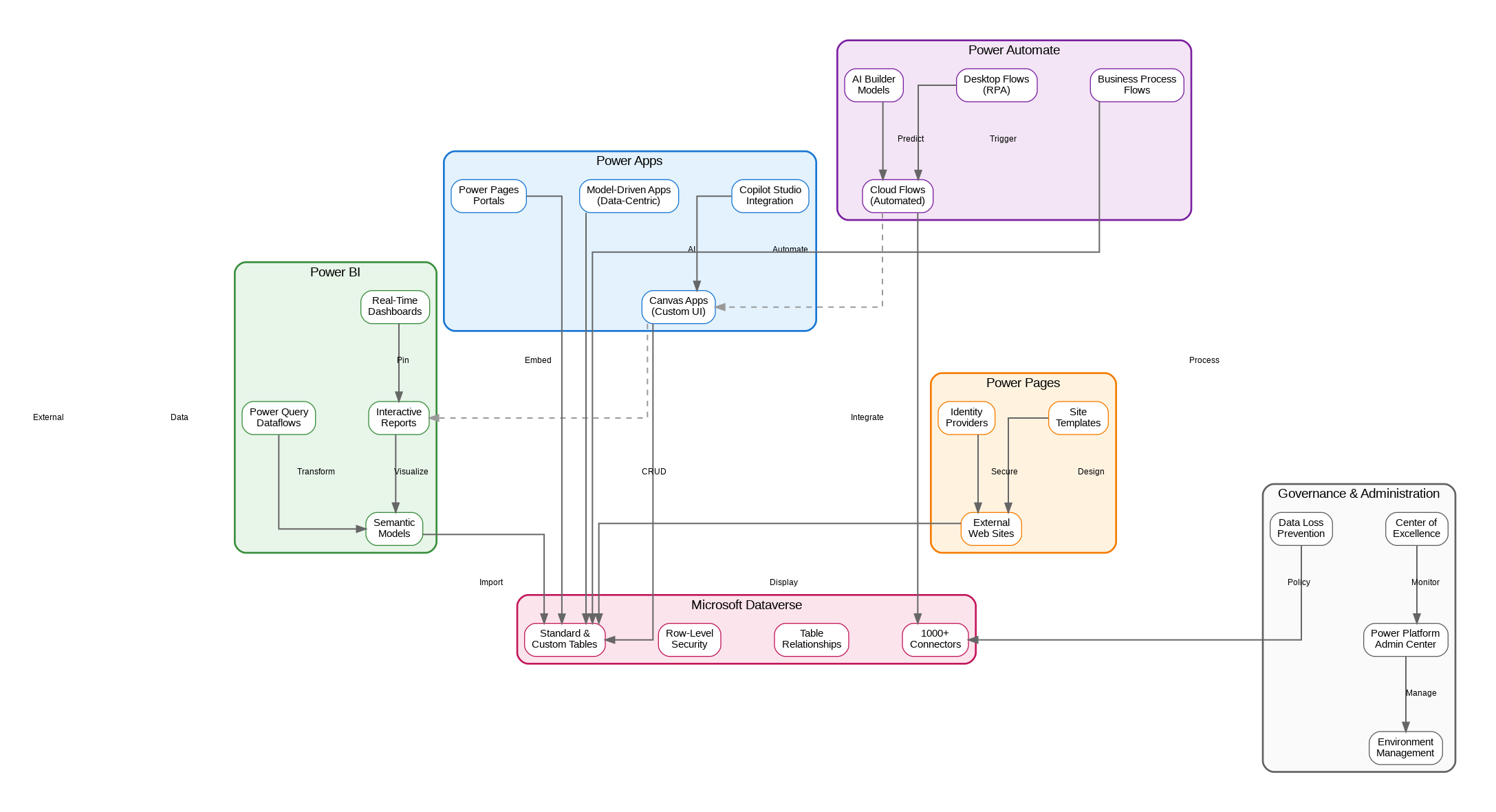
Power Platform comprises four primary components that work together seamlessly. Power Apps enables rapid application development through canvas and model-driven approaches. Power Automate handles workflow automation and robotic process automation (RPA). Power BI delivers business intelligence and data visualization capabilities. Power Pages creates external-facing websites and portals. Together with Microsoft Dataverse as the underlying data platform, these tools form a comprehensive low-code development environment.
Power Apps: Canvas vs. Model-Driven
Power Apps offers two distinct development paradigms. Canvas apps provide pixel-perfect control over user interface design, ideal for task-specific applications with custom layouts. Model-driven apps generate interfaces automatically from data models, excelling in data-heavy scenarios requiring consistent navigation patterns. The choice between approaches depends on user experience requirements and data complexity. Many enterprise solutions combine both, using model-driven apps for back-office operations and canvas apps for field workers or customer-facing scenarios.
Power Automate and RPA
Power Automate extends beyond simple workflow automation into robotic process automation territory. Cloud flows handle API-based integrations and event-driven processes, while desktop flows automate legacy applications through UI interactions. This combination enables organizations to modernize processes incrementally—automating what can be integrated via APIs while bridging gaps with RPA for systems lacking modern interfaces. AI Builder integration adds intelligence through pre-built and custom machine learning models.
Microsoft Dataverse
Dataverse serves as the backbone of Power Platform, providing a secure, scalable data platform with built-in business logic capabilities. Unlike simple databases, Dataverse includes row-level security, calculated fields, business rules, and relationship management out of the box. The platform supports both standard tables aligned with Common Data Model and custom tables for organization-specific needs. Integration with Azure services enables advanced scenarios while maintaining governance through the Power Platform admin center.
Connector Ecosystem
Power Platform’s value multiplies through its extensive connector library—over 1,000 pre-built connectors spanning Microsoft services, third-party SaaS applications, and on-premises systems. Standard connectors cover common scenarios, while premium connectors unlock enterprise integrations with SAP, Salesforce, and other critical systems. Custom connectors extend the platform to proprietary APIs using OpenAPI specifications, ensuring no system remains isolated from automation initiatives.
Governance and Administration
Enterprise Power Platform deployments require robust governance frameworks. Environment management isolates development, testing, and production workloads. Data loss prevention policies control which connectors can communicate, preventing accidental data exposure. The Center of Excellence toolkit provides monitoring dashboards, adoption metrics, and compliance reporting. Managed environments add additional controls including solution checker enforcement and sharing limits for sensitive scenarios.
Copilot Studio Integration
The addition of Copilot Studio brings conversational AI capabilities to Power Platform. Organizations can build intelligent agents that understand natural language, access enterprise data through Dataverse, and execute actions via Power Automate flows. This convergence of low-code development and generative AI represents the next evolution of citizen development—enabling business users to create sophisticated AI-powered solutions without deep technical expertise.
Enterprise Security Considerations
Security in Power Platform operates at multiple levels. Azure Active Directory provides identity management and conditional access policies. Dataverse security roles control data access through teams, business units, and row-level permissions. Environment security groups restrict who can access specific environments. Customer-managed keys enable organizations to control encryption for sensitive data. Regular security reviews and the principle of least privilege remain essential for maintaining secure deployments.
Implementation Best Practices
Successful Power Platform implementations follow established patterns. Start with a Center of Excellence to establish governance before scaling adoption. Use solutions for application lifecycle management, enabling proper version control and deployment pipelines. Implement naming conventions and documentation standards from the beginning. Train citizen developers on security implications and data handling responsibilities. Establish review processes for solutions before production deployment.
Looking Forward
Power Platform continues evolving rapidly with AI integration at its core. Copilot capabilities now assist in building apps, creating flows, and analyzing data through natural language. The platform’s convergence with Azure services enables hybrid scenarios combining low-code simplicity with pro-code extensibility. For organizations pursuing digital transformation, Power Platform offers a pragmatic path—enabling rapid innovation while maintaining enterprise governance and security standards.
Discover more from C4: Container, Code, Cloud & Context
Subscribe to get the latest posts sent to your email.