In the landscape of cloud computing, networking remains the foundational layer upon which all other services depend. Azure Virtual Network (VNet) serves as the cornerstone of network architecture in Microsoft Azure, providing the isolation, segmentation, and connectivity that enterprise applications require. Having designed and implemented VNet architectures across numerous enterprise deployments, I’ve come to appreciate its role as the invisible infrastructure that makes everything else possible.
Understanding the Foundation
A Virtual Network in Azure is fundamentally a logical isolation of the Azure cloud dedicated to your subscription. It enables Azure resources like virtual machines, web apps, and databases to securely communicate with each other, the internet, and on-premises networks. Unlike traditional networking where physical hardware defines boundaries, VNet provides software-defined networking that can be provisioned and configured in minutes rather than weeks.
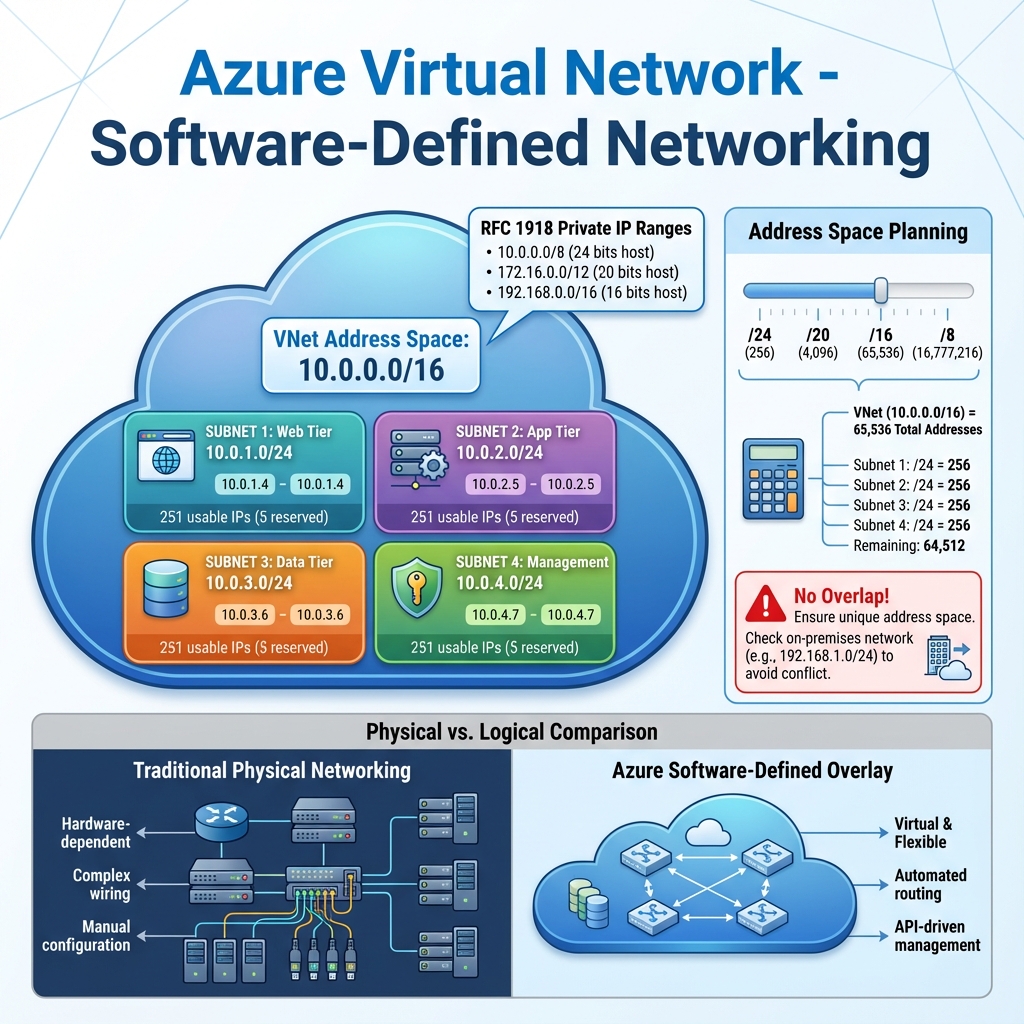
The address space you define for a VNet uses private IP address ranges from RFC 1918 (10.0.0.0/8, 172.16.0.0/12, 192.168.0.0/16). Planning this address space carefully is crucial because it cannot overlap with on-premises networks if you plan to establish connectivity, and changing it later can be disruptive. I typically recommend starting with a /16 address space for production environments, providing 65,536 addresses that can be subdivided into subnets as needed.
Subnet Strategy and Segmentation
Subnets are the building blocks within a VNet, allowing you to segment the address space and apply different security policies to different workloads. A well-designed subnet strategy considers workload isolation, security boundaries, and future growth. Common patterns include dedicated subnets for web tiers, application tiers, database tiers, and management resources.
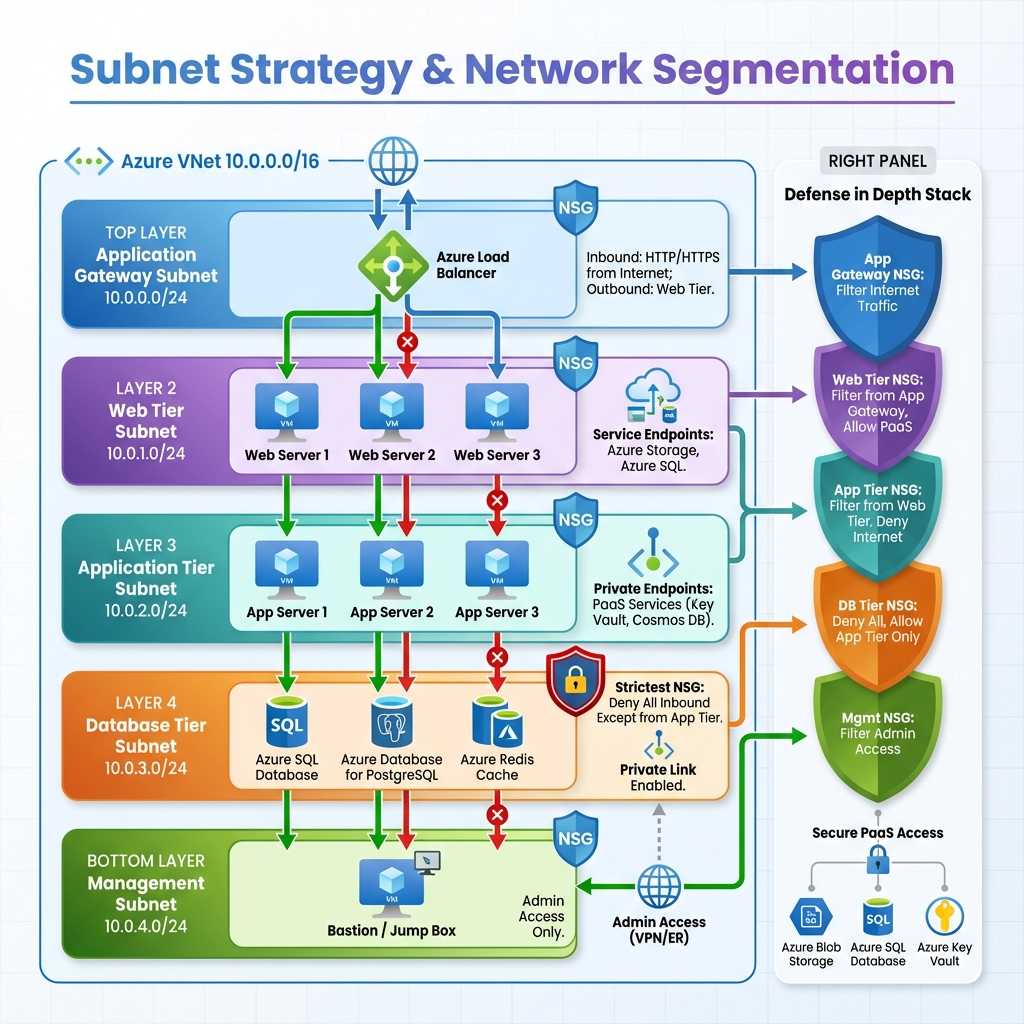
Each subnet can have its own Network Security Group (NSG) attached, enabling fine-grained traffic control. Service endpoints and private endpoints can be configured per subnet, controlling how resources access Azure PaaS services. The subnet design directly impacts your ability to implement defense-in-depth security strategies.
Network Security Groups: The First Line of Defense
Network Security Groups act as stateful firewalls for your Azure resources. They contain security rules that allow or deny inbound and outbound traffic based on source, destination, port, and protocol. NSGs can be associated with subnets or individual network interfaces, with the most restrictive rules taking precedence when both are applied.
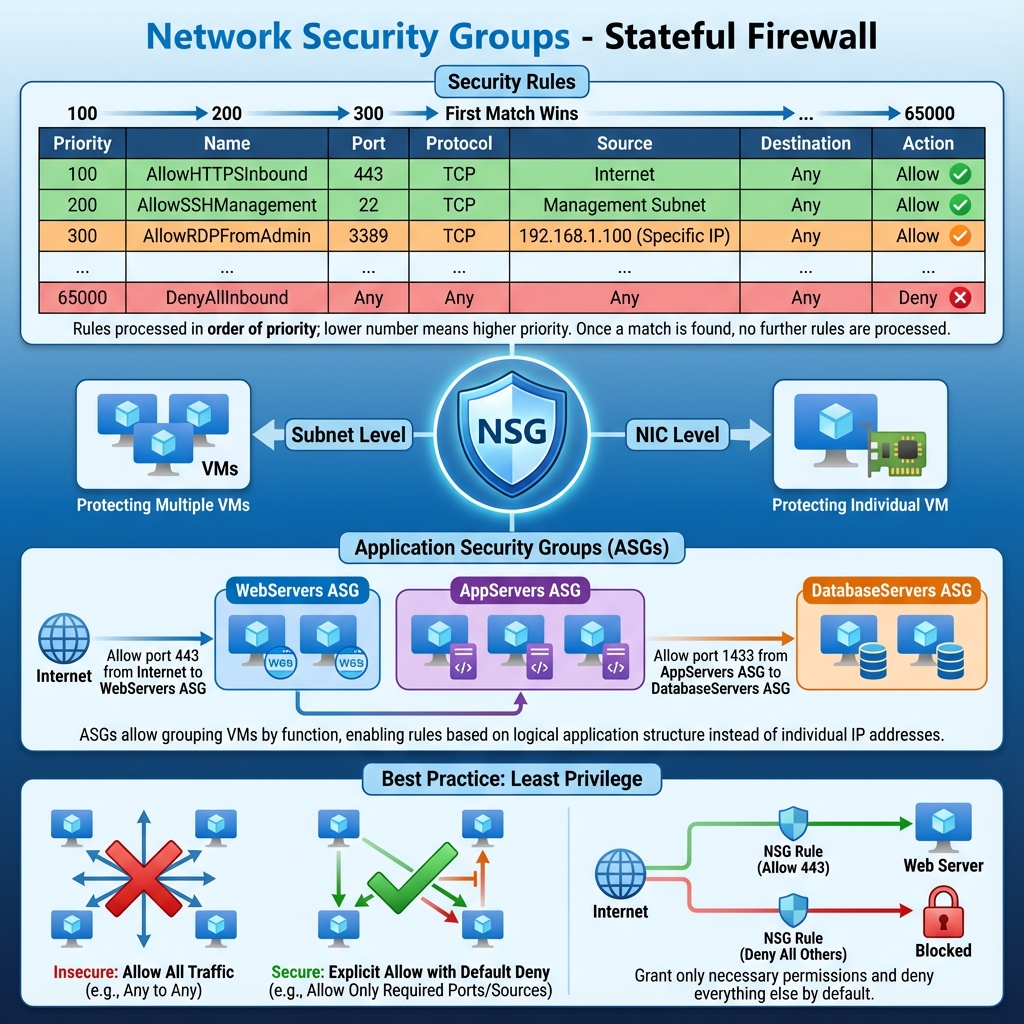
Effective NSG design follows the principle of least privilege. Start by denying all traffic and explicitly allow only what’s necessary. Use application security groups to simplify rule management when dealing with groups of VMs that share similar security requirements. Regular auditing of NSG rules helps identify overly permissive configurations that could expose your environment to risk.
Connectivity Options
Azure provides multiple connectivity options depending on your requirements. VNet peering enables direct connectivity between VNets with traffic staying on the Microsoft backbone network. VPN Gateway establishes encrypted tunnels to on-premises networks or other cloud providers. ExpressRoute provides dedicated private connectivity with predictable performance and higher bandwidth for enterprise scenarios requiring consistent latency.
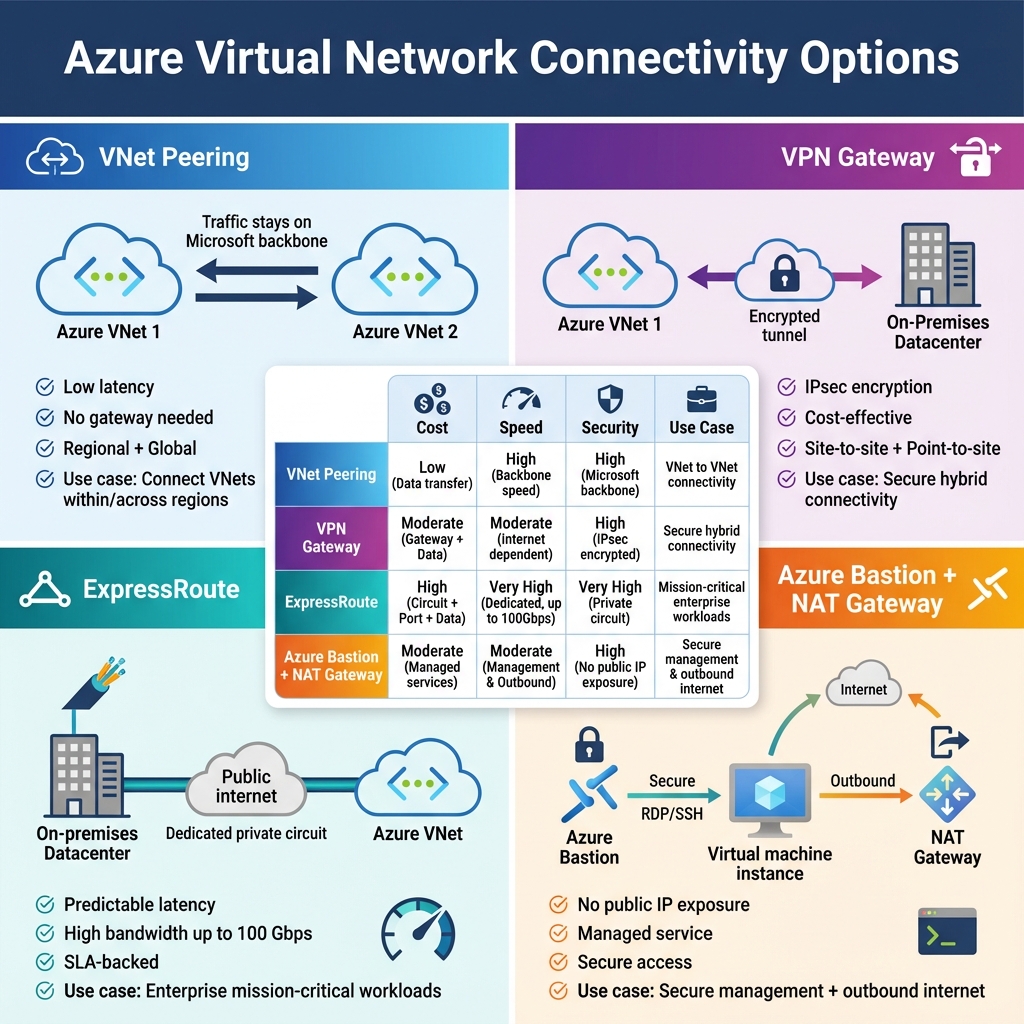
For internet-facing workloads, Azure provides public IP addresses that can be static or dynamic. Azure Bastion offers secure RDP and SSH access to VMs without exposing them to the public internet. NAT Gateway provides outbound internet connectivity for resources in private subnets while maintaining a consistent outbound IP address.
When to Use What
Choose VNet peering when connecting VNets within the same region or across regions with low latency requirements. Use VPN Gateway for encrypted connectivity to on-premises networks or when cost is a primary concern. Select ExpressRoute when you need dedicated bandwidth, consistent latency, or must meet compliance requirements that prohibit internet-based connectivity.
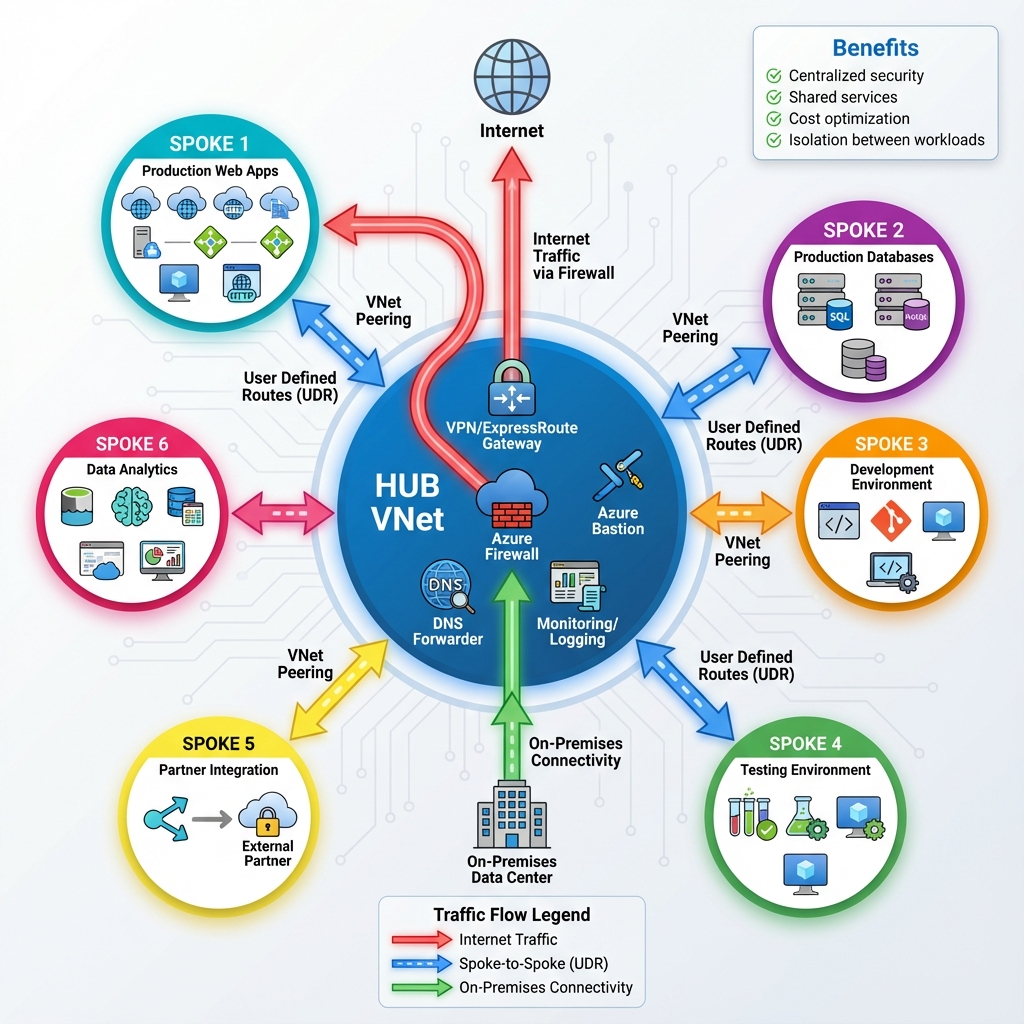
For workload isolation, use separate subnets with NSGs for different application tiers. Deploy Azure Firewall when you need centralized network security policy enforcement across multiple VNets. Consider Azure Private Link when accessing PaaS services to keep traffic on the Microsoft network and eliminate data exfiltration risks.
Monitoring and Diagnostics
Network Watcher provides a suite of tools for monitoring and diagnosing network issues. NSG flow logs capture information about IP traffic flowing through security groups, essential for security auditing and traffic analysis. Connection Monitor proactively monitors connectivity between Azure resources and external endpoints, alerting you to issues before users report them.
Traffic Analytics processes NSG flow logs to provide insights into traffic patterns, helping identify anomalies and optimize network design. VNet flow logs, now in preview, provide even more granular visibility into traffic within your virtual networks.
Looking Forward
Azure networking continues to evolve with features like Azure Virtual Network Manager for centralized network management at scale, and enhanced integration with Azure’s security services. As organizations adopt zero-trust architectures, VNet’s role in implementing microsegmentation and identity-based access becomes increasingly important. The foundation you build today with proper VNet design will serve as the platform for tomorrow’s cloud innovations.
Discover more from C4: Container, Code, Cloud & Context
Subscribe to get the latest posts sent to your email.