Domain Name System (DNS) remains one of the most critical yet often overlooked components of any cloud architecture. After two decades of designing enterprise systems, I’ve seen countless production incidents traced back to DNS misconfigurations, inadequate planning, or a fundamental misunderstanding of how name resolution works in hybrid environments. Azure DNS provides a comprehensive suite of services that address these challenges, offering both public-facing domain hosting and private name resolution for your virtual networks.
Understanding Azure DNS Services
Azure DNS encompasses three distinct but complementary services that together provide complete name resolution capabilities for modern cloud architectures. Public DNS zones host your internet-facing domain records, enabling global users to resolve your application endpoints. Private DNS zones provide name resolution within your Azure virtual networks, ensuring that internal services can communicate using friendly names rather than IP addresses. The DNS Private Resolver bridges the gap between Azure and on-premises environments, enabling bidirectional DNS resolution across hybrid architectures.
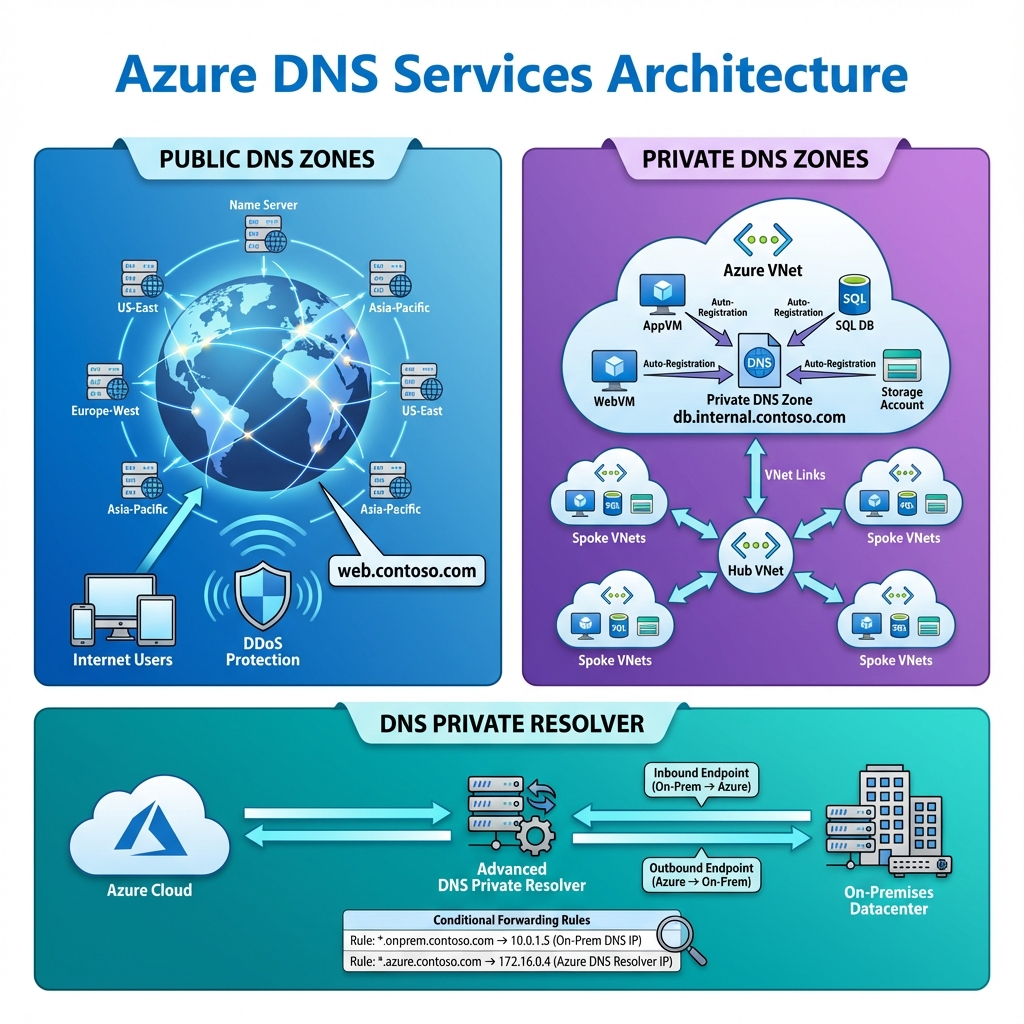
The distinction between these services matters significantly in enterprise deployments. Public DNS zones integrate with Azure’s global anycast network, providing low-latency resolution from anywhere in the world with built-in DDoS protection. Private DNS zones operate entirely within Azure’s network fabric, never exposing internal names to the public internet. The DNS Private Resolver acts as a conditional forwarder, directing queries to the appropriate DNS servers based on domain names.
Public DNS Zone Architecture
When hosting domains in Azure Public DNS, you’re leveraging Microsoft’s global infrastructure of name servers distributed across multiple regions. Each zone you create receives four name server records that you configure at your domain registrar. Azure handles the complexity of geographic distribution, ensuring that DNS queries are answered by the nearest available server.
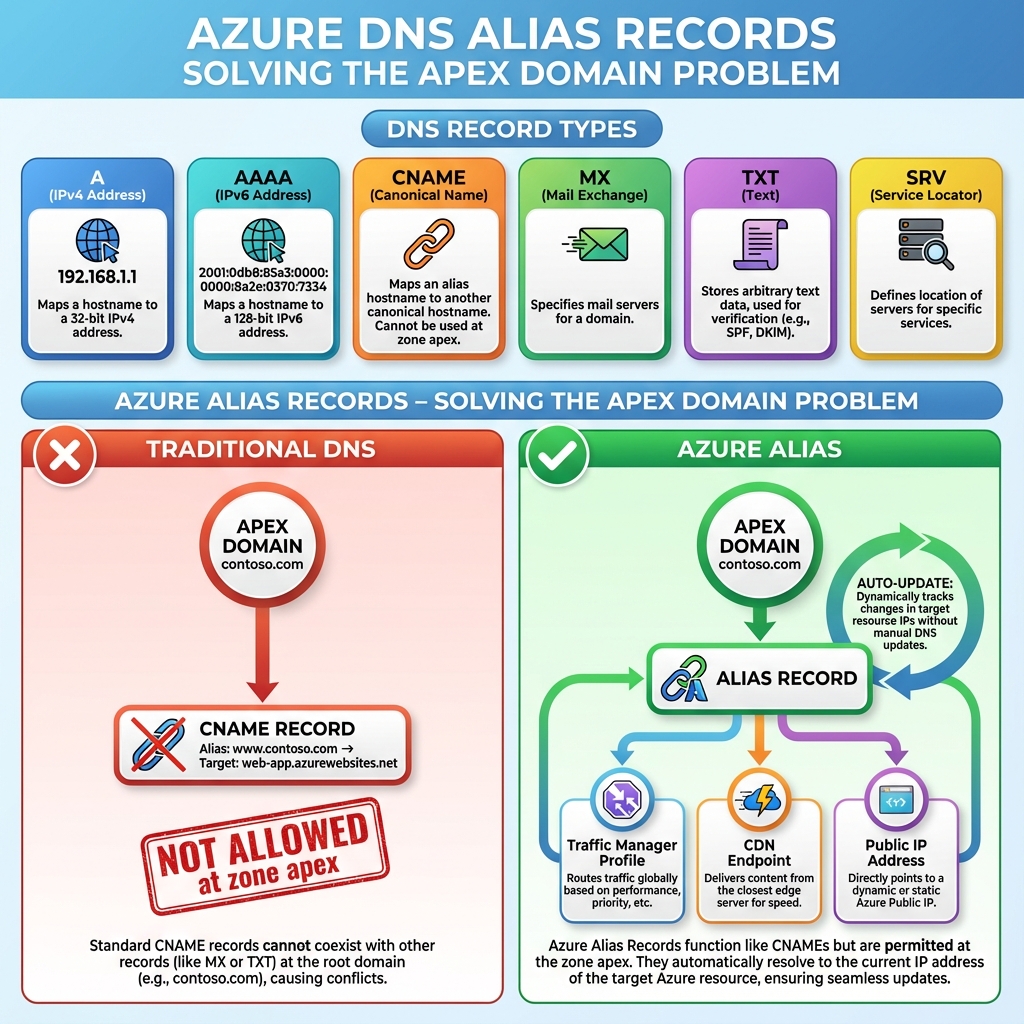
Record management in Azure DNS supports all standard types including A, AAAA, CNAME, MX, TXT, SRV, and the Azure-specific alias records. Alias records deserve special attention because they solve the classic problem of apex domain CNAME records. Traditional DNS doesn’t allow CNAME records at the zone apex, but alias records can point directly to Azure resources like Traffic Manager profiles, CDN endpoints, or public IP addresses, automatically updating when the underlying resource’s IP changes.
Private DNS Zones and Virtual Network Integration
Private DNS zones transform how applications communicate within Azure. Instead of hardcoding IP addresses or maintaining hosts files, you can use meaningful names like database.internal.contoso.com that resolve only within your virtual networks. This approach simplifies configuration management, improves security by keeping internal names private, and enables seamless failover scenarios.
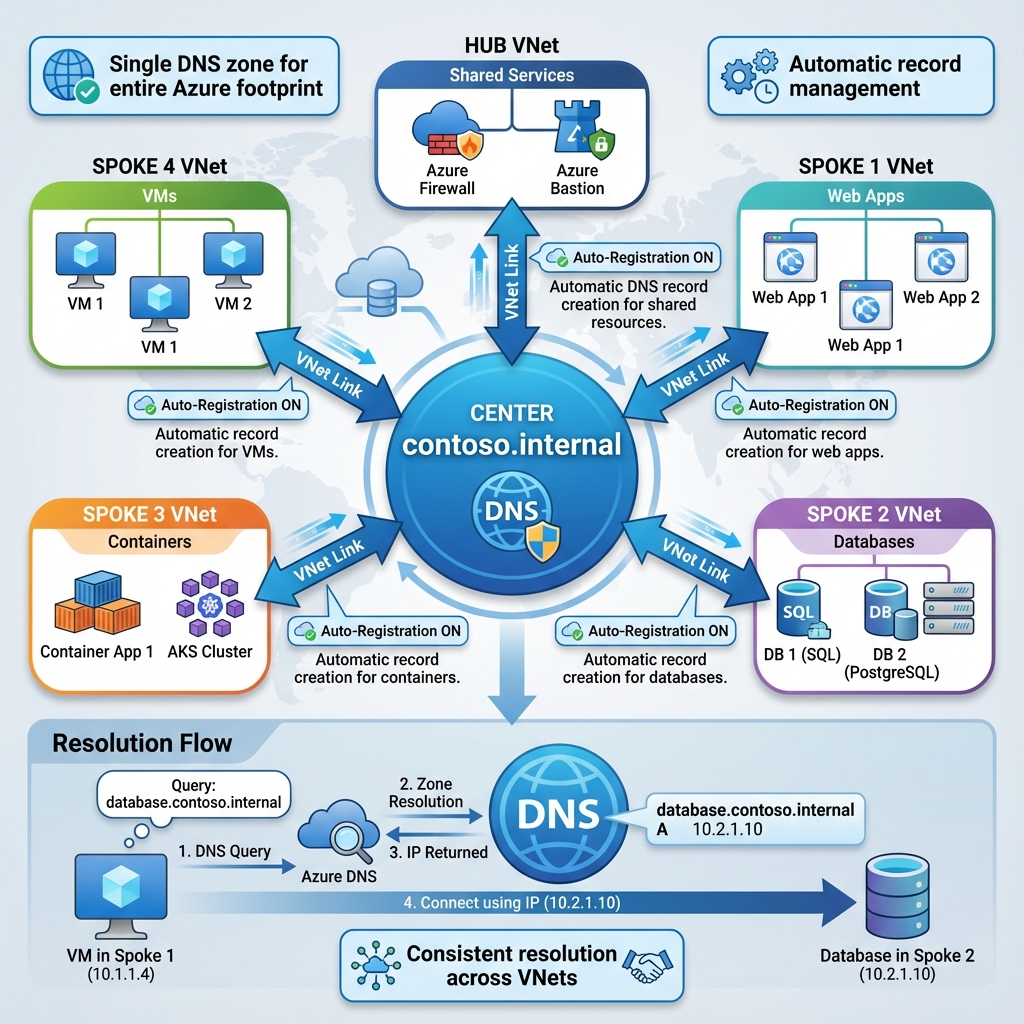
Virtual network links connect private DNS zones to your VNets, enabling resolution for resources within those networks. Auto-registration takes this further by automatically creating DNS records when virtual machines are deployed, using the VM name as the hostname. This feature eliminates manual DNS management for dynamic environments where VMs are frequently created and destroyed.
The architecture of private DNS zones supports hub-and-spoke topologies common in enterprise deployments. A single private DNS zone can be linked to multiple virtual networks, providing consistent name resolution across your entire Azure footprint. This centralized approach simplifies management while maintaining the isolation benefits of separate virtual networks.
DNS Private Resolver for Hybrid Scenarios
Hybrid cloud architectures present unique DNS challenges. On-premises applications need to resolve Azure private endpoints, while Azure workloads may need to query on-premises DNS servers for legacy systems. The DNS Private Resolver addresses both directions of this requirement through inbound and outbound endpoints.
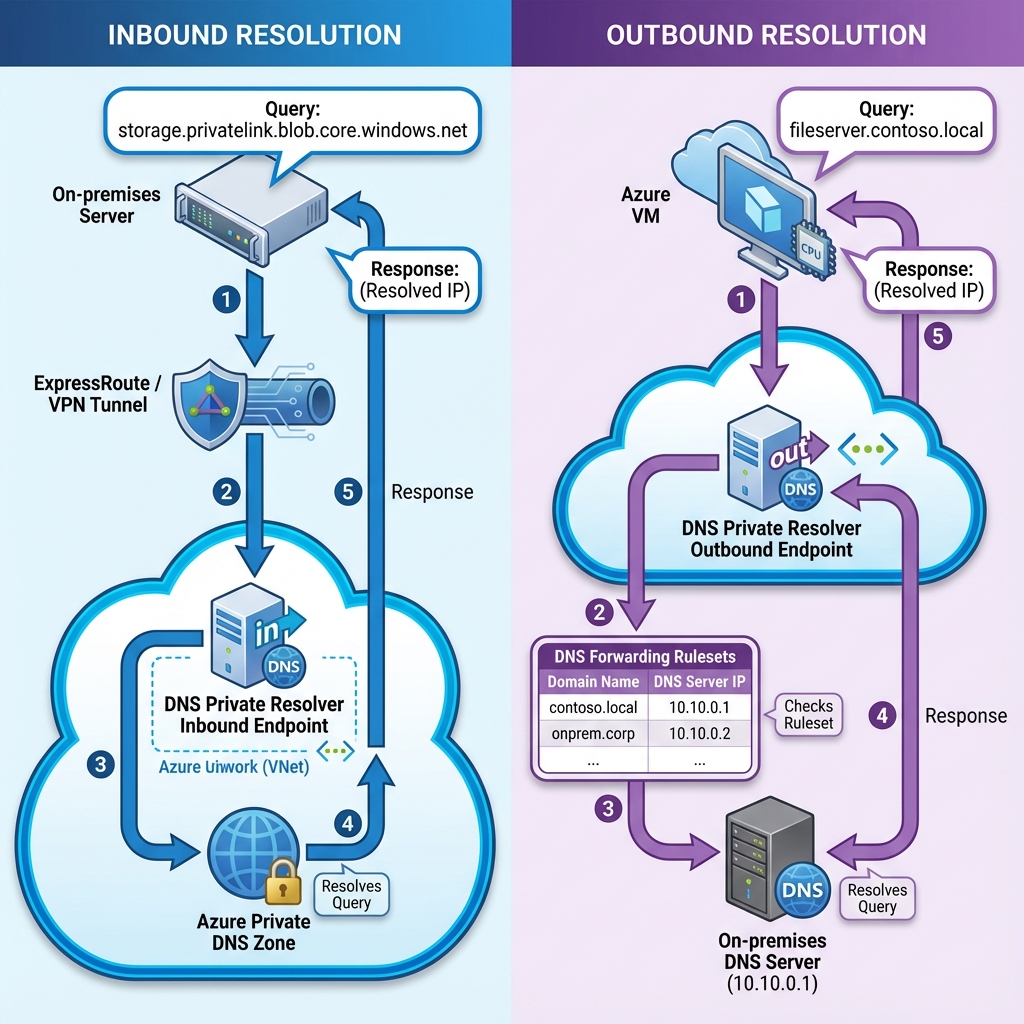
Inbound endpoints provide an IP address within your virtual network that on-premises DNS servers can forward queries to. When an on-premises application needs to resolve an Azure private endpoint, the query travels through your ExpressRoute or VPN connection to the inbound endpoint, which then resolves the name using Azure Private DNS. Outbound endpoints work in reverse, forwarding queries from Azure to on-premises DNS servers based on DNS forwarding rulesets.
Forwarding rulesets define which domains should be resolved by which DNS servers. You might configure rules to forward contoso.local queries to your on-premises Active Directory DNS servers while allowing all other queries to use Azure’s default resolution. This granular control ensures that name resolution works correctly regardless of where the authoritative DNS server resides.
When to Use What
Choosing the right Azure DNS service depends on your specific requirements. Use Public DNS zones when you need to host internet-facing domains with global availability and integration with Azure services like Traffic Manager. The service excels at providing low-latency resolution worldwide with automatic failover and DDoS protection built in.
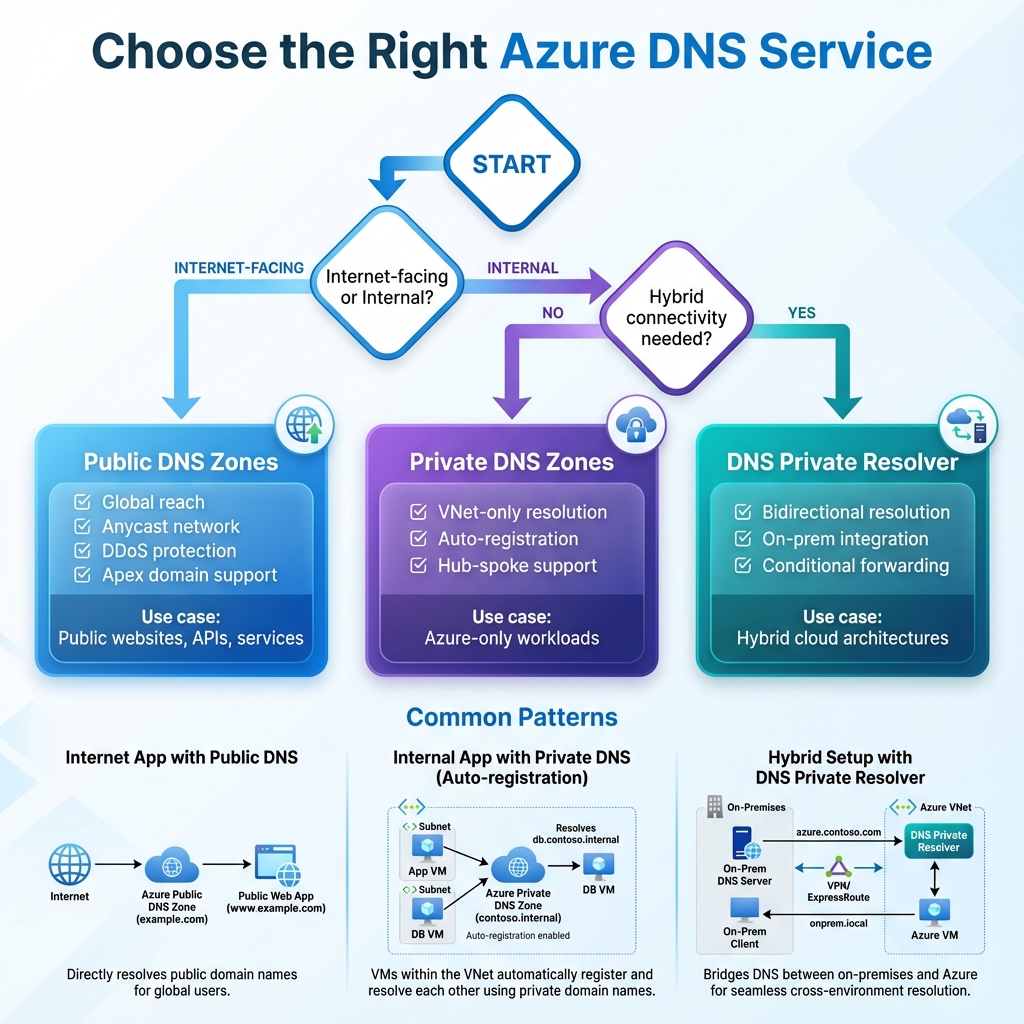
Private DNS zones are essential for any deployment using private endpoints or requiring internal name resolution. If you’re deploying Azure SQL with private endpoints, Azure Storage with private access, or any PaaS service that needs to be accessed privately, you’ll need corresponding private DNS zones. The auto-registration feature makes them particularly valuable for IaaS workloads where VMs are dynamically provisioned.
The DNS Private Resolver becomes necessary when you have hybrid connectivity requirements. If on-premises applications need to resolve Azure private endpoints, or if Azure workloads need to query on-premises DNS servers, the resolver provides the bridge. Without it, you’d need to deploy and manage your own DNS forwarders on virtual machines, adding operational overhead and potential points of failure.
Implementation Best Practices
Successful Azure DNS implementations follow several key practices. First, plan your naming conventions before deployment. Consistent naming across private DNS zones simplifies troubleshooting and reduces configuration errors. Consider using a hierarchy like service.environment.region.internal.contoso.com to provide context in every DNS name.
Second, implement DNS zones through infrastructure as code. Azure Resource Manager templates, Bicep, or Terraform should define your DNS configuration, ensuring consistency across environments and enabling version control. This approach also facilitates disaster recovery by allowing rapid recreation of DNS infrastructure.
Third, monitor DNS resolution actively. Azure Monitor can track query volumes, resolution times, and failures. Set up alerts for unusual patterns that might indicate misconfigurations or attacks. DNS issues often manifest as intermittent application failures that are difficult to diagnose without proper monitoring.
Looking Forward
Azure DNS continues to evolve with new capabilities that address emerging enterprise requirements. The integration with Azure Private Link has made private DNS zones essential for secure PaaS access. DNS security extensions (DNSSEC) support for public zones adds cryptographic verification of DNS responses. As zero-trust architectures become standard, DNS plays an increasingly important role in network segmentation and access control.
For solutions architects, mastering Azure DNS means understanding not just the technical capabilities but also the architectural patterns that leverage them effectively. Whether you’re building a simple web application or a complex hybrid enterprise system, proper DNS design forms the foundation for reliable, secure, and maintainable cloud infrastructure.
Discover more from C4: Container, Code, Cloud & Context
Subscribe to get the latest posts sent to your email.