Business continuity and disaster recovery have become non-negotiable requirements for enterprise IT. After two decades of architecting solutions that must survive regional outages, ransomware attacks, and infrastructure failures, I’ve come to appreciate Azure Site Recovery as one of the most comprehensive disaster recovery platforms available. This service transforms what was once a complex, expensive undertaking into a manageable, automated process.
Understanding the Recovery Services Vault
Azure Site Recovery operates through the Recovery Services Vault, the same management entity used by Azure Backup. This unified approach simplifies governance and allows organizations to manage both backup and disaster recovery from a single control plane. The vault stores replication metadata, recovery points, and configuration information while orchestrating the entire replication and failover process.
The vault architecture supports multiple source environments including Azure VMs, VMware virtual machines, Hyper-V hosts, physical servers, and even AWS EC2 instances. This flexibility makes Site Recovery an ideal choice for organizations with heterogeneous infrastructure or those planning cloud migrations.

Replication Components and Data Flow
The replication architecture consists
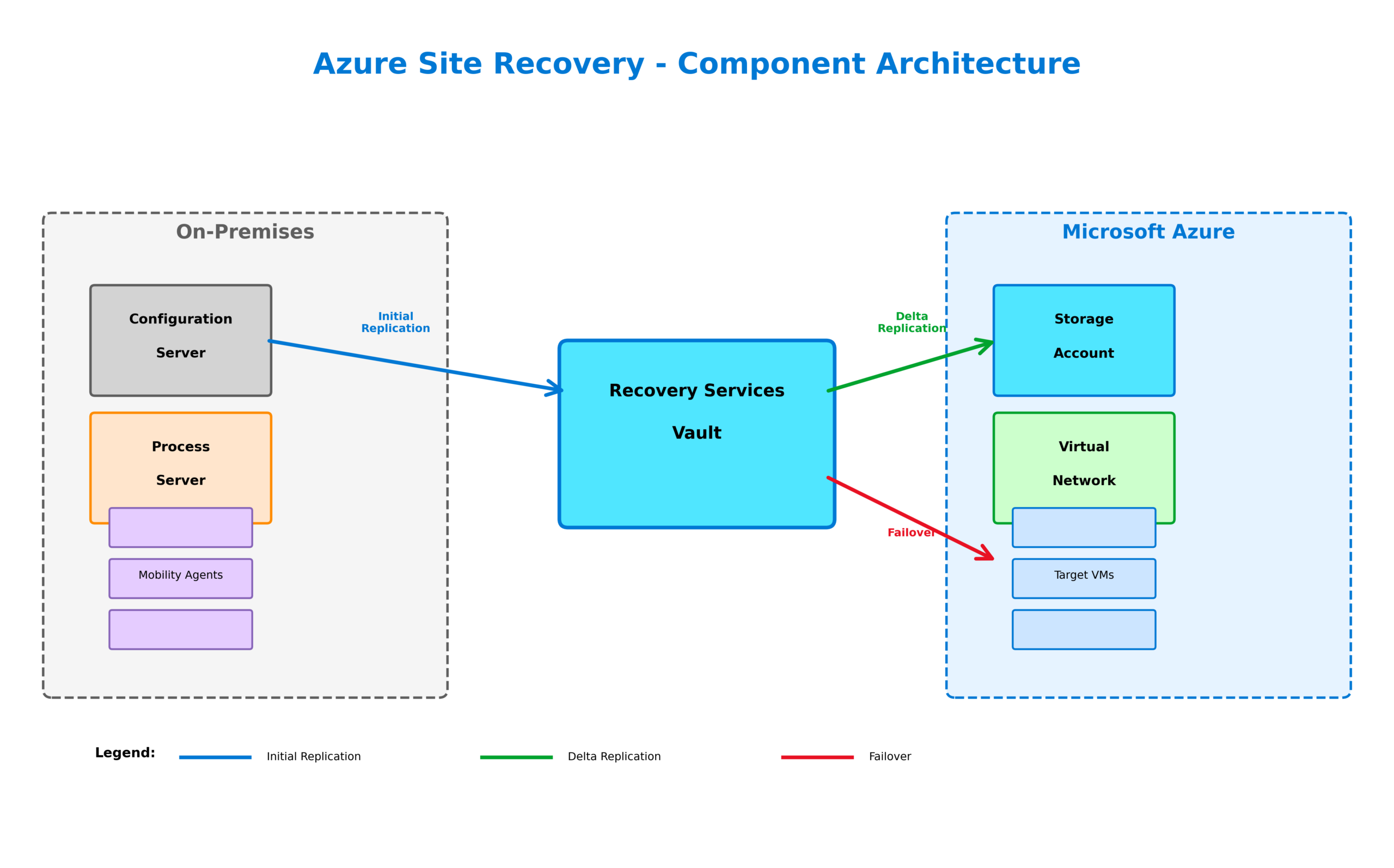
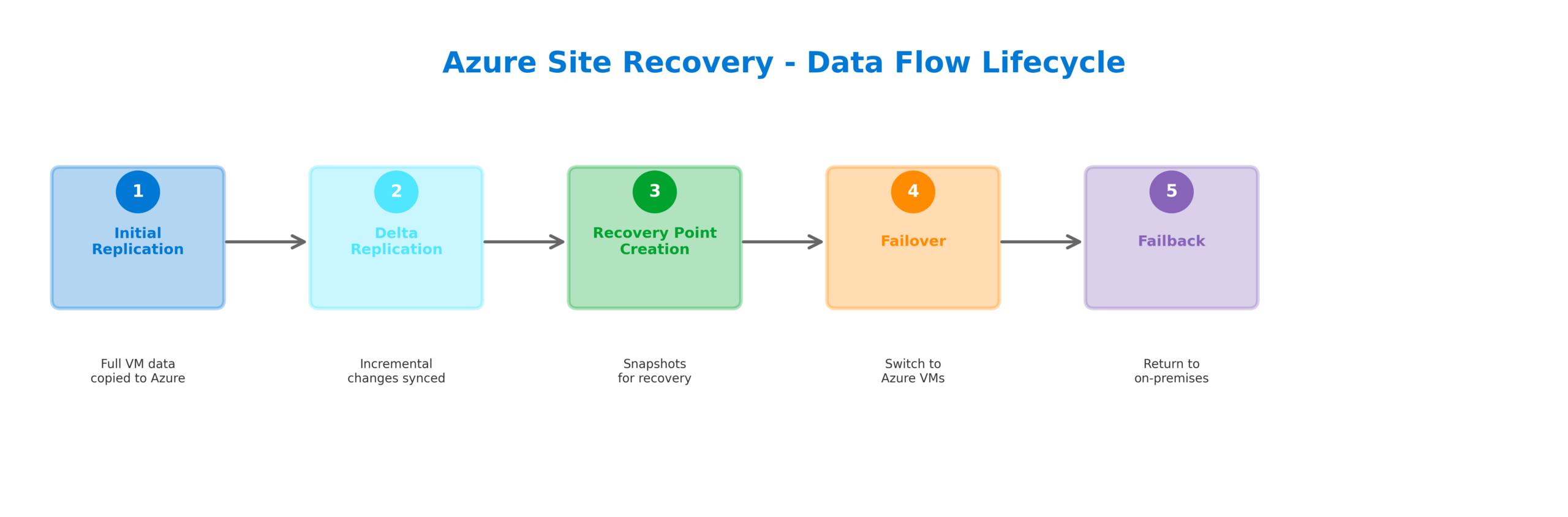
Data replication follows a continuous model where changes are captured in near real-time and transmitted to Azure. Initial replication transfers the complete disk contents, after which only delta changes are synchronized. This approach minimizes bandwidth consumption while maintaining recovery point objectives measured in minutes rather than hours.
Recovery Point Objectives and Retention
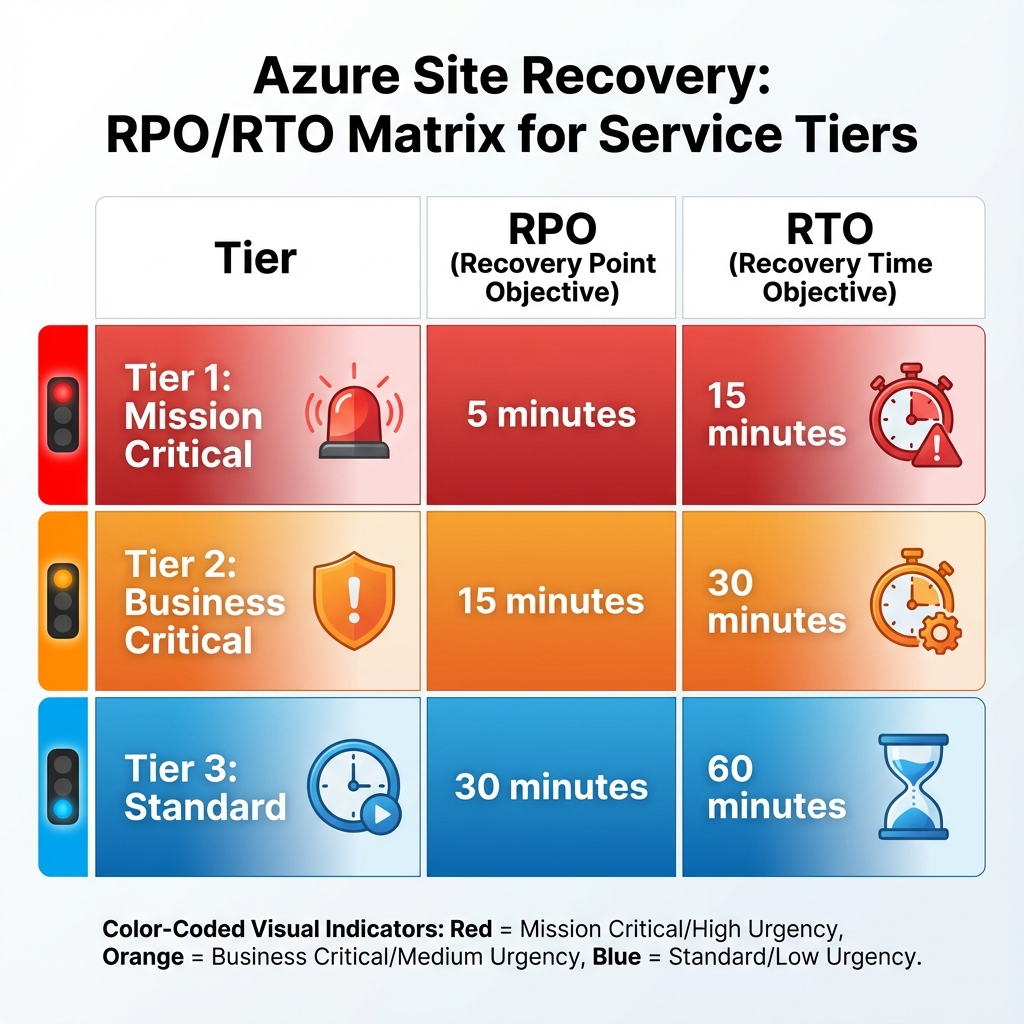
Site Recovery provides granular control over recovery points through replication policies. You can configure crash-consistent recovery points captured every few minutes and application-consistent recovery points that ensure database and application state integrity. The retention period determines how far back you can recover, with options ranging from hours to days depending on your compliance requirements.
For critical workloads, I recommend configuring application-consistent snapshots every hour with crash-consistent points every five minutes. This balance provides multiple recovery options while managing storage costs effectively.
Failover Operations and Recovery Plans
Site Recovery supports three types of failover operations. Test failover creates isolated replicas in Azure for disaster recovery drills without impacting production or replication. Planned failover orchestrates a graceful transition when you know a disruption is coming, ensuring zero data loss. Unplanned failover handles unexpected outages where some data loss may occur depending on the last synchronized recovery point.
Recovery plans enable you to orchestrate failover of multiple machines in a specific sequence. You can group machines into tiers, add manual actions for verification steps, and include Azure Automation runbooks for tasks like updating DNS records or reconfiguring load balancers. This automation ensures consistent, repeatable recovery procedures.

Network Considerations
Network configuration requires careful planning to ensure applications function correctly after failover. Site Recovery can preserve IP addresses when failing over to Azure, simplifying application configuration. For scenarios where IP preservation isn’t possible, you can configure network mappings to assign appropriate addresses in the target environment.
Consider implementing Azure Traffic Manager or Front Door to handle DNS failover automatically. These services can detect when your primary site is unavailable and redirect traffic to the recovery site without manual intervention.
When to Use What
Choosing the right disaster recovery approach depends on your specific requirements. For Azure-to-Azure scenarios, Site Recovery provides the simplest path with native integration and minimal infrastructure overhead. For VMware environments, Site Recovery offers agentless replication options that simplify deployment at scale. For Hyper-V hosts, the integration with System Center Virtual Machine Manager enables centralized management.
For applications requiring near-zero RPO, consider combining Site Recovery with Azure SQL Database geo-replication or Cosmos DB multi-region writes. These services provide continuous data replication at the application layer, complementing the VM-level protection provided by Site Recovery.
Cost Optimization Strategies
Site Recovery licensing is based on protected instances, with costs varying by source environment type. To optimize costs, consider protecting only critical workloads with Site Recovery while using Azure Backup for less critical systems. The target environment resources are only charged during failover, making Site Recovery cost-effective for disaster recovery scenarios where the secondary site remains dormant most of the time.

Implementation Best Practices
Start by documenting your recovery objectives for each application tier. Define RPO and RTO targets based on business impact analysis, then design your replication policies accordingly. Implement regular disaster recovery drills using test failover to validate your recovery procedures and train your operations team.
Monitor replication health through Azure Monitor and configure alerts for replication lag or synchronization failures. Integrate Site Recovery with your incident management processes to ensure rapid response when failover is required.
Looking Forward
Azure Site Recovery continues to evolve with enhanced support for modern workloads. Recent improvements include better integration with Azure Arc for hybrid scenarios, enhanced support for Linux workloads, and improved automation capabilities through Azure Resource Manager templates. As organizations adopt multi-cloud strategies, Site Recovery’s ability to protect workloads across different environments becomes increasingly valuable.
The key to successful disaster recovery lies in treating it as an ongoing operational discipline rather than a one-time implementation. Regular testing, continuous monitoring, and iterative improvement ensure that when disaster strikes, your organization can recover quickly and confidently.
Discover more from C4: Container, Code, Cloud & Context
Subscribe to get the latest posts sent to your email.