In the world of globally distributed applications, ensuring users connect to the optimal endpoint is crucial for performance and reliability. Azure Traffic Manager stands as Microsoft’s DNS-based traffic load balancer, enabling you to distribute traffic across global Azure regions and external endpoints. After architecting numerous multi-region deployments, I’ve come to appreciate Traffic Manager as an essential component of any enterprise high-availability strategy.
Understanding DNS-Based Load Balancing
Azure Traffic Manager DNS-Based Load Balancing Flow – Notice how Traffic Manager only handles DNS resolution; all traffic flows directly from clients to endpoints, eliminating any inline bottleneck.
Unlike traditional load balancers that operate at the network or application layer, Traffic Manager works at the DNS level. When a client requests your application, Traffic Manager responds with the DNS name of the most appropriate endpoint based on your configured routing method. This approach offers several advantages: it works with any internet-facing service regardless of hosting platform, introduces no inline traffic processing overhead, and provides global reach without requiring infrastructure in every region.
The key insight here is that Traffic Manager doesn’t proxy traffic—it simply directs clients to the right endpoint through DNS resolution. Once the client has the endpoint’s IP address, all subsequent traffic flows directly to that endpoint. This architecture means Traffic Manager itself never becomes a bottleneck or single point of failure for your application traffic.
Routing Methods Deep Dive
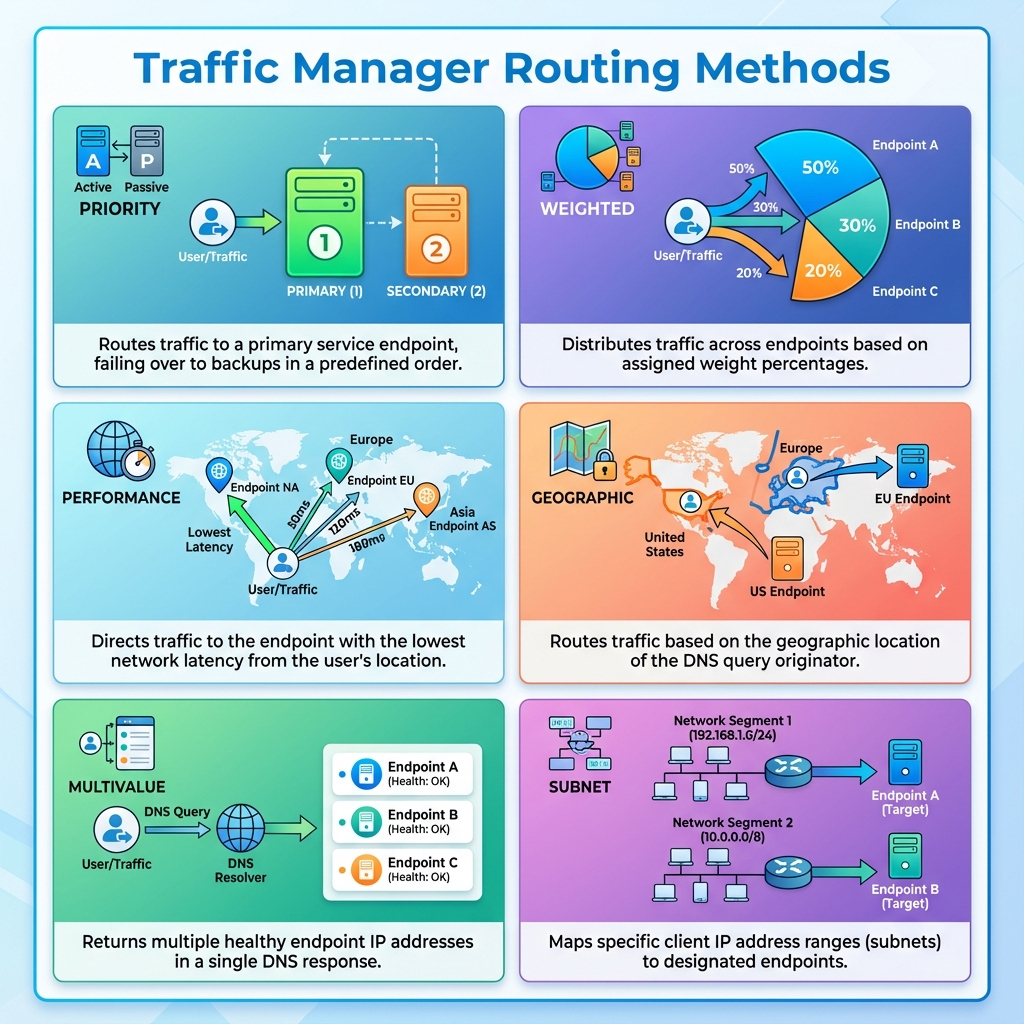
Traffic Manager Routing Methods – Each method serves different architectural needs, from disaster recovery (Priority) to compliance (Geographic) to gradual rollouts (Weighted).
Traffic Manager offers six routing methods, each suited for different scenarios. Priority routing provides active-passive failover by directing all traffic to the primary endpoint until it becomes unhealthy. Weighted routing distributes traffic across endpoints based on assigned weights, useful for gradual rollouts or A/B testing. Performance routing directs users to the endpoint with lowest network latency from their location.
Geographic routing sends users to specific endpoints based on their geographic location, essential for data sovereignty requirements. Multivalue routing returns multiple healthy endpoints in a single DNS response, allowing client-side selection. Subnet routing maps specific IP address ranges to designated endpoints, useful for enterprise scenarios where different user groups need different experiences.
Endpoint Types and Configuration
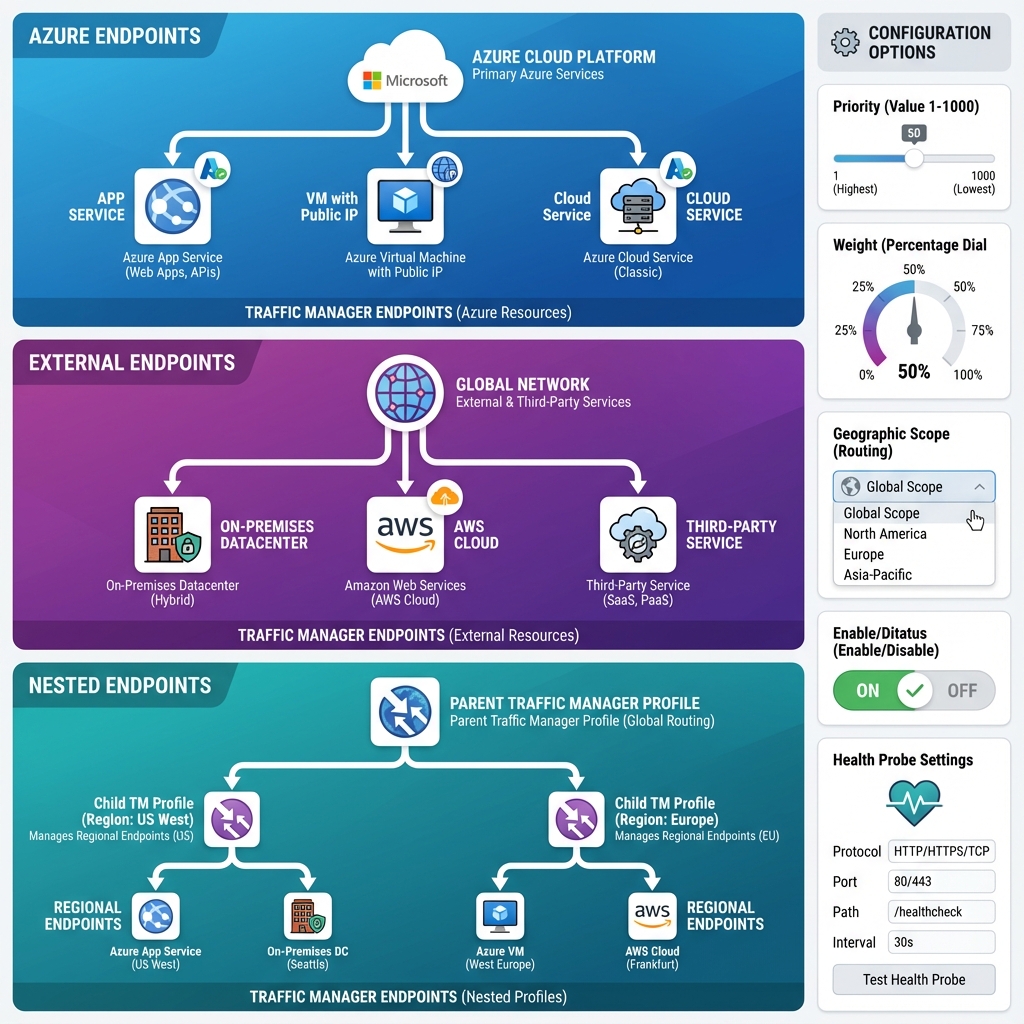
Traffic Manager Endpoint Types – Azure native services, external endpoints (including on-premises and other clouds), and nested profiles for complex routing scenarios.
Traffic Manager supports three endpoint types. Azure endpoints point to Azure services like App Services, Cloud Services, or Public IP addresses. External endpoints can be any internet-accessible service, including on-premises applications or services hosted on other cloud providers. Nested endpoints allow you to combine Traffic Manager profiles, enabling complex routing scenarios like geographic routing with performance-based selection within each region.
Each endpoint can be configured with priority, weight, and geographic scope depending on your routing method. You can also enable or disable endpoints individually, which is invaluable during maintenance windows or when you need to drain traffic from a specific region.
Health Monitoring and Failover
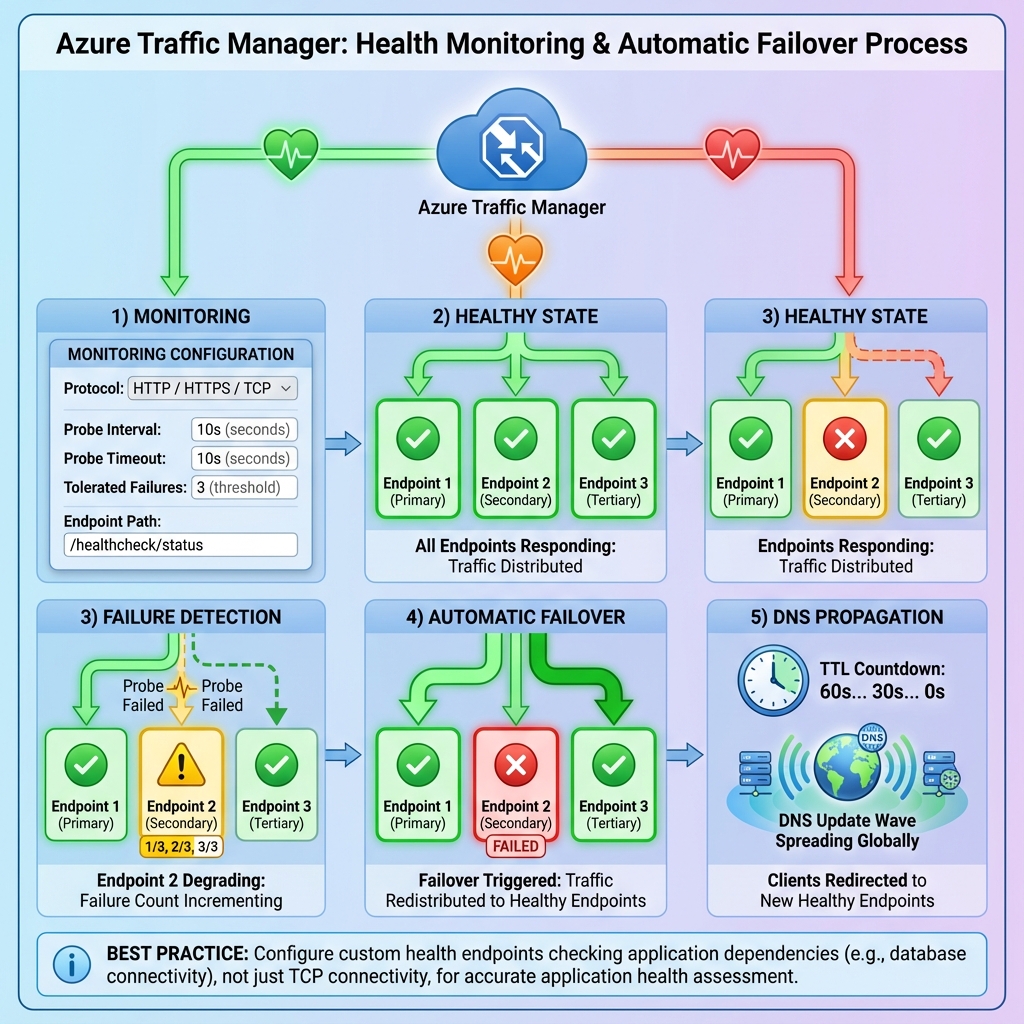
Health Monitoring and Failover Process – Understanding the timeline from endpoint failure to client redirection is crucial for setting appropriate DNS TTL values and probe configurations.
Traffic Manager continuously monitors endpoint health through configurable health probes. You specify the protocol (HTTP, HTTPS, or TCP), port, path, and expected status codes. The probing interval, timeout, and tolerated number of failures determine how quickly Traffic Manager detects and responds to endpoint failures.
When an endpoint fails health checks, Traffic Manager automatically removes it from DNS responses, directing new connections to healthy endpoints. The DNS TTL you configure affects how quickly clients pick up these changes—lower TTLs mean faster failover but more DNS queries. I typically recommend 30-60 second TTLs for production workloads, balancing responsiveness with DNS query volume.
When to Use What
Choosing the Right Azure Load Balancing Service – Traffic Manager excels at global DNS-based routing across regions and external endpoints, while other services handle HTTP/HTTPS or Layer 4 scenarios.
Choosing between Azure’s load balancing options requires understanding their distinct purposes. Use Traffic Manager when you need global DNS-based routing across regions or external endpoints, geographic traffic distribution, or integration with non-Azure services. Choose Azure Front Door when you need global HTTP/HTTPS load balancing with SSL offloading, WAF capabilities, and URL-based routing at the application layer.
Select Azure Load Balancer for regional Layer 4 load balancing within a virtual network, and Application Gateway for regional Layer 7 load balancing with features like SSL termination and cookie-based affinity. Many enterprise architectures combine these services—Traffic Manager for global DNS routing to regional Front Door or Application Gateway instances, which then distribute traffic to backend pools.
Implementation Best Practices
Start by defining your routing requirements clearly. If latency is paramount, use Performance routing. If you need compliance with data residency regulations, Geographic routing is essential. For disaster recovery scenarios, Priority routing with clearly defined failover sequences works best.
Configure health probes to check actual application health, not just TCP connectivity. A custom health endpoint that verifies database connectivity and critical dependencies provides more accurate health status than a simple ping. Set appropriate probe intervals and failure thresholds—too aggressive settings can cause flapping during transient issues.
Use nested profiles for complex scenarios. A common pattern combines Geographic routing at the outer level with Performance routing nested within each geographic region, ensuring users are routed to the correct region for compliance while still getting optimal performance within that region.
Looking Forward
Azure Traffic Manager continues to evolve with enhanced integration into Azure’s networking fabric. Recent improvements include better metrics and diagnostics, tighter integration with Azure Monitor, and improved support for hybrid scenarios. As organizations increasingly adopt multi-cloud and hybrid architectures, Traffic Manager’s ability to route traffic to any internet-accessible endpoint becomes even more valuable.
For architects designing globally distributed systems, Traffic Manager remains an essential tool in the toolkit. Its simplicity, reliability, and flexibility make it the foundation for building resilient, performant applications that serve users worldwide.
Related
Discover more from C4: Container, Code, Cloud & Context
Subscribe to get the latest posts sent to your email.