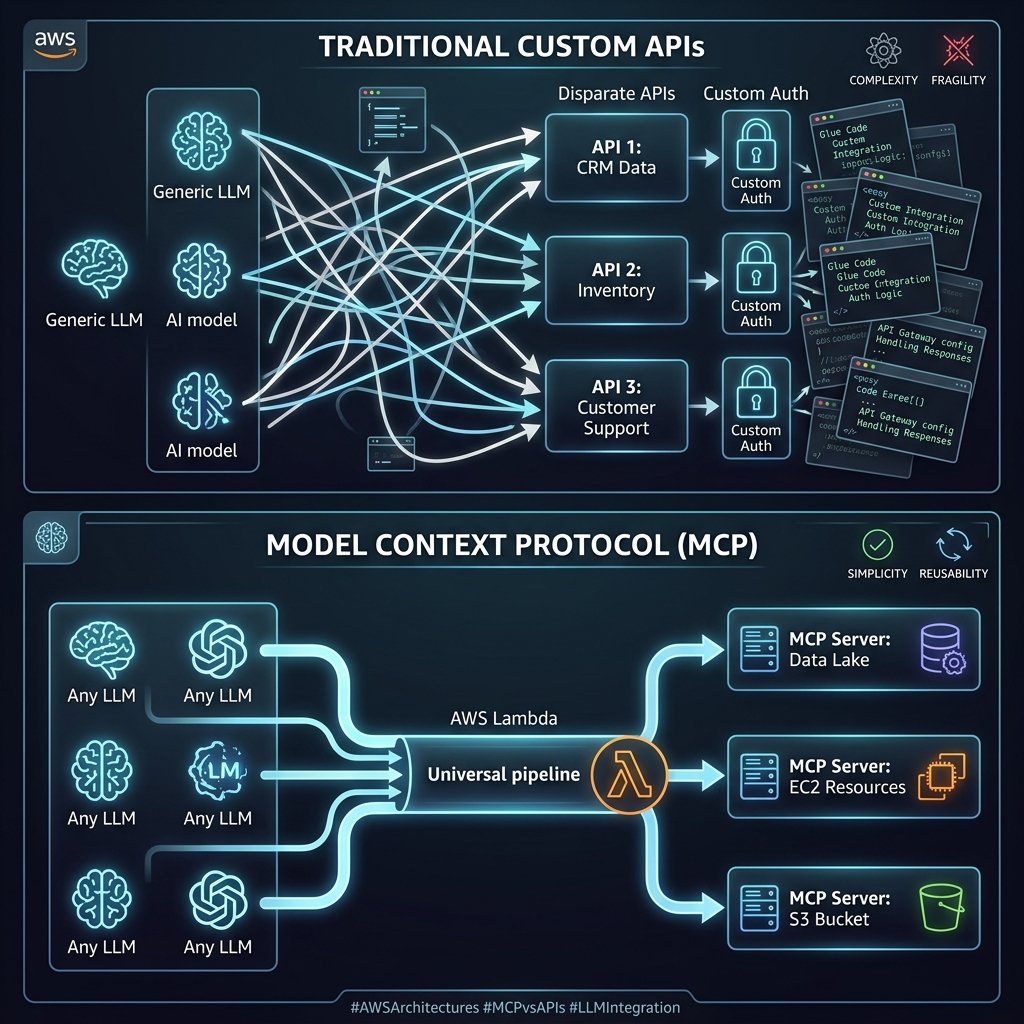
For the first two years of the enterprise generative AI era, building autonomous agents was primarily an exercise in writing messy, brittle integration glue. If you wanted your Anthropic Claude agent to fetch data from Jira, search an internal Confluence wiki, and read a local SQLite database, you had to write custom API wrappers, handle authentication flows, map OpenAPI schemas to LLM tool signatures, and manually coerce the JSON payloads back into the LLM context limits.
Then, Anthropic open-sourced the Model Context Protocol (MCP). Positioned as the “USB-C for AI,” it promised to standardize how foundation models communicate with external data sources and tools. Throughout 2025, AWS aggressively adopted this protocol natively across Amazon Bedrock Agents and Amazon Q Developer.
Now, in early 2026, MCP went from an open-source curiosity to the absolute baseline architectural requirement for enterprise AI integrations. We no longer write bespoke API tool descriptions for large language models; we build standardized MCP Servers. In this deep architectural retrospective, I detail how enterprise teams are securely deploying MCP servers on AWS Serverless infrastructure to safely expose proprietary data to LLMs.
Defining the Model Context Protocol (MCP)
At an engineering level, the Model Context Protocol (MCP) is an open standard that decouples the complexity of data integration from the logic of the LLM. It operates on a strict Client-Server architecture over stdio or HTTP/Server-Sent Events (SSE).
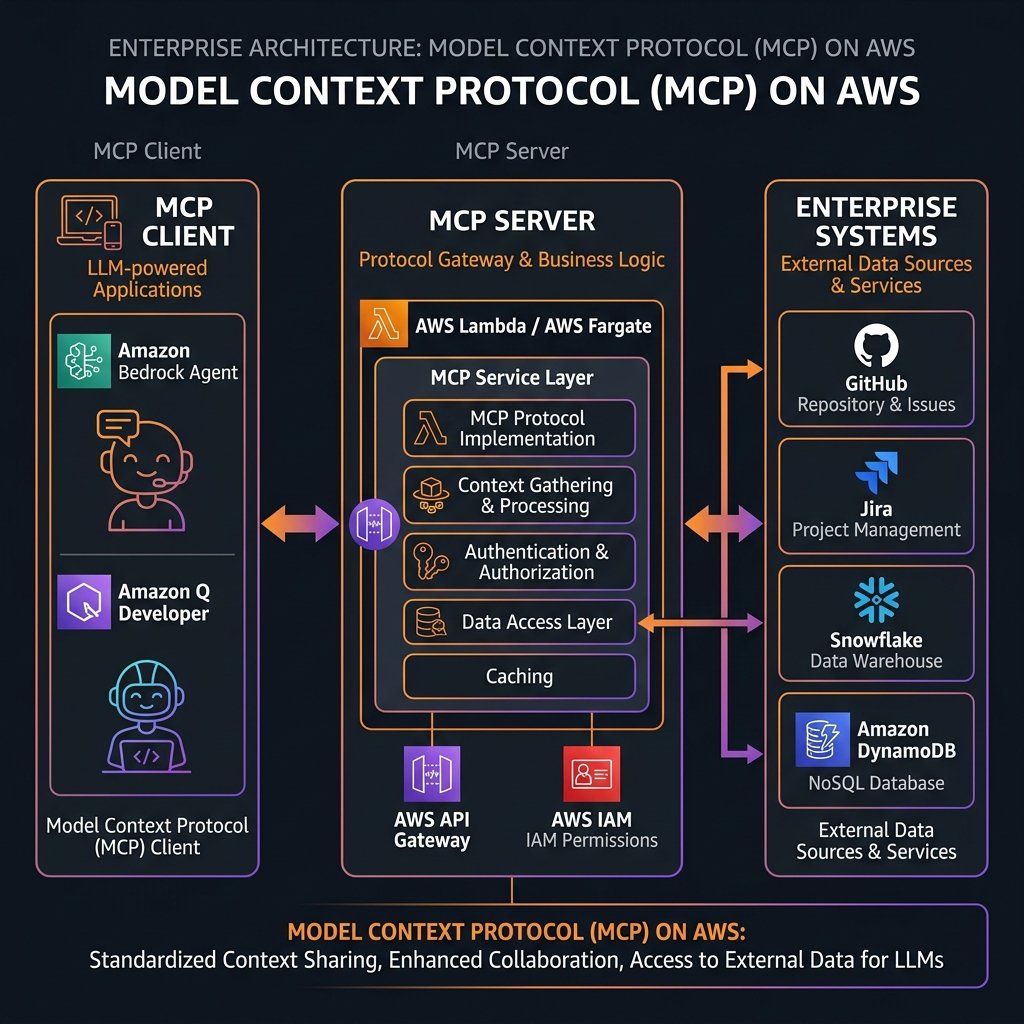
- The MCP Client: This is the AI application (e.g., an Amazon Q Developer instance, a Bedrock Agent, or a custom application using the Anthropic SDK). The client maintains the connection and manages the context window of the LLM.
- The MCP Server: A lightweight program that exposes specific capabilities (Resources, Prompts, and Tools) through the standardized MCP schema. The server handles all the authentication, business logic, and database connections to external systems like GitHub, Stripe, or internal AWS services.
The magic of MCP is standardization. If I build an MCP Server that queries an Aurora PostgreSQL database, I can plug that exact same server unmodified into a Bedrock Agent running Claude 3.5 Sonnet, an Amazon Q Developer IDE plugin, or a local Chat UI running Llama 3 on my laptop.
Architecting MCP Servers on AWS
While running an MCP server locally for a VS Code extension is trivial via `npx`, running an MCP server at enterprise scale requires rigorous AWS security bounds, high availability, and durable execution environments. The primary compute vehicles in AWS for hosting robust MCP servers are AWS Lambda and Amazon ECS (Fargate).
Pattern 1: The Ephemeral Lambda Server
AWS Lambda is the ideal compute environment for 90% of custom MCP servers. Because it relies heavily on short-lived stateless API calls, AWS Lambda aligns perfectly with providing instantaneous, scalable tool access to Bedrock Agents. Integrating MCP SSE over API Gateway to Lambda provides seamless IAM-based authentication.
flowchart LR
    A["Bedrock Agent (MCP Client)"] -->|HTTPS / SSE| API["API Gateway"]
    API -->|Proxy| L["AWS Lambda (MCP Server)"]
    L -->|"SQL Query"| RDS[("Amazon RDS")]
    L -->|"Fetch Doc"| S3["Amazon S3"]
Below is a conceptual snippet showing how cleanly a Python-based MCP Server hosted in an AWS Lambda function defines an enterprise capability using the official MCP SDK.
from mcp.server.fastmcp import FastMCP
import boto3

# FastMCP abstracts away the complex plumbing
mcp = FastMCP("SalesDataServer")
dynamodb = boto3.resource('dynamodb')
table = dynamodb.Table('EnterpriseSales')

@mcp.tool()
def get_customer_sales(customer_id: str) -> str:
    """
    Fetches the lifetime sales value for a given customer.
    The LLM Agent will see this exact description to know WHEN to use this tool.
    """
    try:
        response = table.get_item(Key={'CustomerId': customer_id})
        if 'Item' in response:
            sales = response['Item'].get('TotalSales', 0)
            return f"Customer {customer_id} has ${sales} in lifetime sales."
        return f"Customer {customer_id} not found."
    except Exception as e:
        return f"Error retrieving data: {str(e)}"

# In a Lambda context, we adapt the FastMCP WSGI app to API Gateway
# (Using aws-wsgi or similar mapping)
def lambda_handler(event, context):
    return serverless_wsgi.handle_request(mcp.app, event, context)
Notice how this single decorator (`@mcp.tool()`) automatically extracts the function signature, the type hints (`customer_id: str`), and the docstring, formatting them into the exact JSON schema the MCP protocol expects. The Bedrock Agent reads this dynamically at runtime and gives the underlying LLM permission to autonomously invoke it.
Pattern 2: The Stateful Fargate Container
While Lambda excels at quick lookups, some MCP servers provide persistent “Resources” (like listening to a massive real-time logging stream or continuously reading an active GitHub repository structure). In these long-lived connection scenarios, Amazon ECS on Fargate instances running the MCP Server behind an Application Load Balancer with WebSockets/SSE is the preferred architecture.
Amazon Bedrock Native Integration
A massive turning point for MCP architecture occurred when Amazon Bedrock Agents introduced native schema mapping for MCP endpoints. Instead of configuring complex OpenAPI schemas for Bedrock Agents Action Groups manually, you can now simply supply the endpoint of your MCP Server. Bedrock will automatically perform the schema handshake, discover all `Tools` and `Resources` the server offers, and dynamically equip the agent with them.
This entirely revolutionized the CI/CD deployment cycle. If a backend developer adds a new function to the MCP Server codebase (e.g., adding `get_refund_status()`), they deploy the Lambda function. The Bedrock Agent immediately discovers the new tool on its next session handshake. The AI engineering team does not have to redeploy or reconfigure the Agent whatsoever.
Compliance: Auditing the Autonomous AI
A core reason the financial and healthcare industries aggressively adopted the MCP standard on AWS is the complete abstraction of authorization boundaries.
In a pre-MCP architecture, if you gave an LLM the raw database credentials to execute SQL, you lost all granular IAM auditability. With MCP, the LLM never sees the database. The LLM only knows it can call the `get_customer_sales` tool. The MCP Server (running as an AWS Lambda) assumes an AWS IAM Execution Role that possesses explicit, least-privilege `dynamodb:GetItem` access localized only to the `EnterpriseSales` table.
Every single tool request the AI makes is intercepted by the MCP Server and logged to Amazon CloudWatch. Furthermore, the MCP protocol supports user-context pass-through. If Alice is using the Chat UI, the UI passes Alice’s JWT OAuth token to the Bedrock Agent, which passes it via MCP headers to the Lambda Server. The Lambda Server validates Alice’s token via Amazon Cognito before fetching the row, guaranteeing that the AI cannot hallucinate its way into retrieving Bob’s restricted payroll data.
Migration Strategy and Cost Optimization
Should you tear down your existing Bedrock Agent OpenAPI definitions and move everything to MCP today? Yes, if you intend to reuse those tool integrations across multiple interfaces (e.g., sharing the same diagnostic tools between a customer-facing Chatbot and internal Q Developer IDEs for your engineers).
The cost of running MCP Servers on AWS is strictly limited to the compute invocation (Lambda duration and API Gateway requests). Because MCP eliminates massive overheads of redundant OpenAPI schema mapping parsing and standardizes error responses natively, it typically reduces integration engineering hours by up to 60%.
Key Takeaways
- Standardization is the core value. The Model Context Protocol (MCP) replaces fragmented, proprietary API wrappers with a universal standard. An MCP server built today works with Bedrock, Anthropic Workbench, and local open-source LLMs instantly.
- AWS Lambda is the default Enterprise Host. For tool invocation, running FastMCP Python servers on AWS Lambda behind an API Gateway provides the cheapest, fastest, and most secure IAM bounding.
- Limit Context Dynamically. MCP allows AI to ingest massive datasets seamlessly. Defend your LLM’s context window limits by enforcing strict pagination, truncation, and data sanitization within your MCP backend code before it returns to the client.
- Security acts at the Server boundary. The LLM has zero underlying database credentials. The MCP server validates the human user’s JWT token and executes least-privilege AWS IAM policies, maintaining full CloudWatch audit logs for every AI-triggered action.
- Native Bedrock Discovery. Bedrock Agents automatically discover new capabilities simply by pointing at the MCP server. This completely separates backend data engineering from AI workflow orchestration.
Glossary
- Model Context Protocol (MCP)
- An open-source standard facilitating secure two-way connections between AI models and external data sources or tools, acting as a universal API format for LLMs.
- MCP Client
- The AI orchestrator or application (e.g., Bedrock Agent, Claude Desktop, Amazon Q) that requests context and executes tools.
- MCP Server
- A lightweight application backend that exposes specific capabilities (tools, resources) to the MCP Client while managing raw authentication and external database queries securely.
- System-to-System Authentication
- The protocol standard allowing the MCP Client (Bedrock) to authenticate securely with the API Gateway hosting the MCP Server, typically using AWS SigV4 signatures.
- Context Window Explosion
- A failure state resulting from an MCP tool inadvertently returning a massive payload (like a raw massive database dump) that exceeds the token processing capacity of the orchestrating LLM.
References & Further Reading
- → Official Model Context Protocol Specification— The primary open-source architectural documentation defining Tools, Resources, Prompts, and Transport layers.
- → Amazon Bedrock Agents Architecture— AWS coverage of autonomous AI Agents integrating securely with enterprise proprietary sources.
- → Open Source MCP Server Implementations— A repository of reference MCP Servers (e.g., PostgreSQL, GitHub, Slack) to use as architecture blueprints.
- → Customizing Amazon Q Developer— Documentation on exposing proprietary enterprise codebase structures to Amazon Q using secure architectural principles.
Discover more from C4: Container, Code, Cloud & Context
Subscribe to get the latest posts sent to your email.