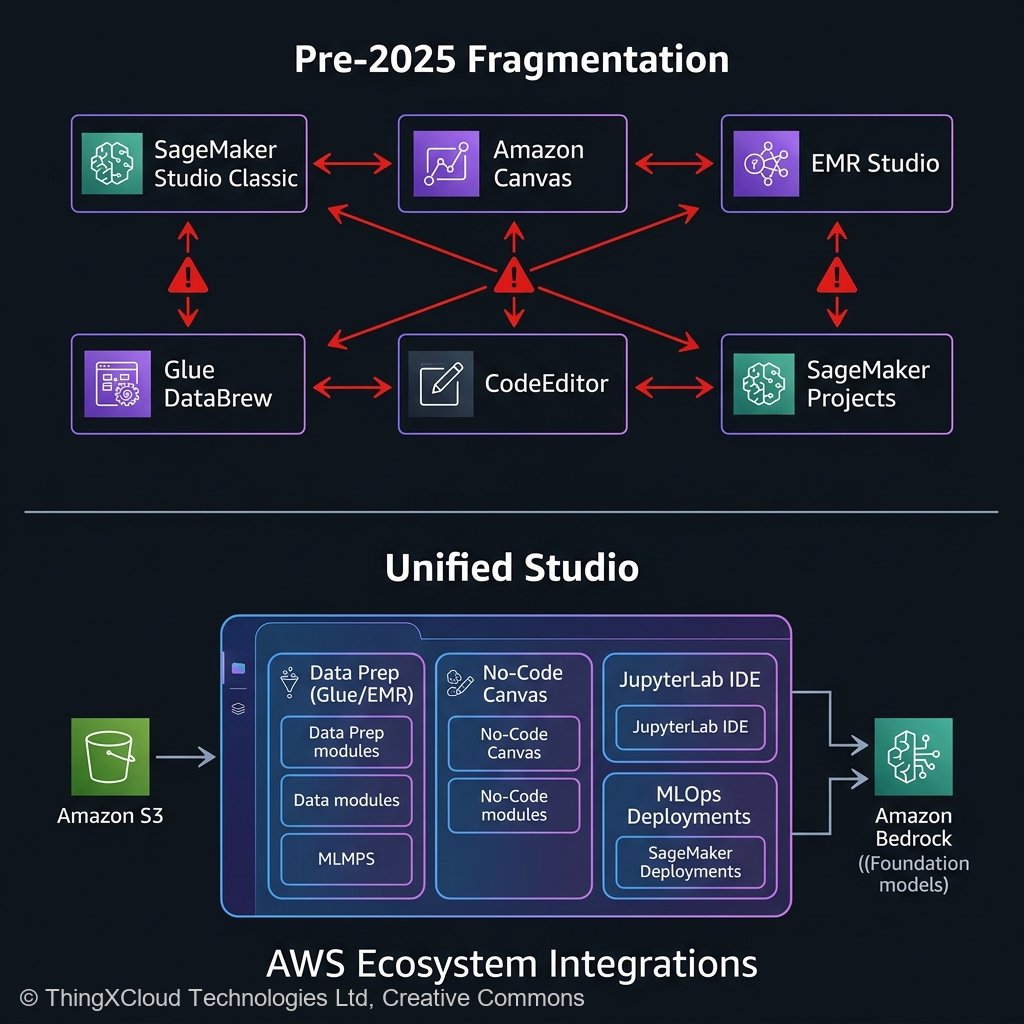
If you were a Data Scientist operating on AWS prior to 2025, your workflow was undeniably powerful—but it was scattered across a notoriously fragmented ecosystem. You would log into Amazon EMR Studio to run massive PySpark transformations, switch tabs to Amazon Glue DataBrew to profile data hygiene, navigate to SageMaker Canvas to prototype a quick random forest model, and finally open SageMaker Studio Classic (managing complex Domain IAM profiles) to orchestrate your Jupyter notebooks and SageMaker Model Endpoints.
It was an integration headache. The cognitive load required just to stitch these autonomous AWS services together drastically increased the Time-to-Deployment for machine learning teams. Recognizing this architectural drift, AWS fundamentally restructured their AI deployment methodology with the announcement of Amazon SageMaker Unified Studio in late 2024.
Now, 15 months deep into general availability deployment cycles in early 2026, the question is no longer “What does Unified Studio do?” but rather “Should my enterprise abandon our legacy SageMaker Domains and migrate?” This article provides an exhaustive, practitioner-led retrospective. We’ll examine the core architectural consolidations, outline what transitions flawlessly, highlight the esoteric edge cases that still require manual workarounds, and establish the definitive migration rubric for enterprise MLOps teams navigating the AWS ecosystem today.
The Great Abstraction: What Unified Studio Actually Does
Amazon SageMaker Unified Studio is not simply a reskinned frontend for existing services; it is a structural paradigm shift in how identity, data sharing, and compute environments are orchestrated within an AWS account. It acts as a universal control plane that natively embeds the discrete capabilities of EMR, Glue, Canvas, and JupyterLab inside a single Web IDE, secured by a unified SSO identity profile.
1. Unified IAM and Identity Propagation
Historically, sharing a data repository between an EMR cluster running Spark and a SageMaker notebook required manually configuring cross-service IAM execution roles and bucket policies. Unified Studio abstracts this via the “Project” primitive. When you create a Project in Unified Studio, AWS silently provisions a bound environment where the underlying Amazon Q Developer IDE, the managed JupyterLab spaces, and the ad-hoc EMR serverless execution roles automatically inherit a shared, scoped data access paradigm. For security engineers, this reduces the attack surface by eliminating overly permissive `s3:GetObject` wildcard policies created by frustrated data scientists.
2. Native Bedrock and Amazon Q Integration
Because Unified Studio was architected post-GenAI explosion, it intrinsically assumes that modern machine learning workflows incorporate Large Language Models. Amazon Q Developer is natively embedded into the Jupyter IDE pane. You do not just use it to generate Python boilerplate; it possesses context awareness of the AWS resources attached to your Unified Studio workspace. You can prompt Q to “Deploy the current model in my active directory to a serverless SageMaker endpoint,” and it will scaffold the architecture locally within the IDE.
flowchart LR
    S3[("Amazon S3 Data Lake")] --> P["Unified Studio Project Workspace"]
    P --> C["Canvas (No-Code GenAI/ML)"]
    P --> J["JupyterLab IDE (Deep Learning)"]
    P --> E["EMR Serverless (Data Prep)"]
    C --> R["Model Registry"]
    J --> R
    E --> S3
    R --> D["SageMaker Endpoints"]
The 15-Month Reality Check: Migrating Legacy MLOps
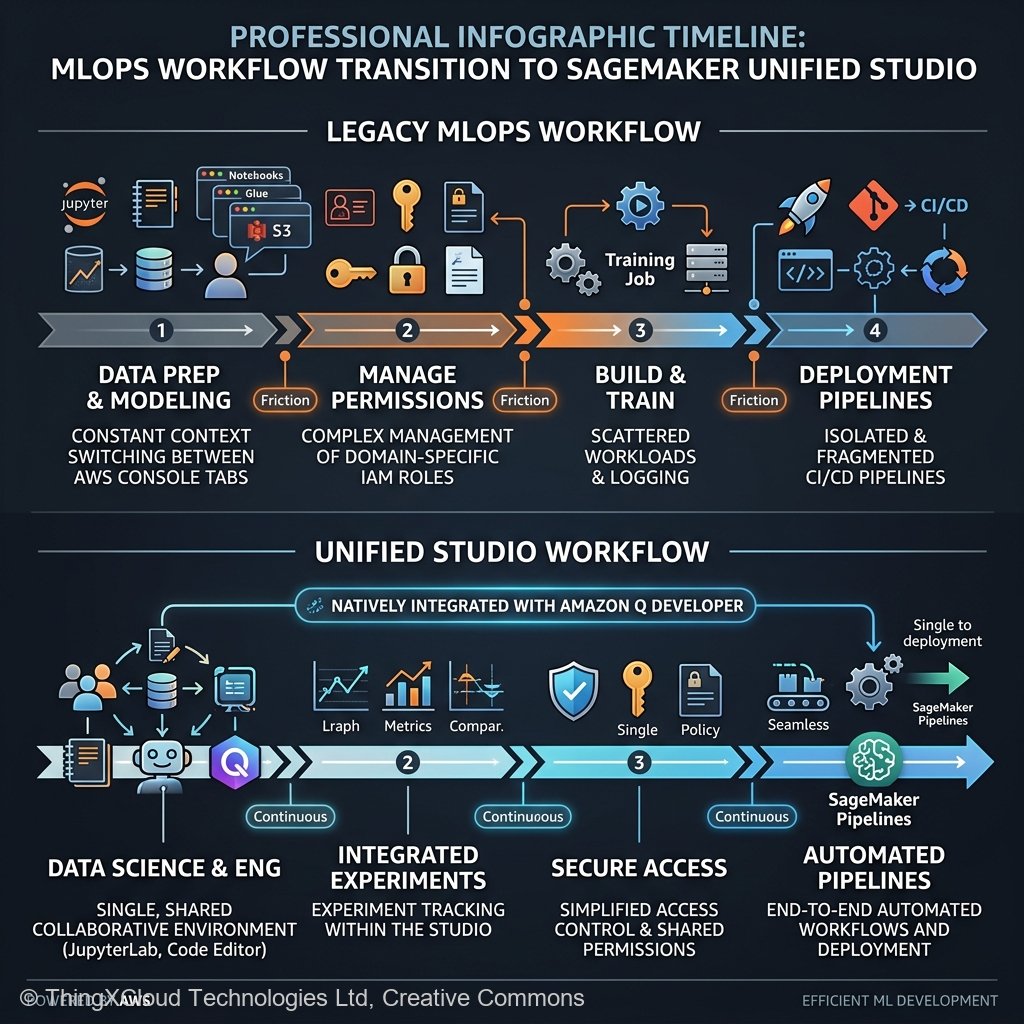
While greenfield projects should absolutely start in Unified Studio, migrating a complex, 5-year-old SageMaker Studio Classic deployment requires significant architectural planning. We have managed multiple enterprise migrations throughout 2025 and 2026. Here is the unvarnished reality of what works out-of-the-box and what requires intense engineering intervention.
What Migrates Seamlessly (The Easy Wins)
- Jupyter Notebooks: Raw `.ipynb` files move over without friction. The transition from Studio Classic’s underlying jupyter-server to Unified Studio’s managed JupyterLab is transparent to the actual Python execution engine.
- Model Registries: Because Unified Studio still sits atop the core SageMaker control plane, your existing SageMaker Model Registry ARN endpoints remain fully accessible. You can register a model from a Unified Studio notebook straight into a lineage graph started years ago.
- SageMaker Pipelines: The underlying DAG execution for SageMaker Pipelines functions normally. If your CI/CD relies heavily on `sagemaker.workflow.pipeline`, you will experience minimal disruption shifting your `PipelineSession` initializations to the new environment.
What Requires Refactoring (The Pain Points)
However, Unified Studio completely overhauled how localized filesystem storage and specific networking architectures are handled, which breaks older custom-tailored environments.
- Custom Docker Images for Notebooks: In Studio Classic, attaching a highly customized Docker container (with obscure C++ libraries) to a notebook instance was a standard, albeit clunky, procedure. Unified Studio tightens this integration. Migrating customized baseline images requires migrating them to the new Space architecture formatting, which often demands rewriting the Dockerfile entrypoints to conform to the new JupyterLab lifecycle hooks.
- VPC Only Limitations: For highly regulated industries (Financial Services, Healthcare) utilizing `VPC Only` mode in SageMaker Studio Classic—where all internet traffic routes aggressively through internal corporate firewalls—the networking translation to Unified Studio requires strict baseline configuration. Unified Studio relies heavily on AWS managed endpoints for intra-tool connectivity (e.g., jumping from DataBrew UI to the Jupyter IDE). If your VPC route tables do not have exactly correct VPC Endpoints (PrivateLink) provisioned for the new overarching Studio URLs, data scientists will suffer silent timeout errors when loading the UI framework.
- Lifecycle Configurations: Legacy bash scripts (`on-start.sh`) running via Studio Classic Lifecycle Configurations often fail. Unified Studio manages dependencies differently, and trying to universally force `pip install` commands sequentially at boot across the new shared architecture often triggers kernel mismatches. Transitioning these tasks to proper `requirements.txt` environments within dedicated Virtual Environments is mandatory.
The Evolution of SageMaker Canvas in Unified Studio
Perhaps the most dramatic upgrade within the Unified Studio umbrella is SageMaker Canvas. Previously relegated as a “citizen developer” toy for business analysts to build auto-ML regressions without coding, Canvas in 2026 is a formidable orchestration engine.
Within Unified Studio, Canvas is tightly woven into the Amazon Bedrock ecosystem. You can drag and drop an S3 bucket containing raw PDFs, attach a “Data Extraction” node powered by Bedrock Data Automation, pipe the output into an Anthropic Claude 3.5 Sonnet processing node for sentiment analysis, and dump the resultant structured data straight into an Amazon Redshift table—all visually, without writing a single line of Python.
Crucially for MLOps engineers, the output of a Canvas run in Unified Studio is no longer a locked “black box.” A Data Scientist can right-click a visual Canvas workflow and hit “Export to Code,” which generates a fully executable, well-commented Jupyter Notebook mapping exactly to the visual DAG. This bridges the notorious gap between Business Analysts writing logic and Software Engineers productionizing it.
import boto3
from sagemaker import Session

# A typical migration translation from a legacy Custom Canvas output
# to a raw programmatic deployment via Unified Studio execution roles.

sagemaker_session = Session()

def deploy_canvas_model(model_package_arn: str, endpoint_name: str):
    """
    Seamlessly deploy models generated natively by SageMaker Canvas
    within Unified Studio directly to real-time endpoints.
    """
    client = boto3.client("sagemaker")

    response = client.create_model(
        ModelName=f"{endpoint_name}-model",
        PrimaryContainer={
            "ModelPackageName": model_package_arn
        },
        ExecutionRoleArn=sagemaker_session.get_caller_identity_arn()
    )

    # Unified Studio handles the complex IAM trust policy under the hood
    print(f"Model {response['ModelArn']} registered successfully for deployment.")
    return response['ModelArn']
Compliance: Auditing the Unified Sphere
Standardizing everything under a “Project” umbrella in Unified Studio radically simplifies compliance audits. Instead of pulling IAM access logs from six different AWS granular services (EMR, Glue, DataBrew, Bedrock, SageMaker, S3), Governance teams audit the activity of the macro Project environment.
Additionally, the integration natively supports AWS Lake Formation. This allows enterprise architectures to maintain rigorous cell-level and column-level access controls on their data lakes. If a data scientist operating inside a Unified Studio Jupyter notebook queries an Athena database housing Patient Health Information (PHI), Lake Formation transparently masks or redacts the columns based on the overarching Identity Center SSO credential tied to the Studio session, regardless of whether they are using PySpark on EMR Serverless or standard Pandas in the notebook.
The Migration Decision Matrix
To cleanly evaluate exactly when, and how, your engineering teams should transition to SageMaker Unified Studio, use this practitioner evaluation matrix:
- Migrate Immediately If: Your team is currently fragmented, manually writing PySpark clusters for basic data engineering before pushing CSVs to isolated SageMaker domains. Organizations heavily leaning into multi-modal Generative AI development via Amazon Bedrock will immediately benefit from embedding those tools explicitly into the IDE workspace.
- Delay Migration If: You operate massively customized, non-standard Docker containers acting as notebook hosts, heavily dependent on specific OS-level `yum` package overrides bound tightly to Legacy Studio Classic Lifecycle configurations. You must rewrite those deployment mechanisms before transitioning.
- Embrace Incrementally If: You run a massive MLOps pipeline heavily integrated with third-party orchestration tools (e.g., Airflow or Kubernetes/EKS custom operators). Leave your production inference pipelines untouched on raw SageMaker Endpoints, but transition your Data Science “Sandbox” environments to Unified Studio to acclimate the team to the central UX without risking live production inference SLAs.
Key Takeaways
- Unified Studio ends cognitive fragmentation. It aggregates EMR Serverless for big data, Glue for structuring, Canvas for visual GenAI flows, and JupyterLab for deep coding into a single web IDE interface.
- Projects organize IAM structurally. Automatically scoped AWS IAM execution environments per “Project” radically reduces security overhead and mitigates overly-permissive data lake queries.
- Native Bedrock cohesion. Incorporating generative AI capabilities directly into the Data Scientist workstation—from Amazon Q syntax completions to automated infrastructure deployments—accelerates the entire MLOps lifecycle from prototype to artifact.
- Canvas bridges the enterprise gap. The ability to visually design an LLM chain reacting to CSV data in Canvas, and instantly export that DAG out as a fully executable Python notebook, unites Business Analysts and MLOps Engineers effectively.
- Plan your Custom Image migrations carefully. Migrating standard notebooks is effortless; migrating highly bespoke C++ custom Docker container logic reliant on old Studio Classic architectures requires rewriting lifecycle setups.
Glossary
- SageMaker Unified Studio
- The comprehensive web-based IDE and orchestration layer released by AWS that consolidates disparate machine learning, data engineering, and generative AI services into a cohesive user environment.
- SageMaker Classic Domain
- The legacy IAM architecture utilized by older AWS SageMaker iteration designs orchestrating localized user profiles bound to dedicated ENIs (Elastic Network Interfaces).
- EMR Serverless
- An AWS deployment option for running big data frameworks (Apache Spark, Hive) scaling compute capacity dynamically without managing physical EC2 cluster fleets.
- DataBrew Integration
- A visual data preparation tool historically isolated, now embedded into Unified Studio, enabling missing value imputation and schema mapping without writing Python code.
- Lake Formation Column Masking
- A security paradigm allowing granular data visibility tied directly to user identity, automatically obscuring sensitive database columns when fetched into a Unified Studio Jupyter notebook session.
References & Further Reading
- → Amazon SageMaker Unified Studio Gateway— Official product portal highlighting architectural consolidation and the integration of robust EMR operations directly inside the application IDE.
- → AWS Launch Announcement: Unified Studio— The foundational Dec 2024 AWS blog outlining the strategic convergence of Canvas, Jupyter, and DataBrew under a unified SSO umbrella.
- → SageMaker Studio Classic Migration Guide— Deep technical deployment documentation resolving VPC connectivity routing, Custom Docker Image porting, and Lifecycle Configuration deprecations.
- → Amazon Bedrock Integrations— Overview of accessing foundational models (Claude, Nova, Llama) directly from visual nodes within the Unified Studio workspace.
Discover more from C4: Container, Code, Cloud & Context
Subscribe to get the latest posts sent to your email.