The evolution of cloud computing has fundamentally transformed how we architect, deploy, and operate applications. Cloud-native architecture and multi-cloud strategies are no longer optional—they’re essential for organizations seeking agility, resilience, and competitive advantage in the digital economy.
This comprehensive guide covers cloud-native principles, multi-cloud strategies, Kubernetes orchestration, and practical implementation patterns with real-world examples.
Cloud Native Architecture Fundamentals
Cloud-native is more than just “running in the cloud.” It’s an approach that fully exploits cloud computing advantages: on-demand resources, elasticity, distributed computing, and managed services.
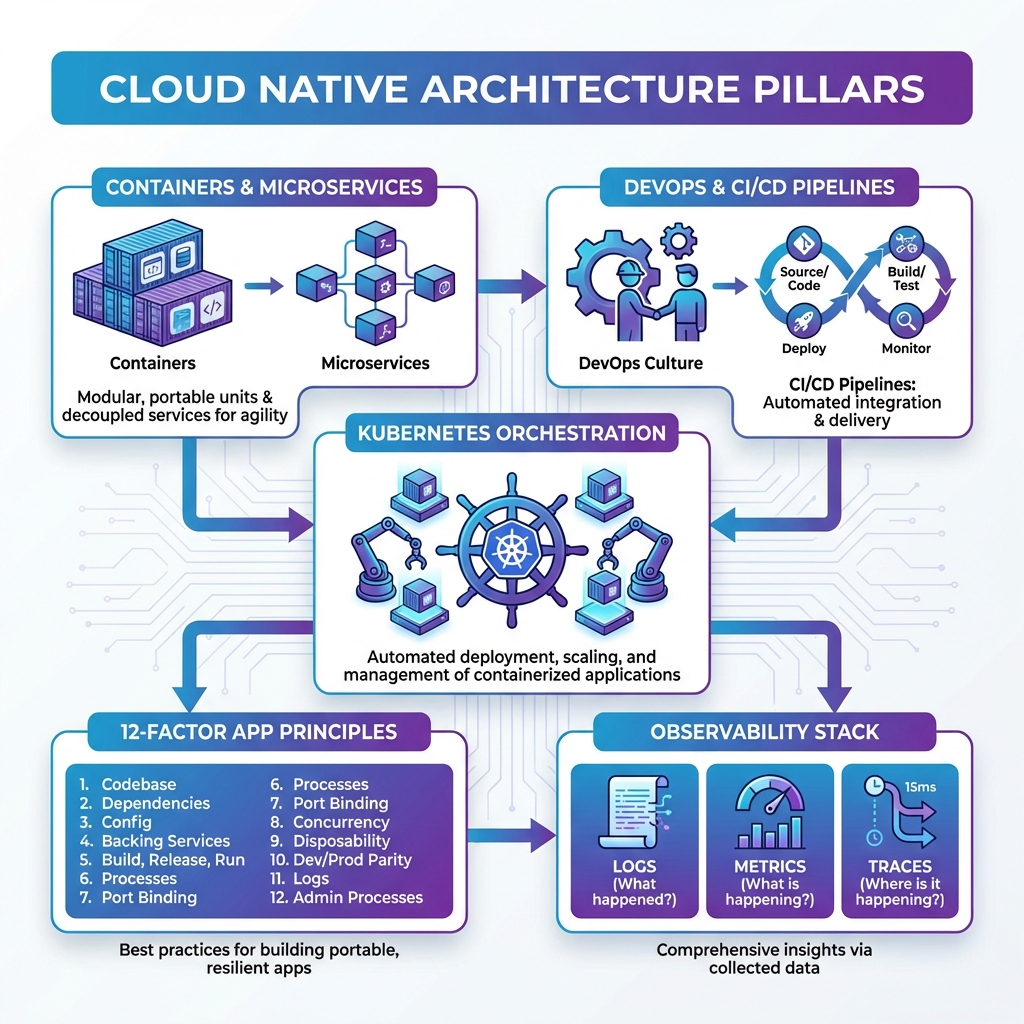
The Four Pillars of Cloud Native
| Pillar | Description | Key Technologies |
|---|---|---|
| Containers | Lightweight, portable packaging for applications and dependencies | Docker, containerd, Podman, CRI-O |
| Microservices | Small, independently deployable services with single responsibilities | API Gateway, Service Mesh, gRPC |
| DevOps & CI/CD | Automated pipelines for continuous integration, testing, and deployment | GitHub Actions, GitLab CI, ArgoCD, Flux |
| Orchestration | Automated container management, scaling, and self-healing | Kubernetes, Docker Swarm, Nomad |
The 12-Factor App Methodology
The 12-Factor App methodology defines best practices for building cloud-native applications. These principles ensure portability, scalability, and maintainability.
| # | Factor | Principle |
|---|---|---|
| 1 | Codebase | One codebase tracked in version control, many deploys |
| 2 | Dependencies | Explicitly declare and isolate dependencies |
| 3 | Config | Store config in the environment (not code) |
| 4 | Backing Services | Treat backing services as attached resources |
| 5 | Build, Release, Run | Strictly separate build and run stages |
| 6 | Processes | Execute app as stateless processes |
| 7 | Port Binding | Export services via port binding |
| 8 | Concurrency | Scale out via the process model |
| 9 | Disposability | Maximize robustness with fast startup/graceful shutdown |
| 10 | Dev/Prod Parity | Keep development, staging, and production similar |
| 11 | Logs | Treat logs as event streams |
| 12 | Admin Processes | Run admin/management tasks as one-off processes |
The 12-Factor methodology was developed by Heroku engineers based on patterns from deploying hundreds of thousands of applications. Following these principles ensures your applications are portable, scalable, and maintainable across any cloud platform.
Container Technology Deep Dive
Containers revolutionized software deployment by packaging applications with their dependencies into standardized, portable units. Understanding containerization is fundamental to cloud-native success.
Container vs Virtual Machine
| Aspect | Containers | Virtual Machines |
|---|---|---|
| Boot Time | Milliseconds to seconds | Minutes |
| Size | MBs (10-500MB typical) | GBs (1-20GB typical) |
| Isolation | Process-level (shared kernel) | Hardware-level (full OS) |
| Resource Usage | Lightweight (shared resources) | Heavy (dedicated resources) |
| Density | 100s per host | 10s per host |
| Security | Namespace isolation | Stronger isolation |
- Use multi-stage builds – Reduce image size by 50-90%
- Run as non-root – Never run containers as root user
- One process per container – Keep containers focused
- Use .dockerignore – Exclude unnecessary files from build context
- Pin base image versions – Avoid
latesttag in production - Scan for vulnerabilities – Use Trivy, Snyk, or Grype regularly
- Use distroless or Alpine – Minimize attack surface
- Layer optimization – Order Dockerfile commands by change frequency
Microservices: Pros and Cons
Microservices decompose applications into small, independently deployable services. Each service owns its data and communicates via well-defined APIs. However, microservices introduce distributed systems complexity that must be carefully managed.
| ✅ Advantages | ❌ Challenges |
|---|---|
| Independent deployment and scaling | Network latency between services |
| Technology flexibility per service | Distributed system complexity |
| Fault isolation (one service fails, others work) | Data consistency challenges (eventual consistency) |
| Team autonomy and ownership | Operational overhead (many deployables) |
| Easier to understand individual services | Harder to understand the whole system |
| Faster release cycles | Testing complexity (integration, E2E) |
The most common microservices failure is creating a “distributed monolith” – services that are technically separate but tightly coupled through synchronous calls, shared databases, or coordinated deployments. This gives you the worst of both worlds: distributed system complexity without the benefits of independence.
Cloud Native Maturity Model
Organizations typically progress through stages of cloud-native maturity. Understanding where you are helps plan the journey ahead.
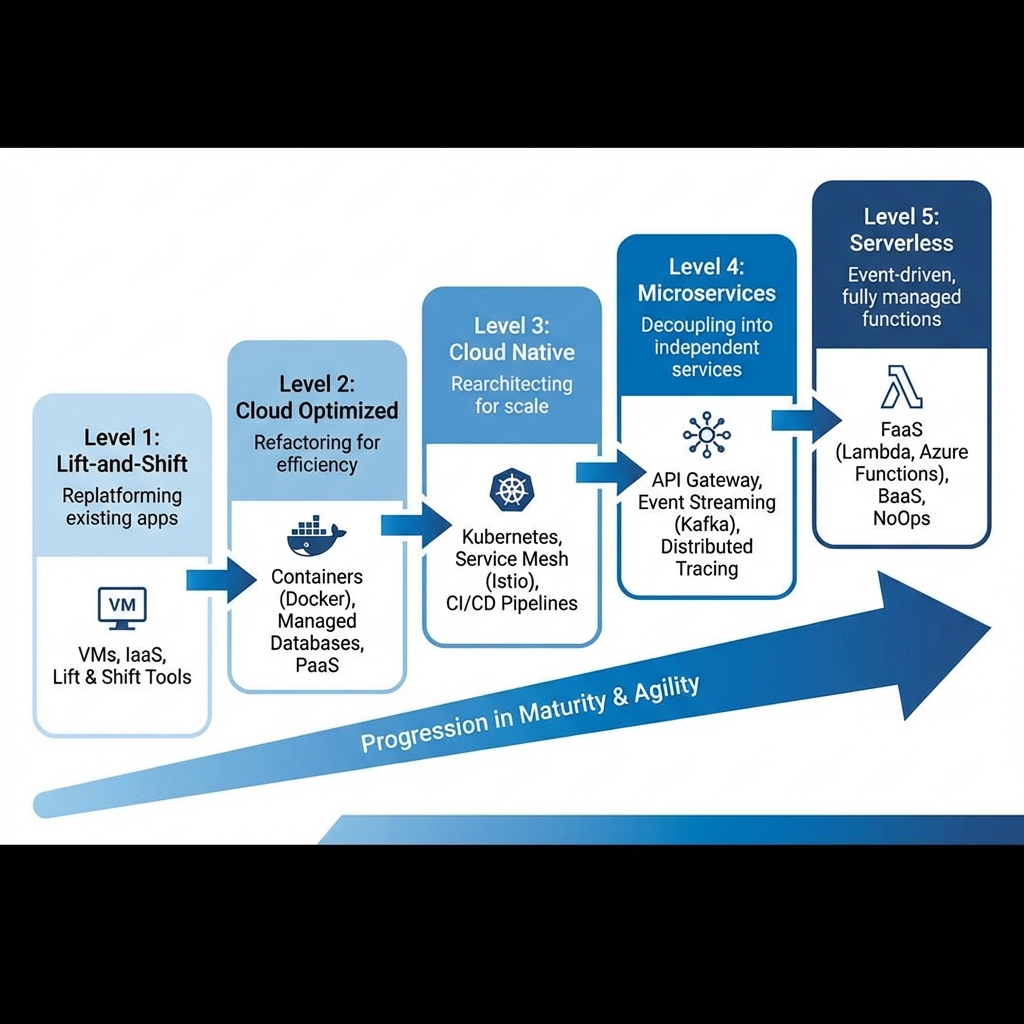
| Level | Characteristics | Common Patterns |
|---|---|---|
| Level 1: Lift-and-Shift | Move existing apps to cloud VMs without modification | IaaS, same architecture, minimal cloud benefits |
| Level 2: Cloud Optimized | Refactor to use managed services (PaaS) | Managed databases, containers, auto-scaling |
| Level 3: Cloud Native | Designed for cloud from ground up | Kubernetes, CI/CD, infrastructure as code |
| Level 4: Microservices | Decomposed into independently deployable services | Service mesh, event streaming, distributed tracing |
| Level 5: Serverless | Event-driven, fully managed infrastructure | FaaS (Lambda, Functions), BaaS, NoOps |
Don’t skip levels. Each stage builds capabilities and organizational learning required for the next. Jumping straight to microservices without containerization expertise leads to distributed monolith anti-patterns.
The Multi-Cloud Imperative
Organizations increasingly adopt multi-cloud strategies for resilience, compliance, and leveraging best-of-breed services. However, multi-cloud comes with complexity that must be carefully managed.
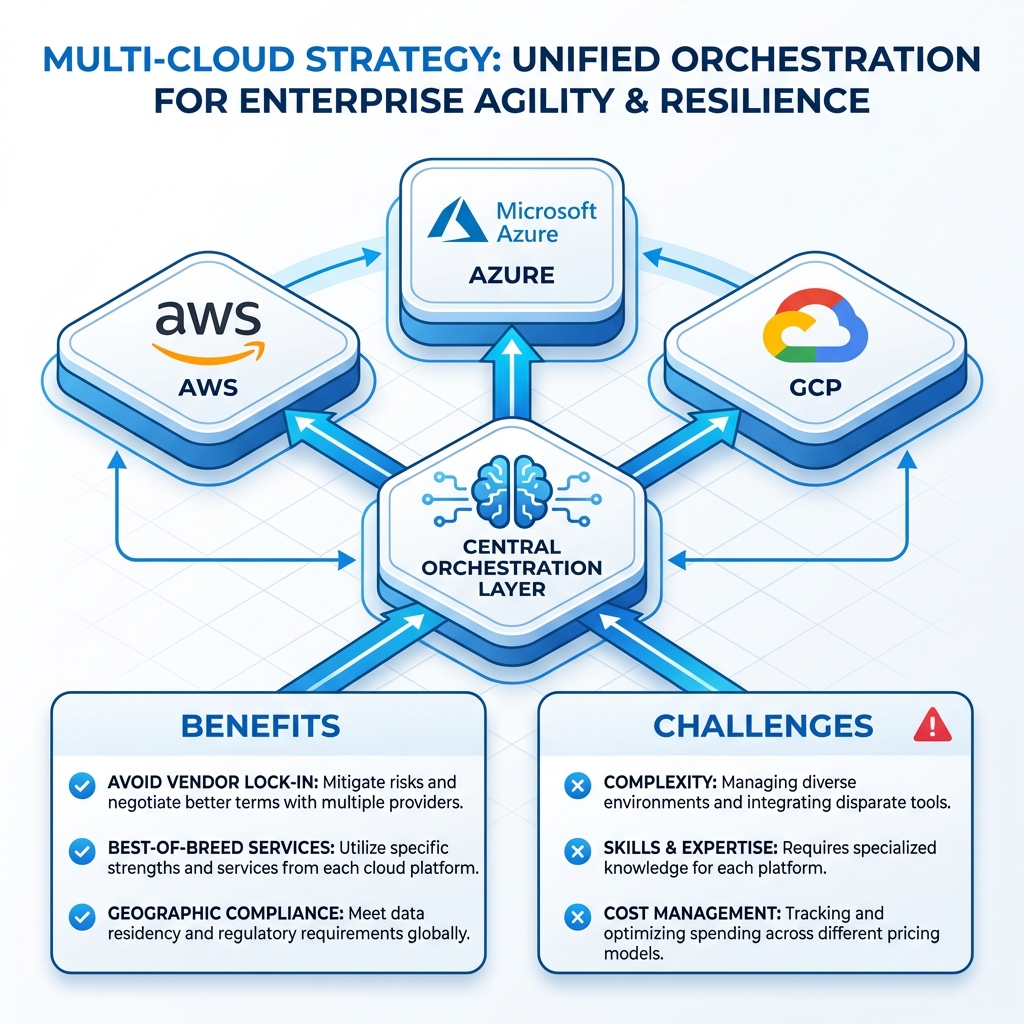
Multi-Cloud vs Hybrid Cloud
| Aspect | Multi-Cloud | Hybrid Cloud |
|---|---|---|
| Definition | Multiple public cloud providers | Public cloud + private infrastructure |
| Primary Goal | Avoid vendor lock-in, best-of-breed | Data sovereignty, gradual migration |
| Complexity | High (different APIs, tools) | Medium (consistent with on-prem) |
| Use Case | Global apps, M&A, compliance | Legacy integration, data residency |
Cloud Provider Comparison
| Category | AWS | Azure | GCP |
|---|---|---|---|
| Market Position | Leader (~32%) | #2 (~23%) | #3 (~10%) |
| Strength | Breadth of services | Enterprise/Microsoft | Data/ML, Kubernetes |
| Kubernetes | EKS | AKS | GKE (most mature) |
| Serverless | Lambda | Azure Functions | Cloud Functions/Run |
| Best For | Startups, variety | Enterprise, .NET | Data, ML, K8s |
Multi-Cloud Decision Framework
Before adopting multi-cloud, evaluate your specific drivers and constraints. Multi-cloud adds significant complexity—ensure the benefits justify the costs.
| ✅ Good Reasons for Multi-Cloud | ❌ Bad Reasons for Multi-Cloud |
|---|---|
| Regulatory data residency requirements | “Everyone is doing it” |
| M&A with existing different platforms | Fear of vendor lock-in without specific risk |
| Best-of-breed requirements (GCP ML + AWS) | Better pricing negotiation (rarely works) |
| True active-active disaster recovery | Premature optimization |
- Use abstraction layers – Kubernetes, Terraform for portability
- Centralize identity – Federate IAM across clouds with OIDC
- Unified observability – Single pane of glass across providers
- Network architecture – Plan cross-cloud connectivity early
- FinOps tooling – Cost management across all providers
- Skills investment – Budget for training on each platform
Kubernetes has become the de facto standard for container orchestration, providing a consistent platform across all cloud providers.
Kubernetes Architecture
---
config:
  theme: 'base'
  themeVariables:
    primaryColor: '#E3F2FD'
    primaryTextColor: '#0D47A1'
    primaryBorderColor: '#2196F3'
    lineColor: '#1976D2'
    textColor: '#1A1A1A'
---
graph TB
    subgraph "Control Plane"
        A[API Server]
        B[etcd]
        C[Scheduler]
        D[Controller Manager]
    end

    subgraph "Worker Node 1"
        E[kubelet]
        F[kube-proxy]
        G[Pod A]
        H[Pod B]
    end

    subgraph "Worker Node 2"
        I[kubelet]
        J[kube-proxy]
        K[Pod C]
        L[Pod D]
    end

    A --> B
    A --> C
    A --> D
    A --> E
    A --> I
    E --> G
    E --> H
    I --> K
    I --> L

    style A fill:#E3F2FD,stroke:#2196F3,stroke-width:2px
    style B fill:#E8F5E9,stroke:#4CAF50,stroke-width:2px
    style C fill:#F3E5F5,stroke:#9C27B0,stroke-width:2px
    style D fill:#FFF3E0,stroke:#FF9800,stroke-width:2px
Control Plane Components:
- API Server: Front-end for the Kubernetes control plane, handles all REST operations
- etcd: Consistent and highly-available key-value store for all cluster data
- Scheduler: Watches for newly created Pods and assigns them to nodes
- Controller Manager: Runs controller processes (node, replication, endpoints)
Node Components:
- kubelet: Agent that ensures containers are running in a Pod
- kube-proxy: Network proxy that maintains network rules on nodes
- Container Runtime: Software responsible for running containers (containerd, CRI-O)
Managed Kubernetes Comparison
| Feature | EKS (AWS) | AKS (Azure) | GKE (GCP) |
|---|---|---|---|
| Control Plane Cost | $0.10/hr (~$73/mo) | Free | Free (1 zonal) |
| Autopilot/Serverless | Fargate | Virtual Nodes | GKE Autopilot |
| Auto-upgrade | Manual/Managed | Automatic | Automatic |
| Networking | VPC CNI | Azure CNI + Kubenet | VPC-native |
| GPU Support | ✅ | ✅ | ✅ (Best) |
- Resource limits – Always set CPU/memory requests and limits
- Pod Disruption Budgets – Ensure availability during upgrades
- Network Policies – Default deny, explicit allow
- RBAC – Least privilege, no cluster-admin for apps
- Liveness/Readiness probes – Essential for self-healing
- Pod Security Standards – Enforce baseline or restricted
- Secrets management – External Secrets Operator with Vault
- Horizontal Pod Autoscaler – Auto-scale based on metrics
- No resource limits – One pod can starve the entire node
- Running as root – Major security vulnerability
- Storing secrets in ConfigMaps – Use Secrets or external vault
- No health checks – K8s can’t self-heal without probes
- Hardcoded replicas – Use HPA for auto-scaling
- Skipping namespaces – Everything in default is chaos
Observability: The Three Pillars
Cloud-native applications require comprehensive observability to understand system behavior, diagnose issues, and optimize performance.
| Pillar | Purpose | Tools |
|---|---|---|
| Logs | What happened? Discrete events with context | ELK Stack, Loki, CloudWatch Logs |
| Metrics | How is the system performing? Numeric time-series | Prometheus, Grafana, Datadog |
| Traces | Where did time go? Request flow across services | Jaeger, Zipkin, AWS X-Ray, OpenTelemetry |
- Structured logging – JSON format with correlation IDs
- Use OpenTelemetry – Vendor-neutral instrumentation standard
- Define SLIs/SLOs – Measure what matters to users
- Alert on symptoms, not causes – Focus on user impact
- Dashboards for context – Not for alerting
- Distributed tracing – Essential for microservices debugging
- Cost-aware retention – Tier data by value and age
Observability Tool Selection Guide
| Tool | Type | Pros | Cons |
|---|---|---|---|
| Prometheus + Grafana | Metrics | Open source, K8s native, powerful PromQL | Scaling requires Thanos/Cortex |
| Datadog | Full stack | All-in-one, great UX, AI features | Expensive at scale |
| Jaeger / Tempo | Tracing | Open source, CNCF, OpenTelemetry native | Requires separate metrics/logs |
| ELK Stack | Logs | Powerful search, mature ecosystem | Resource hungry, complex ops |
| Loki | Logs | Lightweight, Prometheus-like for logs | Less powerful search than Elastic |
Don’t build observability as an afterthought. Instrument your applications from day one. The cost of adding observability later is exponentially higher, and you’ll lack the historical data needed to diagnose problems.
Implementation Patterns
GitOps Workflow
GitOps uses Git as the single source of truth for declarative infrastructure and applications. Changes are made via pull requests, and automated controllers reconcile the desired state.
---
config:
  theme: 'base'
  themeVariables:
    primaryColor: '#E8F5E9'
    primaryTextColor: '#1B5E20'
    primaryBorderColor: '#4CAF50'
---
sequenceDiagram
    participant Dev as Developer
    participant Git as Git Repository
    participant CI as CI Pipeline
    participant Registry as Container Registry
    participant ArgoCD as ArgoCD
    participant K8s as Kubernetes

    Dev->>Git: Push code changes
    Git->>CI: Trigger pipeline
    CI->>CI: Build & Test
    CI->>Registry: Push container image
    CI->>Git: Update image tag in manifests
    Git->>ArgoCD: Webhook notification
    ArgoCD->>Git: Pull desired state
    ArgoCD->>K8s: Reconcile cluster state
    K8s-->>ArgoCD: Current state
    ArgoCD->>K8s: Apply changes
Service Mesh Architecture
A service mesh provides infrastructure-level features like traffic management, security, and observability without changing application code.
| Feature | Istio | Linkerd | AWS App Mesh |
|---|---|---|---|
| Complexity | High | Low | Medium |
| Resource Overhead | High | Very Low | Low |
| mTLS | ✅ | ✅ | ✅ |
| Best For | Feature-rich needs | Simplicity, lightweight | AWS-native |
CI/CD Pipeline Patterns
Continuous Integration and Continuous Deployment pipelines are the backbone of cloud-native delivery. Choosing the right patterns and tools is critical for developer productivity and release reliability.
| Pattern | Description | When to Use |
|---|---|---|
| Trunk-Based Development | All developers commit to main, short-lived branches | High-velocity teams, continuous deployment |
| GitFlow | Feature branches, develop/release/main branches | Scheduled releases, multiple versions |
| GitOps | Git as source of truth, pull-based deployment | Kubernetes, declarative infrastructure |
| Blue-Green Deployment | Two identical environments, instant switchover | Zero-downtime, easy rollback |
| Canary Deployment | Gradual traffic shift (1% → 10% → 100%) | Risk mitigation, A/B testing |
- Fast feedback – Keep CI under 10 minutes, parallelize tests
- Immutable artifacts – Build once, deploy anywhere
- Environment parity – Dev, staging, prod should be identical
- Feature flags – Decouple deployment from release
- Automated security scans – SAST, DAST, dependency scanning in pipeline
- Semantic versioning – Automated version bumps from commits
- Rollback capability – Always have a one-click rollback
Key Takeaways
- ✅ Start with containers – Master containerization before adopting Kubernetes
- ✅ Embrace 12-Factor principles – They’re the foundation of cloud-native design
- ✅ Progress through maturity levels – Don’t skip steps in your cloud-native journey
- ✅ Multi-cloud adds complexity – Adopt only when benefits clearly outweigh costs
- ✅ Kubernetes is the standard – But consider managed services (EKS, AKS, GKE)
- ✅ Observability from day one – Logs, metrics, and traces are non-negotiable
- ✅ GitOps for delivery – Declarative, version-controlled infrastructure
Conclusion
Cloud-native architecture and multi-cloud strategies represent the future of enterprise infrastructure. By embracing containers, microservices, Kubernetes, and modern DevOps practices, organizations can achieve unprecedented agility, resilience, and scalability. The journey requires investment in skills, tooling, and organizational change—but the competitive advantages make it essential for digital transformation.
Start small, learn continuously, and evolve your architecture as your organization’s cloud-native maturity grows. The cloud-native landscape will continue to evolve with technologies like WebAssembly, eBPF, and new serverless patterns—stay curious and keep building.
References
- Cloud Native Computing Foundation (CNCF)
- The Twelve-Factor App
- Kubernetes Documentation
- CNCF Annual Survey
- CNCF Cloud Native Landscape
Discover more from C4: Container, Code, Cloud & Context
Subscribe to get the latest posts sent to your email.