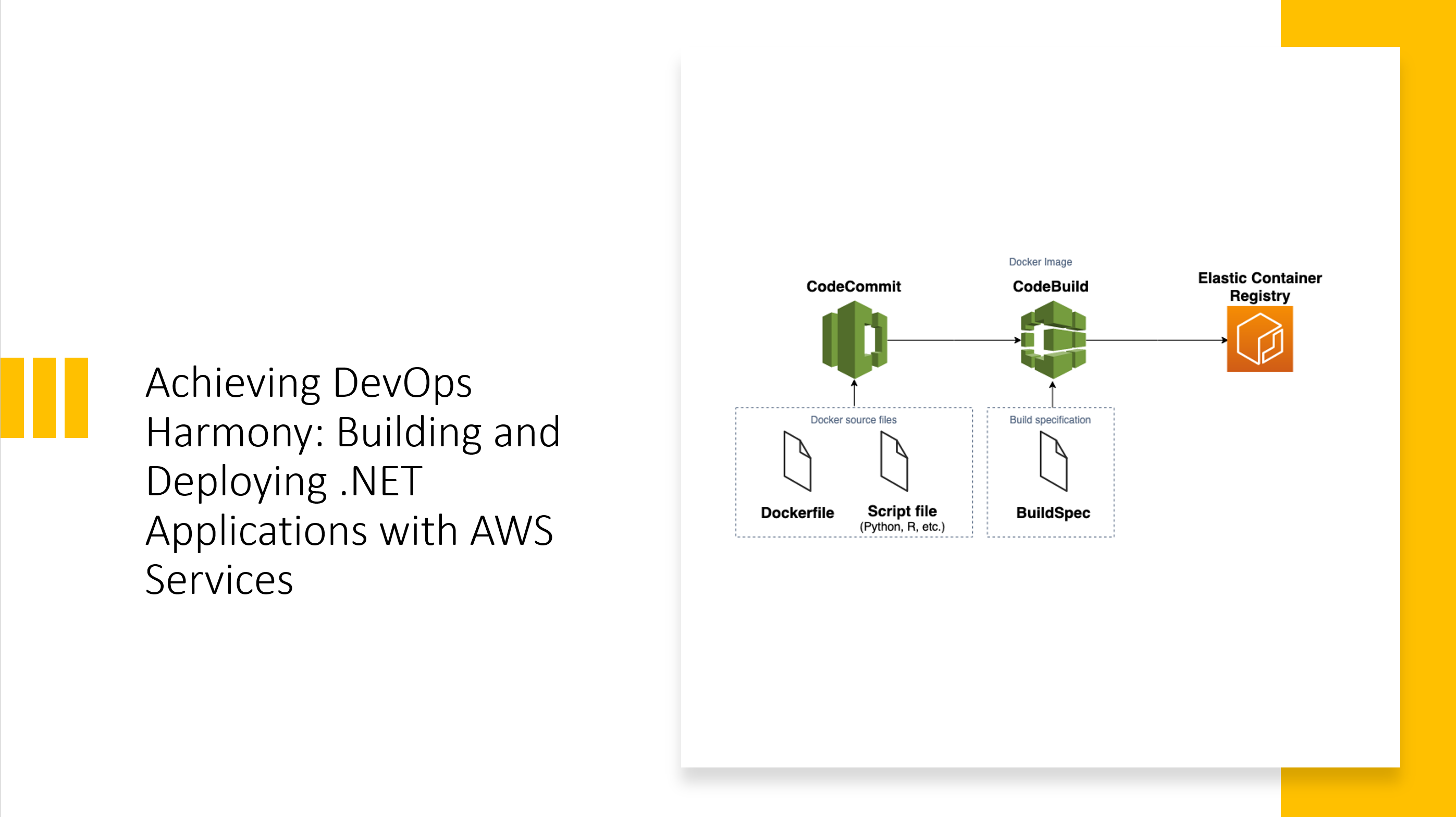
The Evolution of .NET Deployment on AWS
After two decades of building enterprise applications, I’ve witnessed the transformation of deployment practices from manual FTP uploads to sophisticated CI/CD pipelines. When AWS introduced their native DevOps toolchain, it fundamentally changed how we approach .NET application delivery. The integration between CodeCommit, CodeBuild, CodePipeline, and ECR creates a cohesive ecosystem that rivals—and in many ways surpasses—traditional deployment approaches.
What makes the AWS DevOps stack particularly compelling for .NET workloads is its deep integration with the broader AWS ecosystem. Unlike third-party CI/CD tools that require extensive configuration to interact with AWS services, the native toolchain operates with first-class IAM integration, VPC awareness, and seamless service-to-service communication.
Understanding the Pipeline Architecture
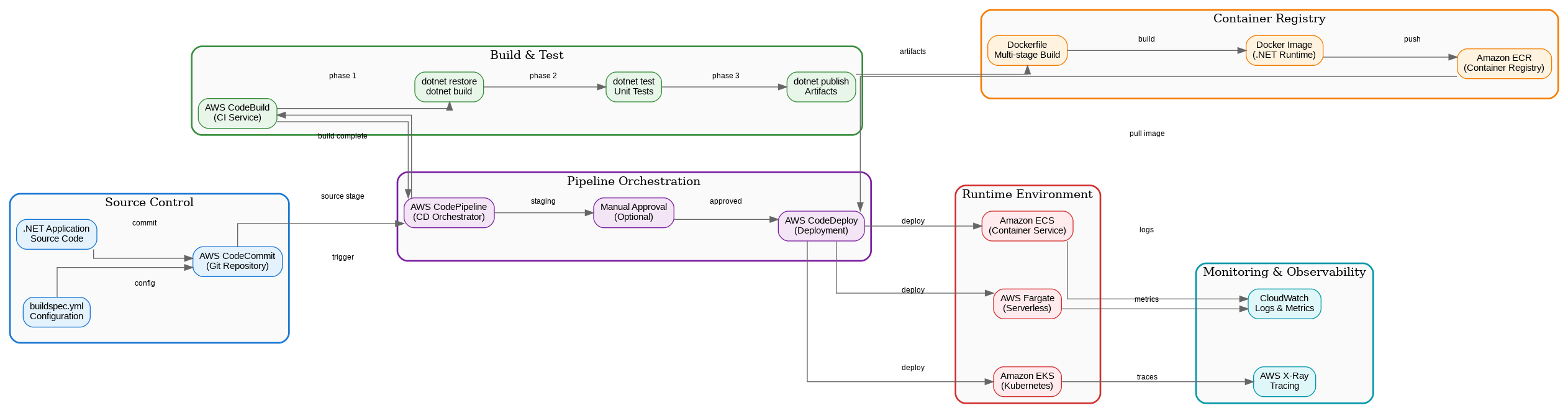
The architecture diagram above illustrates the complete flow from source code to production deployment. Each component serves a specific purpose in the delivery chain, and understanding their interactions is crucial for building resilient pipelines.
Source Control with CodeCommit
AWS CodeCommit provides Git-compatible repositories with enterprise-grade security. Unlike GitHub or Azure Repos, CodeCommit repositories exist entirely within your AWS account, meaning your source code never leaves your security boundary. For organizations with strict compliance requirements—particularly in financial services or healthcare—this isolation is invaluable.
The integration with IAM allows fine-grained access control that maps directly to your existing AWS identity management. You can enforce branch protection policies, require pull request approvals, and audit all repository access through CloudTrail.
Build Orchestration with CodeBuild
CodeBuild executes your build specifications in managed containers, eliminating the need to maintain build servers. For .NET applications, AWS provides pre-configured build environments with the .NET SDK, though I typically recommend creating custom Docker images for production builds to ensure consistency.
A production-ready buildspec.yml for .NET applications should include multiple phases:
version: 0.2
env:
  variables:
    DOTNET_CLI_TELEMETRY_OPTOUT: "1"
phases:
  install:
    runtime-versions:
      dotnet: 8.0
  pre_build:
    commands:
      - dotnet restore --locked-mode
      - dotnet tool restore
  build:
    commands:
      - dotnet build --configuration Release --no-restore
      - dotnet test --configuration Release --no-build --logger trx
      - dotnet publish --configuration Release --no-build -o ./publish
  post_build:
    commands:
      - aws ecr get-login-password | docker login --username AWS --password-stdin $ECR_REGISTRY
      - docker build -t $ECR_REPOSITORY:$CODEBUILD_RESOLVED_SOURCE_VERSION .
      - docker push $ECR_REPOSITORY:$CODEBUILD_RESOLVED_SOURCE_VERSION
artifacts:
  files:
    - publish/**/*
    - appspec.yml
    - taskdef.json
reports:
  test-reports:
    files:
      - '**/*.trx'
    file-format: VisualStudioTrx
Container Registry with ECR
Amazon ECR stores your Docker images with automatic vulnerability scanning, image signing, and lifecycle policies. The integration with ECS and EKS is seamless—no credential management required when pulling images within the same account.
For .NET applications, I recommend multi-stage Dockerfiles that separate the build environment from the runtime:
FROM mcr.microsoft.com/dotnet/sdk:8.0 AS build
WORKDIR /src
COPY ["*.csproj", "./"]
RUN dotnet restore
COPY . .
RUN dotnet publish -c Release -o /app/publish

FROM mcr.microsoft.com/dotnet/aspnet:8.0 AS runtime
WORKDIR /app
COPY --from=build /app/publish .
EXPOSE 8080
ENV ASPNETCORE_URLS=http://+:8080
ENTRYPOINT ["dotnet", "MyApplication.dll"]
Pipeline Orchestration Patterns
CodePipeline orchestrates the entire delivery process, but the real power lies in how you structure your stages. A mature pipeline should include:
Source Stage: Triggered by commits to your main branch, with optional branch filtering for feature branches.
Build Stage: Compiles code, runs unit tests, performs static analysis, and produces artifacts.
Staging Deployment: Deploys to a staging environment that mirrors production.
Integration Testing: Runs automated integration and end-to-end tests against the staging environment.
Manual Approval: Optional gate for human review before production deployment.
Production Deployment: Blue-green or rolling deployment to production with automatic rollback on failure.
Deployment Strategies for .NET on ECS
When deploying containerized .NET applications to ECS, you have several deployment strategies available. Blue-green deployments create a complete parallel environment, routing traffic only after health checks pass. Rolling deployments gradually replace tasks, maintaining availability throughout the process.
For mission-critical applications, I recommend blue-green deployments with CodeDeploy. The ability to instantly roll back by shifting traffic to the previous task set has saved countless production incidents.
Comparing AWS DevOps with Alternatives
The choice between AWS native tools, Azure DevOps, and GitHub Actions depends on your existing infrastructure and team expertise. AWS DevOps excels when your workloads run primarily on AWS—the IAM integration, VPC connectivity, and service mesh capabilities are unmatched. Azure DevOps offers superior integration with Microsoft ecosystems and excellent hybrid cloud support. GitHub Actions provides the most flexibility and largest marketplace of pre-built actions.
| Aspect | AWS DevOps | Azure DevOps | GitHub Actions |
|---|---|---|---|
| AWS Integration | Native, seamless | Good with plugins | Good with actions |
| Learning Curve | Moderate | Low for .NET devs | Low |
| Cost Model | Pay per use | User-based | Minutes-based |
| Self-hosted Runners | Yes (CodeBuild) | Yes | Yes |
| Artifact Management | S3, ECR | Azure Artifacts | GitHub Packages |
Security Considerations
Security in CI/CD pipelines requires attention at every stage. Use IAM roles with least-privilege permissions for CodeBuild and CodePipeline. Store secrets in AWS Secrets Manager or Parameter Store, never in buildspec files. Enable encryption at rest for CodeCommit repositories and ECR images. Implement branch protection policies and require code reviews before merging to main.
Lessons from Production
After implementing dozens of AWS DevOps pipelines for .NET applications, several patterns consistently prove valuable. First, invest in comprehensive build caching—NuGet package caching alone can reduce build times by 40%. Second, implement proper health checks in your ECS task definitions; the default TCP check is insufficient for detecting application-level issues. Third, use CloudWatch Logs Insights to analyze build and deployment patterns over time.
The AWS DevOps toolchain continues to evolve, with recent additions like CodeCatalyst providing higher-level abstractions for common patterns. Whether you’re migrating from on-premises deployments or optimizing existing cloud workflows, the combination of CodeCommit, CodeBuild, CodePipeline, and ECR provides a solid foundation for .NET application delivery.
References
- AWS CodePipeline User Guide
- AWS CodeBuild User Guide
- Amazon ECR User Guide
- Microsoft .NET Docker Documentation
Discover more from C4: Container, Code, Cloud & Context
Subscribe to get the latest posts sent to your email.