
On this page
Intelligent document processing on AWS used to mean a pipeline: Amazon Textract for text and key-value pairs, a Lambda function of regular expressions to find the fields you wanted, perhaps Amazon Comprehend for entities, and more code to map it all into the shape your finance or claims system expects. Every new supplier layout was a code change.
Amazon Bedrock Data Automation (BDA) replaces most of that with a declaration. You describe the fields you want in a blueprint, a JSON schema with a plain-language instruction for each field, and BDA returns those fields as structured JSON with a confidence score and the page they came from. BDA was previewed at re:Invent in December 2024 and became generally available on 3 March 2025, a year before this article. This piece covers how it works as of March 2026, how to build an event-driven intake around it, what it costs, and when Textract or a direct model call is still the better tool. The sample is an invoice intake that is tested against the BDA API model.
What BDA does and does not do
BDA is a capability of Amazon Bedrock for documents, images, audio and video. It has two kinds of output. Standard output is the same for every file of a type: for documents, the text in reading order, tables, figures, a summary and element locations. Custom output is what you define in blueprints. A project holds the standard output settings and up to 40 blueprints, and BDA picks the blueprint that matches each document. You call it through a data automation profile, which routes requests across Regions within a geography using cross-Region inference.
At general availability BDA ran in US East (N. Virginia) and US West (Oregon). In July 2025 it reached Frankfurt, London, Ireland, Mumbai and Sydney, and in August 2025 AWS GovCloud (US-West). In November 2025 a synchronous API was added for images; documents are processed asynchronously, with results written to S3.
What BDA does not do is decide what happens next. It does not post an invoice, call a reviewer or check a value against your purchase orders. That logic stays in your code, and most of this article is about writing it well.
Standard output is priced at $0.010 per page and is what a Bedrock Knowledge Base uses when BDA is its parser. Custom output is $0.040 per page for a blueprint with up to 30 fields. If you only need text and tables for search or retrieval, standard output is enough; use blueprints when a downstream system needs named, typed fields.
Writing a blueprint
A blueprint is a draft-07 JSON schema with a class, a description and a properties object. Each field has a type (string, number or boolean), an inferenceType and an instruction. Use explicit when the value is printed in the document, and inferred when BDA has to derive or normalise it, such as a date reformatted to ISO 8601 or a currency code worked out from a symbol. Repeating groups such as invoice lines are arrays that refer to a type in definitions.
Blueprints have limits worth checking before you call the API: at most 100 leaf fields, field names of up to 60 characters with no slash, and instructions of up to 600 characters for documents. The sample builds the schema from Python objects and checks those limits in CI:
"""Build and check an Amazon Bedrock Data Automation (BDA) document blueprint.

A blueprint is a JSON schema (draft-07) whose fields carry a natural-language
``instruction`` and an ``inferenceType``: ``explicit`` for values printed in the
document, ``inferred`` for values BDA must derive. This module builds the
schema from Python objects and checks it against BDA's documented blueprint
limits before it is sent, so a bad blueprint fails in CI rather than at
CreateBlueprint.
"""

from __future__ import annotations

import json
from dataclasses import dataclass, field
from typing import Any

MAX_LEAF_FIELDS = 100          # leaf fields per blueprint
MAX_NAME_LENGTH = 60           # field and blueprint name length
MAX_DOC_INSTRUCTION = 600      # instruction length for document blueprints
MAX_SCHEMA_CHARS = 100_000     # serialized blueprint size
PRICE_FIELD_THRESHOLD = 30     # custom output price covers up to 30 fields
TYPES = {"string", "number", "boolean"}


@dataclass(frozen=True)
class Field:
    name: str
    instruction: str
    type: str = "string"
    inference: str = "explicit"      # "explicit" or "inferred"


@dataclass(frozen=True)
class Table:
    """A repeating group, such as invoice line items, extracted as an array."""
    name: str
    instruction: str
    columns: list[Field] = field(default_factory=list)


def _leaf(f: Field) -> dict[str, Any]:
    return {"type": f.type, "inferenceType": f.inference, "instruction": f.instruction}


def build_blueprint(class_name: str, description: str,
                    fields: list[Field], tables: list[Table] = ()) -> dict[str, Any]:
    schema: dict[str, Any] = {
        "$schema": "http://json-schema.org/draft-07/schema#",
        "class": class_name,
        "description": description,
        "type": "object",
        "definitions": {},
        "properties": {f.name: _leaf(f) for f in fields},
    }
    for t in tables:
        item = f"{t.name}_item"
        schema["definitions"][item] = {
            "type": "object",
            "properties": {c.name: _leaf(c) for c in t.columns},
        }
        schema["properties"][t.name] = {
            "type": "array",
            "instruction": t.instruction,
            "items": {"$ref": f"#/definitions/{item}"},
        }
    return schema


def leaf_fields(schema: dict[str, Any]) -> list[str]:
    """Names of leaf fields, with table columns as table.column."""
    names: list[str] = []
    for name, prop in schema["properties"].items():
        if prop.get("type") == "array":
            ref = prop["items"]["$ref"].rsplit("/", 1)[1]
            names += [f"{name}.{c}" for c in schema["definitions"][ref]["properties"]]
        else:
            names.append(name)
    return names


def check_blueprint(schema: dict[str, Any]) -> list[str]:
    """Return problems that would make CreateBlueprint fail or extraction unreliable."""
    problems: list[str] = []
    leaves = leaf_fields(schema)
    if len(leaves) > MAX_LEAF_FIELDS:
        problems.append(f"{len(leaves)} leaf fields; the limit is {MAX_LEAF_FIELDS}")
    if len(json.dumps(schema)) > MAX_SCHEMA_CHARS:
        problems.append(f"schema is over {MAX_SCHEMA_CHARS} characters")

    def visit(props: dict[str, Any], path: str) -> None:
        for name, prop in props.items():
            where = f"{path}{name}"
            if "/" in name or len(name) > MAX_NAME_LENGTH:
                problems.append(f"{where}: names must be at most {MAX_NAME_LENGTH} characters and contain no '/'")
            instruction = prop.get("instruction", "")
            if not instruction.strip():
                problems.append(f"{where}: missing instruction")
            elif len(instruction) > MAX_DOC_INSTRUCTION:
                problems.append(f"{where}: instruction longer than {MAX_DOC_INSTRUCTION} characters")
            if prop.get("type") == "array":
                continue
            if prop.get("type") not in TYPES:
                problems.append(f"{where}: type must be one of {sorted(TYPES)}")
            if prop.get("inferenceType") not in {"explicit", "inferred"}:
                problems.append(f"{where}: inferenceType must be explicit or inferred")

    visit(schema["properties"], "")
    for item, definition in schema["definitions"].items():
        visit(definition["properties"], f"{item}.")
    return problems


INVOICE = build_blueprint(
    "supplier_invoice",
    "Supplier invoices received by accounts payable, one invoice per document",
    fields=[
        Field("invoice_number", "The invoice number or invoice ID as printed"),
        Field("invoice_date", "The invoice date, formatted YYYY-MM-DD", inference="inferred"),
        Field("supplier_name", "The legal name of the company issuing the invoice"),
        Field("supplier_vat_number", "The supplier's VAT registration number, without spaces",
              inference="inferred"),
        Field("currency", "The ISO 4217 currency code of the amounts, such as EUR or GBP",
              inference="inferred"),
        Field("net_total", "The total before VAT", type="number"),
        Field("vat_total", "The total VAT charged", type="number"),
        Field("gross_total", "The total amount payable including VAT", type="number"),
        Field("purchase_order_number", "The customer's purchase order number, if one is quoted"),
    ],
    tables=[Table("line_items", "Each billed line on the invoice", columns=[
        Field("description", "Description of the goods or service"),
        Field("quantity", "Quantity billed", type="number"),
        Field("unit_price", "Price per unit before VAT", type="number"),
        Field("line_total", "Line amount before VAT", type="number"),
    ])],
)


def create_blueprint(client: Any, name: str, schema: dict[str, Any]) -> str:
    """Create the blueprint in the DEVELOPMENT stage and return its ARN."""
    problems = check_blueprint(schema)
    if problems:
        raise ValueError("; ".join(problems))
    resp = client.create_blueprint(blueprintName=name, type="DOCUMENT",
                                   blueprintStage="DEVELOPMENT", schema=json.dumps(schema))
    return resp["blueprint"]["blueprintArn"]
The quality of the instructions decides the quality of the output. Say what the field is for, not where it usually sits on the page; name the format you want; and say what to return when the value is absent. Treat a blueprint like code: keep it in version control, create it in the DEVELOPMENT stage, run it against a fixed set of real documents with known answers, and promote it to LIVE only when the results hold.
Submitting documents and reacting to results
Documents go through InvokeDataAutomationAsync. The call takes the input object, an output prefix, the project, the profile and optionally a KMS key, and returns an invocation ARN. With EventBridge notification enabled, BDA publishes Bedrock Data Automation Job Succeeded, Job Failed With Client Error or Job Failed With Service Error events, so nothing needs to poll GetDataAutomationStatus.
%%{init: {'theme': 'base', 'themeVariables': {'actorBkg': '#FFF3E0', 'actorBorder': '#FF9900', 'actorTextColor': '#232F3E', 'signalColor': '#0073BB', 'signalTextColor': '#0F172A', 'noteBkgColor': '#FFF8E7', 'noteBorderColor': '#FF9900', 'noteTextColor': '#232F3E'}}}%%
sequenceDiagram
    participant S as Submit function
    participant B as Bedrock Data Automation
    participant E as EventBridge
    participant R as Result router
    S->>B: InvokeDataAutomationAsync (client token, project, profile)
    B-->>S: invocationArn
    Note over B: Splits, classifies and extracts,<br/>then writes job_metadata.json and result.json to S3
    B->>E: Bedrock Data Automation Job Succeeded
    E->>R: Rule match, with retries and a dead-letter queue
    R->>R: Read custom output, check confidence and required fields
    Note over R: Accept, or send to the review queue
The event carries the job ID and the output location. The router finds the job’s job_metadata.json, which lists each document segment with its blueprint match status and the path of its custom output. Each custom output file has the extracted values in inference_result and, in explainability_info, a confidence score and location for each field:
"""Submit documents to Bedrock Data Automation and route the results by confidence.

submit()      starts an asynchronous BDA job with EventBridge notification.
handler()     is a Lambda handler for the "Bedrock Data Automation Job Succeeded"
              EventBridge event. It finds the job's job_metadata.json, reads the
              custom output for each document segment, and splits fields into
              accepted values and values that need a person to check them.
cost_per_page() prices custom output per page (blueprint fields above 30 cost extra).
"""

from __future__ import annotations

import hashlib
import json
import logging
import os
from typing import Any, Iterator
from urllib.parse import urlparse

log = logging.getLogger()
log.setLevel(logging.INFO)

CUSTOM_PAGE_PRICE = 0.040       # USD per page, blueprints with up to 30 fields
EXTRA_FIELD_PRICE = 0.0005      # USD per page for each field above 30
STANDARD_PAGE_PRICE = 0.010     # USD per page, standard output only


def cost_per_page(fields: int) -> float:
    return round(CUSTOM_PAGE_PRICE + max(0, fields - 30) * EXTRA_FIELD_PRICE, 6)


def submit(client: Any, *, input_uri: str, output_uri: str, project_arn: str,
           profile_arn: str, kms_key_arn: str | None = None) -> str:
    """Start an async job. The client token makes a retried submit of the same object idempotent."""
    kwargs: dict[str, Any] = {
        "clientToken": hashlib.sha256(input_uri.encode()).hexdigest()[:64],
        "inputConfiguration": {"s3Uri": input_uri},
        "outputConfiguration": {"s3Uri": output_uri},
        "dataAutomationConfiguration": {"dataAutomationProjectArn": project_arn, "stage": "LIVE"},
        "dataAutomationProfileArn": profile_arn,
        "notificationConfiguration": {"eventBridgeConfiguration": {"eventBridgeEnabled": True}},
    }
    if kms_key_arn:
        kwargs["encryptionConfiguration"] = {"kmsKeyId": kms_key_arn}
    return client.invoke_data_automation_async(**kwargs)["invocationArn"]


def _split(uri: str) -> tuple[str, str]:
    u = urlparse(uri)
    return u.netloc, u.path.lstrip("/")


def _read_json(s3: Any, bucket: str, key: str) -> dict[str, Any]:
    return json.loads(s3.get_object(Bucket=bucket, Key=key)["Body"].read())


def find_job_metadata(s3: Any, bucket: str, prefix: str, job_id: str) -> str:
    """Return the key of job_metadata.json for this job under the output prefix."""
    paginator = s3.get_paginator("list_objects_v2")
    for page in paginator.paginate(Bucket=bucket, Prefix=prefix.rstrip("/") + "/"):
        for obj in page.get("Contents", []):
            key = obj["Key"]
            if job_id in key and key.endswith("job_metadata.json"):
                return key
    raise FileNotFoundError(f"job_metadata.json for {job_id} not found under s3://{bucket}/{prefix}")


def confidences(explainability: Any, path: str = "") -> Iterator[tuple[str, float]]:
    """Yield (field path, confidence) for every field in a custom output explainability block."""
    if isinstance(explainability, list):
        for i, item in enumerate(explainability):
            yield from confidences(item, f"{path}[{i}]" if path else "")
    elif isinstance(explainability, dict):
        if isinstance(explainability.get("confidence"), (int, float)):
            yield path, float(explainability["confidence"])
            return
        for key, value in explainability.items():
            yield from confidences(value, f"{path}.{key}" if path else key)


def route(custom_output: dict[str, Any], threshold: float,
          required: set[str]) -> dict[str, Any]:
    """Split one document's custom output into accepted fields and fields to review."""
    scores = dict(confidences(custom_output.get("explainability_info", [])))
    low = sorted(p for p, c in scores.items() if c < threshold)
    missing = sorted(f for f in required if custom_output.get("inference_result", {}).get(f) in (None, ""))
    return {
        "blueprint": custom_output.get("matched_blueprint", {}).get("name"),
        "values": custom_output.get("inference_result", {}),
        "low_confidence": low,
        "missing_required": missing,
        "needs_review": bool(low or missing),
    }


def handler(event: dict[str, Any], context: Any = None, *, s3: Any = None, sqs: Any = None) -> dict[str, Any]:
    import boto3  # imported here so tests can inject stubbed clients

    s3 = s3 or boto3.client("s3")
    sqs = sqs or boto3.client("sqs")
    detail = event["detail"]
    if detail.get("job_status") != "SUCCESS":
        log.error(json.dumps({"job_id": detail.get("job_id"), "error": detail.get("error_message")}))
        _send(sqs, {"job_id": detail.get("job_id"), "reason": "job failed",
                    "error": detail.get("error_message"), "input": detail.get("input_s3_object")})
        return {"job_id": detail.get("job_id"), "documents": 0, "review": 1}

    threshold = float(os.environ.get("CONFIDENCE_THRESHOLD", "0.85"))
    required = set(filter(None, os.environ.get("REQUIRED_FIELDS", "").split(",")))
    out = detail["output_s3_location"]
    meta_key = find_job_metadata(s3, out["s3_bucket"], out["name"], detail["job_id"])
    meta = _read_json(s3, out["s3_bucket"], meta_key)

    documents = review = 0
    for asset in meta.get("output_metadata", []):
        for segment in asset.get("segment_metadata", []):
            if segment.get("custom_output_status") != "MATCH":
                review += 1
                _send(sqs, {"job_id": detail["job_id"], "reason": "no blueprint match",
                            "segment": segment})
                continue
            bucket, key = _split(segment["custom_output_path"])
            result = route(_read_json(s3, bucket, key), threshold, required)
            documents += 1
            log.info(json.dumps({"job_id": detail["job_id"], "segment": key,
                                 "needs_review": result["needs_review"],
                                 "low_confidence": result["low_confidence"]}))
            if result["needs_review"]:
                review += 1
                _send(sqs, {"job_id": detail["job_id"], "custom_output": f"s3://{bucket}/{key}", **result})
    return {"job_id": detail["job_id"], "documents": documents, "review": review}


def _send(sqs: Any, body: dict[str, Any]) -> None:
    sqs.send_message(QueueUrl=os.environ["REVIEW_QUEUE_URL"], MessageBody=json.dumps(body, default=str))
The SAM template wires the rule, the function and a review queue with a dead-letter queue. The rule matches all three job outcomes, because a failed job also needs someone to look at the document:
AWSTemplateFormatVersion: "2010-09-09"
Transform: AWS::Serverless-2016-10-31
Description: >
  Bedrock Data Automation intake: a Lambda function on BDA job events that
  queues low-confidence or unmatched documents for review.

Parameters:
  OutputBucket:
    Type: String
    Description: Bucket that BDA writes job output to
  ConfidenceThreshold:
    Type: String
    Default: "0.85"
  RequiredFields:
    Type: String
    Default: invoice_number,supplier_name,gross_total

Resources:
  ReviewDeadLetterQueue:
    Type: AWS::SQS::Queue
    Properties:
      MessageRetentionPeriod: 1209600
      SqsManagedSseEnabled: true

  ReviewQueue:
    Type: AWS::SQS::Queue
    Properties:
      VisibilityTimeout: 300
      SqsManagedSseEnabled: true
      RedrivePolicy:
        deadLetterTargetArn: !GetAtt ReviewDeadLetterQueue.Arn
        maxReceiveCount: 5

  ResultRouter:
    Type: AWS::Serverless::Function
    Properties:
      Runtime: python3.13
      Architectures: [arm64]
      Handler: intake.handler
      CodeUri: .
      Timeout: 60
      MemorySize: 256
      Environment:
        Variables:
          REVIEW_QUEUE_URL: !Ref ReviewQueue
          CONFIDENCE_THRESHOLD: !Ref ConfidenceThreshold
          REQUIRED_FIELDS: !Ref RequiredFields
      Policies:
        - S3ReadPolicy:
            BucketName: !Ref OutputBucket
        - SQSSendMessagePolicy:
            QueueName: !GetAtt ReviewQueue.QueueName
      Events:
        JobFinished:
          Type: EventBridgeRule
          Properties:
            Pattern:
              source: [aws.bedrock]
              detail-type:
                - Bedrock Data Automation Job Succeeded
                - Bedrock Data Automation Job Failed With Client Error
                - Bedrock Data Automation Job Failed With Service Error
            RetryPolicy:
              MaximumRetryAttempts: 4
              MaximumEventAgeInSeconds: 3600
            DeadLetterConfig:
              Type: SQS

Outputs:
  ReviewQueueUrl:
Value: !Ref ReviewQueueA high confidence score means the model is sure it read the field it was asked for, not that the value is correct for your business. Pick the threshold from your own test set by checking which scores came with wrong values, and add checks the model cannot make: net plus VAT equals gross, the purchase order exists, the supplier VAT number is on file. Send every document that matches no blueprint, misses a required field or fails a check to review.
Cost
BDA is priced per page for documents. The AWS pricing page gives these examples, which the sample’s cost_per_page reproduces:
| Workload | Rate | Cost |
|---|---|---|
| 1,000 pages, standard output | $0.010 per page | $10.00 |
| 1,000 pages, custom output, 15-field blueprint | $0.040 per page | $40.00 |
| 40 pages with a 20-field blueprint, and 10 pages with a 40-field blueprint | $0.040, and $0.040 + 10 × $0.0005 = $0.045 | $1.60 + $0.45 = $2.05 |
Worked cell: 10 pages × ($0.040 + 10 extra fields × $0.0005) = $0.45. For comparison, Textract in US West (Oregon) charges $0.0015 per page for text detection, $0.01 per page for AnalyzeExpense and $0.05 per page for form key-value pairs, for the first million pages. BDA’s custom output sits between expense analysis and forms, and it replaces the parsing code you would write on top of Textract. Whether that is cheaper depends on how many layouts you see and how often they change. Keep blueprints under 30 fields where you can, because every extra field adds to the price of every page.
Choosing between BDA, Textract and a direct model call
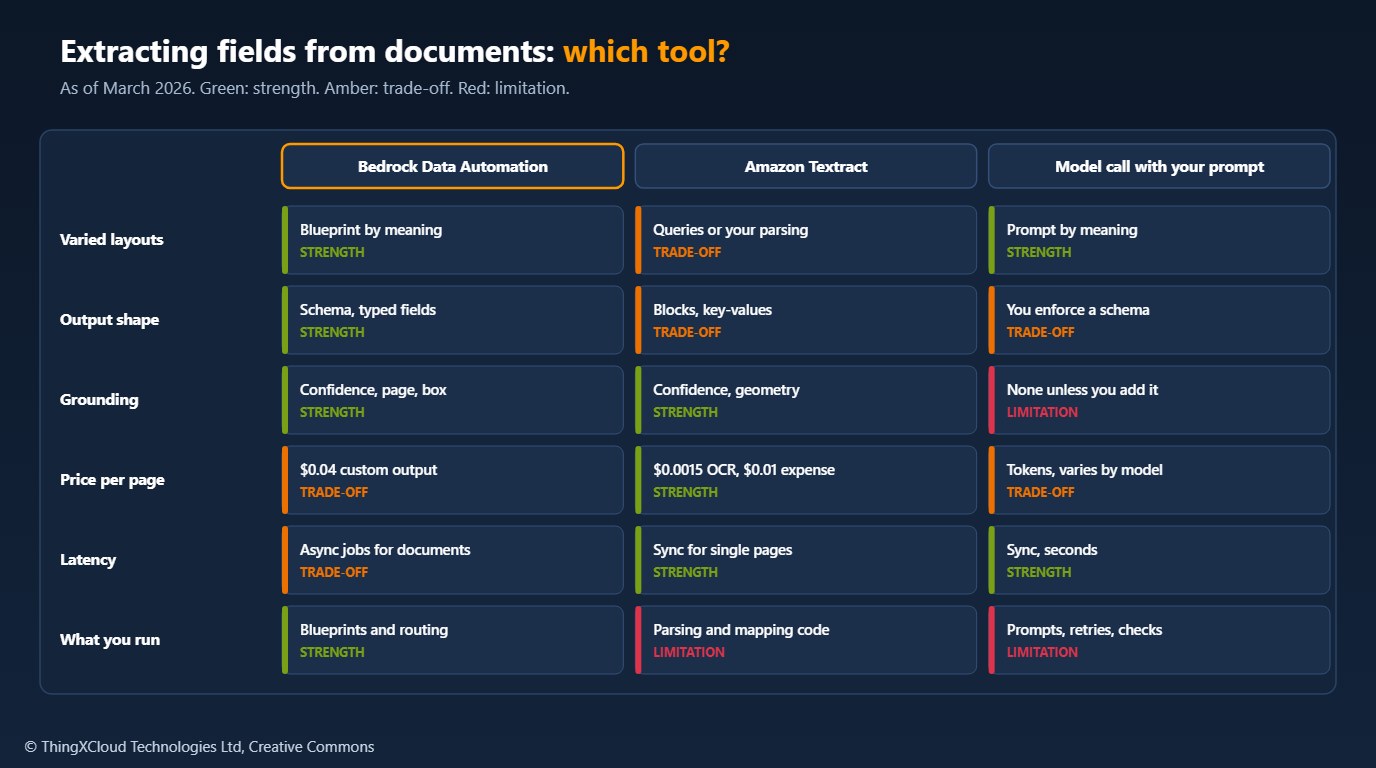
- Use BDA for documents whose layout varies by sender, such as supplier invoices, claims forms and referral letters, where you want typed fields with confidence and page locations and are willing to run asynchronous jobs.
- Use Textract for fixed layouts and high volumes, and where you need synchronous single-page results or only the text. AnalyzeExpense and AnalyzeID cover common document types without a blueprint.
- Use a direct model call, sending the document to a model through the Converse API with a schema in the prompt, for prototypes and low volumes. You then own schema enforcement, retries and any grounding, which BDA gives you.
Before committing, check the limits page for your inputs: file formats, page counts, file size and supported languages. In March 2026 document extraction supports English and a small set of European languages, which matters for forms in other languages.
Production architecture
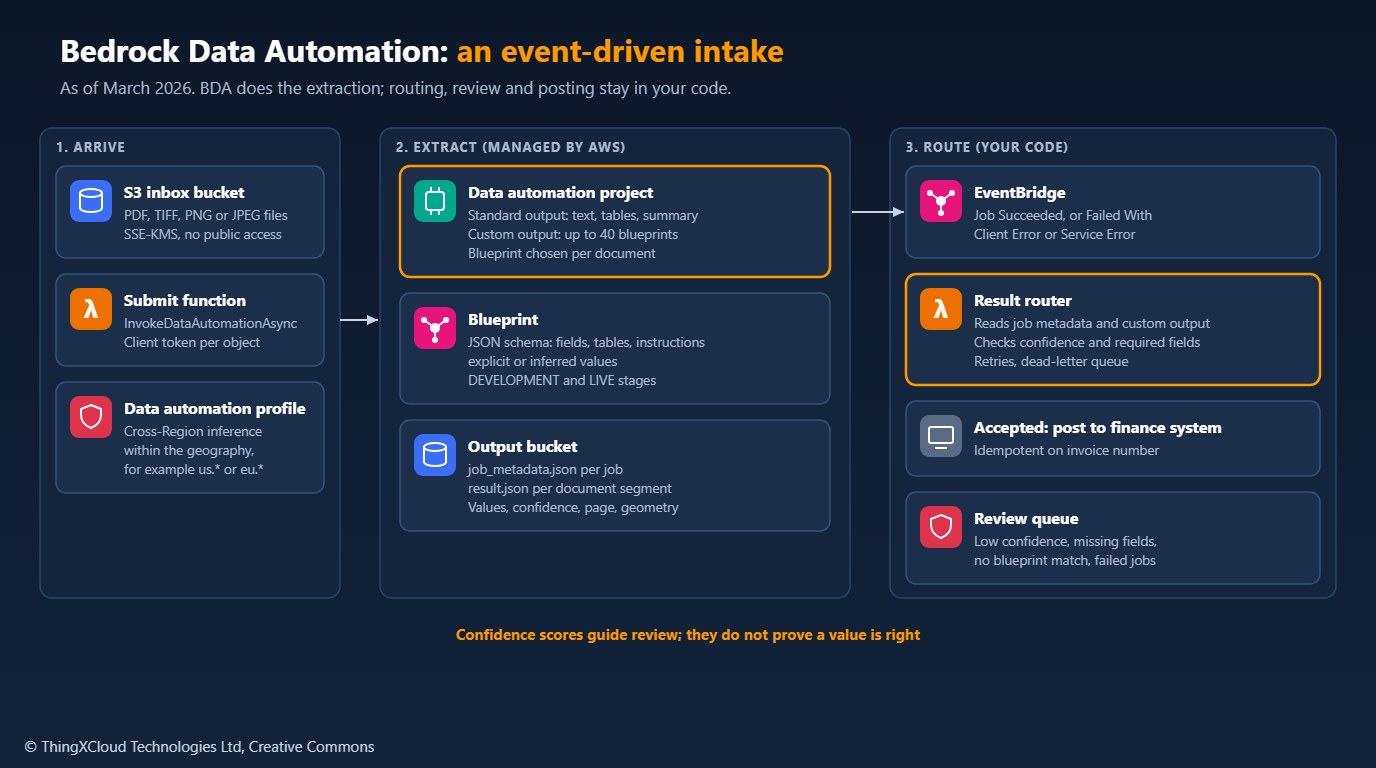
- Make every step idempotent. The sample derives the client token from the input object, so a retried submit does not start a second job, and posting should be keyed on the invoice number.
- Keep the dead-letter queues. EventBridge retries the router and then dead-letters the event; the review queue has its own dead-letter queue.
- Measure accuracy, not just throughput. Sample accepted documents for spot checks, and track the review rate by supplier and blueprint version.
- Version blueprints with the code. A change to an instruction changes the output; promote through
DEVELOPMENTandLIVEwith the test set as the gate.
Invoices carry personal data about sole traders and staff, and claims or referral forms carry health data. Encrypt the input and output buckets and the BDA job with a customer-managed KMS key, keep the output prefix out of broad read access, and set a lifecycle rule on outputs, because result.json holds the extracted values in clear text. BDA projects also have a sensitive-data setting that detects personal data and can write a redacted copy of the output. Confirm the Region and the profile’s geography meet your data residency requirements before you send health records.
blueprint.py and intake.py were tested with Python 3.13, boto3==1.42.55 and pytest==9.0.2: nine tests run the BDA, S3 and SQS calls through botocore’s Stubber, which validates requests and responses against the API models in that release, and reproduce AWS’s pricing examples. template.yaml passes cfn-lint 1.48.1. Nothing was run against a live AWS account, so the output file layout follows AWS documentation and examples rather than a captured job. Prices are from the Amazon Bedrock and Textract pricing pages.
Key takeaways
- BDA turns document extraction into a blueprint: a JSON schema with an instruction per field, returned as typed values with confidence and page locations.
- Use standard output for search and retrieval, and custom output when a downstream system needs named fields.
- Submit asynchronously and react to the EventBridge job events, including failures, instead of polling.
- Route on confidence, required fields and business checks; confidence alone does not prove a value is right.
- Custom output costs $0.040 per page for up to 30 fields. Textract is cheaper for fixed layouts and text-only work.
Have you moved a Textract pipeline to BDA, and what review rate did you end up with? Share it in the comments.
The complete sample for this article is on GitHub: nithinmohantk/blog-samples-working-repo/bda-invoice-intake. Clone it with git clone https://github.com/nithinmohantk/blog-samples-working-repo.git and open the bda-invoice-intake folder. Its README says how to run it and what has been verified.
Glossary
- Bedrock Data Automation (BDA)
- An Amazon Bedrock capability that extracts structured data from documents, images, audio and video.
- Blueprint
- A JSON schema with an instruction per field that defines BDA’s custom output for a document class.
- Project
- A BDA resource that holds standard output settings and the blueprints to match documents against.
- Data automation profile
- The profile ARN used to call BDA, which routes requests across Regions within a geography.
- Standard output
- BDA’s fixed output for a file type, such as text, tables, figures and a summary for documents.
- Custom output
- Fields extracted according to a matched blueprint, with confidence scores and locations.
- Explicit and inferred fields
- Values printed in the document, and values BDA derives or normalises from it.
- Intelligent document processing (IDP)
- Extracting structured data from documents for use in business systems.
References & Further Reading
- → Amazon Bedrock Data Automation is now generally available— GA announcement, 3 March 2025
- → Get insights from multimodal content with Amazon Bedrock Data Automation— Standard and custom output, cross-Region inference
- → BDA in five additional AWS Regions— Frankfurt, London, Ireland, Mumbai, Sydney
- → BDA now supports synchronous image processing— November 2025
- → Blueprint operations with the CLI— Blueprint schema, stages and versions
- → Blueprints— Field types, extraction types, limits
- → BDA limits— File formats, sizes, pages and languages
- → Amazon Bedrock events— BDA job event names
- → How EventBridge for Amazon Bedrock works— Sample BDA event
- → Configuring sensitive data settings— Detection and redaction in a project
- → Amazon Bedrock pricing— BDA standard and custom output prices and examples
- → Amazon Textract pricing— Per-page prices by API
- → Sample code for this article— Blueprint builder, intake router, SAM template, tests
Discover more from C4: Container, Code, Cloud & Context
Subscribe to get the latest posts sent to your email.
