The platform question for a new regulated workload on Azure usually arrives already answered. Someone has decided it will run on Kubernetes, because Kubernetes is what serious systems run on, and the design work that follows is about making AKS acceptable to security and audit. It is worth stopping one step earlier. For a regulated system, the platform choice is mostly a choice about who patches what, who can prove it, and how many moving parts sit inside the audit boundary.
This article compares Azure Container Apps, AKS Automatic and AKS Standard for a workload that handles clinical or otherwise regulated data. It does it with two artefacts: a ledger of thirteen operational duties and who performs each, and the same security baseline written twice in Terraform, once per platform, with tests. Then it gives a decision rule short enough to argue with.
What “regulated” changes
- No public endpoints. The platform and the workload are reachable only from the organisation’s network.
- No standing secrets. Workloads and people authenticate with identities, not stored passwords or shared keys.
- Controlled egress. Outbound traffic leaves through a firewall the security team owns.
- Patching with evidence. Every layer has a named owner, a timescale and a record. “The cloud does it” is acceptable only where it is true.
- Resilience to a zone failure, with capacity that does not depend on a scale-up during the incident.
- Logs somewhere they cannot be quietly edited.
- A small enough platform that the people who answer for it understand it. This is the requirement that is never written down and matters most.
The ledger: who does the work
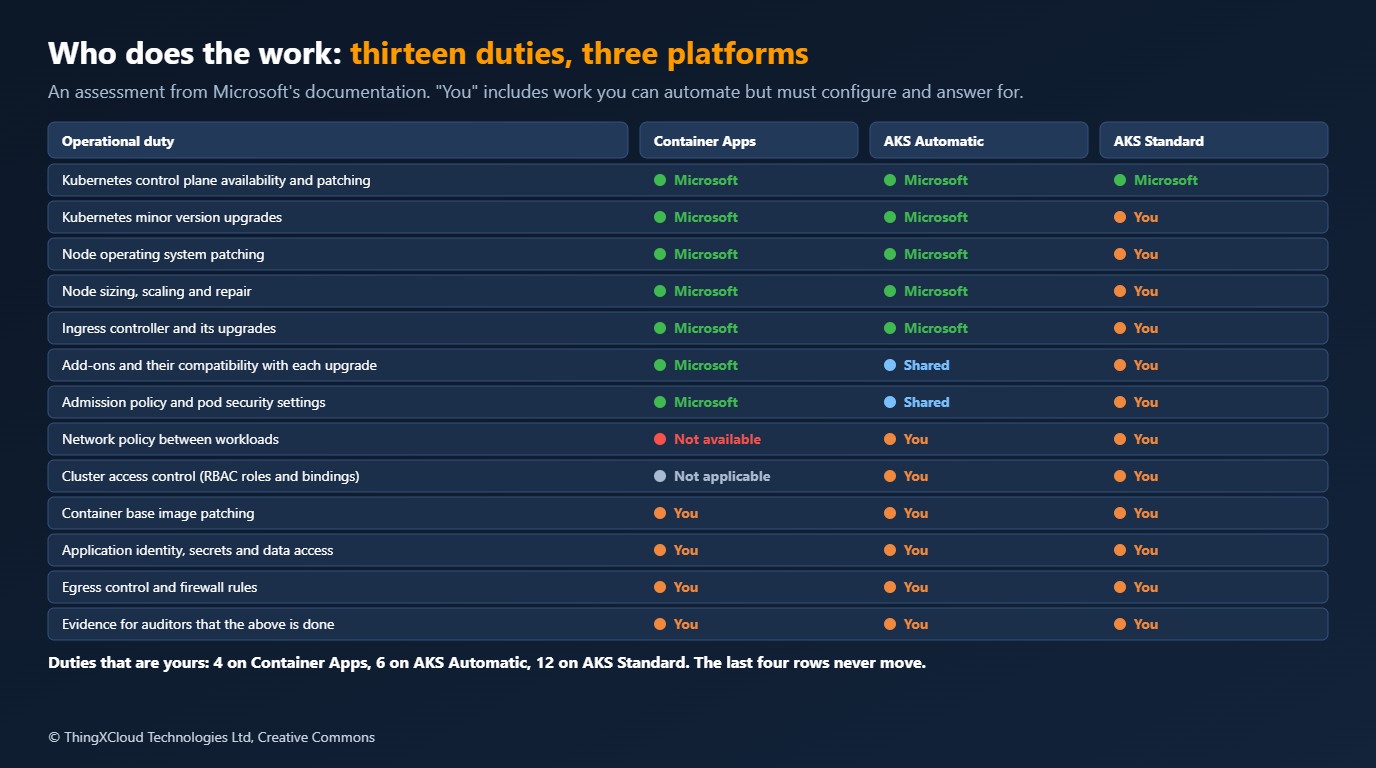
The ledger is kept as data in the sample, so it can be challenged line by line:
{
  "_comment": "Who does the work, for each operational duty. An assessment from Microsoft's documentation as read for this article, not a contractual statement. 'you' includes work you can automate but must configure, monitor and answer for.",
  "duties": [
    {"duty": "Kubernetes control plane availability and patching", "aca": "microsoft", "aks_automatic": "microsoft", "aks_standard": "microsoft"},
    {"duty": "Kubernetes minor version upgrades", "aca": "microsoft", "aks_automatic": "microsoft", "aks_standard": "you"},
    {"duty": "Node operating system patching", "aca": "microsoft", "aks_automatic": "microsoft", "aks_standard": "you"},
    {"duty": "Node sizing, scaling and repair", "aca": "microsoft", "aks_automatic": "microsoft", "aks_standard": "you"},
    {"duty": "Ingress controller and its upgrades", "aca": "microsoft", "aks_automatic": "microsoft", "aks_standard": "you"},
    {"duty": "Add-ons and their compatibility with each upgrade", "aca": "microsoft", "aks_automatic": "shared", "aks_standard": "you"},
    {"duty": "Admission policy and pod security settings", "aca": "microsoft", "aks_automatic": "shared", "aks_standard": "you"},
    {"duty": "Network policy between workloads", "aca": "not_available", "aks_automatic": "you", "aks_standard": "you"},
    {"duty": "Cluster access control (RBAC roles and bindings)", "aca": "not_applicable", "aks_automatic": "you", "aks_standard": "you"},
    {"duty": "Container base image patching", "aca": "you", "aks_automatic": "you", "aks_standard": "you"},
    {"duty": "Application identity, secrets and data access", "aca": "you", "aks_automatic": "you", "aks_standard": "you"},
    {"duty": "Egress control and firewall rules", "aca": "you", "aks_automatic": "you", "aks_standard": "you"},
    {"duty": "Evidence for auditors that the above is done", "aca": "you", "aks_automatic": "you", "aks_standard": "you"}
  ]
}
Three readings of it. First, the gap between Container Apps and AKS Standard is eight duties, and they are the recurring, interrupt-driven ones: version upgrades, node patching, ingress and add-on upgrades. Automation exists for most of them on AKS, and you still configure it, watch it and explain to an auditor what happened when it failed. Second, AKS Automatic closes most of that gap: Microsoft’s documentation describes node provisioning, node image upgrades, cluster upgrades and a set of security defaults as preconfigured. Third, four duties never move. Your container image, your application’s identity and data access, your egress rules and your evidence are yours on every platform. No platform choice removes them, and a programme that treats the platform decision as its security decision has misplaced the risk.
One row runs the other way. Network policy between workloads is marked not available on Container Apps: it does not expose the Kubernetes API, so there is no NetworkPolicy object to create. The isolation boundary on Container Apps is the environment. If two services must not be able to reach each other, they go in different environments or you need AKS.
The same baseline, twice
Statements about platforms are cheap. Here is the baseline as configuration, starting with Container Apps. The module takes a subnet and a Log Analytics workspace from the landing zone and creates an internal environment and one application.
# A regulated API on Azure Container Apps. The platform is an internal, zone-redundant environment on a
# landing-zone subnet; the workload is one container app with a managed identity and no public ingress.

locals {
  prefix = "${var.name}-${var.environment}"

  tags = {
    workload    = var.name
    environment = var.environment
    managed-by  = "terraform"
  }
}

resource "azurerm_user_assigned_identity" "api" {
  name                = "id-${local.prefix}-api"
  resource_group_name = var.resource_group_name
  location            = var.location
  tags                = local.tags
}

resource "azurerm_container_app_environment" "this" {
  name                = "cae-${local.prefix}"
  resource_group_name = var.resource_group_name
  location            = var.location

  infrastructure_subnet_id       = var.subnet_id
  internal_load_balancer_enabled = true
  public_network_access          = "Disabled"
  zone_redundancy_enabled        = true
  mutual_tls_enabled             = true
  log_analytics_workspace_id     = var.log_analytics_workspace_id

  workload_profile {
    name                  = "dedicated"
    workload_profile_type = "D4"
    minimum_count         = 3
    maximum_count         = 6
  }

  tags = local.tags
}

resource "azurerm_container_app" "api" {
  name                         = "ca-${local.prefix}-api"
  resource_group_name          = var.resource_group_name
  container_app_environment_id = azurerm_container_app_environment.this.id
  revision_mode                = "Single"
  workload_profile_name        = "dedicated"

  identity {
    type         = "UserAssigned"
    identity_ids = [azurerm_user_assigned_identity.api.id]
  }

  # The image is pulled with the managed identity: no registry password exists.
  registry {
    server   = var.registry_server
    identity = azurerm_user_assigned_identity.api.id
  }

  ingress {
    external_enabled           = false
    allow_insecure_connections = false
    target_port                = 8080
    transport                  = "http"

    traffic_weight {
      latest_revision = true
      percentage      = 100
    }
  }

  template {
    min_replicas = 3
    max_replicas = 10

    container {
      name   = "api"
      image  = var.image
      cpu    = 0.5
      memory = "1Gi"

      liveness_probe {
        transport = "HTTP"
        port      = 8080
        path      = "/healthz"
      }

      readiness_probe {
        transport = "HTTP"
        port      = 8080
        path      = "/ready"
      }
    }
  }

  tags = local.tags
}
And on AKS Standard, with the same inputs:
# The same regulated API platform on AKS Standard: a private, zone-spread cluster on a landing-zone subnet,
# Entra-only access, workload identity, Cilium network policy, Azure Policy, Defender, and automatic
# upgrades inside maintenance windows. The workload itself is Kubernetes manifests, which are not shown.

locals {
  prefix = "${var.name}-${var.environment}"

  tags = {
    workload    = var.name
    environment = var.environment
    managed-by  = "terraform"
  }
}

resource "azurerm_user_assigned_identity" "cluster" {
  name                = "id-${local.prefix}-aks"
  resource_group_name = var.resource_group_name
  location            = var.location
  tags                = local.tags
}

resource "azurerm_kubernetes_cluster" "this" {
  name                = "aks-${local.prefix}"
  resource_group_name = var.resource_group_name
  location            = var.location
  dns_prefix          = "aks-${local.prefix}"
  kubernetes_version  = var.kubernetes_version
  sku_tier            = "Standard"

  # No public API server, no local accounts, no static credentials.
  private_cluster_enabled             = true
  private_cluster_public_fqdn_enabled = false
  local_account_disabled              = true

  azure_active_directory_role_based_access_control {
    tenant_id              = var.tenant_id
    azure_rbac_enabled     = true
    admin_group_object_ids = var.admin_group_object_ids
  }

  oidc_issuer_enabled       = true
  workload_identity_enabled = true

  # Patching is yours on AKS Standard. These settings hand the routine part to the platform.
  automatic_upgrade_channel = "patch"
  node_os_upgrade_channel   = "NodeImage"

  maintenance_window_auto_upgrade {
    frequency   = "Weekly"
    interval    = 1
    day_of_week = "Sunday"
    start_time  = "02:00"
    duration    = 4
    utc_offset  = "+00:00"
  }

  maintenance_window_node_os {
    frequency   = "Weekly"
    interval    = 1
    day_of_week = "Sunday"
    start_time  = "02:00"
    duration    = 4
    utc_offset  = "+00:00"
  }

  azure_policy_enabled             = true
  image_cleaner_enabled            = true
  image_cleaner_interval_hours     = 48

  identity {
    type         = "UserAssigned"
    identity_ids = [azurerm_user_assigned_identity.cluster.id]
  }

  default_node_pool {
    name                         = "system"
    vm_size                      = "Standard_D4ds_v5"
    node_count                   = 3
    zones                        = ["1", "2", "3"]
    vnet_subnet_id               = var.subnet_id
    os_sku                       = "AzureLinux"
    only_critical_addons_enabled = true

    upgrade_settings {
      max_surge = "33%"
    }
  }

  # Node pools are declared here, not provisioned on demand by the platform.
  node_provisioning_profile {
    mode = "Manual"
  }

  network_profile {
    network_plugin      = "azure"
    network_plugin_mode = "overlay"
    network_data_plane  = "cilium"
    network_policy      = "cilium"
    outbound_type       = "userDefinedRouting"
  }

  microsoft_defender {
    log_analytics_workspace_id = var.log_analytics_workspace_id
  }

  oms_agent {
    log_analytics_workspace_id      = var.log_analytics_workspace_id
    msi_auth_for_monitoring_enabled = true
  }

  key_vault_secrets_provider {
    secret_rotation_enabled = true
  }

  tags = local.tags
}

resource "azurerm_kubernetes_cluster_node_pool" "workload" {
  name                  = "workload"
  kubernetes_cluster_id = azurerm_kubernetes_cluster.this.id
  vm_size               = "Standard_D4ds_v5"
  mode                  = "User"
  os_sku                = "AzureLinux"
  zones                 = ["1", "2", "3"]
  vnet_subnet_id        = var.subnet_id

  auto_scaling_enabled = true
  min_count            = 3
  max_count            = 9

  upgrade_settings {
    max_surge = "33%"
  }

  tags = local.tags
}
Both modules end with the same output, a map of named controls computed from the resources. This is the Container Apps one:
# The same control names are reported by the AKS module, so one test can ask both the same questions.
output "controls" {
  description = "Whether each control in the baseline is configured."
  value = {
    no_public_endpoint         = azurerm_container_app_environment.this.internal_load_balancer_enabled && azurerm_container_app_environment.this.public_network_access == "Disabled" && !azurerm_container_app.api.ingress[0].external_enabled
    zone_redundant             = azurerm_container_app_environment.this.zone_redundancy_enabled
    workload_identity          = azurerm_container_app.api.identity[0].type == "UserAssigned"
    no_static_credentials      = alltrue([for registry in azurerm_container_app.api.registry : registry.password_secret_name == null || registry.password_secret_name == ""])
    encrypted_between_services = azurerm_container_app_environment.this.mutual_tls_enabled
    logs_to_workspace          = azurerm_container_app_environment.this.log_analytics_workspace_id == var.log_analytics_workspace_id
    at_least_three_replicas    = azurerm_container_app.api.template[0].min_replicas >= 3
  }
}

output "platform_id" {
  description = "Resource id of the Container Apps environment."
  value       = azurerm_container_app_environment.this.id
}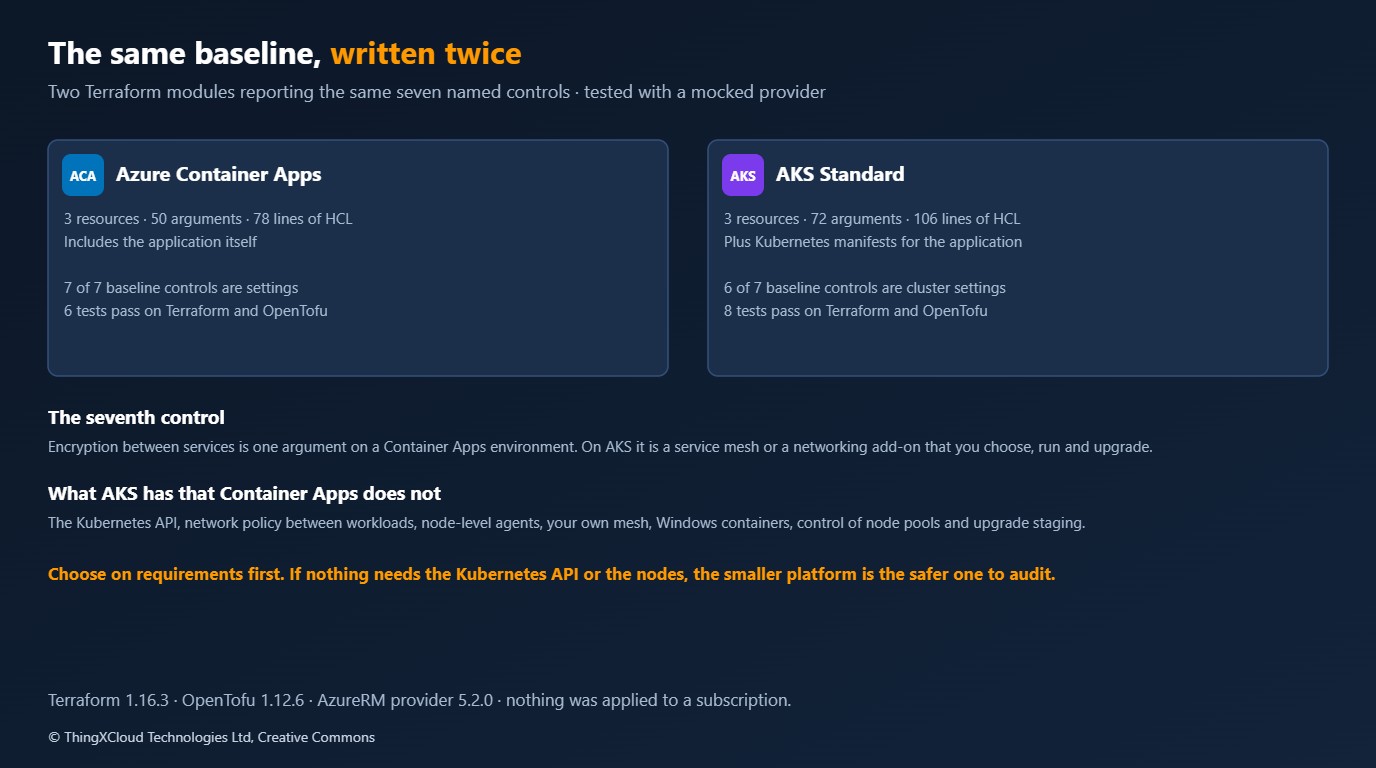
| Container Apps | AKS Standard | |
|---|---|---|
| Resources | 3 | 3 |
| Arguments set | 50 | 72 |
| Lines of HCL | 78 | 106 |
| Includes the application | Yes | No: Deployment, Service, NetworkPolicy, ServiceAccount and bindings are extra |
| Baseline controls that are a platform setting | 7 of 7 | 6 of 7 |
| Tests passing, Terraform 1.16.3 and OpenTofu 1.12.6 | 6 and 6 | 8 and 8 |
The line counts flatter AKS, because the Container Apps module contains the whole workload and the AKS module stops where Kubernetes begins. The arguments are the better measure of what it is like to own each one. Twenty-two more decisions sit in the cluster resource, and most of them are security decisions with a wrong answer: whether local accounts exist, which upgrade channel, which network policy engine, where egress goes.
The control that differs is encryption between services. On a Container Apps environment it is one argument, mutual_tls_enabled. On AKS it is not a cluster setting at all. You get it from a service mesh, or from the Advanced Container Networking Services option that Microsoft lists as optional on both AKS modes, and either is a component you select, operate and upgrade. The AKS module reports that control as false, and its test expects exactly that:
# No Azure subscription: the provider is mocked. Identifiers passed between resources are well-formed,
# because the provider checks their format even when mocked.

mock_provider "azurerm" {
  mock_resource "azurerm_user_assigned_identity" {
    defaults = {
      id = "/subscriptions/00000000-0000-0000-0000-000000000000/resourceGroups/rg-mock/providers/Microsoft.ManagedIdentity/userAssignedIdentities/id-mock"
    }
  }

  mock_resource "azurerm_kubernetes_cluster" {
    defaults = {
      id = "/subscriptions/00000000-0000-0000-0000-000000000000/resourceGroups/rg-mock/providers/Microsoft.ContainerService/managedClusters/aks-mock"
    }
  }
}

variables {
  name                       = "records"
  environment                = "prod"
  location                   = "northeurope"
  resource_group_name        = "rg-records-prod"
  subnet_id                  = "/subscriptions/00000000-0000-0000-0000-000000000000/resourceGroups/rg-mock/providers/Microsoft.Network/virtualNetworks/vnet-mock/subnets/snet-apps"
  log_analytics_workspace_id = "/subscriptions/00000000-0000-0000-0000-000000000000/resourceGroups/rg-mock/providers/Microsoft.OperationalInsights/workspaces/log-mock"
  tenant_id                  = "11111111-1111-1111-1111-111111111111"
  admin_group_object_ids     = ["22222222-2222-2222-2222-222222222222"]
}

run "one_baseline_control_is_not_a_cluster_setting" {
  command = apply

  assert {
    condition     = [for name, met in output.controls : name if !met] == ["encrypted_between_services"]
    error_message = "Expected every control except in-cluster encryption to be configured: ${jsonencode(output.controls)}"
  }
}

run "api_server_is_private_and_entra_only" {
  command = plan

  assert {
    condition     = azurerm_kubernetes_cluster.this.private_cluster_enabled && azurerm_kubernetes_cluster.this.local_account_disabled
    error_message = "The API server must be private and local accounts must be disabled."
  }

  assert {
    condition     = azurerm_kubernetes_cluster.this.azure_active_directory_role_based_access_control[0].azure_rbac_enabled
    error_message = "Kubernetes authorisation must use Azure RBAC."
  }
}

run "egress_leaves_through_the_landing_zone_route" {
  command = plan

  assert {
    condition     = azurerm_kubernetes_cluster.this.network_profile[0].outbound_type == "userDefinedRouting"
    error_message = "Outbound traffic must follow the subnet's route table to the firewall."
  }
}

run "network_policy_engine_is_on" {
  command = plan

  assert {
    condition     = azurerm_kubernetes_cluster.this.network_profile[0].network_policy == "cilium" && azurerm_kubernetes_cluster.this.network_profile[0].network_data_plane == "cilium"
    error_message = "A network policy engine must be enabled so traffic between workloads can be restricted."
  }
}

run "patching_is_automatic_inside_a_window" {
  command = plan

  assert {
    condition     = azurerm_kubernetes_cluster.this.automatic_upgrade_channel == "patch" && azurerm_kubernetes_cluster.this.node_os_upgrade_channel == "NodeImage"
    error_message = "Cluster patch upgrades and node image upgrades must be automatic."
  }

  assert {
    condition     = azurerm_kubernetes_cluster.this.maintenance_window_auto_upgrade[0].day_of_week == "Sunday" && azurerm_kubernetes_cluster.this.maintenance_window_node_os[0].day_of_week == "Sunday"
    error_message = "Upgrades must be confined to the agreed maintenance window."
  }
}

run "policy_and_threat_detection_are_on" {
  command = plan

  assert {
    condition     = azurerm_kubernetes_cluster.this.azure_policy_enabled && length(azurerm_kubernetes_cluster.this.microsoft_defender) == 1
    error_message = "Azure Policy and Defender for Containers must be enabled."
  }
}

run "system_pool_is_reserved_and_spread" {
  command = plan

  assert {
    condition     = azurerm_kubernetes_cluster.this.default_node_pool[0].only_critical_addons_enabled && length(azurerm_kubernetes_cluster.this.default_node_pool[0].zones) == 3
    error_message = "The system pool must run only critical add-ons and span three zones."
  }
}

run "rejects_an_unknown_environment" {
  command = plan

  variables {
    environment = "production"
  }

  expect_failures = [var.environment]
}
Patching, in practice
On AKS Standard the two settings that matter are in the module above: automatic_upgrade_channel = "patch" keeps the cluster on the latest patch of its minor version, and node_os_upgrade_channel = "NodeImage" replaces node images as Microsoft publishes them, both inside a maintenance window. That is good practice and it is not the end of the duty. Minor version upgrades are still a project every few months, because each one can deprecate APIs your manifests or add-ons use. Node image upgrades drain and replace nodes, so pod disruption budgets and surge capacity have to be right. And when an upgrade stalls, it is your on-call engineer who finds out.
On AKS Automatic those are preconfigured: Microsoft’s documentation describes automatic cluster upgrades and node image upgrades as defaults, with a planned maintenance schedule to control timing. On Container Apps there is no Kubernetes version or node image exposed to you at all. In both cases the workload still has to tolerate replicas being moved, and the base image inside your container is still yours to rebuild.
Every row of the ledger above the last four can be Microsoft’s and a critical vulnerability in your base image is still running in production. Image rebuild and redeploy on a schedule, with a scanner in the pipeline and a record of both, is the patching control an auditor should ask about first, on any of the three platforms.
A decision rule you can argue with
The decision script encodes the rule in about forty lines of logic. Hard requirements decide first: anything that needs the Kubernetes API or the nodes rules out Container Apps, and anything that needs control of node configuration or upgrade staging rules out AKS Automatic. Team skills produce cautions, never the recommendation.
"""Recommend a container platform for a regulated workload from a short list of facts about it.

    python decide.py requirements.json

The rules are deliberately few and written down, so the recommendation can be argued with. Hard
requirements (things one platform cannot do) decide first; only then do team and cost factors apply.
Prints the recommendation and every reason. Exit code 0.
"""
from __future__ import annotations

import json
import pathlib
import sys

# A true answer to any of these needs the Kubernetes API or node-level access, which Container Apps does not expose.
NEEDS_KUBERNETES = {
    "needs_kubernetes_api": "The workload or its tooling uses the Kubernetes API (operators, custom resources, Helm charts that create them).",
    "needs_network_policy_between_services": "Traffic between services on the same platform must be restricted by policy.",
    "needs_daemonsets_or_privileged": "Something has to run on every node or with elevated privileges (agents, eBPF tools, device plugins).",
    "needs_custom_service_mesh": "A specific service mesh or sidecar set is mandated.",
    "needs_windows_containers": "Some containers are Windows containers.",
}
# A true answer to any of these needs choices AKS Automatic makes for you.
NEEDS_STANDARD = {
    "needs_custom_node_configuration": "Node pools need specific images, kernel settings, taints or sizes chosen by you.",
    "needs_own_upgrade_schedule_per_pool": "Upgrades must be staged by you, pool by pool, on your own schedule.",
    "needs_bring_your_own_cni": "A CNI other than the built-in options is required.",
}


def decide(facts: dict) -> dict:
    unknown = set(facts) - set(NEEDS_KUBERNETES) - set(NEEDS_STANDARD) - {"team_operates_kubernetes_today", "workload"}
    if unknown:
        raise ValueError(f"unknown facts: {', '.join(sorted(unknown))}")
    kubernetes = [text for key, text in NEEDS_KUBERNETES.items() if facts.get(key)]
    standard = [text for key, text in NEEDS_STANDARD.items() if facts.get(key)]
    operates = bool(facts.get("team_operates_kubernetes_today"))
    cautions: list[str] = []

    if not kubernetes and not standard:
        platform = "Azure Container Apps"
        reasons = ["Nothing in the requirements needs the Kubernetes API or node access.",
                   "Microsoft patches the nodes, the Kubernetes layer and the ingress; your duties shrink to the image, identity, egress and evidence."]
        if operates:
            cautions.append("The team already runs Kubernetes. That is a reason AKS would be affordable, not a requirement for it.")
    elif not standard:
        platform = "AKS Automatic"
        reasons = kubernetes + ["Nothing requires control over node configuration or upgrade staging, so let the platform manage nodes and upgrades."]
        if not operates:
            cautions.append("The team does not run Kubernetes today. Budget for the skills: you own RBAC, network policy and manifests on day one.")
    else:
        platform = "AKS Standard"
        reasons = kubernetes + standard
        if not operates:
            cautions.append("The team does not run Kubernetes today, and AKS Standard leaves upgrades and node patching with you. Staff it before you choose it.")
        if not kubernetes:
            cautions.append("Only node-level control points to AKS. Check whether a dedicated workload profile on Container Apps would meet the underlying need.")
    return {"platform": platform, "reasons": reasons, "cautions": cautions}


def ownership_counts(path: pathlib.Path) -> dict[str, dict[str, int]]:
    duties = json.loads(path.read_text(encoding="utf-8"))["duties"]
    counts: dict[str, dict[str, int]] = {}
    for platform in ("aca", "aks_automatic", "aks_standard"):
        counts[platform] = {}
        for duty in duties:
            counts[platform][duty[platform]] = counts[platform].get(duty[platform], 0) + 1
    return counts


def main() -> int:
    facts = json.loads(pathlib.Path(sys.argv[1]).read_text(encoding="utf-8"))
    result = decide(facts)
    print(f"Recommendation: {result['platform']}")
    for reason in result["reasons"]:
        print(f"  because  {reason}")
    for caution in result["cautions"]:
        print(f"  caution  {caution}")
    return 0


if __name__ == "__main__":
    sys.exit(main())
%%{init: {'theme':'base','themeVariables':{'primaryColor':'#FFF3E0','primaryTextColor':'#232F3E','primaryBorderColor':'#FF9900','lineColor':'#232F3E','clusterBkg':'#F8FAFC','clusterBorder':'#CBD5E1','edgeLabelBackground':'#FFFFFF','nodeTextColor':'#232F3E'}}}%%
flowchart TD
A[Regulated workload on Azure] --> B{Needs the Kubernetes API, network policy between services, node agents, a mandated mesh or Windows containers?}
B -->|No| C[Azure Container Apps: internal environment, workload profiles]
B -->|Yes| D{Needs custom node configuration, your own upgrade staging or your own CNI?}
D -->|No| E[AKS Automatic, private, custom virtual network]
D -->|Yes| F[AKS Standard, with the patching duties staffed]
C --> G[Yours on every path: image, identity, egress, evidence]
E --> G
F --> G
classDef compute fill:#FFF3E0,stroke:#FF9900,stroke-width:2px,color:#232F3E
classDef store fill:#F0FFF4,stroke:#1D8102,stroke-width:2px,color:#145202
classDef net fill:#EBF8FF,stroke:#0073BB,stroke-width:2px,color:#004C74
classDef policy fill:#F3E8FF,stroke:#7C3AED,stroke-width:2px,color:#4C1D95
classDef danger fill:#FEF2F2,stroke:#D13212,stroke-width:2px,color:#991B1B
class A,B,D compute
class C net
class E policy
class F danger
class G storeFor the example in the sample, a stateless patient-records API with a database and a queue, the script recommends Container Apps and gives the reasons. The rule the script refuses to apply is the common one: “the team knows Kubernetes” appears only as a caution that this makes AKS affordable, not necessary.
Where each platform is the wrong choice
| Platform | Do not choose it when |
|---|---|
| Container Apps | Services on the same platform must be isolated from each other by policy; you depend on operators, custom resources or Helm charts that create them; a security agent has to run on every node; a specific mesh is mandated |
| AKS Automatic | You need to choose node images or kernel settings, stage upgrades pool by pool, or bring a CNI; an add-on you depend on is not compatible with its defaults |
| AKS Standard | Nobody is funded to own upgrades and node patching; the only reason is that it is the default in the organisation’s reference architecture |
Alternatives considered
| Option | Advantages | Risks | Operational implication |
|---|---|---|---|
| Azure Container Apps | Smallest audit boundary; encryption between services, ingress and scaling are settings | No Kubernetes API or network policy; environment is the isolation unit | Platform team is small; isolation by environment multiplies environments |
| AKS Automatic | Full Kubernetes API with nodes and upgrades managed; secure defaults on | You still own RBAC, policy content and manifests; opinionated defaults | Kubernetes skills needed for workloads, less for the platform |
| AKS Standard | Every setting is yours | Every setting is yours; patching and upgrade failures are your incidents | A funded platform team with on-call |
| App Service for containers | Simple for a single web app | Not a multi-service platform | Fits one or two services, not a suite |
For each row of the ledger marked “you”, an auditor will ask for the control, the owner and the record. Keep three things regardless of platform: the platform configuration in version control with tests like the ones here, pipeline records showing image rebuilds and scans, and platform logs in a workspace the workload team cannot alter. Where a row says Microsoft, the evidence is Microsoft’s compliance documentation for the service and your record of which settings you enabled. Data residency is decided by the region you pass in, and that choice belongs in the data protection impact assessment, not in a module default.
Cost
Compute price is the smallest part of this comparison and the easiest to get wrong, so no price is quoted here. A dedicated workload profile on Container Apps and a node pool on AKS are both virtual machines you pay for by the hour, and AKS Standard adds a charge for the cluster’s uptime tier. The cost that separates the platforms is people. Twelve duties on AKS Standard against four on Container Apps is the difference between a platform team with an on-call rota and a platform that a product team can own alongside its service. Price that honestly before the per-vCPU rate.
Key takeaways
- Choose on hard requirements first. If nothing needs the Kubernetes API or the nodes, Container Apps gives the smallest platform to patch and to audit.
- Of thirteen operational duties, four are yours on Container Apps, six on AKS Automatic and twelve on AKS Standard. Image patching, application identity, egress and evidence are yours on all three.
- The same baseline took 50 arguments on Container Apps including the application, and 72 on AKS Standard before any Kubernetes manifest.
- Encryption between services is one setting on Container Apps and a component you operate on AKS. Network policy between workloads is the reverse: available on AKS, not on Container Apps.
- AKS Automatic removes most of the patching work that makes AKS Standard expensive to run. Consider it before AKS Standard whenever Kubernetes is required.
If you have taken a regulated workload through audit on one of these platforms and a row of the ledger is wrong, leave a comment and say which.
Both Terraform modules were validated against the AzureRM provider 5.2.0 schema and tested with a mocked provider on Terraform 1.16.3 and OpenTofu 1.12.6 in GitHub Actions (run 43337336490): 6 tests for Container Apps and 8 for AKS on each tool, and 9 of 9 checks for the decision script. The listings are the files in the samples repository. Nothing was applied to an Azure subscription, so no claim is made that either configuration provisions as written. The ownership ledger and the decision rules are a reading of Microsoft’s documentation for Container Apps and AKS, not statements by Microsoft, and no pricing was measured.
The complete sample for this article is on GitHub: nithinmohantk/blog-samples-working-repo/aca-vs-aks-regulated. Clone it with git clone https://github.com/nithinmohantk/blog-samples-working-repo.git and open the aca-vs-aks-regulated folder. Its README says how to run it and what has been verified.
Glossary
- Container Apps environment— The boundary that Container Apps share: one virtual network, one log destination, one set of platform settings.
- Workload profile— The compute a Container Apps environment runs on: consumption, or dedicated virtual machines of a chosen size.
- AKS Automatic— An AKS mode in which node provisioning, upgrades and a set of security defaults are preconfigured and managed.
- Private cluster— An AKS cluster whose API server has no public endpoint.
- Workload identity— Federation that lets a pod or app obtain Microsoft Entra tokens without a stored secret.
- Node image upgrade— Replacing node virtual machines with ones built from a newer, patched operating system image.
- Network policy— Kubernetes rules restricting which workloads may talk to which.
- Audit boundary— The set of components an organisation must evidence controls for.
References & Further Reading
- → Comparing Container Apps with other Azure container options— Microsoft’s own positioning of Container Apps and AKS
- → Networking in Azure Container Apps— Internal environments, workload profiles, routes and private endpoints
- → What is AKS Automatic?— What is preconfigured, default and optional in each AKS mode
- → AKS: automatic cluster upgrades— Upgrade channels and their behaviour
- → AKS: node OS image upgrades— Node OS upgrade channels
- → AzureRM provider: azurerm_kubernetes_cluster— The resource used for the AKS module
- → Sample code for this article— The aca-vs-aks-regulated folder on GitHub
Discover more from C4: Container, Code, Cloud & Context
Subscribe to get the latest posts sent to your email.