A clinical data platform ends up with at least three query languages. FHIR search comes with the FHIR API. The Archetype Query Language (AQL) comes with an openEHR repository. And sooner or later an analyst asks for SQL, which is where SQL on FHIR comes in. Teams tend to pick whichever one they met first and then force every question through it.
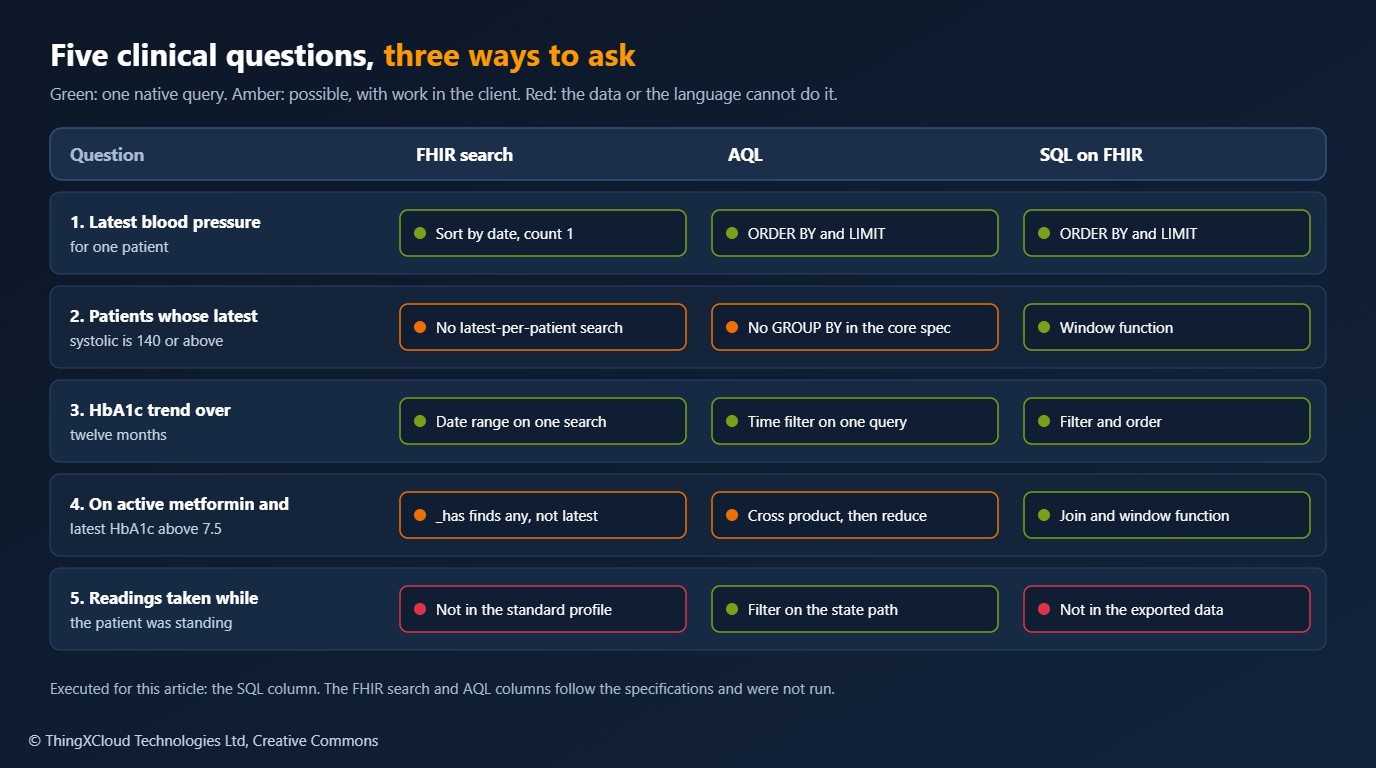
This article puts five ordinary clinical questions to all three. The questions are chosen to be unremarkable: a latest reading, a cohort, a trend, a cross-resource condition, and one question about clinical context. The pattern in the answers is more useful than any single query, because it shows what each language was built for.
It follows the two earlier pieces on FHIR and openEHR coexistence and mapping medication orders. The SQL path was run end to end on a synthetic dataset and every answer checked. The FHIR search and AQL examples follow their specifications and were not executed, and the article says where that matters.
Three languages in three places
- FHIR search is a set of URL parameters defined per resource type. It runs on the operational FHIR server, returns resources in pages, and is what every FHIR client already speaks. It was designed to find resources, not to compute over them.
- AQL queries an openEHR repository by archetype path. It reads like SQL, but its
FROMclause is a containment hierarchy, and it can reach any data point an archetype defines. Its published clauses areSELECT,FROM,WHERE,ORDER BYandLIMIT, with aggregate functions. - SQL on FHIR is not a query language. It is a specification for view definitions that flatten FHIR resources into tables using FHIRPath expressions. Once the tables exist, the query language is ordinary SQL on whatever engine you choose. It runs on an analytical copy, not on the operational server.
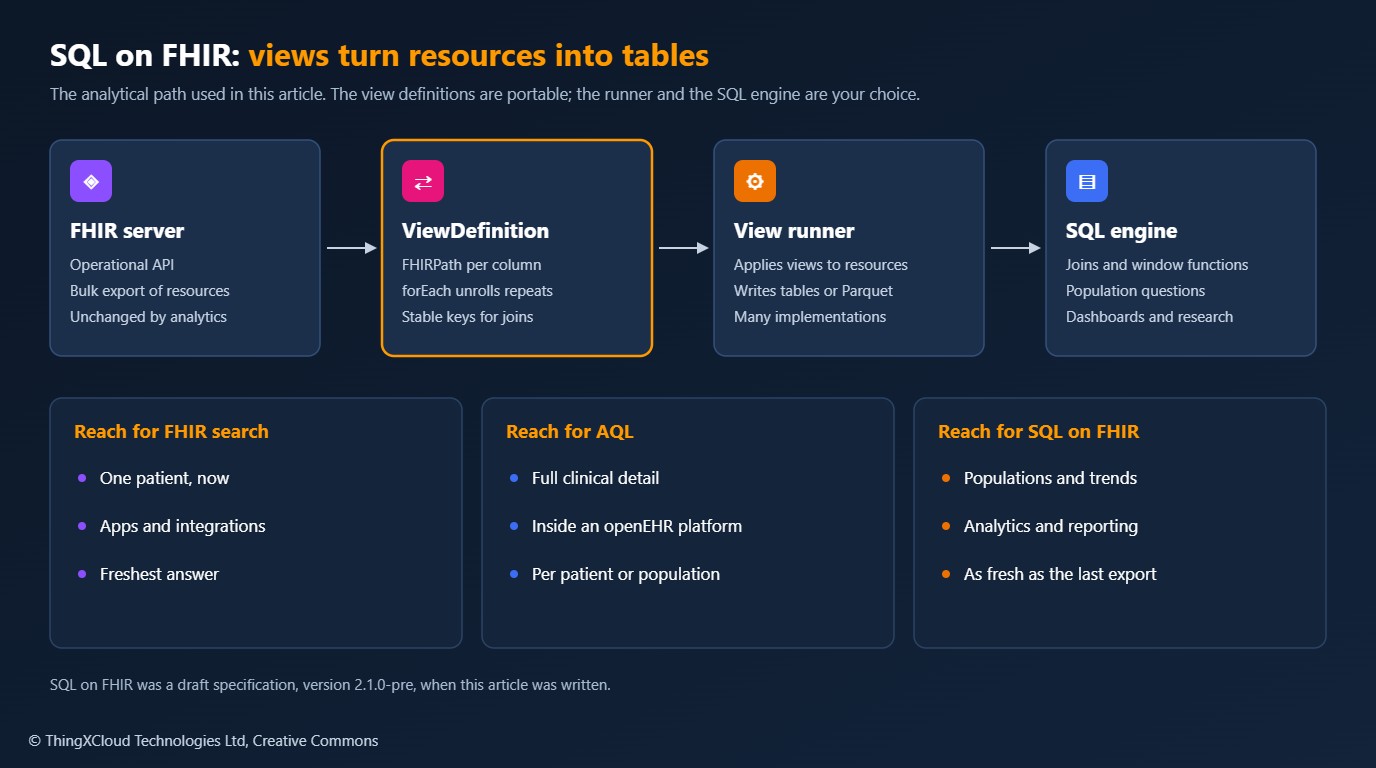
The specification page I read described itself as version 2.1.0-pre and a draft. The core ideas, a ViewDefinition resource with FHIRPath columns and forEach to unroll repeating elements, have been stable across implementations for some time, but check the current status before you standardise on it.
The five questions
- Q1. What is this patient’s latest blood pressure?
- Q2. Which patients have a most recent systolic of 140 or above?
- Q3. How has this patient’s HbA1c moved over the last twelve months?
- Q4. Which patients are on active metformin and have a latest HbA1c above 7.5?
- Q5. Which blood pressure readings were taken with the patient standing?
In FHIR search
# Q1  One request. The server sorts and returns a single resource.
GET [base]/Observation?patient=p1&code=http://loinc.org|85354-9&_sort=-date&_count=1

# Q2  The closest single search: every reading with systolic >= 140. Not the latest per patient.
GET [base]/Observation?code=http://loinc.org|85354-9&component-code-value-quantity=http://loinc.org|8480-6$ge140

# Q2  Where the server implements it: the last reading, one call per patient.
GET [base]/Observation/$lastn?patient=p1&code=http://loinc.org|85354-9&max=1

# Q3  One request with a date range.
GET [base]/Observation?patient=p1&code=http://loinc.org|4548-4&date=ge2025-11-12&_sort=date

# Q4  Patients with ANY HbA1c above 7.5 and ANY metformin request. Not latest, not necessarily active.
GET [base]/Patient?_has:Observation:patient:code-value-quantity=http://loinc.org|4548-4$gt7.5&_has:MedicationRequest:subject:code=urn:example:formulary|MED-0001

# Q5  Not expressible. Patient position is not an element of the standard blood pressure profile.
Q1 and Q3 are what FHIR search is for, and they are a single request each. Q2 exposes the limit: search filters resources one at a time and has no notion of “the latest per patient”. You either fetch every matching reading and reduce in the client, or call $lastn once per patient where the server supports that operation. Q4 can be approximated with reverse chaining, but each _has is evaluated independently, so the result is patients with any high HbA1c and any metformin request. For a clinical cohort that is a different, larger and wrong set.
In AQL
-- Q1  Latest blood pressure for one EHR
SELECT o/data[at0001]/events[at0006]/time/value AS measured_at,
       o/data[at0001]/events[at0006]/data[at0003]/items[at0004]/value/magnitude AS systolic,
       o/data[at0001]/events[at0006]/data[at0003]/items[at0005]/value/magnitude AS diastolic
FROM EHR e CONTAINS COMPOSITION c
     CONTAINS OBSERVATION o[openEHR-EHR-OBSERVATION.blood_pressure.v2]
WHERE e/ehr_id/value = $ehr_id
ORDER BY o/data[at0001]/events[at0006]/time/value DESC
LIMIT 1

-- Q2  Every reading across all EHRs, newest first. The client keeps the first row per EHR
--     and then applies the threshold.
SELECT e/ehr_id/value AS ehr_id,
       o/data[at0001]/events[at0006]/time/value AS measured_at,
       o/data[at0001]/events[at0006]/data[at0003]/items[at0004]/value/magnitude AS systolic
FROM EHR e CONTAINS COMPOSITION c
     CONTAINS OBSERVATION o[openEHR-EHR-OBSERVATION.blood_pressure.v2]
ORDER BY e/ehr_id/value, o/data[at0001]/events[at0006]/time/value DESC

-- Q5  Readings taken standing. at1000 is the archetype's code for "Standing".
SELECT e/ehr_id/value AS ehr_id,
       o/data[at0001]/events[at0006]/time/value AS measured_at,
       o/data[at0001]/events[at0006]/data[at0003]/items[at0004]/value/magnitude AS systolic
FROM EHR e CONTAINS COMPOSITION c
     CONTAINS OBSERVATION o[openEHR-EHR-OBSERVATION.blood_pressure.v2]
WHERE o/data[at0001]/events[at0006]/state[at0007]/items[at0008]/value/defining_code/code_string = 'at1000'
AQL answers Q5 without effort, because the archetype records position and AQL can address any node. That is the case for openEHR in one query. It is also strong on Q1, and on population queries generally: dropping the WHERE on the EHR identifier turns a patient query into a cohort query.
Q2 and Q4 are less comfortable. The clause list in AQL 1.1.0 has no GROUP BY and no window functions, so “the latest per patient” is again reduced in the client, as in the second query above. Individual repositories add functions beyond the specification, which helps on one platform and costs you portability. Q3 and Q4 have the same shape against the laboratory result and medication order archetypes. I have not written those paths out because I did not verify them against the archetypes.
I had no FHIR server and no openEHR repository available. The search parameters follow the FHIR R4 specification, and the AQL uses node identifiers checked against the published blood pressure archetype, but support for $lastn, reverse chaining and composite parameters varies by server. Try each one against your own before relying on it.
In SQL on FHIR
The SQL route starts by declaring tables. A view definition names a resource type, filters it, and gives a FHIRPath expression per column. This one produces one row per blood pressure reading.
{
  "resourceType": "ViewDefinition",
  "name": "bp_readings",
  "status": "active",
  "resource": "Observation",
  "where": [
    {"path": "code.coding.where(system = 'http://loinc.org' and code = '85354-9').exists()"},
    {"path": "status = 'final'"}
  ],
  "select": [{
    "column": [
      {"name": "id",         "path": "getResourceKey()"},
      {"name": "patient_id", "path": "subject.getReferenceKey(Patient)"},
      {"name": "effective",  "path": "effectiveDateTime"},
      {"name": "systolic",   "path": "component.where(code.coding.where(system = 'http://loinc.org' and code = '8480-6').exists()).valueQuantity.value.first()"},
      {"name": "diastolic",  "path": "component.where(code.coding.where(system = 'http://loinc.org' and code = '8462-4').exists()).valueQuantity.value.first()"}
    ]
  }]
}
Two functions are specific to the specification. getResourceKey() gives a stable key for the row, and getReferenceKey(Patient) gives the matching key from a reference, so that tables join without string surgery on Patient/p1. A select with forEach emits one row per item of a repeating element. Sibling selects are cross joined, which is how a per-resource column ends up repeated beside each unrolled row.
To show there is no magic, here is a minimal runner. It leans on an existing FHIRPath engine and covers only the features this article uses.
"""
view_runner.py
A minimal SQL on FHIR ViewDefinition runner: enough to show how the specification turns FHIR
resources into tables. It supports resource, where, select with column, forEach and forEachOrNull,
sibling-select cross joins, getResourceKey() and getReferenceKey(). It is NOT a conformant runner:
no unionAll, no nested select, no constants, no type checking.
"""
import itertools
import re
from typing import Any

from fhirpathpy import evaluate

_REFERENCE_KEY = re.compile(r"^(?P<prefix>.+)\.getReferenceKey\((?P<type>\w*)\)$")


def _column(node: dict, resource: dict, path: str) -> Any:
    if path == "getResourceKey()":
        return resource["id"]
    match = _REFERENCE_KEY.match(path)
    if match:
        refs = evaluate(node, match["prefix"] + ".reference")
        if not refs:
            return None
        kind, _, key = refs[0].partition("/")              # relative literal references only
        return key if not match["type"] or kind == match["type"] else None
    values = evaluate(node, path)
    return values[0] if values else None


def _select_rows(select: dict, resource: dict) -> list[dict]:
    each = select.get("forEach") or select.get("forEachOrNull")
    nodes = evaluate(resource, each) if each else [resource]
    if not nodes and "forEachOrNull" in select:
        return [{c["name"]: None for c in select.get("column", [])}]
    return [{c["name"]: _column(node, resource, c["path"]) for c in select.get("column", [])} for node in nodes]


def run_view(view: dict, resources: list[dict]) -> list[dict]:
    rows = []
    for resource in resources:
        if resource["resourceType"] != view["resource"]:
            continue
        if not all(evaluate(resource, w["path"]) == [True] for w in view.get("where", [])):
            continue
        parts = [_select_rows(select, resource) for select in view["select"]]
        for combination in itertools.product(*parts):       # sibling selects are cross joined
            rows.append({k: v for part in combination for k, v in part.items()})
    return rows
With three views loaded into DuckDB as bp_readings, lab_results and medication_requests, the first four questions are plain SQL.
-- Q1  Latest blood pressure for one patient
SELECT effective, systolic, diastolic
FROM bp_readings
WHERE patient_id = 'p1'
ORDER BY effective DESC
LIMIT 1;

-- Q2  Patients whose most recent systolic is 140 or above
WITH latest AS (
  SELECT *, row_number() OVER (PARTITION BY patient_id ORDER BY effective DESC) AS rn
  FROM bp_readings
)
SELECT patient_id, systolic, effective
FROM latest
WHERE rn = 1 AND systolic >= 140
ORDER BY patient_id;

-- Q3  HbA1c trend for one patient over the last twelve months
SELECT effective, value
FROM lab_results
WHERE patient_id = 'p1' AND loinc = '4548-4' AND effective >= '2025-11-12'
ORDER BY effective;

-- Q4  Patients on active metformin whose latest HbA1c is above 7.5
WITH latest_a1c AS (
  SELECT *, row_number() OVER (PARTITION BY patient_id ORDER BY effective DESC) AS rn
  FROM lab_results
  WHERE loinc = '4548-4'
)
SELECT a.patient_id, a.value AS hba1c, a.effective
FROM latest_a1c a
JOIN medication_requests m ON m.patient_id = a.patient_id
WHERE a.rn = 1 AND a.value > 7.5 AND m.status = 'active' AND m.medication_code = 'MED-0001'
ORDER BY a.patient_id;
The results on the synthetic dataset of five patients:
| Question | Result | What it shows |
|---|---|---|
| Q1 | 142/88 on 3 November 2026 | The newest of patient p1’s three readings |
| Q2 | p1 (142) and p4 (161) | p2 is correctly absent: an earlier reading of 152 was followed by 128 |
| Q3 | 8.1, 7.9, 7.7 | Three results inside the window. A fourth, from June 2025, is correctly excluded |
| Q4 | p1 (7.7) and p5 (8.0) | p2 is on metformin but now at 6.9. p4 is at 9.1 but the metformin was stopped |
| Q5 | Not answerable | Position was never in the FHIR resources, so no view can produce it |
Q2 and Q4 are where SQL earns its place. The patients that the approximate FHIR search would have wrongly included, p2 on both questions and p4 on the fourth, are exactly the ones a window function and a join exclude. Q5 is the counterweight. SQL on FHIR inherits whatever the FHIR resources contain. If clinical context was lost when the data was mapped to FHIR, no amount of SQL brings it back.
The views ran through the runner above with fhirpathpy 2.2.4, and the SQL ran in DuckDB 2.0.0 on Python 3.13. Each answer was compared with one worked out directly from the resources in plain Python, independently of the views and the SQL. A fourth view with forEach over the components returned 14 rows for 7 readings, and no rows for the HbA1c results, which have no components. The runner is a teaching aid. Use a conformant implementation for real work.
Calling FHIR search and AQL from C#
The two request-based languages need little client code, and what they need is the same in any stack: follow the server’s paging links for FHIR search, and pass AQL parameters separately from the query text. These clients use only HttpClient and System.Text.Json.
using System.Net.Http.Json;
using System.Runtime.CompilerServices;
using System.Text.Json.Nodes;
namespace ClinicalQueries;
/// <summary>Runs a FHIR search and follows the server's paging links until the result is exhausted.</summary>
public sealed class FhirSearchClient(HttpClient http)
{
/// <param name="query">Resource type and parameters, for example "Observation?patient=p1&_count=50".</param>
public async IAsyncEnumerable<JsonObject> SearchAsync(
string query, [EnumeratorCancellation] CancellationToken cancellationToken = default)
{
Uri? next = new(query, UriKind.Relative);
while (next is not null)
{
using HttpRequestMessage request = new(HttpMethod.Get, next);
request.Headers.Accept.ParseAdd("application/fhir+json");
using HttpResponseMessage response = await http.SendAsync(request, cancellationToken);
response.EnsureSuccessStatusCode();
JsonNode bundle = await response.Content.ReadFromJsonAsync<JsonNode>(cancellationToken)
?? throw new InvalidOperationException("Empty search response");
foreach (JsonNode? entry in bundle["entry"]?.AsArray() ?? [])
{
// Included resources and OperationOutcome entries are not matches.
if ((string?)entry?["search"]?["mode"] is null or "match" && entry?["resource"] is JsonObject resource)
{
yield return resource;
}
}
// The server decides the page size and the shape of the next link. Never build it yourself.
string? link = bundle["link"]?.AsArray()
.FirstOrDefault(l => (string?)l?["relation"] == "next")?["url"]?.GetValue<string>();
next = link is null ? null : new Uri(link, UriKind.RelativeOrAbsolute);
}
}
}
/// <summary>Runs an ad-hoc AQL query through the openEHR REST API and returns rows keyed by column name.</summary>
public sealed class AqlClient(HttpClient http)
{
public async Task<IReadOnlyList<IReadOnlyDictionary<string, JsonNode?>>> QueryAsync(
string aql, IReadOnlyDictionary<string, object> parameters, CancellationToken cancellationToken = default)
{
// Values travel as query_parameters. Never concatenate them into the AQL text.
JsonObject body = new() { ["q"] = aql, ["query_parameters"] = new JsonObject(
parameters.Select(p => KeyValuePair.Create(p.Key, (JsonNode?)JsonValue.Create(p.Value)))) };
using HttpResponseMessage response = await http.PostAsJsonAsync("query/aql", body, cancellationToken);
response.EnsureSuccessStatusCode();
JsonNode result = await response.Content.ReadFromJsonAsync<JsonNode>(cancellationToken)
?? throw new InvalidOperationException("Empty query response");
string[] names = [.. result["columns"]!.AsArray().Select(c => (string)c!["name"]!)];
return [.. result["rows"]!.AsArray().Select(row =>
(IReadOnlyDictionary<string, JsonNode?>)names.Zip(row!.AsArray()).ToDictionary(p => p.First, p => p.Second))];
}
}The file compiled with warnings treated as errors and ran on the .NET 10 SDK against a stub HTTP handler. The test checked that the search client followed the server’s next link across two pages and skipped an included Patient, and that the AQL client sent the EHR identifier in query_parameters and not inside the query text. It contacted no real server. Authentication, retries and timeouts are left to the HttpClient you inject.
Choosing between them
%%{init: {'theme':'base','themeVariables':{'primaryColor':'#FFF3E0','primaryTextColor':'#232F3E','primaryBorderColor':'#FF9900','lineColor':'#232F3E','clusterBkg':'#F8FAFC','clusterBorder':'#CBD5E1','edgeLabelBackground':'#FFFFFF','nodeTextColor':'#232F3E'}}}%%
flowchart TD
    Q1{One patient, or many?}
    Q1 -- "One patient,
needed now" --> Q2{Is the detail in the
FHIR profile?}
    Q2 -- "Yes" --> F[FHIR search]
    Q2 -- "No, it is clinical context
held in openEHR" --> A[AQL]
    Q1 -- "Many patients" --> Q3{Needs latest-per-patient,
joins or aggregates?}
    Q3 -- "Yes" --> S[SQL on FHIR
on an analytical copy]
    Q3 -- "No, a simple filter" --> Q4{Where does the
data live?}
    Q4 -- "FHIR server" --> F
    Q4 -- "openEHR repository" --> A
    class Q1,Q2,Q3,Q4 edge
    class F mesh
    class A compute
    class S store
classDef compute fill:#FFF3E0,stroke:#FF9900,stroke-width:2px,color:#232F3E
classDef edge fill:#EBF8FF,stroke:#0073BB,stroke-width:2px,color:#004C74
classDef store fill:#F0FFF4,stroke:#1D8102,stroke-width:2px,color:#145202
classDef alert fill:#FEF2F2,stroke:#D13212,stroke-width:2px,color:#991B1B
classDef mesh fill:#F3E8FF,stroke:#7C3AED,stroke-width:2px,color:#4C1D95| FHIR search | AQL | SQL on FHIR | |
|---|---|---|---|
| Runs on | Operational FHIR server | openEHR repository | Analytical copy |
| Returns | Resources, in pages | A result set | Rows |
| Freshness | Current | Current | As of the last export or sync |
| Latest per patient | Per-patient calls or client code | Client code in the core language | Window function |
| Joins across data types | Chaining, approximate | Containment within an EHR | Full SQL joins |
| Reach into clinical detail | What the profile defines | Anything the archetype defines | What the resources contain |
| Who can write it | Any FHIR developer | Someone who knows the archetypes | Any analyst, once views exist |
| Load on the clinical system | Yes | Yes | None after export |
The last row is often the deciding one. Cohort questions run as paged searches or broad AQL queries compete with clinicians for the same server. Moving them to a copy protects the operational system, at the price of freshness.
Where each runs on Azure
| Language | Azure building block | Notes |
|---|---|---|
| FHIR search | FHIR service in Azure Health Data Services | Test which search features your queries depend on: composite parameters, reverse chaining and $lastn are not uniformly supported across FHIR servers |
| AQL | An openEHR server you run on Container Apps or AKS | I know of no first-party managed openEHR service on Azure |
| SQL on FHIR: export | Bulk $export from the FHIR service to Azure storage | Schedule it. Record the export time and show it beside every report |
| SQL on FHIR: views | A view runner in a container job or a notebook | The view definitions are JSON under source control and reviewed like code |
| SQL on FHIR: tables and SQL | Parquet or Delta tables in a lakehouse with a SQL endpoint | Row-level and column-level security belong here, per audience |
Azure’s own analytics offerings flatten FHIR into their own table shapes. Portable view definitions are worth having beside them when the same logic has to run on another engine, or be shared with a partner who uses a different stack.
Running it in production
- State the freshness. Every figure from the analytical copy should carry the time of the export it came from. A cohort that is twelve hours old is fine for a report and unsafe for a clinical alert.
- Keep clinical decisions on the operational path. Anything that prompts an action for one patient should read from the FHIR server or the openEHR repository directly.
- Filter status in the view. The sample views keep only
finalobservations. Decide once, in the view, how corrected and entered-in-error records are treated, so that every query downstream inherits the same rule. - Treat views as a contract. A changed column name or a changed filter alters every report built on it. Version the view definitions and test them against fixed fixtures.
- Check answers independently. The test in the sample computes each answer a second way, straight from the resources. Do the same for the handful of queries your organisation makes decisions from.
- Mind dates and units. The sample compares ISO 8601 strings in one time zone and assumes one unit per analyte. Real data needs both normalised before a window function can be trusted.
- Parameterise everything. Patient identifiers and thresholds go into search parameters, AQL
query_parametersor SQL bind variables. Never into query text.
Exporting FHIR data to a lakehouse creates another store of special-category data under GDPR, with its own access control, residency, retention and audit needs. Apply purpose limitation: a table built for population reporting should not carry names or addresses, and de-identified or pseudonymised views should be the default for analysts. Erasure and rectification at source must reach the copy, which in practice means rebuilding the tables from a fresh export on a known schedule. Cohort queries that single out very small groups can re-identify people even without names.
The reverse-chained search for Q4 returns patients who are no longer on the drug and patients whose latest result is normal. If a list like that drives recalls or medication reviews, some patients are contacted wrongly and the method hides who was missed. Use a query that states exactly what is meant, and have a clinician review the definition of any cohort used for care.
Key takeaways
- FHIR search finds resources for one patient quickly. It does not compute across patients.
- AQL reaches clinical detail that never makes it into a FHIR profile. Its core language has no grouping, so latest-per-patient logic lands in the client.
- SQL on FHIR defines portable tables over FHIR data. The joins and window functions that cohort questions need then come free with any SQL engine.
- No query language can return data that was lost in an earlier mapping. Decide what context must survive before choosing where to query.
- Run population questions on a copy with a stated freshness, and keep single-patient decisions on the operational system.
If you run SQL on FHIR views in production, I would like to hear which runner you chose and how you keep the tables in step with the source. Leave a comment below.
Glossary
- FHIR search
- The FHIR REST query mechanism: URL parameters defined per resource type, returning a paged Bundle.
- AQL
- Archetype Query Language. Queries an openEHR repository by archetype path.
- SQL on FHIR
- A specification for view definitions that project FHIR resources into flat tables.
- ViewDefinition
- The SQL on FHIR resource that declares one table: a resource type, filters and columns.
- FHIRPath
- A path and expression language for navigating FHIR resources, used for view columns and filters.
- View runner
- Software that applies view definitions to FHIR data and writes tables.
- forEach
- A view definition element that emits one row per item of a repeating element.
- Reverse chaining (
_has) - A FHIR search feature that selects resources by properties of other resources that refer to them.
$lastn- A FHIR operation that returns the most recent observations per code. Optional for servers.
- Composite search parameter
- A FHIR search parameter that matches two values on the same element, such as a code and its quantity.
- Window function
- A SQL function computed over a partition of rows, used here to pick the latest row per patient.
- Cohort
- A set of patients defined by clinical criteria.
- Analytical copy
- A separate store of exported data used for reporting, so that queries do not load the clinical system.
References & Further Reading
- → FHIR R4: Search — Parameters, chaining, reverse chaining and composite parameters
- → FHIR R4: Observation $lastn — The last-n observations operation
- → openEHR Archetype Query Language — Clauses, aggregate functions and syntax
- → openEHR REST API: Query — How AQL is executed over HTTP
- → SQL on FHIR implementation guide — Purpose, view definitions and runners
- → SQL on FHIR: ViewDefinition — Elements, row production and the key functions
- → FHIRPath specification — The expression language used in view columns
- → DuckDB documentation — The in-process SQL engine used for the tests
- → Blood pressure archetype in CKM — Source of the node identifiers in the AQL
- → FHIR and openEHR: When to Use Which, and How They Coexist — The first article in this series
Discover more from C4: Container, Code, Cloud & Context
Subscribe to get the latest posts sent to your email.