
On this page
On Thursday 1 February 2024 every public IPv4 address in an AWS account starts costing $0.005 an hour. AWS announced the change on 28 July 2023, so it is not news, but six months is long enough for an announcement to slip off the list while the bill does not. Until now you paid only for idle Elastic IPs and for second and later Elastic IPs on a running instance. From Thursday you also pay for the address an instance gets from a subnet’s auto-assign setting, for the first Elastic IP on an instance, and for the addresses AWS-managed services such as internet-facing load balancers hold in your VPC.
Half a cent an hour sounds like rounding. It is $3.72 for one address in a 31-day month and $3.48 in February, because 2024 is a leap year and February has 696 hours. An account built from the VPC wizard defaults a few years ago can hold dozens of addresses nobody chose deliberately. This article shows how to find every one of them through the EC2 API, say what holds each address, mark which ones become chargeable on Thursday, and price the clean-up. The sample code ran in GitHub Actions against moto and botocore as they stood on 26 January 2024.
What changes on 1 February
The table below follows the pricing table in the AWS News Blog announcement. The charge applies in every commercial Region, in AWS China and in GovCloud, to every address type except addresses you bring yourself through BYOIP. EC2 Free Tier accounts get 750 hours of public IPv4 a month for their first 12 months, which covers one address running all month.
| Address type | Before 1 February 2024 | From 1 February 2024 |
|---|---|---|
| EC2 public IPv4 from a subnet’s auto-assign setting | Free | $0.005 an hour |
| First Elastic IP on a running instance | Free | $0.005 an hour |
| Second and later Elastic IPs on a running instance | $0.005 an hour | $0.005 an hour |
| Idle Elastic IP (allocated, not associated) | $0.005 an hour | $0.005 an hour |
| Service-managed addresses in your VPC (load balancers, ECS tasks and others) | Free | $0.005 an hour |
| Site-to-Site VPN tunnels and Global Accelerator | Free | $0.005 an hour |
| BYOIP addresses | Free | Free |
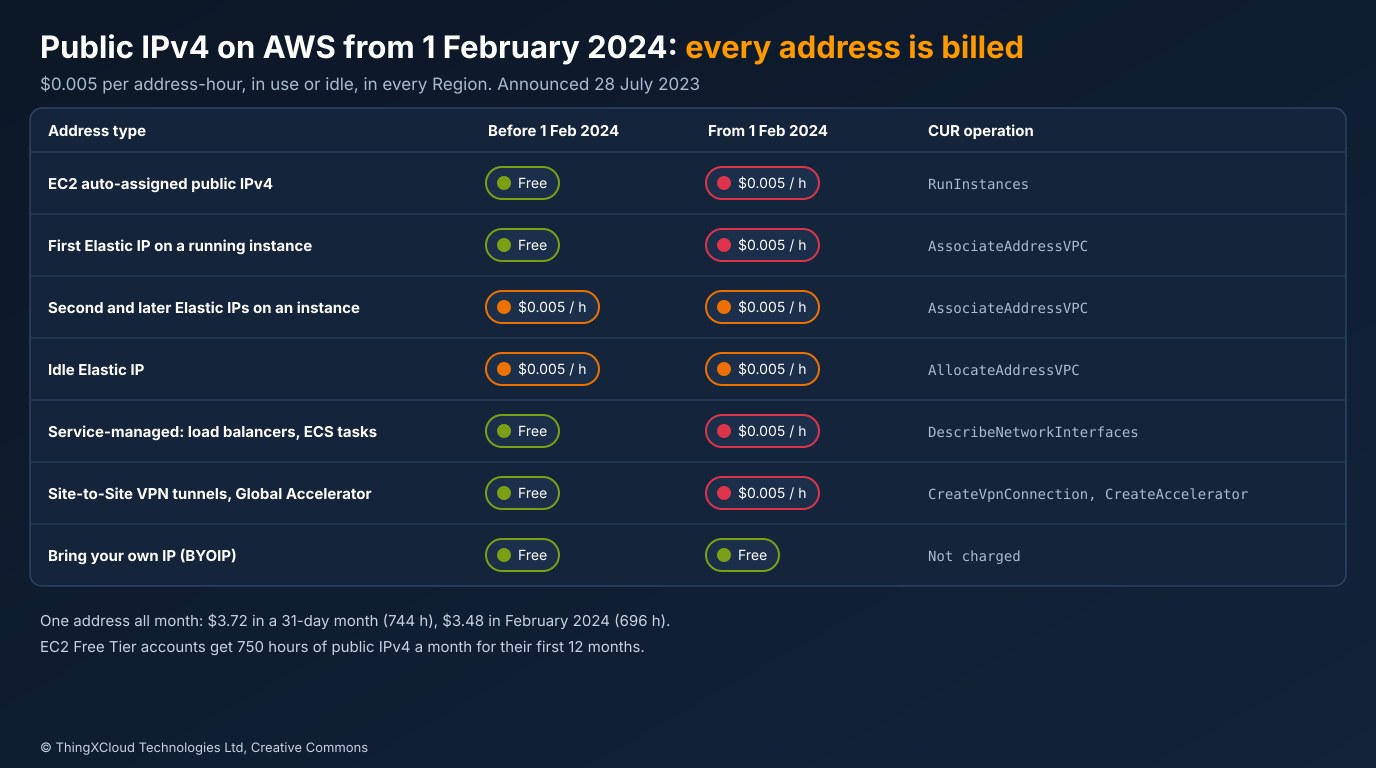
The rows that move from free to charged are the ones nobody tracks. An idle Elastic IP already showed up on the bill, so finance teams have been chasing those for years. An auto-assigned address on a web server, or the addresses behind an internet-facing load balancer, have never had a line item of their own.
Three ways to see the addresses
AWS gave customers two views of this before the price changed, and both are worth using before you write any code.
The first is the Cost and Usage Report. Since 28 July 2023 the CUR has carried two usage types, PublicIPv4:InUseAddress and PublicIPv4:IdleAddress, recorded at no cost until 1 February. That makes January’s CUR the most accurate forecast of February’s charge you can get: it is AWS’s own count, hour by hour. The lineItem/Operation column says what kind of address each line is. The AWS Networking blog post from launch day lists the operations: RunInstances for EC2 addresses, AssociateAddressVPC and AllocateAddressVPC for Elastic IPs in use and idle, DescribeNetworkInterfaces for service-managed addresses, and CreateVpnConnection and CreateAccelerator for VPN and Global Accelerator.
The second is Public IP Insights in Amazon VPC IP Address Manager. It launched with the price announcement as a free feature, and on 17 November 2023 AWS added an IPAM Free Tier and extended Public IP Insights to show addresses across accounts and Regions in one view. You need to create an IPAM to use it, and to see the whole organisation you first delegate an IPAM administrator account from the management account.
The third is the EC2 API, which is what this article’s code uses. The CUR tells you what you paid, after the fact. Public IP Insights is a console view. The API gives you the current state as data you can join to your own tagging, ownership and CMDB records, run on a schedule, and fail a pipeline on. Use the CUR to size the problem and the API to work through it.
How the audit finds each address
No single EC2 call lists every public IPv4 address. Elastic IPs come from DescribeAddresses, which is the only place an idle one appears. Auto-assigned addresses appear on the instance and on its network interface. Service-managed addresses appear only on network interfaces, and those interfaces belong to a service, not to you. The audit reads four sources per Region and counts each address once:
%%{init: {'theme': 'base', 'themeVariables': {'primaryColor': '#FFF3E0', 'primaryTextColor': '#232F3E', 'primaryBorderColor': '#FF9900', 'lineColor': '#232F3E', 'clusterBkg': '#F8FAFC', 'clusterBorder': '#CBD5E1', 'edgeLabelBackground': '#FFFFFF', 'nodeTextColor': '#232F3E'}}}%%
flowchart TD
    R["Every enabled Region<br/>ec2:DescribeRegions"] --> N["NAT gateways<br/>ENI to gateway map"]
    N --> I["Instances<br/>auto-assigned addresses, ENI to instance map"]
    I --> E["Elastic IPs<br/>idle, first on an instance, later ones"]
    E --> X["Every other ENI<br/>load balancers, ECS tasks, the rest"]
    X --> D["One row per address<br/>owner, CUR operation, newly charged"]
    D --> C["Monthly cost<br/>real hours in the month"]
    D --> S["Subnets that auto-assign<br/>the source of future addresses"]
    classDef compute fill:#FFF3E0,stroke:#FF9900,stroke-width:2px,color:#232F3E
    classDef data fill:#EBF8FF,stroke:#0073BB,stroke-width:2px,color:#004C74
    classDef store fill:#F0FFF4,stroke:#1D8102,stroke-width:2px,color:#145202
    classDef alert fill:#FEF2F2,stroke:#D13212,stroke-width:2px,color:#991B1B
    class R,N,I,E,X data
    class D compute
    class C store
    class S alert
The order matters because the same address can show up in more than one source. An Elastic IP on an instance appears in DescribeAddresses, in the instance’s network interfaces and in DescribeNetworkInterfaces. The audit lets Elastic IPs win, then auto-assigned instance addresses, then whatever is left on other interfaces. An address is auto-assigned when its association has no allocation ID, which is how the API tells an Elastic IP from an address borrowed from Amazon’s pool:
    # 1. Instances. Auto-assigned addresses live here (and on the ENI).
    instance_by_eni: dict[str, str] = {}
    auto_assigned: list[PublicIp] = []
    for reservation in _pages(ec2, "describe_instances", "Reservations"):
        for instance in reservation["Instances"]:
            owner = f"ec2 {instance['InstanceId']}"
            seen = set()
            for eni in instance.get("NetworkInterfaces", []):
                instance_by_eni[eni["NetworkInterfaceId"]] = instance["InstanceId"]
                for private in eni.get("PrivateIpAddresses", []):
                    association = private.get("Association") or {}
                    if association.get("PublicIp") and not association.get("AllocationId"):
                        seen.add(association["PublicIp"])
                        auto_assigned.append(PublicIp(region, association["PublicIp"], "ec2-auto", owner,
                                                      eni["NetworkInterfaceId"], OP_EC2, True))
            ip = instance.get("PublicIpAddress")
            if ip and ip not in seen:
                auto_assigned.append(PublicIp(region, ip, "ec2-auto", owner, None, OP_EC2, True))
The instance pass also builds a map from network interface to instance. The Elastic IP pass needs it, because whether an Elastic IP becomes chargeable on Thursday depends on what it is attached to. Only the first Elastic IP on a running instance was free; the second and later ones, and idle ones, were already charged:
    # 2. Elastic IPs. The only source for idle ones. They win over step 1 for the same address.
    eips_per_instance: dict[str, int] = {}
    for address in ec2.describe_addresses()["Addresses"]:
        ip = address["PublicIp"]
        if not address.get("AssociationId"):
            found[ip] = PublicIp(region, ip, "eip-idle", "none (idle)", None, OP_EIP_IDLE, False)
            continue
        eni_id = address.get("NetworkInterfaceId") or None
        # InstanceId can be empty when the EIP was associated through the ENI; map it back.
        instance_id = address.get("InstanceId") or instance_by_eni.get(eni_id or "", "")
        if instance_id:
            owner = f"ec2 {instance_id}"
            eips_per_instance[instance_id] = eips_per_instance.get(instance_id, 0) + 1
            # Before February 2024 the first EIP on a running instance was free.
            newly = eips_per_instance[instance_id] == 1
        else:
            owner = f"nat {nat_by_eni[eni_id]}" if eni_id in nat_by_eni else f"eni {eni_id}"
            newly = True
        found[ip] = PublicIp(region, ip, "eip-in-use", owner, eni_id, OP_EIP_IN_USE, newly)
The comment about InstanceId comes from the tests. moto 4.2.13 returns an empty InstanceId for an Elastic IP associated through its network interface rather than through the instance. Mapping the interface back to its instance costs nothing and means the audit does not depend on that field.
Naming what holds each address
An address is only useful in a report if someone can act on it, which means naming the resource that holds it. For instances and NAT gateways the API says so directly: the interface’s attachment carries an instance ID, and DescribeNatGateways lists each gateway’s interfaces. Everything else needs the network interface’s own fields:
def describe_owner(eni: dict, nat_by_eni: dict[str, str]) -> str:
    """Name the resource that holds an ENI. Uses only documented fields."""
    eni_id = eni["NetworkInterfaceId"]
    instance_id = (eni.get("Attachment") or {}).get("InstanceId")
    if instance_id:
        return f"ec2 {instance_id}"
    if eni_id in nat_by_eni:
        return f"nat {nat_by_eni[eni_id]}"
    description = eni.get("Description") or ""
    if description.startswith(("ELB app/", "ELB net/")):
        return "elb " + description[len("ELB "):]
    if description.startswith("ELB "):
        return "elb classic " + description[len("ELB "):]
    interface_type = eni.get("InterfaceType") or "interface"
    if interface_type in NAT_INTERFACE_TYPES:
        return f"nat (from interface type) {eni_id}"
    if interface_type != "interface":
        return f"{interface_type} {eni_id}"
    if eni.get("RequesterManaged"):
        return f"requester-managed '{description}' {eni_id}"
    return f"unknown {eni_id}"
Load balancer interfaces carry a description that starts ELB app/ for an Application Load Balancer, ELB net/ for a Network Load Balancer, and ELB followed by the name for a Classic Load Balancer. AWS documents the description field as the creating service’s description of the interface, but not its exact format, so treat those prefixes as a convention that has held, not a contract. Anything the code cannot name falls back to the interface type or to the requester-managed flag with the raw description, so a person can still find the owner.
One detail in the interface types is worth knowing if you write your own version. The botocore model of January 2024 and the EC2 API reference disagree on how to spell the NAT gateway interface type. This is what the sample’s tools/api_options.py printed in CI:
{
  "botocore": "1.34.29",
  "elbv2 IpAddressType": [
    "ipv4",
    "dualstack"
  ],
  "ec2 NetworkInterfaceType has nat_gateway": false,
  "ec2 NetworkInterfaceType has natGateway": true,
  "ec2 ModifySubnetAttribute has EnableDns64": true,
  "lambda VpcConfig has Ipv6AllowedForDualStack": true,
  "ecs AssignPublicIp": [
    "ENABLED",
    "DISABLED"
  ]
}
The model’s enum says natGateway, while the API reference lists nat_gateway as the value and as the filter value. Code that compares against one spelling can miss NAT gateway interfaces. The audit accepts both, and it prefers the join from DescribeNatGateways anyway.
moto 4.2.13 gives instances a PublicIpAddress but leaves the network interface’s Association empty. An audit that read only DescribeNetworkInterfaces would find no EC2 addresses at all under moto, and its tests would still pass if they only checked load balancers. The sample reads instances directly and has a separate stubbed test, with the response shape real AWS returns, for an address that appears on both the instance and its interface.
Test setup
The sample has 16 tests in three groups. moto covers instances, Elastic IPs, NAT gateways and subnet settings, because moto can create those resources and change their state. moto cannot create a load balancer’s interfaces or an ECS task’s, so those cases use botocore’s Stubber with synthetic responses that the Stubber checks against the EC2 service model. The CUR reader and the cost model have plain fixture tests. The CI job pins Python 3.12 and installs packages with uv --exclude-newer 2024-01-26, which gave boto3 and botocore 1.34.29, moto 4.2.13 and pytest 7.4.4.
The demo account is made up and built in moto. It is the kind of estate the change hits hardest: a VPC with two public subnets where auto-assign is on, two web instances in each, a bastion with an Elastic IP, a NAT gateway per Availability Zone, two Elastic IPs left over from an old migration, and one instance someone launched into the default VPC in us-east-1 and forgot.
Test results
The audit of the demo account, priced for February 2024:
{
  "addresses": 10,
  "by_kind": {
    "ec2-auto": 5,
    "eip-idle": 2,
    "eip-in-use": 3
  },
  "by_owner_type": {
    "ec2": 6,
    "nat": 2,
    "none": 2
  },
  "newly_charged": 8,
  "month": "2024-02",
  "hours": 696,
  "cost_all": "34.80",
  "cost_new_from_feb_2024": "27.84"
}
Ten addresses, of which eight were free before Thursday. The two idle Elastic IPs cost $6.96 in February under the old pricing and still do. Everything else is new: $27.84 for February, taking the total to $34.80. One row per address went to a CSV:
region,ip,kind,owner,eni,billing_operation,newly_charged
eu-west-1,54.214.143.125,ec2-auto,ec2 i-675460c13d0d73512,eni-ab5db826,RunInstances,True
eu-west-1,54.214.69.25,ec2-auto,ec2 i-8f9dc1e6307f08743,eni-276e466a,RunInstances,True
eu-west-1,54.214.163.221,ec2-auto,ec2 i-b0cb1917dd6d92b63,eni-63176140,RunInstances,True
eu-west-1,54.214.248.192,ec2-auto,ec2 i-f097ad69eba2025c2,eni-4a8cec20,RunInstances,True
eu-west-1,127.188.164.121,eip-idle,none (idle),,AllocateAddressVPC,False
eu-west-1,127.218.90.238,eip-idle,none (idle),,AllocateAddressVPC,False
eu-west-1,127.28.210.127,eip-in-use,ec2 i-d5901cbb587a4b8a8,eni-81a08bab,AssociateAddressVPC,True
eu-west-1,127.63.254.97,eip-in-use,nat nat-b58d60371c8b745ad,eni-de9dd53e,AssociateAddressVPC,True
eu-west-1,127.252.145.49,eip-in-use,nat nat-f0f6ab5397c8cd671,eni-48f7d9b6,AssociateAddressVPC,True
us-east-1,54.214.254.91,ec2-auto,ec2 i-ffba175cc546f099b,eni-71014cfb,RunInstances,True
The Elastic IP addresses are in moto’s 127.0.0.0/8 range and the instance addresses in its 54.214.0.0/16 range; in a real account both are Amazon public addresses. The CSV is the useful output: sort it by owner, send each team its rows.
Pricing the addresses
Monthly estimates usually multiply by 730 hours. That is fine for a budget and wrong for a specific month, and February 2024 is the month most people will compare against. The cost function uses the real number of hours and applies the Free Tier allowance when asked:
def month_cost(address_count: int, year: int, month: int, free_tier: bool = False) -> Decimal:
    """Cost of address_count addresses held for the whole month."""
    hours = address_count * hours_in_month(year, month)
    if free_tier:
        hours = max(0, hours - FREE_TIER_HOURS)
    return (hours * RATE_PER_HOUR).quantize(Decimal("0.01"), rounding=ROUND_HALF_UP)
For the CUR, the sample reads a downloaded report file with the standard library rather than through Athena, since many teams have the CUR delivered to S3 but have not set up the Athena integration. It totals address-hours by usage type, by operation and by resource ID:
    with _open(Path(path)) as handle:
        for row in csv.DictReader(handle):
            usage_type = row.get("lineItem/UsageType", "")
            suffix = next((s for s in USAGE_SUFFIXES if usage_type.endswith(s)), None)
            if not suffix:
                continue
            hours = Decimal(row.get("lineItem/UsageAmount") or "0")
            by_usage[suffix] += hours
            by_operation[row.get("lineItem/Operation", "")] += hours
            by_resource[row.get("lineItem/ResourceId") or "(no resource id)"] += hours
Run it on January’s files and multiply by the February rate, and you have AWS’s own number to check the API audit against. If the two disagree by more than an address or two, something is holding addresses that the API audit does not cover. VPN tunnels and Global Accelerator are the usual suspects, and the operation column will say which. The resource ID column is only filled in if the report was set up with resource IDs included.
Reducing the count
Each address type has its own fix, and none of them is a billing setting. Most of them change architecture or access, so they need an owner and a change window. In rough order of effort:
| Address type | Change | Watch out for |
|---|---|---|
| Idle Elastic IP | Release it | A partner may have it on a firewall allow list; once released you cannot count on getting it back |
| Auto-assigned on new launches | Turn off MapPublicIpOnLaunch on the subnet | Only affects new launches; existing instances get a new address every time they start |
| Bastion or admin access | EC2 Instance Connect Endpoint (launched 13 June 2023) | SSH and RDP only; needs IAM permissions for the endpoint and for EC2 Instance Connect |
| Web instances with public addresses | Private subnets behind an internet-facing load balancer | The load balancer holds public addresses of its own, at least one per Availability Zone |
ECS tasks with assignPublicIp ENABLED | Private subnets, with a NAT gateway or VPC endpoints for image pulls and logs | Interface endpoints and NAT gateways have their own hourly charges; compare them |
| NAT gateway per Availability Zone | Usually keep them | One shared NAT gateway saves addresses but adds cross-AZ traffic and a shared failure point |
The first two rows are the cheapest. Releasing idle Elastic IPs takes minutes once someone confirms nothing depends on them, and turning off auto-assign stops new addresses appearing. Default VPC subnets have it on, and so do public subnets created by many templates. The sample lists the subnets that have it on:
def auto_assign_subnets(ec2) -> list[dict]:
    """Subnets that hand a public IPv4 address to everything launched in them.

    Default VPC subnets have this on. Turning it off changes only new launches.
    Existing instances made their choice at launch: they get a new address
    every time they start, so they have to be replaced to lose it.
    """
    return [
        {"subnet": s["SubnetId"], "vpc": s["VpcId"], "az": s["AvailabilityZone"],
         "default_for_az": s.get("DefaultForAz", False)}
        for s in _pages(ec2, "describe_subnets", "Subnets")
        if s.get("MapPublicIpOnLaunch")
    ]
A test turns the setting off in moto and then launches an instance into the subnet, which comes back without a public address. Existing instances are not affected. The choice was made at launch, so AWS releases the address when the instance stops and gives it a new one when it starts again. To lose the address, the instance has to be replaced, which is usually part of moving it into a private subnet anyway.
The scenario script prices the demo account’s clean-up step by step for March 2024, the first full month at the new rate:
2024-03: 744 hours at $0.005 per address-hour
step                                                                                 addresses  USD/month
As found                                                                                    10      37.20
Release the 2 idle Elastic IPs                                                               8      29.76
Stop or terminate the forgotten us-east-1 instance                                           7      26.04
Replace the bastion's Elastic IP with an EC2 Instance Connect Endpoint                       6      22.32
Move the 4 web instances to private subnets behind an internet-facing ALB in 2 AZs           4      14.88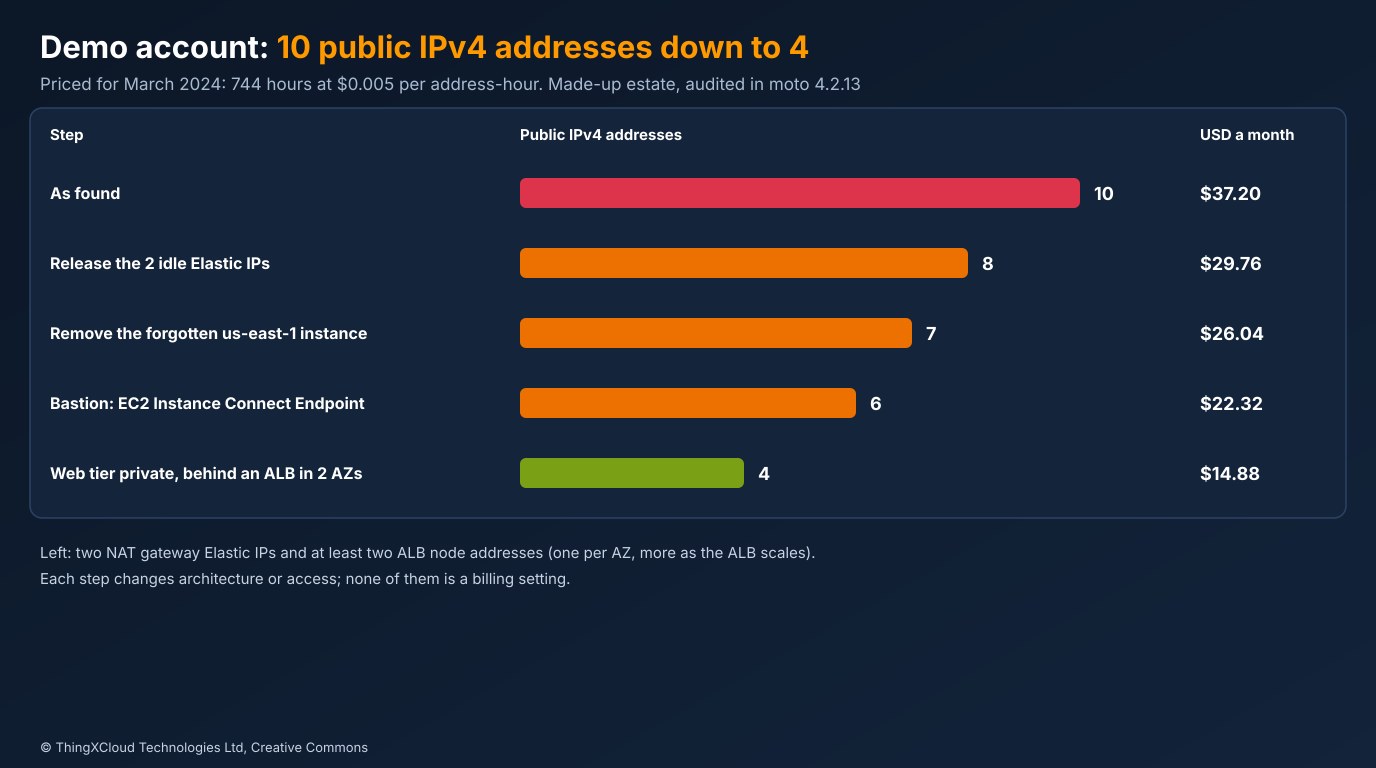
The last step is the one to think about. Moving four web instances into private subnets removes four addresses but adds the load balancer’s, at least one per Availability Zone and more as it scales out. The saving is the difference, and it grows with the number of instances. The real reason to make that change is that web servers should not have public addresses, and the price change makes the argument easier to win.
Where IPv6 helps, and where it does not yet
AWS’s announcement pointed customers towards IPv6, and it does remove addresses in some places today. It does not remove them where most of the new charges come from.
For inbound traffic, a dual-stack Application or Network Load Balancer accepts IPv6 clients, but in January 2024 it still holds public IPv4 addresses too. The botocore model above lists only ipv4 and dualstack as load balancer address types, so there is no way to have an internet-facing load balancer without public IPv4. Dual-stack is worth turning on for clients who prefer IPv6, but it saves nothing on this charge.
For outbound traffic there is more room. An instance in an IPv6-only or dual-stack subnet can reach IPv6 destinations through an egress-only internet gateway with no public IPv4 address, and since 12 October 2023 VPC-attached Lambda functions can send IPv6 traffic from dual-stack subnets. Many endpoints that builds and agents call still have no IPv6 address, so an IPv6-only subnet needs DNS64 on the subnet and NAT64 on a NAT gateway to reach them, and that NAT gateway holds an Elastic IP. The saving comes from many workloads sharing a few NAT gateways instead of each holding an address.
Before changing any architecture, run tools/cur_report.py on January’s Cost and Usage Report. If the total is a few dollars a month, release the idle Elastic IPs, turn off auto-assign on subnets, and move on. If it is hundreds, the CSV from the API audit tells you which teams own the addresses.
Production considerations
- Permissions. The audit needs only
ec2:Describe*calls:DescribeRegions,DescribeAddresses,DescribeInstances,DescribeNetworkInterfaces,DescribeNatGatewaysandDescribeSubnets. Run it from a read-only role assumed into each account in the organisation. - Regions. It audits every enabled Region by default and logs and skips a Region it cannot read, so a service control policy that blocks one Region does not lose the rest. Check the log for skipped Regions; they are not in the totals.
- Coverage. Site-to-Site VPN tunnel addresses and Global Accelerator addresses are charged but not counted. Compare the audit with the CUR or Public IP Insights to catch them.
- Schedule. Run it weekly and diff the CSV. A new idle Elastic IP or a new subnet with auto-assign on is worth an alert; the count creeping up by one a week is how the bill grew in the first place.
- Allow lists. In regulated environments, partners such as payment processors, clearing houses and health information exchanges often allow-list a sender’s Elastic IP. Check before releasing one, and keep a register of addresses that external parties depend on.
- Owners. Join the CSV to your tags. An address owned by “unknown eni-…” is a finding in its own right.
Decision framework
| Question | Recommendation |
|---|---|
| How much will 1 February cost us? | January’s CUR, PublicIPv4 usage types, times $0.005 per hour |
| Which resources hold the addresses? | The API audit, one row per address with its owner |
| What to do first? | Release idle Elastic IPs and turn off auto-assign on subnets |
| Bastions with public addresses? | Replace with EC2 Instance Connect Endpoint where SSH or RDP is all that is needed |
| Will dual-stack load balancers save money? | Not in January 2024: they still hold public IPv4 |
| One NAT gateway or one per AZ? | One per AZ unless the saving outweighs cross-AZ traffic and a shared failure point |
The sample ran in GitHub Actions (run) on Python 3.12 with boto3 and botocore 1.34.29, moto 4.2.13 and pytest 7.4.4, the versions available on 26 January 2024. All 16 tests passed. The demo account, the summary, the CSV, the scenario prices and the botocore model output above are copied from that run. No real AWS account was used: load balancer and ECS interfaces were tested with synthetic responses validated against the service model. Prices and dates come from the AWS News Blog and AWS Networking blog posts of 28 July 2023 and the What’s New posts linked below.
Key takeaways
- From 1 February 2024 every public IPv4 address costs $0.005 an hour, in use or idle; only BYOIP addresses are exempt.
- The new charges are on addresses nobody tracked: auto-assigned instance addresses, the first Elastic IP on an instance, and service-managed addresses.
- January’s Cost and Usage Report already records the usage at no cost, so it is the best forecast of February’s charge.
- No single EC2 call lists every address; read instances, Elastic IPs, NAT gateways and network interfaces, and count each address once.
- Release idle Elastic IPs and turn off auto-assign first; dual-stack load balancers do not remove public IPv4 in January 2024.
If your audit turned up something this one does not classify, let me know in the comments below.
The complete sample for this article is on GitHub: nithinmohantk/blog-samples-working-repo/aws-public-ipv4-charge-audit. Clone it with git clone https://github.com/nithinmohantk/blog-samples-working-repo.git and open the aws-public-ipv4-charge-audit folder. Its README says how to run it and what has been verified.
Glossary
- Public IPv4 address
- An internet-routable IPv4 address; on AWS either from Amazon’s pool, an Elastic IP, or your own through BYOIP.
- Auto-assigned public IPv4
- An address from Amazon’s pool given to an instance at launch because the subnet’s MapPublicIpOnLaunch setting is on; released when the instance stops.
- Elastic IP
- A public IPv4 address allocated to your account that you can move between resources.
- Idle Elastic IP
- An Elastic IP allocated to your account but not associated with anything.
- Service-managed address
- A public IPv4 address that an AWS service, such as a load balancer, holds on a network interface in your VPC.
- BYOIP
- Bring your own IP: public address ranges you own and advertise through AWS; not charged.
- ENI
- Elastic network interface, the virtual network card that carries private and public addresses in a VPC.
- Requester-managed interface
- A network interface an AWS service creates in your VPC; you can see and tag it but not change it.
- CUR
- AWS Cost and Usage Report, the hourly line-item record of usage and cost.
- Public IP Insights
- A free view in Amazon VPC IP Address Manager of public IPv4 addresses across accounts and Regions.
- EC2 Instance Connect Endpoint
- A VPC endpoint that gives SSH and RDP access to instances without public addresses.
- DNS64 and NAT64
- Subnet DNS and NAT gateway features that let IPv6-only workloads reach IPv4-only destinations.
References & Further Reading
- → New: AWS Public IPv4 Address Charge and Public IP Insights— AWS News Blog, 28 July 2023: the pricing table, Free Tier and BYOIP
- → Identify and optimize public IPv4 address usage on AWS— AWS Networking blog: address types, CUR usage types and operations
- → AWS announces Public IP Insights— What's New, 28 July 2023
- → VPC IPAM Free Tier and cross-Region Public IP Insights— What's New, 17 November 2023
- → EC2 Instance Connect Endpoint— What's New, 13 June 2023: SSH and RDP without public addresses
- → Lambda IPv6 outbound connections in VPC— What's New, 12 October 2023
- → EC2 API reference: NetworkInterface— Interface types, requester-managed flag and association fields
- → Find the IP addresses of a load balancer— AWS re:Post Knowledge Center
- → Sample code for this article— Audit, cost model, CUR reader, demo account and tests
Discover more from C4: Container, Code, Cloud & Context
Subscribe to get the latest posts sent to your email.
