.NET 8 leaves support on 10 November 2026, and .NET 9 leaves on the same day. For the many services that sit on .NET 8 because it is the long-term support release, the next stop is .NET 10, which shipped last November and is supported until November 2028. That is a jump across two releases, and it collects the breaking changes of both.
Microsoft documents those changes thoroughly, in two long lists. The lists tell you what changed in the platform. They cannot tell you which of the changes your code will meet, or whether you will find out from the compiler, from an exception, or from a customer. This article takes one codebase, builds and runs it on .NET 8 and on .NET 10, and records every difference: twenty probes of run-time behaviour in an ASP.NET Core project, and nine small projects of the kind of code that older services contain.
Three legs, not two
An upgrade changes two things that are easy to conflate: the SDK that builds the code and the framework the code targets. They can be changed separately, so the comparison has three legs.
| Leg | SDK | Target | Runtime | What it stands for |
|---|---|---|---|---|
| A | 8.0.417 | net8.0 | 8.0.23 | Where the service is today |
| B | 10.0.102 | net8.0 | 8.0.23 | Step one: new SDK, same runtime |
| C | 10.0.102 | net10.0 | 10.0.2 | Step two: new target |
The project multi-targets and sets no language version, so each target gets its default, C# 12 for net8.0 and C# 14 for net10.0, as an upgraded project would.
<Project Sdk="Microsoft.NET.Sdk.Web">
  <PropertyGroup>
    <TargetFrameworks>net8.0;net10.0</TargetFrameworks>
    <Nullable>enable</Nullable>
    <ImplicitUsings>enable</ImplicitUsings>
    <!-- No LangVersion: each target gets its default, C# 12 for net8.0 and C# 14 for net10.0, as an upgraded project would. -->
    <ServerGarbageCollector>true</ServerGarbageCollector>
    <EnableUnsafeBinaryFormatterSerialization>true</EnableUnsafeBinaryFormatterSerialization>
    <NoWarn>$(NoWarn);SYSLIB0011;CS0618</NoWarn>
  </PropertyGroup>
</Project>
One detail of the method matters more than it looks. A machine with several runtimes installed rolls an application forward to the newest patch of its major version, so a build agent with a later .NET 8 runtime would quietly test something other than what was intended. The pipeline installs each SDK into its own directory and turns multi-level lookup off.
#!/usr/bin/env bash
# Installs the two SDKs into private directories, so nothing rolls forward to a newer runtime on the machine,
# then runs the checks. Usage: ./ci.sh <output directory>
set -uo pipefail
out="$(mkdir -p "$1" && cd "$1" && pwd)"
cd "$(dirname "$0")"
SDK8="8.0.417"; RUNTIME8="8.0.23"     # 13 January 2026
SDK10="10.0.102"                      # 13 January 2026, carries runtime 10.0.2
root="$(mktemp -d)"
curl -fsSL -o "$root/dotnet-install.sh" https://dot.net/v1/dotnet-install.sh || exit 2
bash "$root/dotnet-install.sh" --version "$SDK8" --install-dir "$root/sdk8" --no-path > "$out/install.txt" 2>&1 || exit 2
bash "$root/dotnet-install.sh" --version "$SDK10" --install-dir "$root/sdk10" --no-path >> "$out/install.txt" 2>&1 || exit 2
bash "$root/dotnet-install.sh" --runtime aspnetcore --version "$RUNTIME8" --install-dir "$root/sdk10" --no-path >> "$out/install.txt" 2>&1 || exit 2
{ for d in sdk8 sdk10; do echo "[$d]"; DOTNET_ROOT="$root/$d" DOTNET_MULTILEVEL_LOOKUP=0 "$root/$d/dotnet" --list-sdks; DOTNET_ROOT="$root/$d" DOTNET_MULTILEVEL_LOOKUP=0 "$root/$d/dotnet" --list-runtimes | grep -v WindowsDesktop; done; } | sed "s|$root/||" | tee "$out/versions.txt"

status=0
python -u upgrade_check.py "$root/sdk8" "$root/sdk10" "$out" recorded.json 2>&1 | tee "$out/upgrade-check.txt"; [ "${PIPESTATUS[0]}" -eq 0 ] || status=1

echo "== container base images" | tee "$out/images.txt"
for tag in 8.0 10.0; do
  printf 'aspnet:%s  ' "$tag" | tee -a "$out/images.txt"
  docker run --rm --entrypoint /bin/sh "mcr.microsoft.com/dotnet/aspnet:$tag" -c '. /etc/os-release; echo "$PRETTY_NAME"' 2>/dev/null | tee -a "$out/images.txt" || status=1
done
exit $status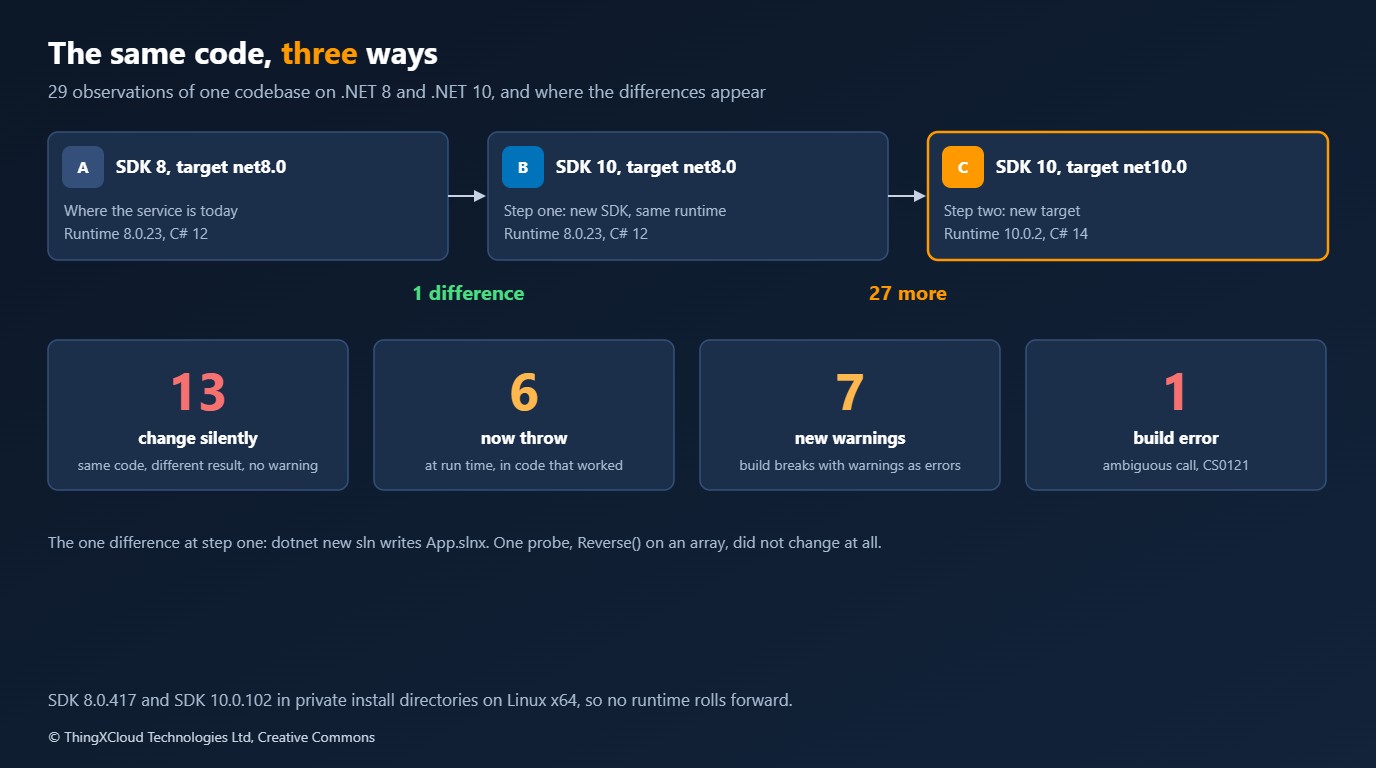
Step one changes almost nothing
Moving from leg A to leg B, the new SDK building the old target, produced one difference in twenty-nine: dotnet new sln now writes App.slnx, the XML solution format, where the .NET 8 SDK wrote App.sln. Every behaviour probe gave the same result and every compile sample built clean.
That is useful for planning. The stricter defaults in the .NET 10 SDK are keyed to the target framework: the language version follows the target, and so does the new NuGet audit default. A team can therefore put the .NET 10 SDK on its build agents and developer machines, pin it with global.json, and keep shipping net8.0 binaries with no change in behaviour. It separates “is our tooling ready” from “is our code ready”, and it means the second step is the only one with risk in it.
Step two: what the build tells you
Changing the target to net10.0 is where the other twenty-seven differences appear. Eight of them are reported by the build.
| Older code | On net10.0 | Since |
|---|---|---|
The System.Linq.Async package with LINQ over IAsyncEnumerable | Error CS0121, ambiguous call | .NET 10 |
A member named field used inside a property accessor | Warning CS9258, and CS0169 because the member is now unused | C# 14 |
new X509Certificate2(bytes) | Warning SYSLIB0057 | .NET 9 |
new Rfc2898DeriveBytes(...) | Warning SYSLIB0060 | .NET 10 |
WebHost.CreateDefaultBuilder and IWebHost | Warning ASPDEPR008 | .NET 10 |
ForwardedHeadersOptions.KnownNetworks and the ASP.NET Core IPNetwork | Warning ASPDEPR005 | .NET 10 |
.WithOpenApi() on an endpoint | Warning ASPDEPR002 | .NET 10 |
| A package whose dependency has a known advisory | Warning NU1903 for the transitive package | .NET 10 SDK, for net10.0 targets |
The error is the friendly one, because nothing ships until it is fixed. LINQ for IAsyncEnumerable is now part of the framework, so the same extension methods exist twice.
// The community System.Linq.Async package, used for LINQ over IAsyncEnumerable before the framework had its own.
List<int> numbers = await Numbers().Where(n => n % 2 == 0).ToListAsync();
Console.WriteLine(numbers.Count);

static async IAsyncEnumerable<int> Numbers()
{
    for (int i = 0; i < 10; i++) { await Task.Yield(); yield return i; }
}
Microsoft’s guidance is to remove the package reference or move to version 7 of it, and, where another package brings it in transitively, to exclude its compile assets.
The warnings need more care than their severity suggests. Most services build with warnings as errors, in which case seven warnings are seven build breaks. The one that deserves a second look is CS9258.
// A class with a member called "field", read and written from a property accessor. Common in older code.
Console.WriteLine(new Reading { Value = 42 }.Value);

internal sealed class Reading
{
    private int field;

    public int Value
    {
        get { return field; }
        set { field = value; }
    }
}
In C# 14, field inside a property accessor is a keyword for a compiler-generated backing field. This class still compiles and still prints 42, but the accessor no longer touches the member the author declared, which is why the compiler also reports that member as unused. Anything else that reads the declared member, a constructor, a serializer or a ToString, now sees a different variable from the one the property writes. A team that has silenced warnings to get an upgrade through would ship that. The fix the compiler suggests is this.field or @field; renaming the member is better.
The NuGet warning is a policy change. Restore has audited direct package references since .NET 8. For projects that target .NET 10 it audits transitive ones as well, so a dependency of a dependency with a known advisory now fails a warnings-as-errors build. In the sample the direct reference is clean and the package it pulls in, an old Newtonsoft.Json, is not.
What the build does not tell you: six new exceptions
Nineteen differences produce no diagnostic at all. Six of them are code that ran on .NET 8 and throws on .NET 10. They are at least loud, provided a test or a request reaches them.
| Probe | .NET 8 | .NET 10 | Since |
|---|---|---|---|
GetKeyedService with KeyedService.AnyKey | Returns the AnyKey registration | InvalidOperationException | .NET 10 |
| A property with the same name as the JSON type discriminator | Serializes {"Type":"dog","Type":"Dog"} | InvalidOperationException | .NET 10 |
array.Contains(x) in an expression tree, compiled with interpretation | Binds to Enumerable.Contains and runs | Binds to MemoryExtensions.Contains; ArgumentException | C# 14 |
new MailAddress("first..last@example.org") | Accepted | FormatException | .NET 10 |
BinaryFormatter with the opt-in switch set | Serializes | PlatformNotSupportedException | .NET 9 |
HostBuilder in Development with a singleton that depends on a scoped service | Builds | AggregateException at build | .NET 9 |
Two of these are improvements that happen to break things. The JSON one replaces invalid output with an early error, and the host one finds a real lifetime bug that .NET 8 let through outside WebApplication. The expression tree change is the one with reach. It comes from the language, not the runtime: C# 14 lets span-based extension methods bind to arrays, so Contains on an array inside an expression lambda now resolves to the span overload, and anything that interprets the tree instead of compiling it fails.
await Probe("language.array_contains_in_expression_tree", () =>
{
    Expression<Func<int[], int, bool>> contains = (values, wanted) => values.Contains(wanted);
    string bound = ((MethodCallExpression)contains.Body).Method.DeclaringType!.Name;
    string interpreted;
    try { interpreted = contains.Compile(preferInterpretation: true)(new[] { 1, 2, 3 }, 2) ? "interprets" : "interprets wrongly"; }
    catch (Exception error) { interpreted = $"interpreter throws {error.GetType().Name}"; }
    return Task.FromResult($"binds to {bound}.Contains, {interpreted}");
});
Query providers, rule engines and mocking libraries that walk expression trees are the code to check. The documented way to keep the old binding is to call Enumerable.Contains explicitly or to cast the array to IEnumerable<T>.
What nothing tells you: thirteen silent changes
The remaining thirteen differences throw nothing and warn about nothing. The service builds, starts and answers, and does something different from what it did the day before.
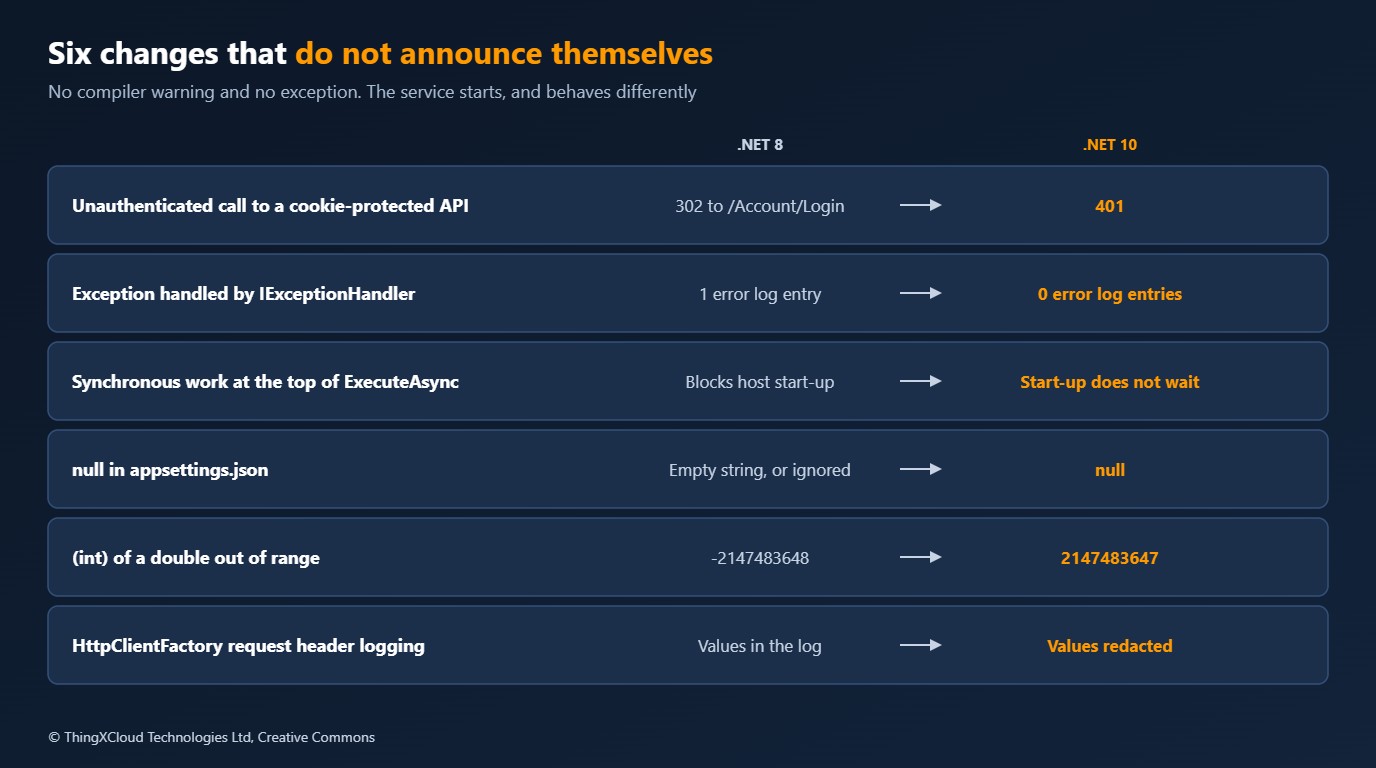
| Probe | .NET 8 | .NET 10 | Since |
|---|---|---|---|
| Unauthenticated request to a cookie-protected API endpoint | 302 to /Account/Login | 401 | .NET 10 |
Exception handled by IExceptionHandler | One error entry logged by the middleware | None | .NET 10 |
Synchronous work before the first await in ExecuteAsync | Host start-up waits for it | Start-up returns first | .NET 10 |
null in JSON configuration | Name='', Retries=3, Hosts=['', ''] | Name=null, Retries=null, Hosts=[null, null] | .NET 10 |
| Default trace propagator header fields | Includes Request-Id | No Request-Id | .NET 10 |
[Obsolete] property with XmlSerializer | Left out | Serialized | .NET 10 |
| A URI longer than 65,519 characters | UriFormatException | Accepted | .NET 10 |
HttpClientFactory logging of request headers | Values written to the log | Values redacted | .NET 9 |
HttpClientFactory primary handler | HttpClientHandler | SocketsHttpHandler | .NET 9 |
Nullable JsonDocument property given JSON null | null | A document of kind Null | .NET 9 |
(int)1e20, (int)NaN, (uint)-1.0 | -2147483648, -2147483648, 4294967295 | 2147483647, 0, 0 | .NET 9 |
SetEnvironmentVariable(name, "") | Deletes the variable | Keeps it, empty | .NET 9 |
| Server GC adaptation mode | 0 | 1: dynamic adaptation on by default | .NET 9 |
Four of these change what an operations team sees, and they are worth taking one at a time.
Cookie-protected APIs answer 401. ASP.NET Core 10 recognises API endpoints and stops redirecting them to a login page.
await Probe("aspnet.cookie_auth_on_api_endpoint", async () =>
{
    WebApplicationBuilder builder = QuietBuilder();
    builder.Services.AddAuthentication(CookieAuthenticationDefaults.AuthenticationScheme).AddCookie();
    builder.Services.AddAuthorization();
    await using WebApplication app = builder.Build();
    app.UseAuthentication();
    app.UseAuthorization();
    app.MapGet("/api/orders", () => new Order(1, "open")).RequireAuthorization();
    await app.StartAsync();
    using HttpClient client = new(new HttpClientHandler { AllowAutoRedirect = false }) { BaseAddress = new Uri(Address(app)) };
    using HttpResponseMessage response = await client.GetAsync("/api/orders");
    return $"{(int)response.StatusCode}" + (response.Headers.Location is { } location ? $", Location {location.AbsolutePath}" : ", no Location header");
});
%%{init: {'theme':'base','themeVariables':{'primaryColor':'#FFF3E0','primaryTextColor':'#232F3E','primaryBorderColor':'#FF9900','lineColor':'#232F3E','signalColor':'#0073BB','signalTextColor':'#0F172A','actorBkg':'#FFF3E0','actorBorder':'#FF9900','actorTextColor':'#232F3E','noteBkgColor':'#FFF8E7','noteBorderColor':'#FF9900','noteTextColor':'#232F3E'}}}%%
sequenceDiagram
participant C as API client
participant A as API on .NET 8
participant B as API on .NET 10
C->>A: GET /api/orders, no cookie
A-->>C: 302 Found, Location /Account/Login
Note over C: Follows the redirect and receives a login page
C->>B: GET /api/orders, no cookie
B-->>C: 401 Unauthorized
Note over C: Has to handle 401 itselfFor a single-page application calling its own API this is the behaviour it wanted all along. For a client that relied on being redirected, or a test that asserts a 302, it is a break. A redirect can be restored for one endpoint with AllowCookieRedirect(), or for the whole application with the Microsoft.AspNetCore.Authentication.Cookies.IgnoreRedirectMetadata switch.
Handled exceptions disappear from the log. When an IExceptionHandler returns true, the middleware no longer logs the exception or tags the request-duration metric with an error type.
await Probe("aspnet.handled_exception_is_logged", async () =>
{
    CapturingLoggerProvider logs = new();
    WebApplicationBuilder builder = QuietBuilder();
    builder.Logging.AddProvider(logs).SetMinimumLevel(LogLevel.Information);
    builder.Services.AddExceptionHandler<HandlesEverything>();
    await using WebApplication app = builder.Build();
    app.UseExceptionHandler(_ => { });
    app.MapGet("/boom", string () => throw new InvalidOperationException("synthetic failure"));
    await app.StartAsync();
    using HttpClient client = new() { BaseAddress = new Uri(Address(app)) };
    using HttpResponseMessage response = await client.GetAsync("/boom");
    int errors = logs.Entries.Count(e => e.Level >= LogLevel.Error && e.Category.Contains("ExceptionHandlerMiddleware"));
    return $"{(int)response.StatusCode}, {errors} error log entr{(errors == 1 ? "y" : "ies")} from the middleware";
});
The response is the same 500 on both. What changes is that an alert built on the middleware’s error log, or on the error.type tag, stops firing after the upgrade while the failures continue. Either log inside the handler, which is the better home for it, or set SuppressDiagnosticsCallback on ExceptionHandlerOptions to return false.
Background services no longer hold up start-up. On .NET 8 the synchronous part of ExecuteAsync ran on the starting thread, and some services leaned on that to warm a cache or open a connection before the host accepted traffic.
internal sealed class SlowToFirstAwait : BackgroundService
{
    protected override Task ExecuteAsync(CancellationToken stoppingToken)
    {
        Thread.Sleep(1500); // stands for synchronous start-up work: loading a cache, opening a connection
        return Task.CompletedTask;
    }
}
On .NET 10 the whole method runs in the background and StartAsync returns without waiting for it. A readiness probe that passed only after that work had finished can now pass before it has. Work that must complete before the service is ready belongs in StartAsync or an IHostedLifecycleService.
Null in configuration means null. A property with a default and a JSON value of null kept its default on .NET 8, or became an empty string. On .NET 10 it is null.
await Probe("configuration.null_in_json", () =>
{
    const string json = """{ "Settings": { "Name": null, "Retries": null, "Hosts": [null, null] } }""";
    IConfiguration configuration = new ConfigurationBuilder().AddJsonStream(new MemoryStream(Encoding.UTF8.GetBytes(json))).Build();
    Settings settings = configuration.GetSection("Settings").Get<Settings>() ?? new Settings();
    string hosts = settings.Hosts is null ? "null" : "[" + string.Join(", ", settings.Hosts.Select(h => h is null ? "null" : $"'{h}'")) + "]";
    return Task.FromResult($"Name={(settings.Name is null ? "null" : $"'{settings.Name}'")}, Retries={settings.Retries?.ToString() ?? "null"}, Hosts={hosts}");
});
Retries going from 3 to null is the kind of difference that surfaces as a NullReferenceException three layers away, or as a retry policy that has stopped retrying. Search configuration files for explicit nulls before the upgrade.
The floating-point change is the one to raise with anyone who owns calculations. An out-of-range conversion used to produce whatever the processor produced, which on x64 was the minimum value. Since .NET 9 it saturates, and NaN converts to zero. Code that tested for the old sentinel value, or that depended on wrap-around, gives different answers with no error. In a clinical or financial calculation that is a correctness defect, so the conversion sites need to be found by search and reviewed, not left for a test to stumble on.
One that did not change
The twenty-ninth observation is worth a line. Reverse() on an array, written expecting LINQ’s new reversed sequence, is exposed in principle to the same C# 14 rule that moved Contains, since a span has an in-place Reverse of its own. On the released .NET 10 it builds without a warning and prints the same output as on .NET 8: the reversed sequence, with the array untouched. A probe that comes back unchanged is still information. It is one item off the list of things to worry about.
The container moves too
The default .NET container images changed their base. Reading /etc/os-release from each: mcr.microsoft.com/dotnet/aspnet:8.0 is Debian 12, and aspnet:10.0 is Ubuntu 24.04. A Dockerfile that only copies the published output will not notice. One that installs packages with apt-get, pins a package version, adds a certificate authority or applies a hardening baseline written for Debian needs to be read again, and so does the allow-list in whatever scans images for the organisation.
A sequence for the upgrade
%%{init: {'theme':'base','themeVariables':{'primaryColor':'#FFF3E0','primaryTextColor':'#232F3E','primaryBorderColor':'#FF9900','lineColor':'#232F3E','clusterBkg':'#F8FAFC','clusterBorder':'#CBD5E1','edgeLabelBackground':'#FFFFFF','nodeTextColor':'#232F3E'}}}%%
flowchart TD
    A["Leg A
SDK 8, net8.0, today"] --> B["Leg B
SDK 10, net8.0
pinned with global.json"]
    B --> W["Clear the new warnings
on a branch that targets net10.0"]
    W --> T["Change the target to net10.0
and move packages to 10.x"]
    T --> R["Run the behaviour checks
on both targets"]
    R --> D{"A difference
nobody expected?"}
    D -- "yes" --> F["Adapt the code, or opt out
with the documented switch"]
    F --> R
    D -- "no" --> I["Move the container image
Debian 12 to Ubuntu 24.04"]
    I --> S["Release through the usual
progressive rollout"]
    classDef compute fill:#FFF3E0,stroke:#FF9900,stroke-width:2px,color:#232F3E
    classDef db fill:#EBF8FF,stroke:#0073BB,stroke-width:2px,color:#004C74
    classDef store fill:#F0FFF4,stroke:#1D8102,stroke-width:2px,color:#145202
    classDef alert fill:#FEF2F2,stroke:#D13212,stroke-width:2px,color:#991B1B
    class A,B db
    class W,T,R,I compute
    class D,F alert
class S store- Adopt the SDK first. Put the .NET 10 SDK on agents and workstations, pin it in
global.json, keep targetingnet8.0. This step is safe to release. - Clear warnings before behaviour. On a branch, target
net10.0and fix the build with warnings as errors still on. Do not suppress CS9258. - Multi-target while you compare. For the length of the migration, build both targets and run the same checks on both, as the sample does. Differences then show up in a pull request instead of in production.
- Review the silent list against your own code. Search for cookie-protected API endpoints,
IExceptionHandlerimplementations, synchronous work inExecuteAsync, explicit nulls in configuration, and narrowing conversions from floating point. - Check what your alerts are built on. Two of the changes remove log lines or change header logging. An alert with no data looks the same as a healthy service.
- Move the image last, as its own change, so a problem with the base image is not confused with a problem in the runtime.
Where the effort goes
| Work | Size | Why |
|---|---|---|
| SDK adoption | Small | One observed difference, and it concerns new solution files only |
| Build fixes | Small to medium | Mechanical, and the compiler lists every site |
| Package updates | Medium | ASP.NET Core, EF Core and extension packages move to 10.x together; transitive advisories surface for the first time |
| Behaviour review | Medium to large | No tool lists the sites. It scales with how much the service depends on defaults |
| Observability | Small, and easy to forget | Alerts and dashboards built on log lines that no longer appear |
| Container image | Small to medium | Depends on how much the Dockerfile does beyond copying output |
There is no licence cost in the move, and staying has one: after 10 November, .NET 8 receives no security fixes, which for a regulated workload is a finding in its own right.
Decision framework
| Situation | Approach |
|---|---|
| A service on .NET 8 with good test coverage | SDK first, then target, in two releases |
| A service on .NET 8 with thin tests | Add behaviour checks for the silent list before changing the target. The upgrade is the reason to write them |
| A service already on .NET 9 | The .NET 9 rows above are behind you. Review only those marked .NET 10 and C# 14 |
| A shared library used by services on both | Multi-target net8.0 and net10.0 until the last consumer has moved |
| A service due for retirement within the year | Weigh the upgrade against bringing the retirement forward. Running out of support is the option to rule out |
| Heavy use of expression trees or a custom LINQ provider | Test with C# 14 early; this is the change most likely to need design work |
Key takeaways
- Changing the SDK and changing the target are separate steps. The first produced one difference in twenty-nine, and the second produced the other twenty-seven.
- The build reported eight of them. Nineteen came with no diagnostic: six new exceptions and thirteen silent changes in behaviour.
- The silent changes cluster around defaults: authentication challenges, exception logging, hosted service start-up, configuration binding and numeric conversion.
- An upgrade can switch off an alert. Check what monitoring is built on before trusting a quiet dashboard.
- Run both targets side by side during the migration, with runtimes pinned so that nothing rolls forward.
If your upgrade turned up a behaviour change that is not in the tables above, I would like to add it to the probe set. The comments are open.
Every observation comes from building and running the sample in GitHub Actions on Linux x64, with .NET SDK 8.0.417 (runtime 8.0.23) and .NET SDK 10.0.102 (runtime 10.0.2) installed into private directories. The run compares its results with a recorded set and fails on any drift. The base images were inspected by running them. Each probe is one small case, so a behaviour that is unchanged here can still differ in other code, and nothing was measured for performance or memory. Entity Framework Core, Blazor, OpenAPI generation, trimming and Native AOT are outside the sample. The attribution of each change to .NET 9, .NET 10 or C# 14 follows Microsoft’s compatibility lists. The workflow run has the logs.
The complete sample is on GitHub: blog-samples-working-repo/dotnet8-to-dotnet10. It contains the multi-targeted probe project, the nine compile samples, the script that runs the three legs and compares them, and the recorded results. Adding a probe for your own code is a matter of one more block in Program.cs.
Glossary
- LTS— Long-term support release, supported for three years. .NET 8 and .NET 10 are LTS releases.
- Target framework— The framework version a project compiles against and runs on, such as net8.0 or net10.0.
- Roll forward— The host’s choice of the newest installed patch of the required runtime version.
- Multi-targeting— Building one project for more than one target framework.
- Expression tree— Code represented as data, which a library can compile, interpret or translate, as LINQ providers do.
- Known API endpoint— An endpoint ASP.NET Core 10 identifies as an API, for which cookie authentication returns 401 or 403 instead of redirecting.
- Transitive package— A package a project depends on only through another package.
- Saturating conversion— A numeric conversion that clamps an out-of-range value to the nearest representable one.
References & Further Reading
- → Breaking changes in .NET 10— The runtime, libraries and SDK list.
- → Breaking changes in .NET 9— The intermediate release whose changes an LTS-to-LTS move also collects.
- → Breaking changes in ASP.NET Core 10— Cookie redirects, exception diagnostics and the obsoletions.
- → Cookie login redirects disabled for known API endpoints— The change and the two ways to opt out.
- → Exception diagnostics suppressed when TryHandleAsync returns true— Including SuppressDiagnosticsCallback.
- → BackgroundService runs all of ExecuteAsync as a Task— Where to put work that must finish before start-up completes.
- → C# 14 overload resolution with span parameters— The expression tree binding change and how to keep the old binding.
- → System.Linq.AsyncEnumerable included in core libraries— What to do with the System.Linq.Async package.
- → dotnet restore audits transitive packages— The new default for projects that target .NET 10.
- → Sample code for this article— Probes, compile samples, the comparison script and the recorded results.
Discover more from C4: Container, Code, Cloud & Context
Subscribe to get the latest posts sent to your email.