A small HTTP API is the most common thing a team puts on AWS and one of the easiest to over-build. A few endpoints, a database behind them, a few million requests a month at most. There have been three low-effort ways to run one: a Lambda function, an App Runner service, and since last November, a container on ECS Express Mode.
The choice between them changed this week. On 31 March AWS announced that App Runner will stop accepting new customers on 30 April 2026. Existing customers keep the service, and AWS’s own page for the change points to ECS Express Mode as the alternative. So the question most teams are now asking is not “App Runner or Lambda” but “what does the App Runner replacement cost, and when is Lambda still the better answer”.
This article answers that with a design comparison and a cost model. The model is a short Python file with its prices and assumptions in the open, checked against the worked examples on the AWS pricing pages.
Design and cost model only. Nothing was deployed for this article and no latency, cold start or throughput figure here was measured. Prices are on-demand list prices for US East (N. Virginia), with no free tier or discounts. The traffic shape and the CPU each request needs are assumptions, stated below and easy to change in the code.
The workload and what it needs
| Requirement | For this API |
|---|---|
| Interface | JSON over HTTPS, request and response, no streaming |
| Volume | 100 thousand to 50 million requests a month |
| Shape | A working day: 85% of requests in ten busy hours, the busiest minute at three times the busy-hour average |
| Work per request | About 15 ms of CPU; the rest of the response time is waiting on a database or another service |
| Availability | Survives the loss of one Availability Zone without manual action |
| Security | TLS at the edge, IAM for anything it calls, no credentials in the image or the code |
| Operations | A team that does not want to run a cluster or patch hosts |
| Cost | Proportionate. An API that earns nothing at night should cost little at night |
Three designs
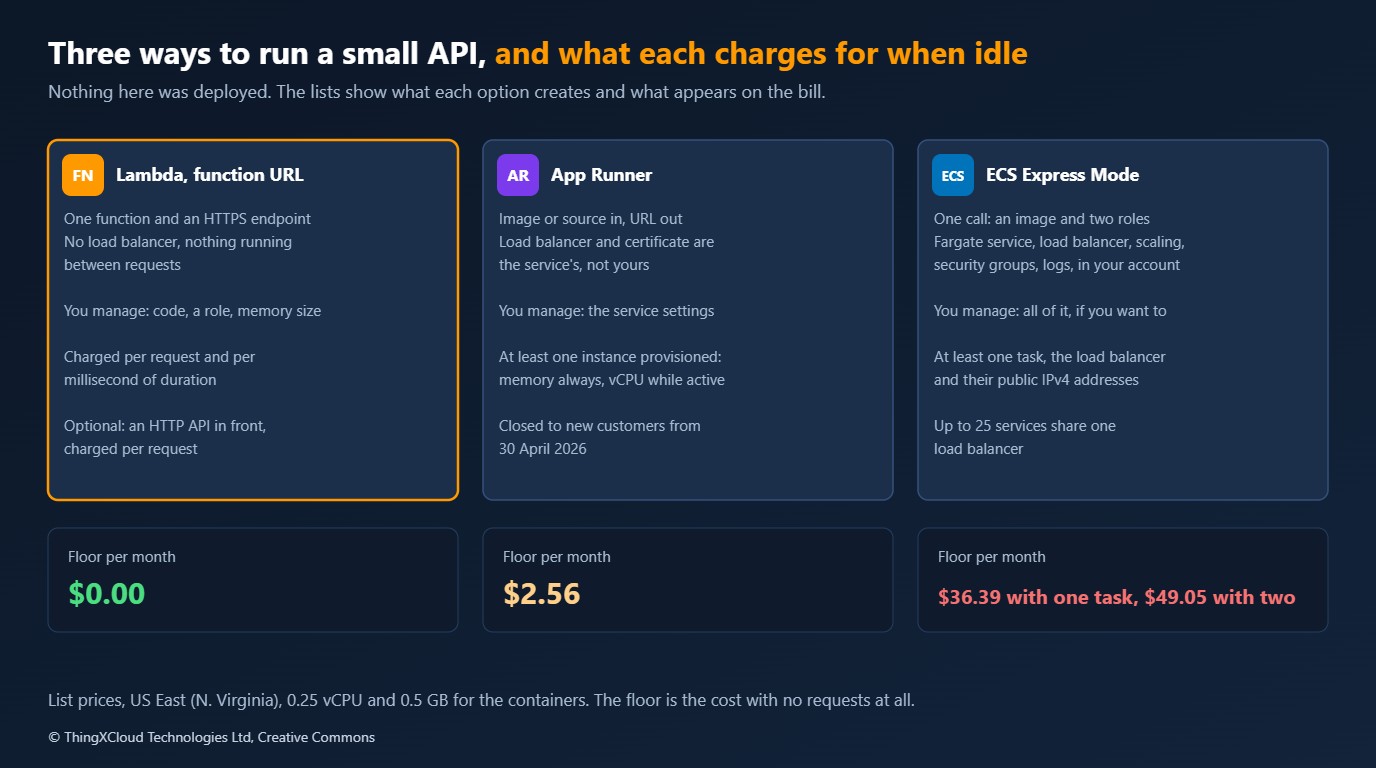
Lambda with a function URL. One function, one HTTPS endpoint that Lambda provides. There is no load balancer and nothing running between requests. Put an API Gateway HTTP API in front if you need a JWT authorizer, throttling per client or routes mapped to several functions; that adds a charge per request.
App Runner. A container image or a source repository in, a URL out. App Runner owns the load balancer and the TLS certificate. At least one instance stays provisioned, and you pay for its memory all the time and for its CPU only while it handles requests.
ECS Express Mode. One API call with a container image and two IAM roles. ECS then creates, in your account, a Fargate service, an Application Load Balancer with an HTTPS listener and an AWS-provided URL, target tracking auto scaling, security groups and a log group. Express Mode itself is free; the resources are not. Up to 25 Express Mode services in the same VPC share one load balancer.
The difference in kind is ownership. With Lambda and App Runner the platform’s plumbing is invisible and not yours. With Express Mode the plumbing is ordinary ECS, visible in your account, and yours to change and to pay for. That is the reason AWS can call it a path forward for App Runner users and also the reason its bill looks different.
What changed for App Runner on 31 March
- From 30 April 2026 App Runner is closed to new customers. An account that wants to use it has to start before that date.
- Existing customers can carry on as normal, including creating new services.
- AWS says it will keep investing in security and availability and does not plan new features.
- The alternative AWS names is ECS Express Mode. It deploys images only, so a service that App Runner builds from source needs a Dockerfile and a build step first.
For a decision made today that turns App Runner from a default into a special case. If you already run on it, nothing forces a move, and the cost section below shows why you might stay for small services. If you do not, starting on a service that will get no new features is hard to justify for anything you expect to keep.
How the three differ where it matters
| Concern | Lambda, function URL | App Runner | ECS Express Mode |
|---|---|---|---|
| Cost with no traffic | Nothing | One instance’s memory | A task, a load balancer and their public addresses |
| Scale to zero | Yes | No. Minimum one provisioned instance | No. Minimum one task |
| First request after idle | A cold start | Served by the provisioned instance | Served by the running task |
| Concurrency model | One request per execution environment | Many requests per instance | Many requests per task |
| Scaling signal | Each concurrent request | Concurrent requests per instance | CPU by default, target 60%; memory or requests per target as alternatives |
| Longest request | 15 minutes with a function URL; 30 seconds behind an HTTP API | 120 seconds | Set by the load balancer idle timeout, 60 seconds by default |
| Deployments | Versions and aliases, weighted shifting | Managed by the service | Canary, fixed for Express Mode services |
| AWS WAF | Not directly; through CloudFront | Supported | Supported on the load balancer |
| Packaging | Zip or container image | Image or source | Image only |
| What is in your account | A function and a role | A service | A cluster, service, task definition, load balancer, target group, security groups, scaling policy, log group |
If you give Express Mode no subnets, it uses the public subnets of the default VPC, creates an internet-facing load balancer and gives each task a public IP address. The security group only admits the load balancer, so the tasks are not open to the internet, but they are in a public subnet with a public address, and each address is charged. For anything that handles personal or clinical data, supply private subnets, and budget for the NAT gateway or VPC endpoints the tasks then need to pull images and write logs.
The cost model
The model has three inputs: prices, a workload, and the options. The prices are a JSON file, each group with the pricing page it was read from.
{
  "_note": "On-demand list prices in USD for US East (N. Virginia), as published on the AWS pricing pages named in 'source'. No free tier, discounts, Savings Plans or taxes. Check the pages before relying on any figure.",
  "hours_per_month": 730,
  "fargate": {
    "source": "https://aws.amazon.com/fargate/pricing/",
    "x86": {"vcpu_second": 0.000011244, "gb_second": 0.000001235},
    "arm": {"vcpu_second": 0.0000089944, "gb_second": 0.0000009889}
  },
  "alb": {
    "source": "https://aws.amazon.com/elasticloadbalancing/pricing/",
    "hour": 0.0225, "lcu_hour": 0.008,
    "lcu": {"new_connections_per_second": 25, "active_connections": 3000, "processed_gb_per_hour": 1.0, "rule_evaluations_per_second": 1000, "free_rules": 10}
  },
  "public_ipv4": {"source": "https://aws.amazon.com/vpc/pricing/", "hour": 0.005},
  "apprunner": {
    "source": "https://aws.amazon.com/apprunner/pricing/",
    "provisioned_gb_hour": 0.007, "active_vcpu_hour": 0.064, "active_gb_hour": 0.007
  },
  "lambda": {
    "source": "https://aws.amazon.com/lambda/pricing/",
    "million_requests": 0.20,
    "x86": {"gb_second": 0.0000166667},
    "arm": {"gb_second": 0.0000133334},
    "provisioned_concurrency": {"x86": {"gb_second": 0.0000041667, "duration_gb_second": 0.0000097222}},
    "free_tier": {"requests": 1000000, "gb_seconds": 400000}
  },
  "http_api": {"source": "https://aws.amazon.com/api-gateway/pricing/", "million_requests": 1.00},
  "logs": {"source": "https://aws.amazon.com/cloudwatch/pricing/", "ingest_gb": 0.50},
  "data_transfer_out": {"source": "https://aws.amazon.com/ec2/pricing/on-demand/", "gb": 0.09}
}
The workload is the part to argue with. Every number in the results follows from these eight values.
@dataclasses.dataclass(frozen=True)
class Workload:
    """One API, described by what it is asked to do in a month."""
    requests_per_month: float
    duration_ms: float = 60          # time to answer one request, as Lambda would bill it
    cpu_ms: float = 15               # CPU time one request needs; the rest of the duration is waiting on I/O
    response_kb: float = 4           # response body, for load balancer bytes and data transfer
    log_bytes_per_request: float = 300
    busy_hours_per_day: float = 10   # the working day
    busy_share: float = 0.85         # share of the day's requests that arrive in the busy hours
    peak_to_average: float = 3.0     # the busiest minute of the busy hours against their average
Containers are sized for the busiest minute, at the scaling target Express Mode uses by default. That one line is where most of the difference between “what a container can do” and “what a container costs” comes from: a task kept at 60% CPU at a peak three times the average is, on average, mostly idle.
def instances_needed(w: Workload, vcpu: float, minimum: int, cpu_target: float = 0.60) -> dict[bool, int]:
    """Instances that keep average CPU at the scaling target during the busiest minute of each period."""
    return {busy: max(minimum, math.ceil(w.rate(busy) * w.peak_to_average * w.cpu_ms / 1000 / (vcpu * cpu_target))) for busy in (True, False)}
The Express Mode function prices what Express Mode creates: Fargate tasks, a share of an Application Load Balancer, load balancer capacity units, and public IPv4 addresses for the load balancer and for each task.
def ecs_express(w: Workload, vcpu: float = 0.25, gb: float = 0.5, min_tasks: int = 1, arch: str = "x86",
                services_on_load_balancer: int = 1, availability_zones: int = 2, public_subnets: bool = True) -> dict[str, float]:
    """Fargate tasks behind an Application Load Balancer, which is what Express Mode creates. It cannot scale to zero."""
    tasks = instances_needed(w, vcpu, min_tasks)
    task_hours = sum(tasks[busy] * w.hours(busy) for busy in (True, False))
    lcu_hours = 0.0
    for busy in (True, False):
        rate = w.rate(busy)
        dimensions = [
            rate / PRICES["alb"]["lcu"]["new_connections_per_second"],                       # one new connection per request: the expensive end
            rate * w.duration_ms / 1000 / PRICES["alb"]["lcu"]["active_connections"],
            rate * 3600 * (w.response_kb + 1) / 1e6 / PRICES["alb"]["lcu"]["processed_gb_per_hour"],
            rate * max(0, services_on_load_balancer - PRICES["alb"]["lcu"]["free_rules"]) / PRICES["alb"]["lcu"]["rule_evaluations_per_second"],
        ]
        lcu_hours += max(dimensions) * w.hours(busy)
    # The load balancer's hourly charge and its addresses are shared by every Express Mode service on it; its LCUs are this service's own.
    shared = (PRICES["alb"]["hour"] + (availability_zones * PRICES["public_ipv4"]["hour"] if public_subnets else 0)) * HOURS / services_on_load_balancer
    return {
        "compute": fargate_cost(task_hours * 3600, vcpu, gb, arch),
        "load balancer": shared + lcu_hours * PRICES["alb"]["lcu_hour"],
        "task public IPv4": task_hours * PRICES["public_ipv4"]["hour"] if public_subnets else 0.0,
        **common(w),
    }
Before any result is worth reading, the pricing functions have to agree with AWS. The tests reproduce four worked examples from the pricing pages, and the load balancer’s hourly charge:
test_app_runner_example_lightweight_api (test_model.PublishedExamples.test_app_runner_example_lightweight_api) ... ok
test_fargate_example_five_x86_tasks_ten_minutes_a_day (test_model.PublishedExamples.test_fargate_example_five_x86_tasks_ten_minutes_a_day) ... ok
test_fargate_example_same_workload_on_arm (test_model.PublishedExamples.test_fargate_example_same_workload_on_arm) ... ok
test_lambda_example_mobile_backend (test_model.PublishedExamples.test_lambda_example_mobile_backend) ... ok
test_load_balancer_hour_charge_for_a_month (test_model.PublishedExamples.test_load_balancer_hour_charge_for_a_month) ... ok
Results
Monthly cost in USD, US East (N. Virginia) list prices, by requests per month

                                                        0.1M        1M        5M       20M       50M
ECS Express, 1 task                                    36.44     36.98     44.65     69.46    131.74
ECS Express, 2 tasks                                   49.11     49.64     52.04     76.85    131.74
ECS Express, 2 tasks, Graviton, ALB shared by 5        26.52     27.06     29.46     52.01    101.65
App Runner, 1 instance                                 10.45     14.73     22.72     48.16    113.28
Lambda, function URL                                    0.11      1.11      5.55     22.20     55.50
Lambda, HTTP API                                        0.21      2.11     10.55     42.20    105.50
Lambda, 1 provisioned, function URL                     5.58      6.48     10.48     25.51     55.56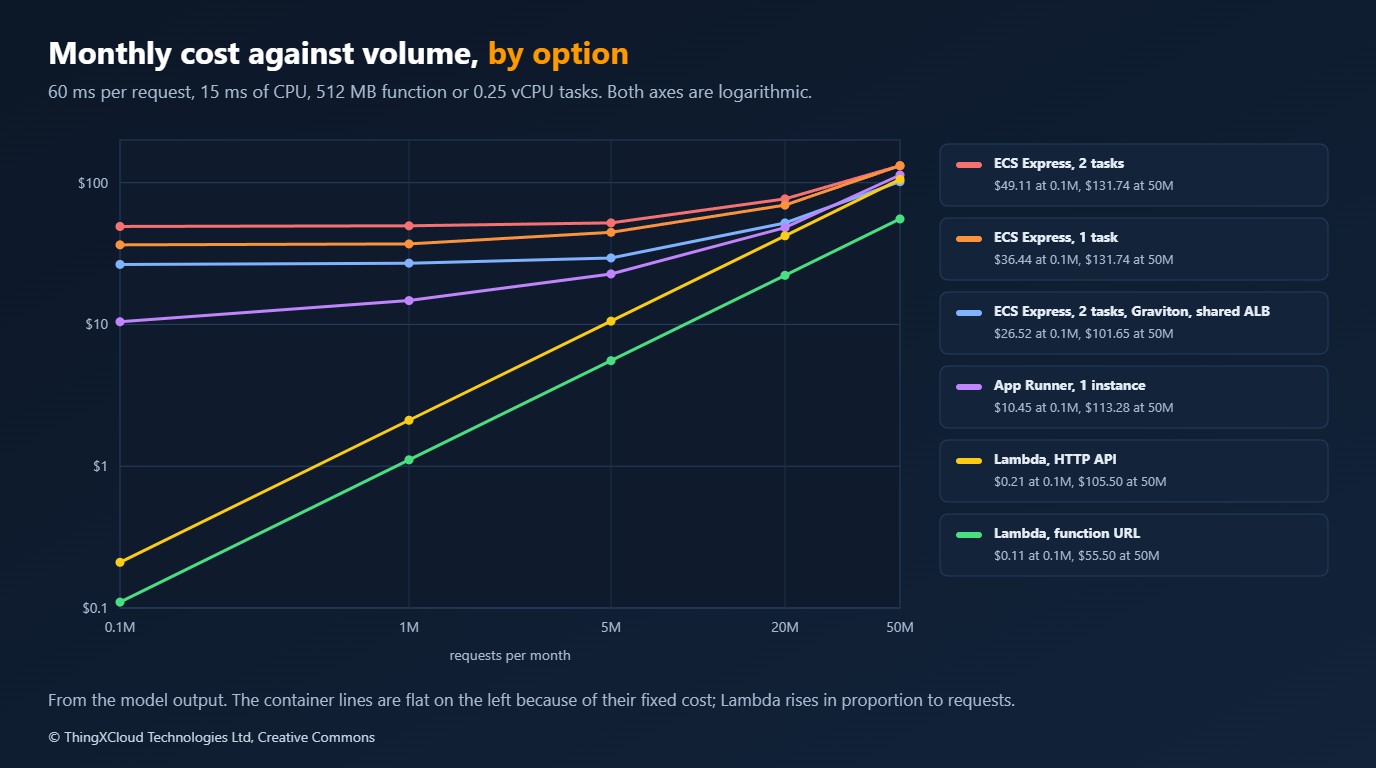
Three things stand out, and none of them is the usual “serverless is cheap until it is not”.
The floor is the story at this size. With no traffic at all, the options cost this much a month:
The floor: what each option costs with no traffic at all

  ECS Express, 1 task                                   36.39
  ECS Express, 2 tasks                                  49.05
  ECS Express, 2 tasks, Graviton, ALB shared by 5       26.46
  App Runner, 1 instance                                 2.56
  Lambda, function URL                                   0.00
  Lambda, HTTP API                                       0.00
  Lambda, 1 provisioned, function URL                    5.48
An Express Mode service with one small task starts at about 36 dollars a month before it serves a request, and about 49 with the two tasks that the availability requirement calls for. App Runner’s floor is under 3 dollars because an idle instance is charged for memory only. A team moving ten small App Runner services to Express Mode one-for-one would notice.
Most of the Express Mode floor is not compute. At 5 million requests a month:
Where the money goes at 5 million requests a month

ECS Express, 1 task                                   44.65  compute 12.76, load balancer 24.17, task public IPv4 5.17, logs 0.75, data transfer out 1.80
ECS Express, 2 tasks                                  52.04  compute 18.02, load balancer 24.17, task public IPv4 7.30, logs 0.75, data transfer out 1.80
ECS Express, 2 tasks, Graviton, ALB shared by 5       29.46  compute 14.42, load balancer 5.19, task public IPv4 7.30, logs 0.75, data transfer out 1.80
App Runner, 1 instance                                22.72  compute 20.17, logs 0.75, data transfer out 1.80
Lambda, function URL                                   5.55  requests 1.00, compute 2.00, logs 0.75, data transfer out 1.80
Lambda, HTTP API                                      10.55  requests 1.00, compute 2.00, HTTP API 5.00, logs 0.75, data transfer out 1.80
Lambda, 1 provisioned, function URL                   10.48  requests 1.00, compute 1.46, provisioned concurrency 5.48, logs 0.75, data transfer out 1.80
For the single-task service, 12.76 is compute and 24.17 is the load balancer. The load balancer line is its hourly charge, its capacity units, and the two public addresses it holds in two Availability Zones. The task’s own public address adds another 5.17.
One 0.25 vCPU, 0.5 GB Fargate task for an hour: 0.01234 for compute and 0.005 for its public IPv4 address,
so the address adds 41% to the price of the task
That is a pricing fact worth knowing before choosing task sizes. The public IPv4 charge is per address, not per vCPU, so many small tasks in public subnets pay it many times.
Sharing the load balancer changes the answer. The third row of the first table is the same two-task service on Graviton, as one of five Express Mode services on one load balancer. Its floor falls from 49 to about 26 dollars. Express Mode does this sharing by itself for services in the same VPC, so the cost per service depends on how many you run, and the first service is the expensive one.
When a container beats Lambda
The folklore says Lambda wins at low volume and containers win at high volume. The model says volume is the wrong variable. Lambda bills for the whole time a request takes, including the time it spends waiting. A container bills for capacity, and a request that is waiting uses almost none. So the break-even depends on how much of each request is waiting.
Requests per month above which a container option is cheaper than Lambda with a function URL
Each request needs 15 ms of CPU; what changes is how long it takes in total, and how spiky the traffic is

  busiest minute at 3 times the average
      20 ms per request:  ECS Express, 1 task: never,  ECS Express, 2 tasks: never,  App Runner, 1 instance: never
      60 ms per request:  ECS Express, 1 task: never,  ECS Express, 2 tasks: never,  App Runner, 1 instance: never
     200 ms per request:  ECS Express, 1 task: never,  ECS Express, 2 tasks: never,  App Runner, 1 instance: never
     500 ms per request:  ECS Express, 1 task: 15.2M,  ECS Express, 2 tasks: 18.8M,  App Runner, 1 instance: 4.0M
    1000 ms per request:  ECS Express, 1 task: 6.1M,  ECS Express, 2 tasks: 7.2M,  App Runner, 1 instance: 2.1M
  busiest minute at 1.5 times the average
      20 ms per request:  ECS Express, 1 task: never,  ECS Express, 2 tasks: never,  App Runner, 1 instance: never
      60 ms per request:  ECS Express, 1 task: never,  ECS Express, 2 tasks: never,  App Runner, 1 instance: never
     200 ms per request:  ECS Express, 1 task: 39.8M,  ECS Express, 2 tasks: 48.6M,  App Runner, 1 instance: 13.2M
     500 ms per request:  ECS Express, 1 task: 12.1M,  ECS Express, 2 tasks: 14.2M,  App Runner, 1 instance: 4.0M
    1000 ms per request:  ECS Express, 1 task: 5.4M,  ECS Express, 2 tasks: 7.2M,  App Runner, 1 instance: 2.1M
Each request needs the same 15 ms of CPU in every row. When it also finishes in 20 or 60 ms, Lambda is cheaper at every volume the model covers, because there is little waiting to be billed for and the containers carry a floor and peak headroom. When the same request takes 500 ms, because it calls a slow dependency, a single-task Express Mode service is cheaper above about 15 million requests a month, and App Runner above about 4 million. At a second per request the crossover is in the low millions.
Spikiness moves it too. With the busiest minute at 1.5 times the average instead of 3, containers need less headroom, and a 200 ms request has a break-even near 40 million a month where before it had none.
The practical reading: for a fast API, choose between these on something other than cost, because Lambda will be cheapest and the differences are a few dollars. For an API that spends most of its time waiting on something slow, do the arithmetic with your own numbers before defaulting to Lambda.
What the model leaves out
- Cold starts. The model prices Lambda as if every request ran warm. Since August 2025 the initialisation phase is billed as duration as well, so a function with a heavy start-up pays for each cold start; and a cold start is also a latency cost that no price captures. The provisioned concurrency row shows what removing it for one environment costs: about 5.50 a month at 512 MB.
- Private networking. Moving Express Mode tasks to private subnets removes the address charges and adds a NAT gateway or VPC endpoints, either of which costs more than the addresses it saves at this scale. A Lambda function in a VPC has the same need.
- The free tier. Lambda’s monthly allowance of one million requests and 400,000 GB-seconds would make the first two columns free for Lambda in an account that uses it for nothing else. It is off in the model because most accounts use it for something else.
- AWS WAF, custom domains, image builds and storage. All real, all small, and broadly the same across the options.
- People. The most expensive item for a small API is the time spent on it. Express Mode gives you a dozen resources to understand; Lambda gives you one. That difference does not appear in a pricing page.
- Commitment discounts. A Compute Savings Plan lowers the Fargate and Lambda compute lines. It does not touch the load balancer or the addresses, which are most of the Express Mode floor.
Operating notes for each
| Topic | Lambda | App Runner | ECS Express Mode |
|---|---|---|---|
| Identity | An execution role. A function URL is either open or IAM-authenticated; decide which deliberately | An instance role, and an access role for private images | A task execution role, an infrastructure role that ECS uses to manage the load balancer and scaling, and optionally a task role |
| Logging and metrics | CloudWatch Logs and metrics per function | CloudWatch Logs and service metrics | A log group per service, Container Insights if enabled, load balancer metrics |
| What to alarm on | Errors, throttles, duration near the timeout, concurrent executions | 5xx rate, active instances at the maximum | Target 5xx rate, unhealthy hosts, tasks at the maximum, failed deployments |
| Failure mode to plan for | Account concurrency limit shared with every other function | Scaling lag on a sudden burst | A deployment that passes the health check and fails real requests; the canary and its alarm are the defence |
| Infrastructure as code | One resource and a URL | One resource | One Express Mode resource that expands into many; decide whether your templates manage the expanded resources or leave them to ECS |
Decision framework
%%{init: {'theme':'base','themeVariables':{'primaryColor':'#FFF3E0','primaryTextColor':'#232F3E','primaryBorderColor':'#FF9900','lineColor':'#232F3E','clusterBkg':'#F8FAFC','clusterBorder':'#CBD5E1','edgeLabelBackground':'#FFFFFF','nodeTextColor':'#232F3E'}}}%%
flowchart TD
    A["A small HTTP API"] --> Q1{"Fits Lambda: under 15 minutes,
stateless, cold start acceptable?"}
    Q1 -- "no" --> E["ECS Express Mode"]
    Q1 -- "yes" --> Q2{"Mostly waiting on slow calls,
and millions of requests a month?"}
    Q2 -- "no" --> L["Lambda with a function URL"]
    Q2 -- "yes" --> Q3{"Already an App Runner customer,
and the service is small?"}
    Q3 -- "yes" --> R["Stay on App Runner for now,
plan the move"]
    Q3 -- "no" --> E
    L --> H{"Need a JWT authorizer, throttling
or several functions on one host?"}
    H -- "yes" --> G["Add an API Gateway HTTP API"]
    style L fill:#FFF3E0,stroke:#FF9900,stroke-width:2px,color:#232F3E
    style G fill:#FFF3E0,stroke:#FF9900,stroke-width:2px,color:#232F3E
    style E fill:#EBF8FF,stroke:#0073BB,stroke-width:2px,color:#004C74
style R fill:#F3E8FF,stroke:#7C3AED,stroke-width:2px,color:#4C1D95| Your situation | Choose | Reason |
|---|---|---|
| A new, fast API with uneven or low traffic | Lambda with a function URL | No floor, and cheapest at every volume in the model when requests are short |
| A new API that needs a long-lived process, a sidecar, or more than Lambda’s limits | ECS Express Mode | Ordinary ECS with the set-up done for you |
| Several small container services in one VPC | ECS Express Mode, and let them share a load balancer | The fixed cost is paid once for up to 25 services |
| Existing App Runner services that are small and stable | Stay, and schedule a review | The floor is far lower than Express Mode, and nothing forces a move |
| Existing App Runner services you expect to grow or extend | Plan a move to ECS Express Mode | No new features are coming, and the migration is easier before the service is critical |
| Not yet an App Runner customer | Do not start | Closed to new customers from 30 April, with no new features |
| An API that waits on slow dependencies at millions of requests a month | Run the model with your numbers | This is the one case where the container can be cheaper than Lambda at modest volume |
Key takeaways
- App Runner closes to new customers on 30 April 2026. Existing services keep running; ECS Express Mode is the named alternative.
- An Express Mode service costs roughly 36 to 49 dollars a month before its first request, and most of that is the load balancer and public addresses, not the task. App Runner’s floor is under 3 dollars and Lambda’s is zero.
- A public IPv4 address adds 41% to the hourly price of the smallest Fargate task. Many small tasks in public subnets pay it many times.
- Share the load balancer. Up to 25 Express Mode services in a VPC use one, which is what makes the second and later services cheap.
- Lambda bills waiting time and containers do not. For a fast API Lambda is cheapest at any volume here; for one that waits on slow calls, the crossover can be a few million requests a month.
If you have moved services from App Runner to Express Mode, I would like to see your before and after bill. Leave a comment with the task size and how many services share the load balancer.
Nothing was deployed. The cost model and its tests ran in GitHub Actions on Python 3.13: 15 of 15 tests passed. Five of them compare the pricing functions with figures on the AWS pricing pages: the two Fargate examples for x86 and Arm, the App Runner lightweight API example, the Lambda mobile backend example, and the load balancer’s hourly charge over a month. The other ten check the model’s own behaviour, such as the floors, the shared load balancer and the break-even points. Every table in this article is the output of that run. What the run cannot check is whether the assumptions fit your API: the traffic shape, the 15 ms of CPU per request, one new load balancer connection per request, and the rule used for App Runner’s active time. The service descriptions and limits come from AWS documentation and were not tested. The run is here.
The prices, the model and the tests are in small-api-cost-model in the samples repository. It needs only Python: change the fields of Workload and run python model.py.
Glossary
- ECS Express Mode— A way to create an Amazon ECS service on Fargate from a container image, with the load balancer, scaling and networking set up by ECS in your account.
- App Runner— A managed service that runs a web application from an image or source code. Closed to new customers from 30 April 2026.
- Function URL— An HTTPS endpoint that Lambda provides for a function, with no separate charge.
- HTTP API— The lower-cost API Gateway product, charged per request.
- Fargate— The AWS compute engine that runs containers without servers to manage, charged per vCPU and GB per second.
- LCU— Load balancer capacity unit. An Application Load Balancer is charged per hour and per LCU, measured on its busiest dimension.
- Provisioned concurrency— Lambda execution environments kept initialised, to avoid cold starts, for an hourly charge.
- Cold start— The time Lambda takes to create and initialise a new execution environment for a request.
- Target tracking— A scaling policy that adds or removes capacity to keep a metric, such as CPU, near a target value.
- Break-even— The request volume at which two options cost the same.
References & Further Reading
- → AWS service availability updates, 31 March 2026— The announcement that lists App Runner among services closing to new customers
- → AWS App Runner availability change— What changes for existing customers, and the alternative AWS names
- → Amazon ECS Express Mode— Overview and pricing statement
- → Resources created by ECS Express Mode services— The defaults for tasks, scaling, networking and the load balancer
- → Launch post for ECS Express Mode— AWS News Blog, November 2025
- → AWS Fargate pricing— Per-second vCPU and memory prices, with worked examples
- → Elastic Load Balancing pricing— Hourly and capacity unit charges for an Application Load Balancer
- → AWS App Runner pricing— Provisioned and active instance prices
- → AWS Lambda pricing— Request, duration and provisioned concurrency prices
- → Amazon API Gateway pricing— HTTP API price per million requests
- → Amazon VPC pricing— The public IPv4 address charge
- → Sample code for this article— Prices, the cost model and its tests
Discover more from C4: Container, Code, Cloud & Context
Subscribe to get the latest posts sent to your email.