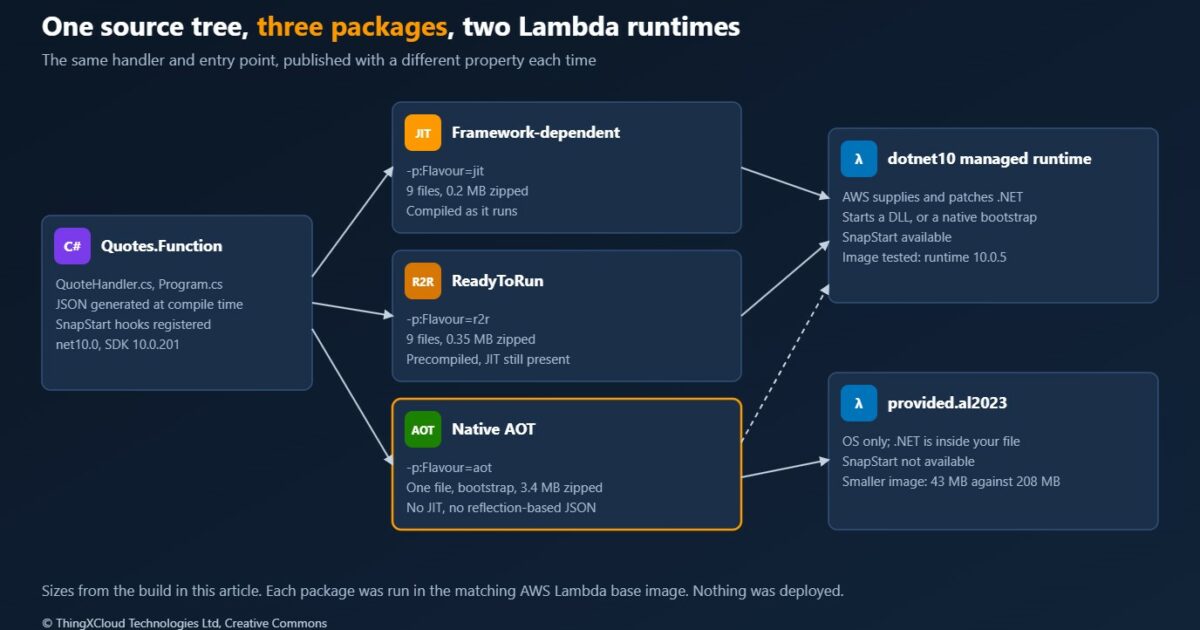
The .NET 10 managed runtime has been available on AWS Lambda since January. With it, a .NET team has three ways to ship the same function: as ordinary assemblies that the runtime compiles as they run, as the same assemblies with SnapStart restoring a snapshot instead of starting cold, or as a Native AOT executable with no just-in-time compiler in it at all. Each one moves the cold start, and each one moves something else with it: who patches .NET, which libraries still work, and what appears on the bill.
Last week’s cost model put Lambda first for a small API that sits idle for much of the day. This article takes the next question for a .NET team that makes that choice. It builds one function three ways from one source tree, runs every build in the AWS Lambda base images under the Runtime Interface Emulator, and reads the SnapStart rules against the code that has to obey them.
.NET 10 with SDK 10.0.201, x86_64, zip-style packages for the dotnet10 and provided.al2023 runtimes. Everything was built and run in containers; no function was created in an AWS account. The emulator shows whether a package starts, whether it answers correctly and how the builds compare with each other. It cannot show a Lambda cold start, and it cannot take a SnapStart snapshot.
What the .NET 10 runtime brings
AWS released the dotnet10 managed runtime and the matching container base image on 8 January 2026. Like the .NET 8 runtime it is built on Amazon Linux 2023. .NET 10 is a long-term support release, which Microsoft supports until November 2028, so for most teams this is the runtime to move .NET 8 functions to. The upgrade itself is covered in Moving a .NET 8 API to .NET 10.
| Item | At the .NET 10 launch |
|---|---|
| Managed runtime identifier | dotnet10 |
| Container base image | public.ecr.aws/lambda/dotnet:10 |
| Operating system | Amazon Linux 2023 |
Amazon.Lambda.Core | 2.8.0 |
Amazon.Lambda.RuntimeSupport | 1.14.1 |
Amazon.Lambda.Serialization.SystemTextJson | 2.4.4 |
Amazon.Lambda.Tools and Amazon.Lambda.Templates | 6.0.0 and 8.0.1 |
| New with this runtime | C# file-based apps as functions, and support for Lambda Managed Instances |
File-based apps and Managed Instances are outside this article. The subject here is the choice every existing function faces: how it is compiled and which runtime starts it.
Architecture: three packages and what each hands to AWS
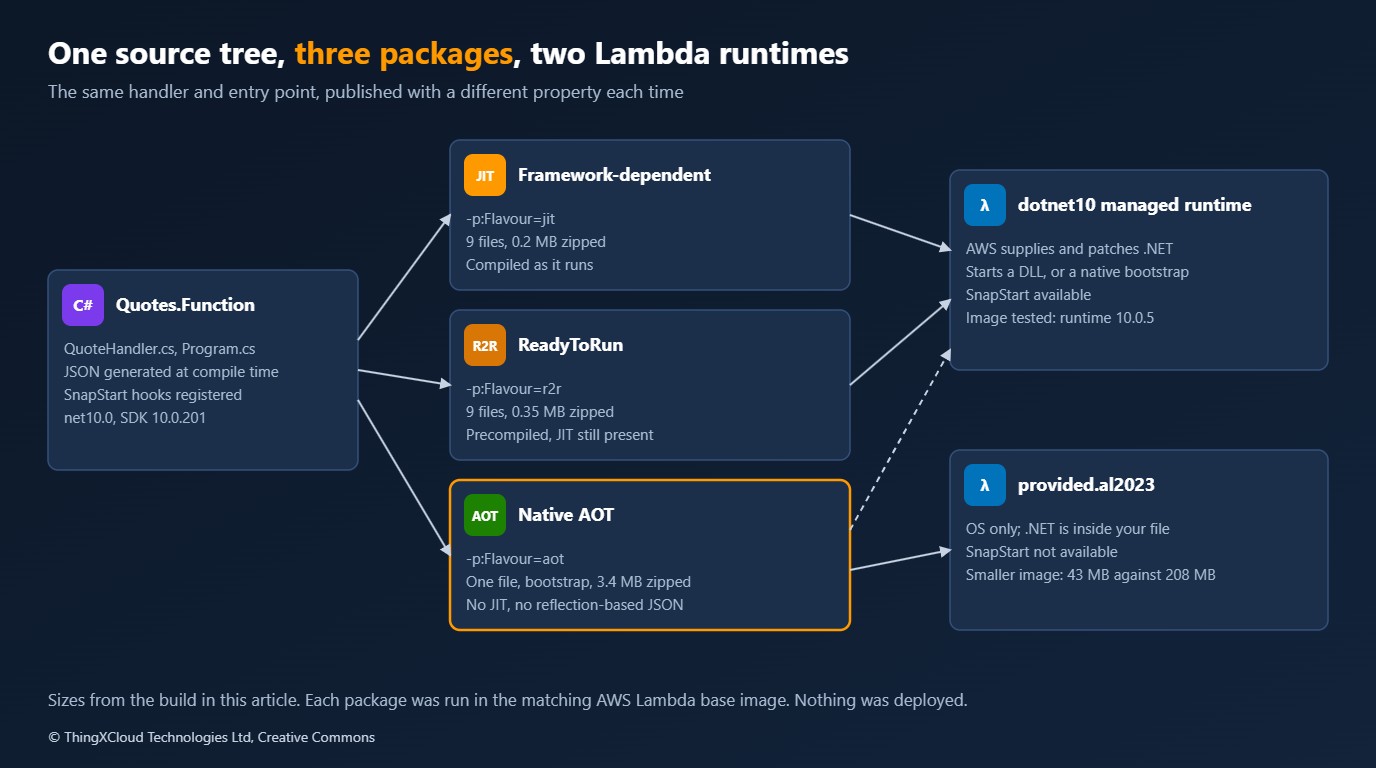
A Lambda function for .NET is a package and a runtime setting. The package is either a set of assemblies or one native executable. The runtime is either the managed one, where AWS supplies .NET and keeps it patched, or the OS-only one, where the package brings everything it needs. SnapStart is a setting on top of the managed runtime.
| Option | Advantages | Disadvantages and risks | Cost and operations |
|---|---|---|---|
| Managed runtime, JIT | Every library works. Smallest package. AWS patches .NET | Slowest start: the runtime loads and compiles on the first request | No extra charge. Nothing new to operate |
| Managed runtime with ReadyToRun | Same compatibility. Some start-up compilation is done at build time | A modest gain. Package is larger, and tied to one architecture | No extra charge. One build property |
| Managed runtime with SnapStart | Start-up work is done once, at publish. Same code and libraries | State captured in a snapshot must be made unique or fresh again after restore. Not with provisioned concurrency, Amazon EFS or more than 512 MB of ephemeral storage | For .NET, a charge to keep each snapshot and a charge per restore. Versions must be published, and old ones removed |
| Native AOT | Fastest start and lowest memory. One file to deploy | No reflection-based serialisation, no run-time code generation. Each library must be trim-compatible. Build must target Amazon Linux 2023 | No extra Lambda charge. You rebuild and redeploy to patch .NET. Longer builds |
The rest of the article puts numbers and code behind that table.
One function, one entry point
The function prices a quote. It receives an API Gateway HTTP API event, looks up a product in a catalogue of 50,000 entries that it builds once at start-up, applies a tax rate and returns JSON. The catalogue stands in for the work a real function does once per execution environment: reading configuration, building lookup tables, creating clients.
    public APIGatewayHttpApiV2ProxyResponse Handle(APIGatewayHttpApiV2ProxyRequest request, ILambdaContext context)
    {
        Handled++;
        QuoteRequest? quote;
        try
        {
            quote = string.IsNullOrWhiteSpace(request.Body) ? null : Read(request.Body);
        }
        catch (JsonException)
        {
            return Respond(400, new Problem("Bad request", "The body is not a quote request."));
        }
        if (quote is null || string.IsNullOrWhiteSpace(quote.Sku) || quote.Quantity is < 1 or > 10_000)
        {
            return Respond(400, new Problem("Bad request", "A quote needs a sku and a quantity from 1 to 10000."));
        }
        if (!_prices.TryGetValue(quote.Sku, out decimal unitPrice))
        {
            return Respond(404, new Problem("Not found", $"There is no product {quote.Sku}."));
        }
        decimal net = unitPrice * quote.Quantity;
        decimal tax = decimal.Round(net * TaxRates.GetValueOrDefault(quote.Country ?? "", 0m), 2, MidpointRounding.AwayFromZero);
        return Respond(200, new QuoteResponse(quote.Sku, quote.Quantity, unitPrice, net, tax, net + tax, "EUR"));
    }
All three packages share one Program.cs. It is an executable assembly: the program creates the handler, registers two SnapStart hooks and hands control to the Lambda runtime client. On the managed runtime the function’s handler setting is the assembly name, Quotes.Function. As Native AOT the same program is compiled to a file named bootstrap.
QuoteHandler handler = new();

// SnapStart, managed runtime only. Lambda calls the first hook before it takes the snapshot of an initialised
// environment and the second in every environment restored from it. Without SnapStart neither is called.
Amazon.Lambda.Core.SnapshotRestore.RegisterBeforeSnapshot(() =>
{
    handler.Warm();
    return ValueTask.CompletedTask;
});
Amazon.Lambda.Core.SnapshotRestore.RegisterAfterRestore(() =>
{
    handler.BecomeANewInstance();
    return ValueTask.CompletedTask;
});

await LambdaBootstrapBuilder
    .Create<APIGatewayHttpApiV2ProxyRequest, APIGatewayHttpApiV2ProxyResponse>(handler.Handle, new SourceGeneratorLambdaJsonSerializer<EventJson>())
    .Build()
    .RunAsync();
The difference between the builds is three property groups in the project file.
  <PropertyGroup Condition="'$(Flavour)' == 'r2r'">
    <PublishReadyToRun>true</PublishReadyToRun>
  </PropertyGroup>
  <PropertyGroup Condition="'$(Flavour)' == 'aot'">
    <PublishAot>true</PublishAot>
    <AssemblyName>bootstrap</AssemblyName>
    <StripSymbols>true</StripSymbols>
  </PropertyGroup>
JSON decides whether Native AOT is possible
A Native AOT executable contains only the code the compiler could see would be needed. A serialiser that discovers the properties of a type by reflection at run time gives the compiler nothing to see. System.Text.Json therefore has to be told at compile time which types cross the wire, through a source-generated context. The function has two: one for its own request and response bodies, one for the event Lambda delivers and the response it expects.
[JsonSourceGenerationOptions(PropertyNamingPolicy = JsonKnownNamingPolicy.CamelCase, PropertyNameCaseInsensitive = true)]
[JsonSerializable(typeof(QuoteRequest))]
[JsonSerializable(typeof(QuoteResponse))]
[JsonSerializable(typeof(Problem))]
public sealed partial class BodyJson : JsonSerializerContext;

/// <summary>The same for the event Lambda delivers and the response it expects back.</summary>
[JsonSerializable(typeof(APIGatewayHttpApiV2ProxyRequest))]
[JsonSerializable(typeof(APIGatewayHttpApiV2ProxyResponse))]
public sealed partial class EventJson : JsonSerializerContext;
To see what happens without it, the project has a switch that swaps the generated serialiser for the reflection-based one. The compiler says so, with two warnings for each call:
/build/src/Quotes.Function/QuoteHandler.cs(97,55): warning IL3050: Using member 'System.Text.Json.JsonSerializer.Deserialize<TValue>(String, JsonSerializerOptions)' which has 'RequiresDynamicCodeAttribute' can break functionality when AOT compiling. JSON serialization and deserialization might require types that cannot be statically analyzed and might need runtime code generation. Use System.Text.Json source generation for native AOT applications.The build still succeeds. On the managed runtime that package answers normally. As Native AOT it starts, takes the event, and fails on the first request:
System.InvalidOperationException: Reflection-based serialization has been disabled for this application. Either use the source generator APIs or explicitly configure the 'JsonSerializerOptions.TypeInfoResolver' property.
   at System.Text.Json.ThrowHelper.ThrowInvalidOperationException_JsonSerializerIsReflectionDisabled() + 0x27
   at System.Text.Json.JsonSerializerOptions.ConfigureForJsonSerializer() + 0x2e
   at System.Text.Json.JsonSerializer.GetTypeInfo(JsonSerializerOptions, Type) + 0x2d
   at System.Text.Json.JsonSerializer.GetTypeInfo[T](JsonSerializerOptions) + 0x2b
   at System.Text.Json.JsonSerializer.Deserialize[TValue](String, JsonSerializerOptions) + 0x27
at Quotes.QuoteHandler.Handle(APIGatewayHttpApiV2ProxyRequest request, ILambdaContext context) + 0x6eIL2026 and IL3050 are the only notice you get before production. The package builds, deploys and passes a health check that does not touch the affected path. List both codes in WarningsAsErrors for the Native AOT build, and run every event shape through the built executable in the pipeline. The same applies to each NuGet package the function uses: an AWS SDK client, a logging sink or an ORM that relies on reflection will fail the same way.
Building for Amazon Linux 2023
The managed-runtime packages are portable assemblies and can be built anywhere. The Native AOT executable is linked against the C library of the machine that builds it, so it has to be built on the operating system it will run on. The sample does every build inside an Amazon Linux 2023 container, with the linker toolchain installed and an exact SDK version.
dnf install -y -q clang gcc zlib-devel tar gzip findutils zip > /dev/null 2>&1 || exit 2
curl -fsSL -o /tmp/dotnet-install.sh https://dot.net/v1/dotnet-install.sh && bash /tmp/dotnet-install.sh --version "$SDK" --install-dir /opt/dotnet --no-path > /out/install.txt 2>&1 || exit 2
export DOTNET_ROOT=/opt/dotnet PATH=/opt/dotnet:$PATH
publish() { # name flavour reflection
rm -rf src/Quotes.Function/bin src/Quotes.Function/obj
local began; began=$(date +%s%N)
dotnet publish src/Quotes.Function -c Release -r linux-x64 --self-contained "$([ "$2" = aot ] && echo true || echo false)" \
-p:Flavour="$2" -p:ReflectionJson="$3" -p:DebugType=none -o "/out/publish/$1" > "/out/publish-$1.log" 2>&1 || { echo "publish $1 FAILED"; tail -n 20 "/out/publish-$1.log"; status=1; return; }The result of the five builds, with sizes in bytes:
name            flavour  reflection  seconds  files  folder_bytes  zip_bytes  trim_warnings
jit             jit      false       2        9      493780        204718     none
r2r             r2r      false       3        9      863300        353868     none
aot             aot      false       13       1      7180560       3366891    none
jit-reflection  jit      true        1        9      493780        204760     none
aot-reflection  aot      true        11       1      7122656       3343574    IL2026 x4 IL3050 x4
  aot/bootstrap  7.2 MB
The managed package is nine files and 0.2 MB zipped, because .NET itself is in the runtime. The Native AOT package is one 7.2 MB file, 3.4 MB zipped, with the parts of .NET it uses compiled in. It took 13 seconds to publish against 2 for the managed build. On a function this small the difference is noise; on a service with many dependencies the Native AOT link step becomes a visible part of the pipeline.
Running the packages in the runtime emulator
AWS publishes the images its runtimes are built from. Their entry point is the Lambda Runtime Interface Emulator, a small process that accepts an invocation over HTTP and passes it to the function through the same Runtime API that Lambda uses. Mounting a package into the image and posting an event to it tests the real runtime client, the real event serialisation and the real start-up path, with no account.
%%{init: {'theme':'base','themeVariables':{'primaryColor':'#FFF3E0','primaryTextColor':'#232F3E','primaryBorderColor':'#FF9900','lineColor':'#232F3E','signalColor':'#0073BB','signalTextColor':'#0F172A','actorBkg':'#FFF3E0','actorBorder':'#FF9900','actorTextColor':'#232F3E','noteBkgColor':'#FFF8E7','noteBorderColor':'#FF9900','noteTextColor':'#232F3E'}}}%%
sequenceDiagram
    participant T as Test script
    participant E as Runtime emulator
    participant F as Function process
    T->>E: POST /2015-03-31/functions/function/invocations
    E->>F: Start the runtime (first request only)
    F->>E: GET next invocation
    E-->>F: The event
    F->>E: POST the response
    E-->>T: The response
The plain image tags, dotnet:10 and provided:al2023, move every time AWS patches them. A test that uses them changes without a commit. The sample asks the registry for the dated tags and takes the newest one on or before a chosen day, so a run can be repeated against the same runtime.
pattern = re.compile(rf"^{re.escape(prefix)}\.(\d{{4}}\.\d{{2}}\.\d{{2}})\.(\d+)$")
found: list[tuple[str, int, str]] = []
url = f"https://public.ecr.aws/v2/{repository}/tags/list?n=1000"
while url:
    request = urllib.request.Request(url, headers={"Authorization": f"Bearer {token}"})
    with urllib.request.urlopen(request, timeout=60) as response:
        for tag in json.load(response).get("tags", []):
            match = pattern.match(tag)
            if match and match.group(1) <= cutoff:
                found.append((match.group(1), int(match.group(2)), tag))
        link = response.headers.get("Link", "")
    following = re.search(r"<([^>]+)>;\s*rel=\"next\"", link)
    url = ("https://public.ecr.aws" + following.group(1)) if following else None
if not found:
    sys.exit(f"no dated tag of {repository} with prefix {prefix} on or before {cutoff}")
print(max(found)[2])
managed runtime image public.ecr.aws/lambda/dotnet:10.2026.04.10.09
.NET runtime inside 10.0.5
OS-only runtime image public.ecr.aws/lambda/provided:al2023.2026.04.10.07
image sizes 208 MB and 43 MBEach container is started with 512 MB of memory, and the package mounted read-only where Lambda would unpack it.
def start(folder: str, image: str, handler: str, mount: str, cpus: str = "1") -> float:
    """Starts a container the way Lambda sizes a 512 MB function, and returns when it was asked to start."""
    docker("rm", "-f", NAME)
    began = time.perf_counter()
    docker("run", "-d", "--name", NAME, "-p", f"127.0.0.1:{PORT}:8080", "--memory", "512m", "--cpus", cpus,
           "-e", "AWS_LAMBDA_FUNCTION_MEMORY_SIZE=512", "-v", f"{out / 'publish' / folder}:{mount}:ro", image, handler)
    return began
One detail of the images is worth knowing. For a zip deployment to provided.al2023, Lambda starts /var/task/bootstrap. The base image for that runtime looks for the file in /var/runtime instead, so that is where the test mounts it.
The managed runtime turned out to have a second way in. Its start-up script, read out of the image, checks whether the handler setting names an assembly; if there is no such DLL but there is an executable file of that name, it runs the file directly:
if [[ "${HANDLER_COL_INDEX}" == 0 ]]; then
  EXECUTABLE_ASSEMBLY="${LAMBDA_TASK_ROOT}/${LAMBDA_HANDLER}"
  EXECUTABLE_BINARY="${LAMBDA_TASK_ROOT}/${LAMBDA_HANDLER}"
  if [[ "${EXECUTABLE_ASSEMBLY}" != *.dll ]]; then
    EXECUTABLE_ASSEMBLY="${EXECUTABLE_ASSEMBLY}.dll"
  fi
  if [[ -f "${EXECUTABLE_ASSEMBLY}" ]]; then
    DOTNET_ARGS+=("${EXECUTABLE_ASSEMBLY}")
  elif [[ -f "${EXECUTABLE_BINARY}" ]]; then
    EXECUTABLE_BINARY_EXIST=true
  else
    echo "Error: executable assembly ${EXECUTABLE_ASSEMBLY} or binary ${EXECUTABLE_BINARY} not found." 1>&2
    exit 104
  fi
So a Native AOT executable also runs on the dotnet10 runtime with the handler set to bootstrap, which is the arrangement the AWS guidance on Native AOT describes. The test runs the Native AOT package both ways. All four configurations were sent the same six events:
ok    1-quote              200  {"sku":"SKU-00042","quantity":3,"unitPrice":332.98,"net":998.94,"tax":229.76,"total":1228.70,"cu
ok    2-no-tax             200  {"sku":"SKU-50000","quantity":10,"unitPrice":435.00,"net":4350.00,"tax":0.00,"total":4350.00,"cu
ok    3-unknown-product    404  {"title":"Not found","detail":"There is no product NOPE."}
ok    4-bad-quantity       400  {"title":"Bad request","detail":"A quote needs a sku and a quantity from 1 to 10000."}
ok    5-not-json           400  {"title":"Bad request","detail":"The body is not a quote request."}
ok    6-no-body            400  {"title":"Bad request","detail":"A quote needs a sku and a quantity from 1 to 10000."}
ok    all four gave byte-identical bodies and the same status for every request
What the emulator measured
The emulator starts the function’s process when the first invocation arrives, so the first request to a new container pays for runtime start-up, for building the catalogue and for the first pass through the handler. The test started seven containers per configuration and then sent warm requests. Lambda gives a function CPU in proportion to its memory, one vCPU at 1,769 MB, so a 512 MB function has about 0.29 of one. The test ran once with a whole CPU and once with that share.
== 1 CPU: first request to a new container (7 containers each), then 200 warm requests
build                           start to first answer   first request  emulator init  warm p50  warm p99   memory
managed runtime                                439 ms          254 ms         183 ms   1.35 ms   2.09 ms   32 MiB
managed runtime, ReadyToRun                    401 ms          218 ms         167 ms   1.36 ms   2.01 ms   32 MiB
Native AOT, OS-only runtime                    212 ms           30 ms          27 ms   1.22 ms   1.77 ms   22 MiB
Native AOT, managed runtime                    225 ms           39 ms          36 ms   1.22 ms   1.83 ms   22 MiB

== 0.29 CPU: first request to a new container (7 containers each), then 200 warm requests
build                           start to first answer   first request  emulator init  warm p50  warm p99   memory
managed runtime                               1060 ms          871 ms         641 ms    1.4 ms   79.9 ms   33 MiB
managed runtime, ReadyToRun                    980 ms          792 ms         599 ms   1.42 ms  79.89 ms   32 MiB
Native AOT, OS-only runtime                    286 ms           99 ms          96 ms   1.23 ms  70.63 ms   22 MiB
Native AOT, managed runtime                    299 ms          104 ms         101 ms   1.24 ms   71.6 ms   22 MiB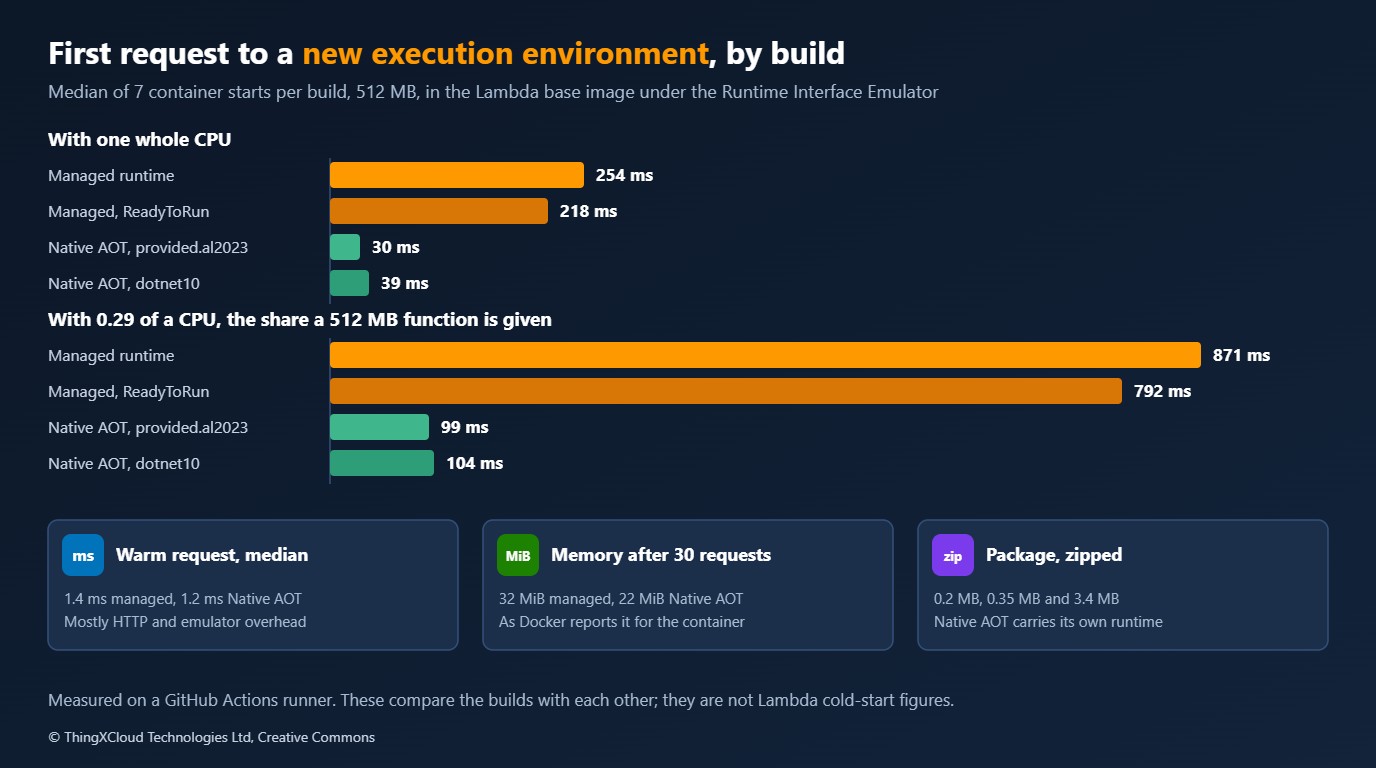
Four observations, each limited to what was run.
- The JIT is most of the first request. With a whole CPU the managed build took 254 ms and Native AOT 30 ms. With 0.29 of a CPU the managed build took 871 ms. Native AOT took 99 ms at the median, and between 40 and 110 ms across the seven starts, so its figure at the small share is the less stable of the two.
- ReadyToRun helped by about a tenth. 218 ms against 254, and 792 against 871. The runtime still has to load, and the Lambda runtime client and its start-up path are the same.
- The runtime Native AOT runs on barely matters. Going through the managed runtime’s start-up script cost 9 ms with a whole CPU and 5 ms at the smaller share, which is inside the spread.
- Warm requests are the same. 1.2 to 1.4 ms through the emulator’s HTTP interface for every build. The 70 to 80 ms at the 99th percentile under 0.29 of a CPU appears equally in all four configurations, which points at the container being paused by its CPU quota and not at the code.
Memory, as Docker reports it for the whole container after 30 requests, was 32 MiB for the managed builds and 22 MiB for Native AOT.
They are not Lambda cold starts. A real cold start also creates the execution environment, downloads the package, and on a real function opens network connections and creates SDK clients. All of that is missing here and all of it adds time to every build. What carries over is the direction and rough size of the difference between builds of the same code, and that Docker’s CPU limit is a stand-in for Lambda’s allocation, not a copy of it. Measure on Lambda before you set a latency target.
SnapStart: the rules, and the code that has to follow them
SnapStart changes when initialisation happens. When a function version is published, Lambda initialises it once, takes a snapshot of the memory and disk of that execution environment, and starts later environments by restoring the snapshot. For .NET it is available on the managed runtimes from .NET 8 onward, and only for published versions and the aliases that point at them, never for $LATEST. It cannot be combined with provisioned concurrency, Amazon EFS or ephemeral storage above 512 MB. OS-only runtimes are not supported.
Two consequences follow for the code. Whatever the function did before the snapshot is shared by every environment restored from it. And whatever it did not do before the snapshot is still paid for on the first request after a restore. The runtime offers a hook for each: one that runs before the snapshot is taken, one that runs after every restore. They are the two registrations in Program.cs above, and these are the methods they call.
    /// <summary>Runs the whole request path once, so that code is compiled and caches are filled before a snapshot is taken.</summary>
    public void Warm() =>
        Handle(new APIGatewayHttpApiV2ProxyRequest { Body = """{"sku":"SKU-00001","quantity":1,"country":"IE"}""" }, null!);

    /// <summary>Everything that must differ between two environments restored from the same snapshot.</summary>
    public void BecomeANewInstance()
    {
        InstanceId = Guid.NewGuid().ToString("N");
        Handled = 0;
    }
Warm sends one request through the handler before the snapshot, so the JSON code and the handler have been compiled and are part of what is restored. BecomeANewInstance reissues everything that must differ between two environments. In this function that is one identifier. In a real one the list is longer.
| State captured in a snapshot | What goes wrong | What to do after restore |
|---|---|---|
| Identifiers and random seeds created at start-up | Two environments issue the same “unique” value | Create them again. Prefer creating them per request |
| Network connections | The socket in the snapshot is dead by the time it is restored | Reconnect, or connect lazily on first use |
| Credentials and tokens fetched at start-up | They have expired, or are shared more widely than intended | Fetch after restore, and honour their expiry |
| Cached configuration and timestamps | The function serves values from the day the version was published | Refresh, or cache with a lifetime |
The two methods are covered by the sample’s own checks, which run without any Lambda runtime:
ok    warming runs a request and leaves the instance as it was
ok    after a restore the instance has a new identity and a clean count
That is as far as local testing goes. The emulator has no snapshot, so neither hook is called in it, and nothing here measures what SnapStart saves. AWS documents two limits to design for: after a restore, the runtime and the after-restore hooks together have ten seconds, and the registration API needs Amazon.Lambda.Core 2.5.0 or later.
The SnapStart documentation excludes OS-only runtimes. It does not say what happens to a Native AOT executable deployed on the dotnet10 runtime, and that combination was not tested here. Treat it as requiring clarification from AWS before planning on it. With a first request of tens of milliseconds, there is also little left for a snapshot to remove.
Security and operations
| Concern | Managed runtime, with or without SnapStart | Native AOT |
|---|---|---|
| Patching .NET | AWS updates the runtime. With SnapStart, Lambda re-runs initialisation to apply the update, which is billed | .NET is inside your executable. A security release means a rebuild and a redeploy of every function |
| What you must track | Runtime deprecation dates | .NET patch releases, and the SDK version in the build image |
| Secrets | Never read a secret before a snapshot unless it is re-read after restore | No snapshot. Read at start-up as usual |
| Diagnostics | Full stack traces. Any profiler or agent that works on .NET | Stack traces keep method names, as the failure above shows. Tools that depend on the JIT or on run-time instrumentation do not work |
| Cold-start visibility | The Init Duration and, with SnapStart, Restore Duration fields of the REPORT log line | Init Duration |
| Pipeline | Build anywhere. Publish a version and move an alias | Build on Amazon Linux 2023 for the target architecture. Fail on trim warnings. Run the executable against recorded events before deploying |
Whichever option is chosen, the test in this article belongs in the pipeline. It needs Docker and nothing else, takes a few minutes for five builds and four configurations, and it catches the two failures that otherwise appear only after deployment: a package the runtime cannot start, and a Native AOT build that has lost a code path.
Cost
Lambda has billed the initialisation phase for every function since August 2025, so a slow start is paid for as well as waited for. The amounts are small. The figures below use the US East (N. Virginia) list prices for x86: $0.0000166667 per GB-second of duration, and for SnapStart on .NET $0.0000015046 per GB-second to keep a snapshot and $0.0001397998 per GB restored. The durations are the emulator’s first-request times at the small CPU share, used only to show the proportions.
| For a 512 MB function | Sum | Result |
|---|---|---|
| One managed-runtime start, 0.871 s | 0.871 × 0.5 GB × $0.0000166667 | $0.0000073 |
| One Native AOT start, 0.099 s | 0.099 × 0.5 GB × $0.0000166667 | $0.0000008 |
| One SnapStart restore | 0.5 GB × $0.0001397998 | $0.0000699 |
| Keeping one SnapStart version for 30 days | 0.5 GB × 2,592,000 s × $0.0000015046 | $1.95 |
| A million cold starts a month, managed | $7.26 | |
| A million cold starts a month, Native AOT | $0.83 | |
| A million restores a month, plus the snapshot | $71.85 |
Two things follow. First, none of these is a reason to choose on cost alone: a million cold starts a month is a busy function, and the whole range is under a hundred dollars. Second, for .NET SnapStart is something you pay for to buy latency. One restore costs the same as 8.4 seconds of billed duration at the same memory size, so it only saves money on a function whose initialisation is longer than that. Every published version with SnapStart enabled is charged for its snapshot until it is deleted, with a three-hour minimum, so the pipeline that publishes versions needs a step that removes old ones.
Decision framework
%%{init: {'theme':'base','themeVariables':{'primaryColor':'#FFF3E0','primaryTextColor':'#232F3E','primaryBorderColor':'#FF9900','lineColor':'#232F3E','clusterBkg':'#F8FAFC','clusterBorder':'#CBD5E1','edgeLabelBackground':'#FFFFFF','nodeTextColor':'#232F3E'}}}%%
flowchart TD
    A["A .NET 10 function on Lambda"] --> B{"Is the cold start
a problem users notice?"}
    B -- "no" --> M["Managed runtime.
Add ReadyToRun if it is free"]
    B -- "yes" --> C{"Do all dependencies build
without trim warnings?"}
    C -- "yes" --> N["Native AOT, with the
emulator test in the pipeline"]
    C -- "no" --> D{"Needs provisioned concurrency,
EFS or large ephemeral storage?"}
    D -- "no" --> S["Managed runtime with SnapStart,
hooks for unique and stale state"]
    D -- "yes" --> P["Managed runtime with
provisioned concurrency"]
    style M fill:#FFF3E0,stroke:#FF9900,stroke-width:2px,color:#232F3E
    style N fill:#F0FFF4,stroke:#1D8102,stroke-width:2px,color:#145202
    style S fill:#EBF8FF,stroke:#0073BB,stroke-width:2px,color:#004C74
style P fill:#F3E8FF,stroke:#7C3AED,stroke-width:2px,color:#4C1D95| Situation | Choose | Reason |
|---|---|---|
| Queue consumers, scheduled jobs, internal APIs with tolerant callers | Managed runtime | Nobody is waiting on the first request. Keep full library compatibility and let AWS patch .NET |
| A new, small function on an interactive path | Native AOT | Easiest when designed for it from the first commit: source-generated JSON, few dependencies |
| An existing service with Entity Framework, reflection-heavy libraries or dynamic loading | SnapStart | The code stays as it is. The work moves to the hooks and to version management |
| Strict latency with steady traffic | Provisioned concurrency | Environments are kept initialised. Costs more, and excludes SnapStart |
| A team that cannot commit to rebuilding on every .NET security release | Managed runtime, with or without SnapStart | Native AOT moves that duty from AWS to you |
Key takeaways
- The same source built three ways gave byte-identical answers to six events in the Lambda base images. The first request to a new environment took 254 ms on the managed runtime, 218 ms with ReadyToRun and 30 ms as Native AOT with a whole CPU, and 871, 792 and 99 ms with the CPU share of a 512 MB function.
- Native AOT is decided by serialisation and dependencies. A reflection-based JSON call produced compiler warnings, built anyway, and failed on its first request. Fail the build on
IL2026andIL3050. - Build Native AOT on Amazon Linux 2023. The executable runs on
provided.al2023and also ondotnet10, whose start-up script hands over to a native file named by the handler setting. - SnapStart keeps the code and libraries as they are, and asks for two hooks: do the expensive work before the snapshot, and renew everything unique or perishable after each restore. For .NET it has its own charges, and a restore costs as much as 8.4 seconds of duration.
- Put the emulator test in the pipeline with dated image tags. It runs the real runtime client against real event shapes in a few minutes and needs no AWS account.
If you have Init Duration figures from Lambda itself for the same function built as managed, SnapStart and Native AOT, I would like to see how they compare with the proportions here. Leave a comment.
Everything shown ran in GitHub Actions on a hosted Linux runner with four vCPUs. The five builds were published inside an Amazon Linux 2023 container with .NET SDK 10.0.201 and clang 15. They ran in public.ecr.aws/lambda/dotnet:10.2026.04.10.09, which contains runtime 10.0.5, and public.ecr.aws/lambda/provided:al2023.2026.04.10.07, each started with 512 MB of memory and either one CPU or 0.29 of one. The handler’s ten checks passed, all four configurations returned identical bodies and status codes for six events, and the reflection build behaved as described. Timings are medians of seven container starts and 203 warm requests per configuration, taken once; the Native AOT figure at 0.29 of a CPU varied most between starts. Not run: any deployment to Lambda, SnapStart snapshots and restores, the two hooks under the real runtime, arm64, container-image packaging, and any function with AWS SDK calls. The prices are list prices read from the AWS pricing page, not a bill. The run is here.
The function, its checks, the build script for Amazon Linux 2023, the image-tag picker and the emulator test are in dotnet10-on-lambda in the samples repository. ./ci.sh out runs all of it with Docker and Python 3.
Glossary
- Managed runtime— A Lambda runtime in which AWS supplies and patches the language runtime, here dotnet10.
- OS-only runtime— A Lambda runtime with an operating system and nothing else, here provided.al2023. The package must contain an executable named bootstrap.
- Cold start— The first request to a new execution environment, which waits for the environment to be created and the function to initialise.
- JIT— Just-in-time compilation: .NET turns intermediate code into machine code the first time each method runs.
- ReadyToRun— Assemblies that carry precompiled machine code beside the intermediate code. The JIT is still present and still used.
- Native AOT— Ahead-of-time compilation of the whole program to one native executable with no JIT.
- Trimming— Removing code the compiler cannot see being used. Reflection hides uses from it.
- Source generation— Code written by the compiler at build time, here the JSON serialisers for the listed types.
- SnapStart— A Lambda feature that initialises a published version once, snapshots it, and starts environments by restoring the snapshot.
- Runtime hook— Code a function registers to run before a SnapStart snapshot is taken or after one is restored.
- Runtime Interface Emulator— A local stand-in for the Lambda service that passes HTTP invocations to a function through the Runtime API.
- Provisioned concurrency— A Lambda setting that keeps a chosen number of execution environments initialised.
References & Further Reading
- → .NET 10 runtime now available in AWS Lambda— AWS Compute Blog: the launch, package versions and new features
- → AWS Lambda adds support for .NET 10— The release announcement
- → Lambda SnapStart— Supported runtimes, limitations and pricing rules
- → SnapStart runtime hooks for .NET— The registration API and its time limits
- → Compile .NET Lambda function code to a native runtime format— AWS guidance on Native AOT, trimming and serialisation
- → Testing Lambda container images locally— The Runtime Interface Emulator and the invocation endpoint
- → AWS Lambda base images for .NET— The image and its dated tags
- → aws/aws-lambda-dotnet— The Lambda runtime client, serialisers and tools for .NET
- → Native AOT deployment— Microsoft: requirements and limitations
- → System.Text.Json source generation— Microsoft: contexts and options
- → AWS Lambda standardizes billing for INIT phase— AWS Compute Blog: initialisation is billed from August 2025
- → AWS Lambda pricing— Duration, request and SnapStart prices
- → Sample code for this article— Function, build script, emulator test and results
Discover more from C4: Container, Code, Cloud & Context
Subscribe to get the latest posts sent to your email.