
On this page
Most comparisons of AWS Inferentia and NVIDIA GPUs start from a headline: custom silicon is 40 or 70 per cent cheaper. Those figures come from a specific model, precision, batch size and latency target, usually the vendor’s. Your bill depends on yours, and on something no benchmark includes: how busy the endpoint is over a month. A chip that is cheaper per token at full load can cost more in practice if you have to keep a whole extra instance warm for the evening peak.
This article compares the options for serving a large language model on your own instances on AWS as of April 2026: Inferentia2 (inf2), Trainium2 (trn2) and NVIDIA GPUs (g6e with L40S, p5 with H100). It covers what each one asks of you, a software change this week that matters for anyone choosing Inferentia2, and a method for working out the cost per token from your own measurements. The sample code does the measuring and the arithmetic.
The options, and what changed this week
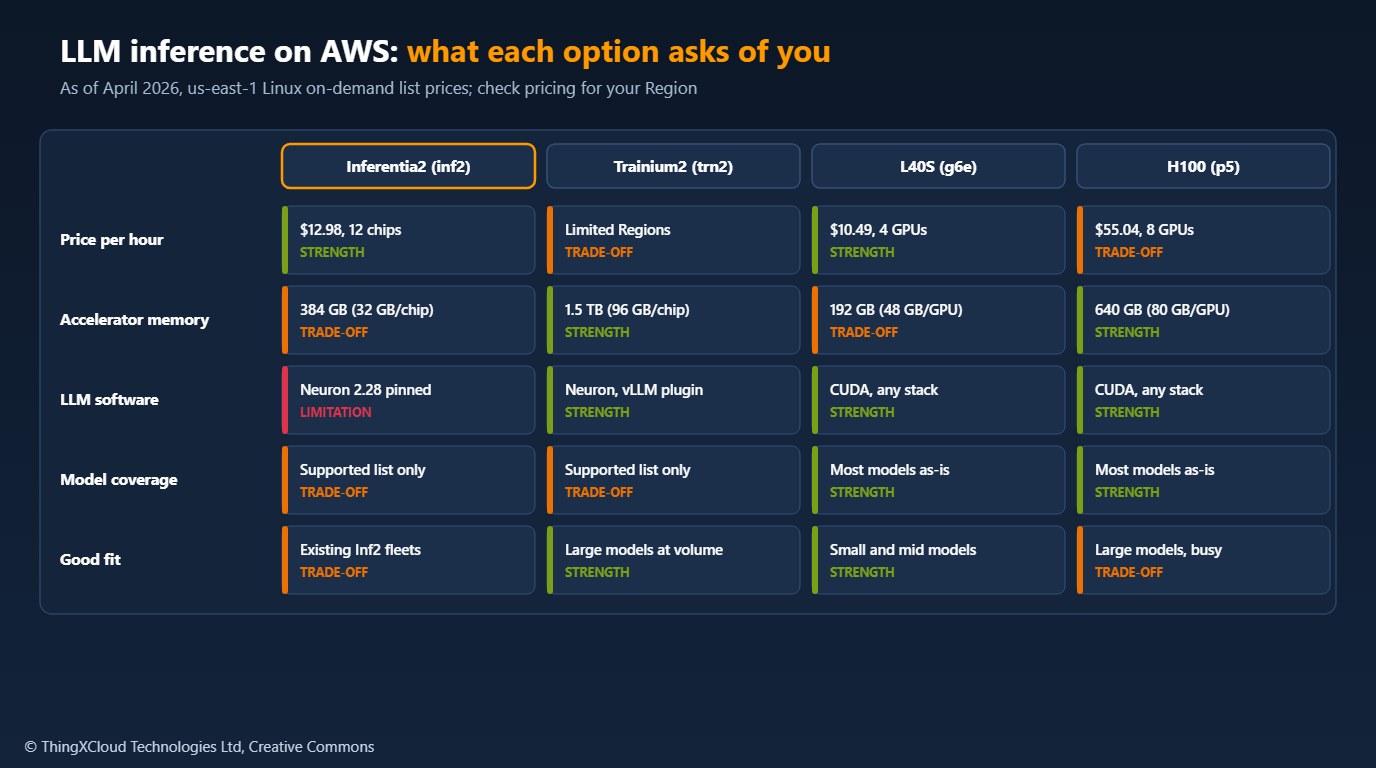
Inferentia2 instances range from inf2.xlarge (one chip, $0.76 an hour on demand in us-east-1) to inf2.48xlarge (twelve chips with 32 GB of memory each, $12.98 an hour). They were the obvious AWS answer for inference in 2023 and 2024. On 9 April 2026, Neuron SDK 2.29 removed NxD Inference support for Inf2 and Trn1; NxD Inference and the vLLM Neuron plugin built on it now target Trn2 and later, and AWS advises pinning Neuron 2.28 to keep serving LLMs on Inf2. The older Transformers NeuronX library reached end of support with Neuron 2.26. Inf2 still runs, and existing fleets can stay on 2.28, but a new LLM project on Inf2 starts on a stack that will not get new model support.
Trainium2 is where AWS now puts its inference software effort, despite the name. A trn2.48xlarge has sixteen chips with 96 GB each, enough for large models at high batch sizes, and Neuron’s vLLM plugin serves on it. Availability is the constraint: it is offered in a limited set of Regions and often through EC2 Capacity Blocks, so check before you plan around it. Trainium3 UltraServers went generally available in December 2025 for the largest workloads.
NVIDIA GPUs run almost any model with any serving stack (vLLM, SGLang, TensorRT-LLM, Hugging Face TGI) on day one. A g6e.12xlarge with four L40S GPUs costs $10.49 an hour; a p5.48xlarge with eight H100s costs $55.04 after AWS cut P5 on-demand prices by 44 per cent in June 2025. Comparisons written before that cut overstate the gap.
Many older Inferentia guides compile an LLM with torch_neuronx.trace on a dummy input. That produces a fixed-shape forward pass, not a text generator with a KV cache, continuous batching and streaming. For LLMs, use NxD Inference through vLLM (Trn2 and later, or Inf2 pinned to Neuron 2.28), and treat any model that is not on the supported list as a porting project.
Measure, then price
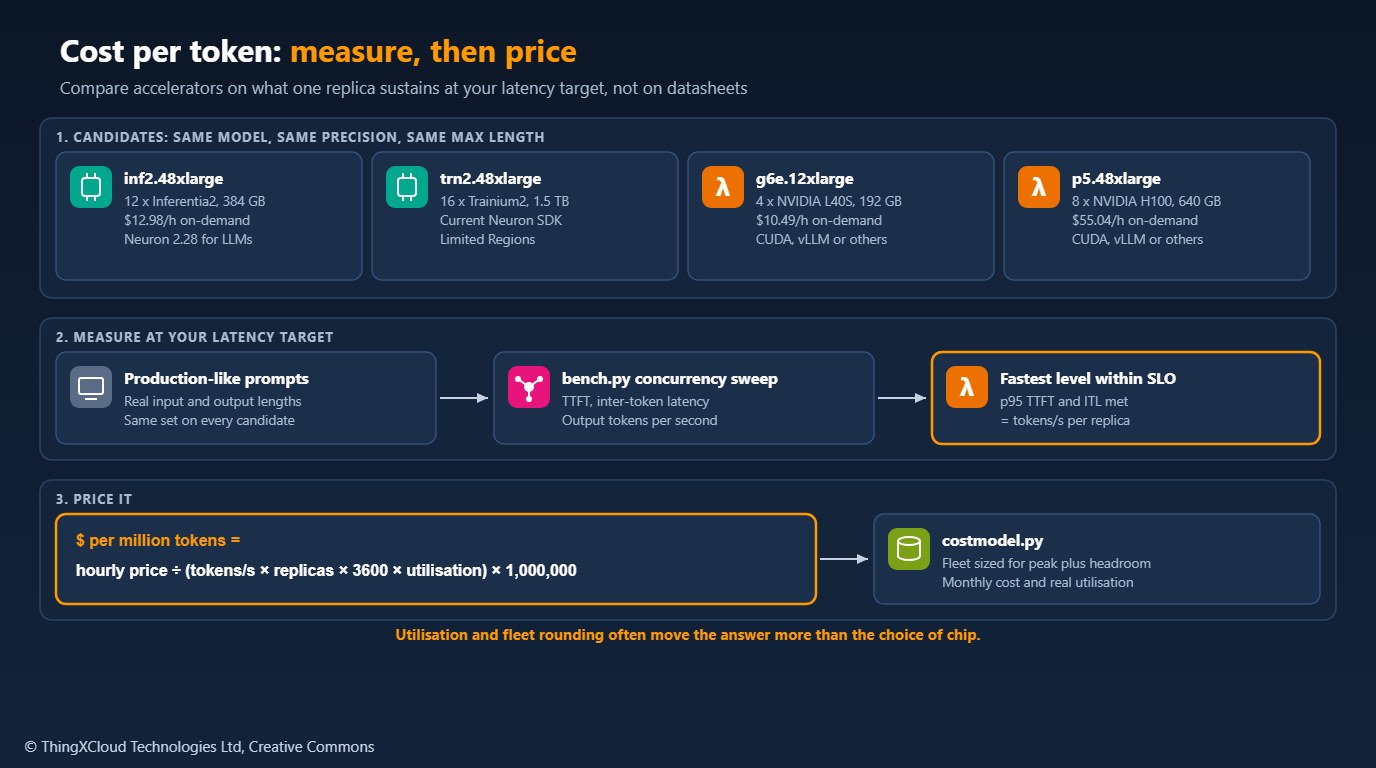
The cost of one million output tokens on a self-hosted endpoint is the hourly price divided by the tokens the instance produces in an hour, scaled by how much of that capacity you use:
$ per million = hourly price ÷ (tokens/s per replica × replicas per instance × 3600 × utilisation) × 1,000,000
Three of those inputs need care. Tokens per second must be measured at your latency target, because throughput rises with concurrency until time to first token or inter-token latency breaks your service level. Replicas per instance depends on memory: a model that needs 70 GB at your precision and context length fits once on a pair of L40S GPUs and several times on a p5. Utilisation is what the fleet does on average, and a fleet sized for a peak rarely averages above 30 to 40 per cent.
The sample’s bench.py sends production-like prompts to any OpenAI-compatible streaming endpoint at increasing concurrency and reports the fastest level that meets your p95 targets:
"""Measure sustained output throughput of an OpenAI-compatible endpoint.

Works against vLLM (on GPU, or with the vLLM Neuron plugin on Inferentia2
and Trainium), and any server that implements streaming /v1/completions.
For each concurrency level it sends a fixed number of requests and reports
time to first token (TTFT), inter-token latency (ITL) and aggregate output
tokens per second. `best_under_slo` picks the highest throughput that still
meets your latency targets; that figure is the `tokens_per_second` input
for costmodel.Candidate.

Usage:
    python bench.py --url http://localhost:8000 --model my-model \
        --prompt-file prompts.txt --concurrency 1 4 8 16 32 --requests 64
"""
from __future__ import annotations

import argparse
import asyncio
import json
import statistics
import time
from dataclasses import dataclass, field

import httpx


@dataclass
class RequestResult:
    ok: bool
    ttft: float = 0.0               # seconds to first token
    latency: float = 0.0            # seconds to last token
    output_tokens: int = 0
    gaps: list[float] = field(default_factory=list)  # seconds between streamed chunks
    error: str = ""


@dataclass
class LevelResult:
    concurrency: int
    requests: int
    failures: int
    wall_seconds: float
    output_tokens: int
    ttft_p50: float
    ttft_p95: float
    itl_p95: float

    @property
    def tokens_per_second(self) -> float:
        return self.output_tokens / self.wall_seconds if self.wall_seconds else 0.0


def percentile(values: list[float], pct: float) -> float:
    if not values:
        return 0.0
    ordered = sorted(values)
    k = (len(ordered) - 1) * pct / 100
    lo, hi = int(k), min(int(k) + 1, len(ordered) - 1)
    return ordered[lo] + (ordered[hi] - ordered[lo]) * (k - lo)


async def one_request(client: httpx.AsyncClient, url: str, model: str, prompt: str,
                      max_tokens: int) -> RequestResult:
    body = {
        "model": model,
        "prompt": prompt,
        "max_tokens": max_tokens,
        "temperature": 0,
        "stream": True,
        "stream_options": {"include_usage": True},
    }
    start = time.perf_counter()
    first = last = None
    chunks = 0
    usage_tokens = None
    gaps: list[float] = []
    try:
        async with client.stream("POST", f"{url}/v1/completions", json=body) as resp:
            if resp.status_code != 200:
                await resp.aread()
                return RequestResult(ok=False, error=f"HTTP {resp.status_code}")
            async for line in resp.aiter_lines():
                if not line.startswith("data: "):
                    continue
                data = line[6:].strip()
                if data == "[DONE]":
                    break
                event = json.loads(data)
                if event.get("usage"):
                    usage_tokens = event["usage"].get("completion_tokens")
                choices = event.get("choices") or []
                if choices and choices[0].get("text"):
                    now = time.perf_counter()
                    if first is None:
                        first = now
                    else:
                        gaps.append(now - last)
                    last = now
                    chunks += 1
    except (httpx.HTTPError, json.JSONDecodeError) as exc:
        return RequestResult(ok=False, error=type(exc).__name__)
    if first is None:
        return RequestResult(ok=False, error="no tokens")
    return RequestResult(
        ok=True,
        ttft=first - start,
        latency=last - start,
        # Prefer the server's count; one streamed chunk can carry several tokens.
        output_tokens=usage_tokens if usage_tokens is not None else chunks,
        gaps=gaps,
    )


async def run_level(url: str, model: str, prompts: list[str], concurrency: int,
                    requests: int, max_tokens: int, timeout: float = 300.0) -> LevelResult:
    sem = asyncio.Semaphore(concurrency)
    limits = httpx.Limits(max_connections=concurrency, max_keepalive_connections=concurrency)
    async with httpx.AsyncClient(timeout=timeout, limits=limits) as client:

        async def bounded(i: int) -> RequestResult:
            async with sem:
                return await one_request(client, url, model, prompts[i % len(prompts)], max_tokens)

        start = time.perf_counter()
        results = await asyncio.gather(*(bounded(i) for i in range(requests)))
        wall = time.perf_counter() - start

    good = [r for r in results if r.ok]
    gaps = [g for r in good for g in r.gaps]
    return LevelResult(
        concurrency=concurrency,
        requests=requests,
        failures=len(results) - len(good),
        wall_seconds=wall,
        output_tokens=sum(r.output_tokens for r in good),
        ttft_p50=percentile([r.ttft for r in good], 50),
        ttft_p95=percentile([r.ttft for r in good], 95),
        itl_p95=percentile(gaps, 95),
    )


def best_under_slo(levels: list[LevelResult], ttft_p95_max: float, itl_p95_max: float,
                   max_failure_rate: float = 0.0) -> LevelResult | None:
    """Highest-throughput level that meets the latency and error targets."""
    passing = [
        lv for lv in levels
        if lv.ttft_p95 <= ttft_p95_max
        and lv.itl_p95 <= itl_p95_max
        and lv.failures <= lv.requests * max_failure_rate
    ]
    return max(passing, key=lambda lv: lv.tokens_per_second, default=None)


def main() -> None:
    ap = argparse.ArgumentParser(description=__doc__.splitlines()[0])
    ap.add_argument("--url", required=True)
    ap.add_argument("--model", required=True)
    ap.add_argument("--prompt-file", required=True, help="one prompt per line, representative of production")
    ap.add_argument("--concurrency", type=int, nargs="+", default=[1, 4, 8, 16, 32])
    ap.add_argument("--requests", type=int, default=64)
    ap.add_argument("--max-tokens", type=int, default=256)
    ap.add_argument("--ttft-p95", type=float, default=2.0, help="seconds")
    ap.add_argument("--itl-p95", type=float, default=0.1, help="seconds")
    args = ap.parse_args()

    with open(args.prompt_file, encoding="utf-8") as fh:
        prompts = [line.strip() for line in fh if line.strip()]
    if not prompts:
        raise SystemExit("prompt file is empty")

    levels = []
    for c in args.concurrency:
        lv = asyncio.run(run_level(args.url, args.model, prompts, c, args.requests, args.max_tokens))
        levels.append(lv)
        print(f"c={c:>3} tok/s={lv.tokens_per_second:8.1f} ttft_p50={lv.ttft_p50:.2f}s "
              f"ttft_p95={lv.ttft_p95:.2f}s itl_p95={lv.itl_p95 * 1000:.0f}ms failures={lv.failures}")
    best = best_under_slo(levels, args.ttft_p95, args.itl_p95)
    if best is None:
        print("No concurrency level met the latency targets.")
    else:
        print(f"Use tokens_per_second={best.tokens_per_second:.1f} (concurrency {best.concurrency})")


if __name__ == "__main__":
    main()
costmodel.py then sizes a fleet for your peak, with headroom, and works out what you would really pay per million tokens:
"""Cost per million output tokens for self-hosted LLM inference.

The inputs are what you measure, not what a datasheet promises:
the instance price, the number of model replicas the instance holds,
the sustained output throughput of one replica at your latency target,
and how busy the fleet really is.
"""
from __future__ import annotations

from dataclasses import dataclass
import math


@dataclass(frozen=True)
class Candidate:
    """One way of serving the model, for example inf2.48xlarge with 2 replicas."""

    name: str
    hourly_usd: float           # price you pay per instance-hour (on-demand or committed)
    replicas_per_instance: int  # model copies the instance holds (tensor parallel groups)
    tokens_per_second: float    # output tokens/s for ONE replica at the latency target

    def __post_init__(self) -> None:
        if self.hourly_usd <= 0:
            raise ValueError(f"{self.name}: hourly_usd must be positive")
        if self.replicas_per_instance < 1:
            raise ValueError(f"{self.name}: replicas_per_instance must be at least 1")
        if self.tokens_per_second <= 0:
            raise ValueError(f"{self.name}: tokens_per_second must be positive")

    @property
    def instance_tokens_per_hour(self) -> float:
        return self.tokens_per_second * self.replicas_per_instance * 3600


def cost_per_million(c: Candidate, utilisation: float = 1.0) -> float:
    """USD per million output tokens at the given average utilisation (0 < u <= 1).

    Utilisation is the share of paid capacity that does useful work. An
    endpoint sized for a daytime peak and idle at night may average 0.3.
    """
    if not 0 < utilisation <= 1:
        raise ValueError("utilisation must be in (0, 1]")
    return c.hourly_usd / (c.instance_tokens_per_hour * utilisation) * 1_000_000


def instances_needed(c: Candidate, peak_tokens_per_second: float, headroom: float = 0.2) -> int:
    """Instances required to serve a peak output rate with spare headroom."""
    if peak_tokens_per_second <= 0:
        raise ValueError("peak_tokens_per_second must be positive")
    if not 0 <= headroom < 1:
        raise ValueError("headroom must be in [0, 1)")
    per_instance = c.tokens_per_second * c.replicas_per_instance * (1 - headroom)
    return max(1, math.ceil(peak_tokens_per_second / per_instance))


def monthly_cost(c: Candidate, instances: int, hours: float = 730.0) -> float:
    return c.hourly_usd * instances * hours


def compare(candidates: list[Candidate], peak_tokens_per_second: float,
            monthly_tokens: float, headroom: float = 0.2) -> list[dict]:
    """Rank candidates by monthly cost for a fleet sized to the peak.

    Effective utilisation follows from the sizing: tokens actually produced
    divided by the capacity you pay for.
    """
    rows = []
    for c in candidates:
        n = instances_needed(c, peak_tokens_per_second, headroom)
        cost = monthly_cost(c, n)
        capacity = c.instance_tokens_per_hour * n * 730.0
        util = min(1.0, monthly_tokens / capacity)
        rows.append({
            "name": c.name,
            "instances": n,
            "monthly_usd": round(cost, 2),
            "utilisation": round(util, 3),
            "usd_per_million": round(cost / monthly_tokens * 1_000_000, 2),
        })
    return sorted(rows, key=lambda r: r["monthly_usd"])
A worked example, with placeholder throughput
The numbers below show how the method behaves. The prices are list prices; the throughput figures are invented to illustrate the arithmetic and are not benchmarks of any chip.
| Candidate | Placeholder tokens/s per replica | Replicas | Instances for a 3,000 tokens/s peak | Monthly cost | $ per million at 30% average load |
|---|---|---|---|---|---|
| inf2.48xlarge | 900 | 2 | 3 | $28,426 | $12.02 |
| g6e.12xlarge | 1,400 | 1 | 3 | $22,973 | $9.71 |
| p5.48xlarge | 2,500 | 4 | 1 | $40,179 | $16.99 |
Read it for the mechanics, not the winner. The p5 has the most capacity per instance but is 91 per cent idle at this load; double the traffic and it becomes the cheapest per token, because the others need more instances while it needs none. Rounding up to whole instances matters as much as the chip: going from three instances to four costs a third more for the same tokens. If your measured utilisation is low, compare the result with a managed per-token service for the same model, such as Amazon Bedrock, before buying capacity at all.
Use the same model weights, precision, maximum context length, prompts, output length and latency targets on every candidate. Warm each endpoint before measuring, and include compile or load time in your scale-out plans: Neuron models are compiled ahead of time for fixed shapes, so a new sequence length or batch configuration means a recompile, not a restart.
Choosing
%%{init: {'theme': 'base', 'themeVariables': {'primaryColor': '#FFF3E0', 'primaryTextColor': '#232F3E', 'primaryBorderColor': '#FF9900', 'lineColor': '#232F3E', 'clusterBkg': '#F8FAFC', 'clusterBorder': '#CBD5E1', 'edgeLabelBackground': '#FFFFFF', 'nodeTextColor': '#232F3E'}}}%%
flowchart TD
    A["Self-hosting an LLM<br/>on AWS"] --> B{"Steady, high load?"}
    B -- "No" --> C["Price a managed<br/>per-token service first"]
    B -- "Yes" --> D{"Model on the Neuron<br/>supported list?"}
    D -- "No" --> E["NVIDIA GPU:<br/>g6e or p5"]
    D -- "Yes" --> F{"Trn2 available<br/>in your Region?"}
    F -- "Yes" --> G["Benchmark Trn2<br/>against a GPU"]
    F -- "No" --> H{"Already running Inf2?"}
    H -- "Yes" --> I["Stay on Neuron 2.28,<br/>plan the next move"]
    H -- "No" --> E
    classDef aws fill:#FFF3E0,stroke:#FF9900,stroke-width:2px,color:#232F3E
    classDef ok fill:#F0FFF4,stroke:#1D8102,stroke-width:2px,color:#145202
    classDef warn fill:#FEF2F2,stroke:#D13212,stroke-width:2px,color:#991B1B
    class A,B,D,F,H aws
    class C,E,G ok
    class I warn
Pick NVIDIA GPUs when the model is new or customised, when you need a serving feature that only exists on CUDA, or when your team has no Neuron experience and the workload is small. Benchmark Trainium2 when the model is on the supported list, the load is steady and large enough to keep instances busy, and capacity is available where you run. Keep existing Inferentia2 fleets on Neuron 2.28 while they meet their targets, and benchmark Trn2 or GPUs before the next model change.
Self-hosting keeps prompts and outputs inside your VPC and account, which is often the reason to do it. It also ties you to the Regions where the accelerator is offered. Confirm that the instance type is available in a Region your data may be processed in before you benchmark it, and plan for capacity: an endpoint that cannot scale out because no instances are available is a reliability risk, not a cost saving.
bench.py and costmodel.py were tested with Python 3.13, httpx==0.28.1 and pytest==9.0.2: thirteen tests cover the cost arithmetic, fleet sizing and input validation, and run the load generator against a local fake streaming server, including failed requests and chunks that carry more than one token. No accelerator was benchmarked. The worked example uses placeholder throughput. Prices are us-east-1 Linux on-demand list prices and change; check the EC2 pricing page for your Region and purchase option.
Key takeaways
- Cost per token depends on your measured throughput at your latency target, the replicas memory allows, and real utilisation; vendor percentages do not transfer.
- Since Neuron 2.29 (9 April 2026), LLM serving with NxD Inference targets Trn2 and later. Inf2 needs Neuron 2.28 pinned.
- NVIDIA GPUs remain the low-effort option for any model; P5 prices fell by up to 45 per cent in June 2025.
- Fleet rounding and idle capacity often outweigh the chip choice. At low or bursty load, price a managed per-token service first.
- Measure every candidate with the same model, prompts and targets, and include compile time and capacity in the decision.
Have you moved an LLM endpoint between GPUs and Neuron? Share your measured tokens per second and what the porting took in the comments.
The complete sample for this article is on GitHub: nithinmohantk/blog-samples-working-repo/inference-cost-per-token. Clone it with git clone https://github.com/nithinmohantk/blog-samples-working-repo.git and open the inference-cost-per-token folder. Its README says how to run it and what has been verified.
Glossary
- Inferentia2
- AWS’s second-generation inference chip, used in inf2 instances.
- Trainium2
- AWS’s second-generation training chip, also used for inference, in trn2 instances.
- Neuron SDK
- The compiler, runtime and libraries for Inferentia and Trainium.
- NxD Inference
- The Neuron library for serving LLMs, used by the vLLM Neuron plugin.
- TTFT
- Time to first token: delay before a streamed response starts.
- Inter-token latency (ITL)
- Time between streamed tokens after the first.
- Replica
- One copy of the model, possibly spread across several accelerators.
- Utilisation
- The share of paid capacity doing useful work, averaged over time.
References & Further Reading
- → AWS Neuron SDK 2.29.0 release notes— 9 April 2026; supported hardware
- → NxD Inference release notes— Inf2 and Trn1 support removed in 2.29; pin 2.28
- → Neuron DLAMI release notes— Transformers NeuronX end of support from 2.26
- → Up to 45% price reduction for EC2 NVIDIA GPU instances— P4 and P5 price cuts, June 2025
- → Amazon EC2 Trn3 UltraServers— General availability, December 2025
- → EC2 Capacity Blocks for ML pricing— Reserved accelerator capacity
- → Sample code for this article— Load generator and cost model
Discover more from C4: Container, Code, Cloud & Context
Subscribe to get the latest posts sent to your email.
