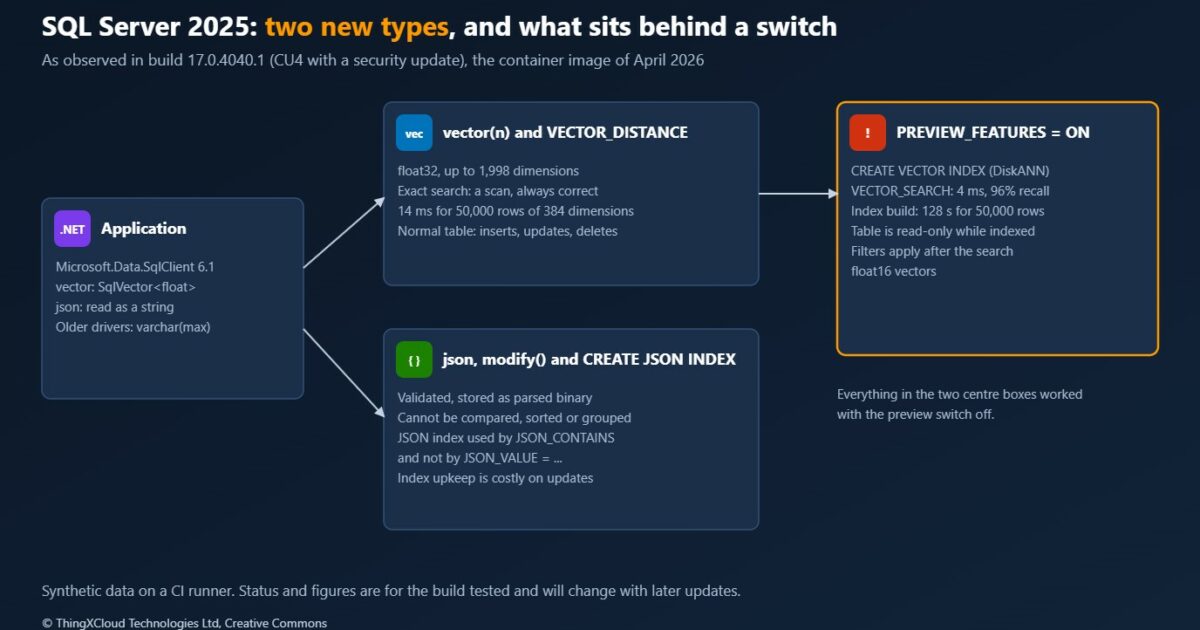
SQL Server 2025 has been generally available since 18 November 2025 and is now at its fourth cumulative update. Two of its additions reach past the database team into application design: a vector type with distance functions and an approximate index, and a native json type with its own index. Between them they raise a question that comes up in most design reviews this year: can the relational database you already run hold the embeddings and the documents too, or do you still need a second store?
The answer depends on details that a feature list does not show: what is finished and what is still a preview, what an index does to writes, and what the driver hands your code. This article finds out by running the statements. Every result below comes from the SQL Server 2025 container image, started in a CI pipeline, with a small .NET program that sends T-SQL and records what the server answers.
The ORM side of vector search is in EF Core 10: Vector Search, LeftJoin/RightJoin, and Full-Text Search on Cosmos DB. This article stays in T-SQL and the driver, where the behaviour is decided.
SQL Server 2025 build 17.0.4040.1, which is cumulative update 4 with a security update, Developer edition, in the Linux container image. Microsoft.Data.SqlClient 6.1.1 on .NET 10. The data is synthetic: 50,000 vectors of 384 dimensions that are not embeddings from a model, and 50,000 order documents of about 300 bytes. Timings were taken on a CI runner and compare the options with each other. Preview features change between updates, so the status reported here is the status of this build.
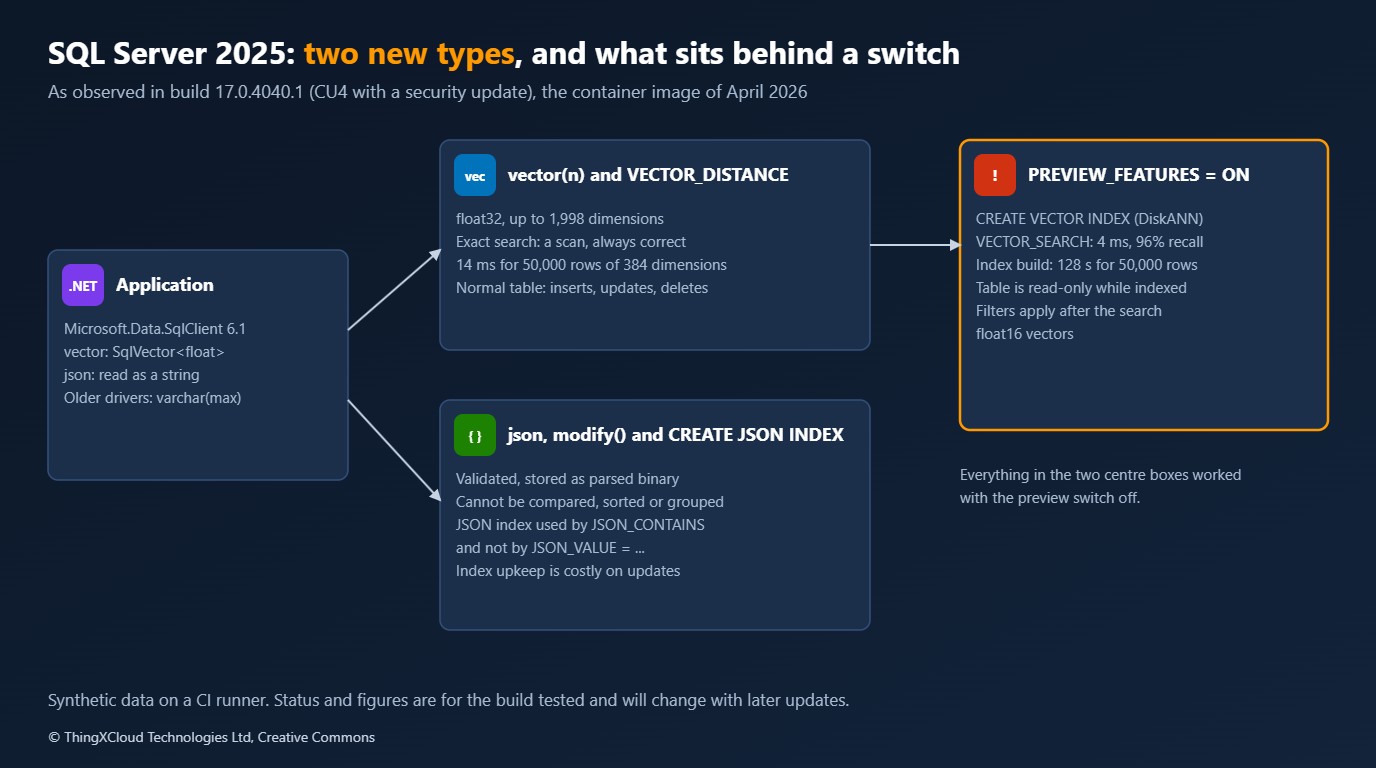
What is finished and what is behind a switch
SQL Server 2025 introduced a database-scoped setting, PREVIEW_FEATURES, that is off by default. Features that shipped before they were finished stay unavailable until someone turns it on for a database. The first thing an architect needs is the list of what falls on which side. This is what the build answered.
| Feature | With the switch off | Notes from the run |
|---|---|---|
vector(n), float32 | Works | Up to 1,998 dimensions |
VECTOR_DISTANCE: cosine, euclidean, dot | Works | Exact search by scanning |
CREATE VECTOR INDEX, VECTOR_SEARCH | Error 343 | Works with the switch on. Table becomes read-only |
vector(n, float16) | Error 195 | Works with the switch on |
json type, modify() | Works | Objects and arrays only |
JSON_VALUE ... RETURNING, JSON_CONTAINS, JSON_OBJECTAGG | Works | |
CREATE JSON INDEX | Works | Used by JSON_CONTAINS, not chosen for JSON_VALUE |
Architecture: one engine or two
There are three places the vectors and documents of an application can live once the system of record is SQL Server. The trade is always the same: one engine means one transaction, one backup and one security model, and a second engine means a better-fitting index and something else to run and keep in step.
| Option | Advantages | Disadvantages and risks | Cost and operations |
|---|---|---|---|
| Everything in SQL Server 2025 | A row and its embedding change in one transaction. Row-level security, auditing, backup and encryption at rest already apply. A join filters by anything | Approximate search is a preview in this build and makes the table read-only. Exact search reads every row | No new service. Index builds and larger rows are paid for in the database you already size |
| SQL Server plus a dedicated vector store | Mature approximate indexes, filtering inside the search, incremental updates | Two stores to keep consistent. Deletes and permission changes must reach both. A second place where personal data lives | A second service to run, secure, back up and monitor |
| SQL Server plus a search service | Hybrid keyword and vector ranking, language analysers | The same consistency and data-protection duties, plus an indexing pipeline with its own lag | Per-replica or per-unit pricing, and the pipeline to operate |
The measurements that follow are meant to show where the first option stops being enough.
A SQL Server container in CI
The whole investigation runs in a pipeline, which is also how a team should test its own schema and queries against a new SQL Server version. Three details make it repeatable and safe.
The image is pinned. 2025-latest moves with every cumulative update, and the tag names carry no dates, so a small script reads each image’s build time from the registry and takes the newest one on or before a chosen day.
def built(tag: str) -> str:
    manifest = get(f"manifests/{tag}")
    if "manifests" in manifest:  # a multi-architecture index: take the x64 Linux image
        entry = next(m for m in manifest["manifests"] if m["platform"]["architecture"] == "amd64" and m["platform"]["os"] == "linux")
        manifest = get(f"manifests/{entry['digest']}")
    return get(f"blobs/{manifest['config']['digest']}")["created"]
image mcr.microsoft.com/mssql/server:2025-CU4-GDR1-ubuntu-22.04
built 2026-04-19T12:32:21.126991629Z
digest sha256:15057bb772025cf9f279d2e6e7a83b90b73109c0dc1e12fc5a1fd19992fb8c7f
size 662 MBThe sa password is generated when the script starts, exists only in that shell, and the script fails the run if the value appears in any output file. The connection is encrypted; the certificate is the container’s self-signed one, so it is trusted for this test and nowhere else.
# A throwaway password for a throwaway container. It is made here, lives in this shell and is never written to a file.
password="$(openssl rand -base64 24 | tr -d '/+=')aA1!"
docker run -d --name sql2025 -e ACCEPT_EULA=Y -e MSSQL_PID=Developer -e MSSQL_SA_PASSWORD="$password" \
  -p 127.0.0.1:14333:1433 --memory 6g "$IMAGE" > /dev/null || exit 2
# Encrypt is on; the certificate is the container's self-signed one, so it is trusted here and nowhere else.
export LAB_SQL_CONNECTION="Server=127.0.0.1,14333;User ID=sa;Password=$password;Encrypt=True;TrustServerCertificate=True;Connect Timeout=5"
The server takes some seconds to accept logins after the container starts. The program waits for a successful connection, with a limit, before it does anything else.
    public async Task<bool> WaitUntilReadyAsync(TimeSpan limit)
    {
        Stopwatch waited = Stopwatch.StartNew();
        while (waited.Elapsed < limit)
        {
            try
            {
                Connection();
                return true;
            }
            catch (SqlException)
            {
                _connection?.Dispose();
                _connection = null;
                await Task.Delay(TimeSpan.FromSeconds(2));
            }
        }
        return false;
    }
%%{init: {'theme':'base','themeVariables':{'primaryColor':'#FFF3E0','primaryTextColor':'#232F3E','primaryBorderColor':'#FF9900','lineColor':'#232F3E','signalColor':'#0073BB','signalTextColor':'#0F172A','actorBkg':'#FFF3E0','actorBorder':'#FF9900','actorTextColor':'#232F3E','noteBkgColor':'#FFF8E7','noteBorderColor':'#FF9900','noteTextColor':'#232F3E'}}}%%
sequenceDiagram
participant P as Pipeline
participant R as Container registry
participant S as SQL Server container
participant L as Lab program
P->>R: Which 2025 tag was built last, on or before the date?
R-->>P: 2025-CU4-GDR1-ubuntu-22.04
P->>S: Start with a generated sa password
P->>L: Run with the connection string
L->>S: Log in, retrying until ready
L->>S: Each T-SQL batch
S-->>L: Rows, or an error number and message
L-->>P: Transcript and exit codeThe T-SQL lives in two .sql files as named batches, and the program treats a server error as a result to record, because several of the experiments are expected to fail.
The vector type: what it accepts and what it refuses
A vector is declared with its number of dimensions, written and read as a JSON array of numbers, and stored as binary floats. The first experiments probe its edges.
[1.1] a vector cast to text
      SELECT CAST(CAST('[1, 2.5, -3]' AS vector(3)) AS varchar(100))
      ok -> [1.0000000e+000,2.5000000e+000,-3.0000000e+000]
[1.2] a float32 vector of 1,998 dimensions
      CREATE TABLE dbo.Wide (id int PRIMARY KEY, e vector(1998)); DROP TABLE dbo.Wide;
      ok
[1.3] one of 1,999 dimensions
      CREATE TABLE dbo.Wider (id int PRIMARY KEY, e vector(1999));
      error 2717: The size (1999) given to the column 'e' exceeds the maximum allowed (1998).
[1.4] three numbers into a vector(2)
      DECLARE @v vector(2) = '[1,2,3]';
      error 42204: The vector dimensions 2 and 3 do not match.
[1.5] text that is not an array of numbers
      DECLARE @v vector(2) = '[1,"two"]';
      error 13670: Input JSON is not a valid Vector : 'String not Supported'.
[1.6] comparing two vectors with =
      SELECT CASE WHEN CAST('[1,0]' AS vector(2)) = CAST('[1,0]' AS vector(2)) THEN 1 ELSE 0 END
      error 8117: Operand data type vector is invalid for equal to operator.
[1.7] a vector as a primary key
      CREATE TABLE dbo.Keyed (e vector(2) NOT NULL PRIMARY KEY);
      error 1919: Column 'e' in table 'Keyed' is of a type that is invalid for use as a key column in an index. Could not create constraint or index. See previous errors.
[1.8] a float16 vector, PREVIEW_FEATURES off
      CREATE TABLE dbo.Half (id int PRIMARY KEY, e vector(8, float16)); DROP TABLE dbo.Half;
      error 195: 'float16' is not a recognized vector base type.
Three of these shape a design. The 1,998-dimension limit rules out the largest embedding models at full size unless the half-precision type, still a preview here, is used. A vector cannot be a key or be compared, so it never identifies a row. And a dimension mismatch is an error at write time, which means the embedding model is part of the schema: changing to a model with a different output size is a column migration.
The test table has an integer key, a category that has nothing to do with the vector, and the embedding.
CREATE TABLE dbo.Doc
(
    id        int           NOT NULL CONSTRAINT PK_Doc PRIMARY KEY CLUSTERED,
    category  tinyint       NOT NULL,
    title     nvarchar(100) NOT NULL,
    embedding vector(384)   NOT NULL
);
Rows are loaded a thousand at a time, as one JSON document per round trip that OPENJSON turns into rows.
INSERT INTO dbo.Doc (id, category, title, embedding)
SELECT id, category, title, CAST(embedding AS vector(384))
FROM OPENJSON(@rows)
     WITH (id int, category tinyint, title nvarchar(100), embedding nvarchar(max) AS JSON);
== 2. Loading 50,000 vectors of 384 dimensions
ok 50,000 rows are in the table
loaded in 27.3 s as JSON text, 1,000 rows per round trip
table size 78.4 MB, 1645 bytes per row; the raw floats are 1536 bytesStorage is close to the arithmetic: 384 floats are 1,536 bytes, and a row takes 1,645. A million such rows would be about 1.6 GB before any index.
Exact search is a table scan, and often that is enough
Without an index, nearest-neighbour search is an ordinary query: compute the distance from the query vector to every row, sort, keep ten.
DECLARE @v vector(384) = CAST(@q AS vector(384));
SELECT TOP (10) id, VECTOR_DISTANCE('cosine', embedding, @v) AS distance
FROM dbo.Doc
ORDER BY distance;
Because the result is exact, it can be checked. The program computes the same cosine distances in C# for all 50,000 rows and compares the ten smallest with what the server returned, for 50 different queries.
    double[] expected = [.. vectors.Select(vector => Synthetic.CosineDistance(query, vector)).Order().Take(10)];
    agrees &= exact.Rows.Count == 10 && exact.Rows.Select((row, i) => Math.Abs(Convert.ToDouble(row[1]) - expected[i]) < 1e-4).All(same => same);
== 3. Exact search, checked against the same arithmetic in C#
ok the ten nearest and their distances match a brute-force calculation for all 50 queries
median 14 ms per query over 50,000 rows (slowest 43 ms); one query reads 10,543 pagesFourteen milliseconds to read all 10,543 pages of the table and rank 50,000 vectors. The cost grows in a straight line with the number of rows and dimensions, so this is not an answer for tens of millions of chunks. It is a complete answer for a product catalogue, a policy library or one tenant’s documents, and it has properties the index does not: it is correct, it works with any WHERE clause, and the table stays writable. A filter should make it cheaper, since rows that fail it need no distance, though that was not timed here.
Size the exact scan first. If the rows a query has to consider, after tenant and permission filters, number in the tens or low hundreds of thousands, a scan in tens of milliseconds may meet the requirement with nothing in preview and nothing approximate.
The vector index: fast, approximate and, in this build, read-only
The approximate index is a DiskANN graph. Creating it fails until the preview switch is on.
[5.1] CREATE VECTOR INDEX with PREVIEW_FEATURES off
      CREATE VECTOR INDEX IX_Doc_embedding ON dbo.Doc (embedding) WITH (METRIC = 'cosine', TYPE = 'DiskANN');
      error 343: Unknown object type 'VECTOR' used in a CREATE, DROP, or ALTER statement.
[5.2] turn the preview features on for this database
      ALTER DATABASE SCOPED CONFIGURATION SET PREVIEW_FEATURES = ON;
      ok
[5.3] CREATE VECTOR INDEX again
      CREATE VECTOR INDEX IX_Doc_embedding ON dbo.Doc (embedding) WITH (METRIC = 'cosine', TYPE = 'DiskANN');
      ok
  built in 127.5 s; the database grew by 13.1 MB
It is queried through a table-valued function, not through ORDER BY.
DECLARE @v vector(384) = CAST(@q AS vector(384));
SELECT t.id, s.distance
FROM VECTOR_SEARCH(
         TABLE = dbo.Doc AS t,
         COLUMN = embedding,
         SIMILAR_TO = @v,
         METRIC = 'cosine',
         TOP_N = 10) AS s
ORDER BY s.distance;
VECTOR_SEARCH: ok
median 4.3 ms per query (slowest 6.8 ms); one query reads 4,262 pages
recall against the exact answer: mean 96.0 %, worst query 80 %, 34 of 50 queries returned exactly the true ten
with WHERE category = 3, one row in eight: the exact query returned 10 rows for 50 of 50 queries;
the index query returned 10 for 0, between 1 and 9 for 33, and none for 17; 1.0 rows on averageFour findings, in order of how much they matter.
- The table cannot be written while the index exists. Inserts, deletes and updates all fail, including an update to a column that is not the vector. The transcript is below.
- Filters run after the search. The function returns its ten nearest rows and the
WHEREclause then removes those that do not match. With a filter that keeps one row in eight, a request for ten returned one row on average and none at all for 17 of 50 queries. The exact query returned ten every time. - Recall was 96% on average and 80% for the worst query. On this data, one query in three missed at least one of the true ten.
- Building took 128 seconds for 50,000 rows, against 27 seconds to load them. Queries then took 4 ms against 14.
[5.4] insert a row
      INSERT INTO dbo.Doc (id, category, title, embedding) VALUES (900001, 1, N'New', CAST(@q AS vector(384)));
      error 42231: Data modification statement failed because table 'Doc' has a vector index on it.
[5.5] update a column that is not the vector
      UPDATE dbo.Doc SET title = N'Renamed' WHERE id = 2;
      error 42231: Data modification statement failed because table 'Doc' has a vector index on it.
[5.6] update the vector
      UPDATE dbo.Doc SET embedding = CAST(@q AS vector(384)) WHERE id = 2;
      error 42231: Data modification statement failed because table 'Doc' has a vector index on it.
[5.7] delete a row
      DELETE FROM dbo.Doc WHERE id = 3;
      error 42231: Data modification statement failed because table 'Doc' has a vector index on it.
[5.8] drop the index
      DROP INDEX IX_Doc_embedding ON dbo.Doc;
      ok
[5.9] insert a row once the index is gone
      INSERT INTO dbo.Doc (id, category, title, embedding) VALUES (900002, 1, N'New', CAST(@q AS vector(384)));
okIn this build a vector index fits a table that is loaded, indexed and then only read: a nightly or weekly rebuild of a search copy. It does not fit a table the application writes to. The two-minute build for 50,000 rows also has to be planned for at real volumes. And any filter that matters for correctness or security, such as tenant or permission, cannot be left to the WHERE clause after an approximate search; partition the data so that each index holds only rows the caller may see, or use the exact query.
What the driver sees
Microsoft.Data.SqlClient 6.1 has a type for vectors, and the server falls back to text for clients that do not.
== 4. What the driver sees
  a vector column: SQL type 'vector', declared .NET type System.Byte[], value returned as SqlVector<Single>
  a SqlVector<float> parameter: ok, distance to its own row 0.000000
ok    the 384 floats read back through the driver are bit-for-bit the ones that were sent as text
SqlParameter typed = new("@v", SqlDbTypeExtensions.Vector) { Value = new SqlVector<float>(vectors[0]) };
Outcome distance = db.Run("SELECT VECTOR_DISTANCE('cosine', embedding, @v) FROM dbo.Doc WHERE id = 1", ("@v", typed));A vector comes back as SqlVector<float>, although the reader’s declared field type for the column is a byte array, which matters to generic code such as a data-table loader or a mapper that asks for the type before it reads the value. A json column arrives as a string. Older drivers and other languages see both as varchar(max), so nothing breaks, and nothing is gained, until the driver is upgraded.
The json type: validation, and what it normalises
Until this release JSON in SQL Server was text in an nvarchar column with a check constraint if someone remembered to add one. The json type validates on write and stores a parsed binary form.
[6.1] an object
      DECLARE @j json = '{"a": 1,  "b": [true, null]}'; SELECT CAST(@j AS nvarchar(100));
      ok -> {"a":1,"b":[true,null]}
[6.2] a bare scalar
      DECLARE @j json = 'true';
      error 13609: JSON text is not properly formatted. Unexpected character 't' is found at position 0.
[6.3] text that is not JSON
      DECLARE @j json = '{"a": }';
      error 13609: JSON text is not properly formatted. Unexpected character '}' is found at position 6.
[6.4] a repeated key
      DECLARE @j json = '{"a": 1, "a": 2}'; SELECT CAST(@j AS nvarchar(100));
      ok -> {"a":1}
[6.5] a number with more digits than a double holds
      DECLARE @j json = '{"n": 12345678901234567890.123456789}'; SELECT CAST(@j AS nvarchar(100));
      ok -> {"n":12345678901234567890.123456789}
[6.6] key order and trailing zeros
      DECLARE @j json = '{"b": 1.50, "a": 2}'; SELECT CAST(@j AS nvarchar(100));
      ok -> {"b":1.50,"a":2}
[6.7] comparing two json values with =
      DECLARE @a json = '{}', @b json = '{}'; SELECT CASE WHEN @a = @b THEN 1 ELSE 0 END;
      error 13636: The JSON data type cannot be compared or sorted, except when using the IS NULL operator.
[6.8] ORDER BY a json column
      SELECT j FROM (VALUES (CAST('{}' AS json))) AS t(j) ORDER BY j;
      error 13636: The JSON data type cannot be compared or sorted, except when using the IS NULL operator.
[6.9] JSON_VALUE with RETURNING
      DECLARE @j json = '{"total": 12.50}'; SELECT JSON_VALUE(@j, '$.total' RETURNING decimal(9, 2));
      ok -> 12.50
[6.10] JSON_CONTAINS, PREVIEW_FEATURES off
      DECLARE @j json = '{"c": "IE"}'; SELECT JSON_CONTAINS(@j, 'IE', '$.c');
      ok -> 1
The points to carry into a design review:
- It is not a byte-for-byte store. White space is removed and a repeated key silently keeps its first value. Key order, trailing zeros and a 29-digit number survived. If you must return exactly the bytes you received, for a signature or a legal record, keep the original text as well.
- Only objects and arrays are accepted. A bare
trueor a number is an error. - A json value cannot be compared, sorted or grouped. An equality test and an
ORDER BYboth fail with error 13636, and its message rules out comparing and sorting in general. Extract a property, or cast to text. - The typed extraction and containment functions worked without the preview switch.
JSON_VALUEwithRETURNINGgives a decimal directly.
Storage: three column types for the same documents
CREATE TABLE dbo.OrdersN (id int NOT NULL CONSTRAINT PK_OrdersN PRIMARY KEY CLUSTERED, doc nvarchar(max) NOT NULL CONSTRAINT CK_OrdersN_json CHECK (ISJSON(doc) = 1));
CREATE TABLE dbo.OrdersV (id int NOT NULL CONSTRAINT PK_OrdersV PRIMARY KEY CLUSTERED, doc varchar(max) COLLATE Latin1_General_100_BIN2_UTF8 NOT NULL);
CREATE TABLE dbo.OrdersJ (id int NOT NULL CONSTRAINT PK_OrdersJ PRIMARY KEY CLUSTERED, doc json NOT NULL);
nvarchar(max) 31.3 MB 656 bytes per document
varchar(max), UTF-8 15.8 MB 331 bytes per document
json 25.2 MB 528 bytes per document
the documents average 301 bytes as UTF-8 textThe native type is a fifth smaller than nvarchar(max), which stores two bytes per character. It is larger than the same text in a UTF-8 varchar(max) column, because the binary form carries structure so that a property can be found without parsing. For small documents like these, json is not a storage saving over UTF-8 text. What it buys is validation and cheaper access.
Updating one property
The type has a method, modify, that changes one value in place. The test updates the status of all 50,000 documents inside a transaction and reads how much transaction log that one statement wrote.
BEGIN TRANSACTION;
UPDATE dbo.OrdersJ SET doc.modify('$.status', @status);
SELECT database_transaction_log_bytes_used
FROM sys.dm_tran_database_transactions
WHERE database_id = DB_ID() AND transaction_id = CURRENT_TRANSACTION_ID();
COMMIT;
== 8. Changing one property in every document, before any index exists
json, doc.modify(), value of the same length 0.2 s 5.0 MB of log
json, doc.modify(), longer value 0.4 s 31.0 MB of log
json, JSON_MODIFY(), value of the same length 0.2 s 5.0 MB of log
json, JSON_MODIFY(), longer value 0.4 s 31.0 MB of log
nvarchar(max), JSON_MODIFY(), same length 0.8 s 5.4 MB of log
nvarchar(max), JSON_MODIFY(), longer value 0.9 s 23.0 MB of log
ok after the updates all three tables hold the new status in every document
json, doc.modify(), same length, 20 characters 0.2 s 6.6 MB of logReplacing a value with one of the same length wrote 5 MB of log; replacing it with a longer one wrote 31 MB, because each document had to be rewritten. On the json column, modify() and the older JSON_MODIFY function cost the same in this build. Both were two to four times faster than JSON_MODIFY on nvarchar(max), which parses the text, changes it and writes it back. For a property that changes often, a fixed-width representation, such as a status code of constant length, keeps updates in place.
Indexing a property inside the document
The query is the usual one: all orders for one country, here 245 of 50,000. There are two ways to index it. The long-standing one is a computed column over the property with an ordinary index:
ALTER TABLE dbo.OrdersC ADD country AS CAST(JSON_VALUE(doc, '$.customer.country') AS nchar(2));
CREATE INDEX IX_OrdersC_country ON dbo.OrdersC (country);
The new one is a JSON index over one or more paths, which was created without the preview switch:
CREATE JSON INDEX IX_OrdersJ_doc ON dbo.OrdersJ (doc) FOR ('$.customer.country', '$.status');== 9. Finding the orders for one country, about 1 in 200
nvarchar(max), no index 245 orders median 160.0 ms 4,230 pages read
json, no index 245 orders median 95.3 ms 3,367 pages read
json, computed column with a B-tree index 245 orders median 1.7 ms 761 pages read
[9.1] CREATE JSON INDEX with PREVIEW_FEATURES off
CREATE JSON INDEX IX_OrdersJ_doc ON dbo.OrdersJ (doc) FOR ('$.customer.country', '$.status');
ok
sys.indexes for dbo.OrdersJ: CLUSTERED, JSON; the database grew by 13.4 MB
json, JSON index, JSON_VALUE(...) = N'MT' 245 orders median 94.8 ms 3,367 pages read
json, JSON index, JSON_CONTAINS(...) = 1 245 orders median 1.7 ms 764 pages read
json, JSON index named in a hint 245 orders median 20.6 ms 3,726 pages read
ok every way of asking returns the same count and the same total
and the cost of keeping that index when the indexed property changes:
json, doc.modify(), same length, JSON index 5.2 s 69.6 MB of log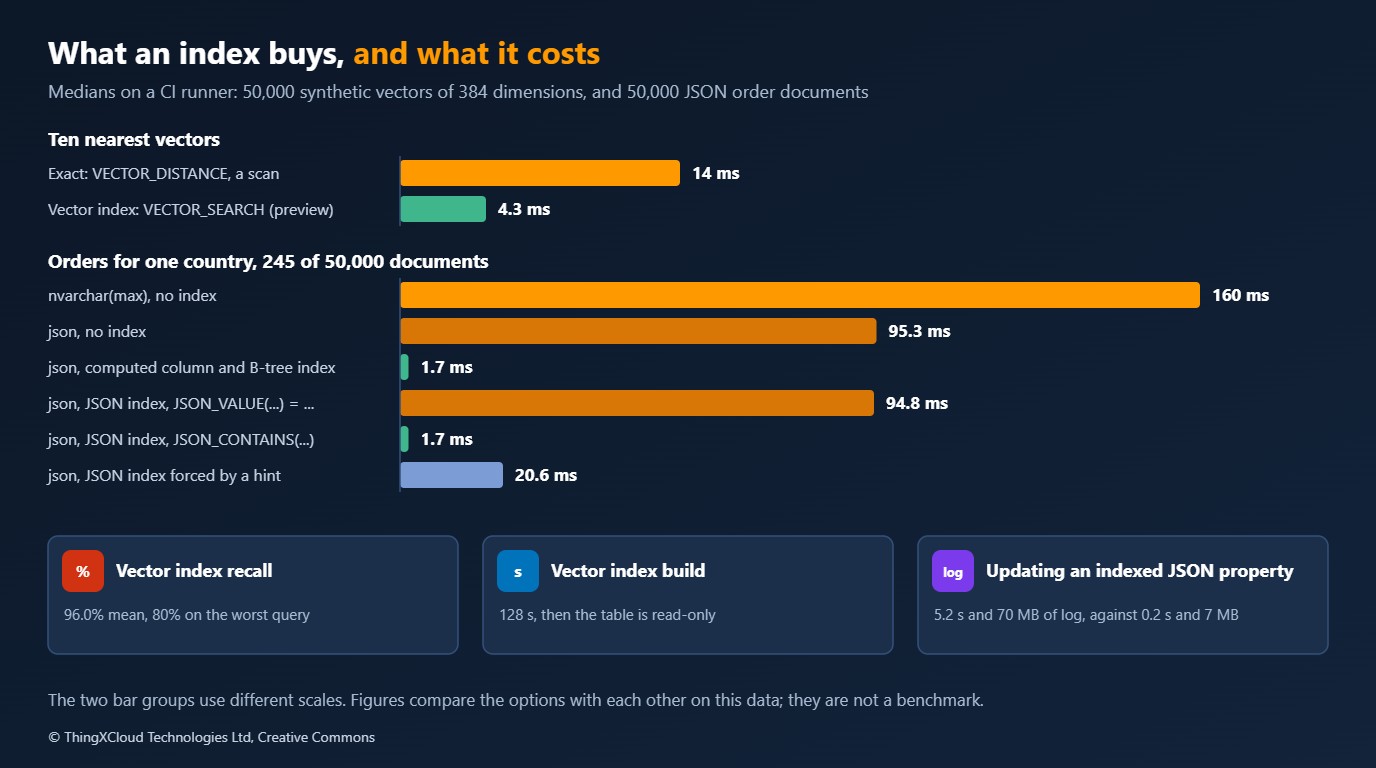
Without an index the native type scans in 95 ms against 160 ms for text, since there is nothing to parse. Either index brings the query to under 2 ms. The surprises are in the JSON index rows.
- The predicate decides whether the index is used. The query written with
JSON_VALUE(doc, '$.customer.country') = N'MT'read exactly as many pages after the index was created as before. The same question written withJSON_CONTAINSused it. Forcing the index with a hint for theJSON_VALUEform worked and took 21 ms, about twelve times slower than the computed column. - Keeping the index is expensive when an indexed property changes. The update that took 0.2 seconds and 6.6 MB of log without the index took 5.2 seconds and 69.6 MB with it.
- It is not small. The database grew by 13.4 MB for two paths over documents that occupy 25 MB.
For a property you know in advance and query by equality or range, the computed column with a B-tree index is still the better tool: the optimiser uses it for the natural predicate, it is narrow, and it only changes when that property changes. The JSON index is for containment and existence questions over paths you cannot enumerate one column at a time. Check the plan, not the syntax: an index that exists and is not chosen costs writes and returns nothing.
Moving an existing column
An nvarchar(max) column holding JSON can be changed to the native type with one statement, and the statement is all-or-nothing:
[10.2] change an existing nvarchar(max) column to json
      ALTER TABLE dbo.OrdersN DROP CONSTRAINT CK_OrdersN_json; ALTER TABLE dbo.OrdersN ALTER COLUMN doc json NOT NULL;
      ok
[10.3] the same when one row is not JSON
      CREATE TABLE dbo.Legacy (id int PRIMARY KEY, doc nvarchar(max)); INSERT INTO dbo.Legacy VALUES (1, N'{"ok": true}'), (2, N'not json'); ALTER TABLE dbo.Legacy ALTER COLUMN doc json;
      error 13609: JSON text is not properly formatted. Unexpected character 'n' is found at position 0. The statement has been terminated.
One invalid row fails the whole change, so find those rows first with ISJSON(doc) = 0. Remember the normalisation above: after the change, duplicate keys and white space are gone. The change is one way; the documentation says a json column cannot be altered back to a string type.
Security, compliance and operations
| Concern | What applies |
|---|---|
| Preview features in production | PREVIEW_FEATURES is per database and off by default. Decide as policy whether any production database may turn it on, and audit sys.database_scoped_configurations. Behaviour behind the switch can change in any update |
| Embeddings as personal data | A vector computed from text about a person is derived from personal data and falls under the same GDPR duties as the text. In one engine, deleting the row deletes the embedding, and the same access rules and audit cover both. With a second store, erasure and permission changes have to be propagated and proven |
| Encryption | Encryption at rest and in transit cover both types. The documentation lists Always Encrypted as not supported for vector columns |
| Ledger | The documentation states that ledger verification raises an error if the database contains a table with a vector column. Check this before adding vectors to a ledger database |
| Row-level security and the vector index | Because filters apply after an approximate search, a security predicate can leave a caller with few or no results. Use exact search, or one index per security boundary |
| Approximate results in regulated workflows | An approximate index misses some true neighbours by design. Do not put one in a path where a missed record is a safety or compliance failure. In healthcare, that includes any lookup a clinical decision depends on |
| Drivers | Native types need Microsoft.Data.SqlClient 6.0 for json and 6.1 for vector. Older clients keep working with text |
| Log and backup volume | A JSON index multiplied the log written by an update by ten in this test. Size log backups and replication for it |
| Monitoring | Track recall yourself: keep a sample of queries, run them both exact and approximate after each index build, and alert on the difference |
| Pipeline | Pin the image tag, generate the password per run, and run the schema and the critical queries against each cumulative update before it reaches production |
Cost
Neither type adds a service to pay for. The cost is capacity in the database you already run.
| Item | From the run | What it implies |
|---|---|---|
| Vector storage | 1,645 bytes per row at 384 dimensions | About 1.6 GB per million rows. Four times the dimensions is four times the bytes |
| Exact search | 14 ms and 10,543 pages per query for 50,000 rows | CPU and buffer pool grow with rows per query. Filter first |
| Vector index build | 128 s for 50,000 rows | A scheduled job with its own window, repeated after every load |
| JSON storage | 528 bytes per document as json, 331 as UTF-8 text | Not a saving for small documents |
| JSON index | 13.4 MB for two paths over 25 MB of documents; ten times the log on update | Storage, log backup and replica traffic |
Edition limits set the outer boundary. Express edition now allows 50 GB per database, which holds a useful number of vectors for a small product. Standard edition is limited to 32 cores and 256 GB of buffer pool. A free Standard Developer edition exists alongside the Enterprise one, so a team that deploys on Standard can develop and test against the same feature set. A second, dedicated store has its own bill; compare it with the extra capacity above, not with zero.
Decision framework
%%{init: {'theme':'base','themeVariables':{'primaryColor':'#FFF3E0','primaryTextColor':'#232F3E','primaryBorderColor':'#FF9900','lineColor':'#232F3E','clusterBkg':'#F8FAFC','clusterBorder':'#CBD5E1','edgeLabelBackground':'#FFFFFF','nodeTextColor':'#232F3E'}}}%%
flowchart TD
    A["Embeddings or documents next to
relational data in SQL Server"] --> B{"Rows a query must rank,
after filters?"}
    B -- "up to a few hundred thousand" --> E["vector column and exact search
with VECTOR_DISTANCE"]
    B -- "millions" --> C{"Is the table written to
while it is searched?"}
    C -- "no, rebuilt on a schedule" --> D{"May production turn on
preview features?"}
    C -- "yes" --> X["A dedicated vector store,
or wait for a later update"]
    D -- "yes" --> V["Read-only search copy
with a vector index"]
    D -- "no" --> X
    style E fill:#F0FFF4,stroke:#1D8102,stroke-width:2px,color:#145202
    style V fill:#FFF3E0,stroke:#FF9900,stroke-width:2px,color:#232F3E
style X fill:#F3E8FF,stroke:#7C3AED,stroke-width:2px,color:#4C1D95| Situation | Choose | Reason |
|---|---|---|
| New JSON column | json | Validation and faster reads and updates than nvarchar(max) |
Existing JSON in nvarchar(max) | Change the type after finding invalid rows | One statement, one way, and it normalises the text |
| Payloads that must be returned byte for byte | A text column, possibly beside a json one | The native type removes white space and duplicate keys |
| A known property queried by equality or range | Computed column and B-tree index | Chosen by the optimiser, narrow, cheap to maintain |
| Containment over many or unknown paths | JSON index, queried with JSON_CONTAINS | What it was used for in the run. Budget for the write cost |
| Semantic search over thousands to a few hundred thousand rows | vector and exact search | Correct, filterable, writable, nothing in preview |
| Semantic search over millions of rows that change all day | A dedicated store today | The vector index in this build blocks writes and filters late |
Key takeaways
- The
vectorandjsontypes, their functions and the JSON index worked with the preview switch off in build 17.0.4040.1. The vector index,VECTOR_SEARCHand float16 vectors needed it on. - Exact vector search ranked 50,000 rows of 384 dimensions in 14 ms and matched a brute-force calculation for every query. For data that filters down to that scale it needs no index and no second store.
- The vector index answered in 4 ms with 96% mean recall, took 128 seconds to build, made its table read-only, and applied filters after the search, returning one row on average when ten were asked for under a one-in-eight filter.
jsonwas a fifth smaller thannvarchar(max)and larger than UTF-8 text. It updates a same-length value in place, and it removes white space and duplicate keys, so it is not an archive of the original bytes.- A JSON index was used for
JSON_CONTAINSand not chosen forJSON_VALUEequality, and it made an update of an indexed property twenty-six times slower. For a known property, a computed column with a B-tree index did the same lookup at a fraction of the upkeep.
If you are running the vector index on a later update, I would like to know whether the table is still read-only and whether filters still apply after the search. Leave a comment.
Everything shown ran in GitHub Actions on a hosted Linux runner with four vCPUs and 16 GB of memory, against mcr.microsoft.com/mssql/server:2025-CU4-GDR1-ubuntu-22.04, build 17.0.4040.1, with the container limited to 6 GB, from a .NET 10 program using Microsoft.Data.SqlClient 6.1.1. Eight checks passed, among them: three known distances, the ten nearest neighbours and their distances against a brute-force calculation in C# for 50 queries, a vector read back bit for bit through the driver, and the same count and total from six ways of querying the JSON documents. The other results are the server’s own answers, recorded as returned. Timings are medians of 50 vector queries and 15 runs of each JSON query, taken once; the updates were run once each. Not run: vectors from a real embedding model, more than 50,000 rows, float16 beyond creating a table, Standard or Express edition, Windows, availability groups or replication, concurrent load, and any later cumulative update. Recall and timing depend on the data, and synthetic clusters are not a substitute for your own. The run is here.
The T-SQL batches, the lab program, the image-tag picker and the pipeline script are in sqlserver2025-vector-json in the samples repository. ./ci.sh out starts the container and runs everything with Docker and Python 3; set LAB_SQL_CONNECTION to run the program against a server of your own.
Glossary
- Embedding— A list of numbers that represents a piece of text or an image so that similar items have nearby values.
- Vector— Here, the SQL Server type that stores such a list with a fixed number of dimensions.
- Cosine distance— One minus the cosine of the angle between two vectors: 0 for the same direction, 1 for perpendicular.
- Exact nearest-neighbour search— Measuring the distance to every candidate row and keeping the closest. Always correct, linear in the number of rows.
- Approximate nearest-neighbour search— Using an index to find most of the closest rows without measuring them all.
- Recall— The share of the true nearest rows that an approximate search returned.
- DiskANN— The graph-based approximate index algorithm, from Microsoft Research, that the vector index uses.
- PREVIEW_FEATURES— A database-scoped setting in SQL Server 2025 that makes unfinished features available in that database.
- Computed column— A column whose value is an expression over other columns, which can be indexed like any other.
- JSON index— An index over one or more paths inside a json column.
- Transaction log— The record of every change, written before the change is durable. Its volume drives backup size and replication traffic.
- Cumulative update— A scheduled SQL Server update that contains all fixes since release. A GDR is a security-only update on top of one.
References & Further Reading
- → What’s new in SQL Server 2025— Microsoft: the feature list, preview features and edition changes
- → Vector data type— Microsoft: dimensions, conversions, limitations and driver support
- → VECTOR_DISTANCE— Microsoft: metrics and return values
- → CREATE VECTOR INDEX— Microsoft: syntax and limitations of the approximate index
- → VECTOR_SEARCH— Microsoft: the table-valued search function
- → JSON data type— Microsoft: storage, limits, the modify method and conversions
- → CREATE JSON INDEX— Microsoft: paths, requirements and supported predicates
- → Editions and supported features of SQL Server 2025— Microsoft: limits by edition
- → SQL Server 2025 embraces vectors— Azure SQL blog: the design of the vector features
- → SQL Server container images— Tags and environment variables
- → Microsoft.Data.SqlClient— The .NET driver, with SqlVector and json support
- → DiskANN— The approximate nearest-neighbour algorithm behind the vector index
- → Sample code for this article— T-SQL batches, lab program, pipeline script and results
Discover more from C4: Container, Code, Cloud & Context
Subscribe to get the latest posts sent to your email.