
On this page
Clinical records describe overdoses, stab wounds, genital examinations, purging and safeguarding concerns as a matter of routine. The content filters in front of hosted language models were built to stop people producing harmful material, and they classify text by category and severity. Put the two together and some clinical text will be blocked. That part is expected. The risk is in what the application does next.
A block that surfaces as an error is an inconvenience. A block that removes one note from a discharge summary, or stops a stream halfway through a medication history, produces a document that looks complete and is not. In a clinical setting that is a patient safety hazard, and it is created by the integration, not by the filter.
This article looks at where clinical language meets the filter categories of Azure OpenAI and Gemini on Vertex AI, how each kind of block reaches an application, and a design that keeps every block visible to the people relying on the output. The mechanics of how each provider reports outcomes are compared in the abstraction leaks article; this one builds on that and does not repeat its tables.
This is a design article. No clinical or synthetic text was sent to either service and no block rates were measured. Statements about the services come from the documentation pages listed under References. The clinical scenarios below are invented and described in prose; none is drawn from a real record. The design is untested guidance and is not clinically validated.
The problem
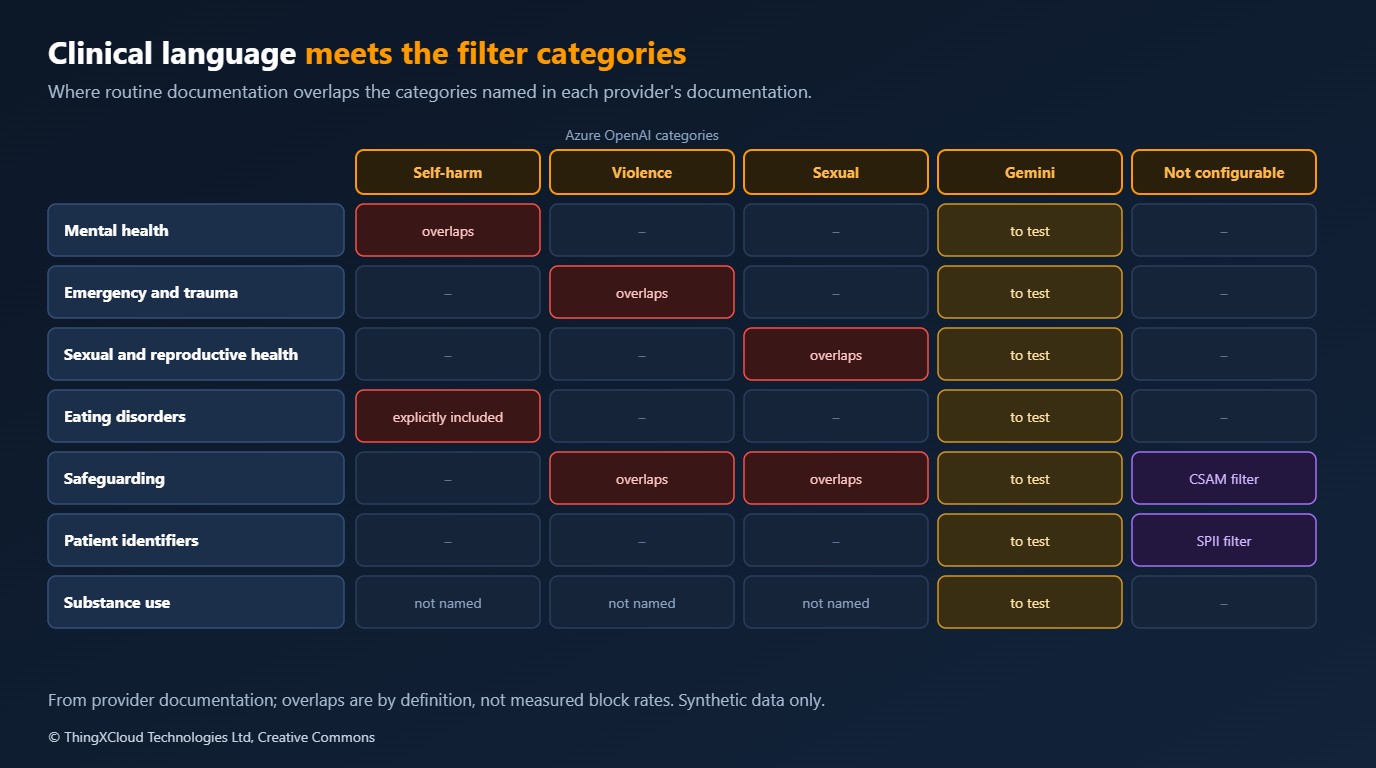
Microsoft defines its self-harm category as language about physical actions intended to hurt one’s own body or kill oneself, and lists eating disorders inside it. Violence covers actions intended to hurt or kill someone. The sexual category covers anatomical organs and genitals as well as sexual acts. Google’s configurable categories for Gemini are hate speech, harassment, sexually explicit and dangerous content. The table below maps clinical areas to Azure’s definitions. The Gemini page read names its categories without defining them in the same detail, so which Gemini category a given note falls under is something to establish by testing.
| Clinical area | Typical content | Azure category it overlaps |
|---|---|---|
| Mental health | Overdose attempts, self-injury, suicidal ideation, safety plans | Self-harm (Azure) |
| Emergency and trauma | Mechanism of injury, assault, weapons, wound descriptions | Violence (Azure) |
| Sexual and reproductive health | Examinations, symptoms, contraception, assault history | Sexual (Azure) |
| Eating disorders | Restriction, purging, weight targets, compensatory behaviour | Self-harm, which explicitly includes eating disorders (Azure) |
| Safeguarding | Descriptions of abuse and neglect, including of children | Sexual, violence, and filters that cannot be configured |
| Substance use | Quantities, routes, overdose history | Not named in Azure’s category definitions |
Microsoft’s own guidance acknowledges the overlap. It says lower-severity content can include legitimate medical, educational and personal material, and asks whether an application should allow it. It also recommends testing with representative content and reviewing both unwanted blocks and harmful content that gets through. That is the right advice, and it leaves the consequences of a block entirely to the application.
Three examples, all invented, show the range. A mental health discharge summary records a paracetamol overdose, the ward stay and the agreed safety plan. An emergency department note records a stab wound to the forearm, its depth and the mechanism. A dietitian’s letter records a patient’s restriction, purging frequency and target weight. Each is a correct and necessary clinical record. Each contains exactly the language the categories describe, and none of them is about harming anyone.
Two further points sharpen this. The categories are defined by intent, and a single note often states the act without the context that makes it clinical; whether a classifier reads a given note as clinical is something to test, not assume. And Google lists filters for child sexual abuse material and for sensitive personal information as non-configurable. Safeguarding records and patient identifiers are both normal in clinical text, so a deployment cannot rely on settings alone to keep them flowing.
How blocks surface
The providers report blocks differently, as covered in the earlier article. For clinical text, what matters is which of those reports an application might fail to notice.
- Blocked input. Azure rejects the request with HTTP 400 and the code
content_filter. Gemini returns a response withpromptFeedbackset and no candidates. Both are hard to miss, as long as the code reads the second one. - Blocked output. Azure returns HTTP 200 with
finish_reasonset tocontent_filterand the content withheld. Gemini returns a candidate with no content and afinishReasonsuch asSAFETYorSPII. Both look like a successful call with an empty or short answer. - Partial output. Azure notes that, rarely, a long response can be returned in part with
finish_reasonupdated. A summary that stops mid-list looks like a short summary. - Streaming. Azure returns streamed segments as they complete and stops a generation when filtered content is detected; the last chunk for that generation carries
finish_reasonset tocontent_filter. Whatever was already displayed stays on screen unless the application removes it. - Filter unavailable. Azure documents a case where filtering did not run and the response arrives unfiltered, marked only by an error inside
content_filter_results.
Each of these is visible in the response. None of them is visible to a clinician unless the application chooses to show it.
Failure modes
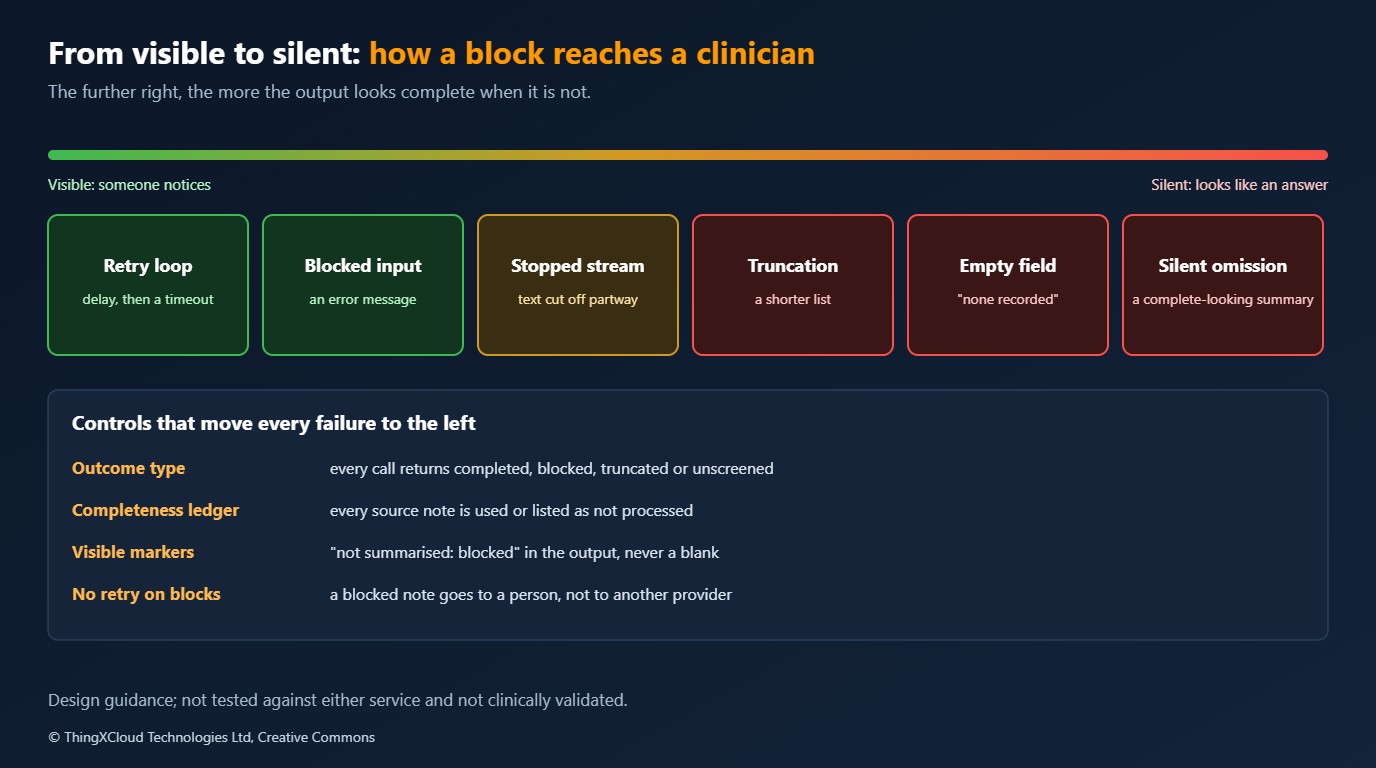
The dangerous failures are not the blocks themselves. They are the ways an application turns a block into something that looks like an answer.
| Failure mode | How it happens | What the clinician sees | Hazard |
|---|---|---|---|
| Silent omission | A pipeline summarises several notes; one call is blocked and dropped; the rest are combined | A complete-looking summary without the overdose | A key event missing from the record a decision is based on |
| Silent truncation | A partial response or a stopped stream is treated as finished | A shorter list of medications or problems | An incomplete list read as complete |
| Empty field | A structured extraction returns no content and the application stores nulls | “No allergies recorded” | Absence of data read as a negative finding |
| Retry loop | A blocked input is retried as a transient error | Delay, then a timeout | Lost time; cost; the same block each time |
| Displayed then stopped | A stream shows text, then a later segment is filtered | Text that stops partway, with no explanation | Partial text read as the whole answer |
| Unscreened output | The filter did not run and nobody checked | Nothing unusual | Text that was never screened presented as screened |
%%{init: {'theme':'base','themeVariables':{'primaryColor':'#FFF3E0','primaryTextColor':'#232F3E','primaryBorderColor':'#FF9900','lineColor':'#232F3E','signalColor':'#0073BB','signalTextColor':'#0F172A','actorBkg':'#FFF3E0','actorBorder':'#FF9900','actorTextColor':'#232F3E','noteBkgColor':'#FFF8E7','noteBorderColor':'#FF9900','noteTextColor':'#232F3E'}}}%%
sequenceDiagram
    participant P as Summary pipeline
    participant M as Model service
    participant C as Clinician view
    P->>M: Summarise note 1 (admission)
    M-->>P: Summary text
    P->>M: Summarise note 2 (overdose and safety plan)
    M-->>P: Blocked: content withheld
    Note over P: Naive pipeline drops note 2
    P->>M: Summarise note 3 (discharge)
    M-->>P: Summary text
    P->>C: Combined summary of notes 1 and 3
Note over C: Looks complete, overdose absentA clinical summary that omits content without saying so is worse than no summary, because it will be trusted. Any design that drops, truncates or nulls blocked content without a visible marker should be treated as a hazard in the clinical safety case, whatever the block rate turns out to be.
Proposed design
The aim is that every block reaches a person who can act on it, and that no output looks more complete than it is. Lowering the filters may be part of it. It is not the first step.
An outcome for every call. Use a closed outcome type, as proposed in the abstraction article: completed, truncated, blocked on input, blocked on output, unscreened, throttled, invalid. Nothing downstream receives raw text without its outcome.
A completeness ledger. Every input to a composite output, such as each note in a summary or each page in an extraction, gets an identifier. The output must account for every identifier as either used or not processed, with the reason. The ledger is built before any model call and checked after the last one, so a dropped input is a failed check, not a gap.
%%{init: {'theme':'base','themeVariables':{'primaryColor':'#FFF3E0','primaryTextColor':'#232F3E','primaryBorderColor':'#FF9900','lineColor':'#232F3E','clusterBkg':'#F8FAFC','clusterBorder':'#CBD5E1','edgeLabelBackground':'#FFFFFF','nodeTextColor':'#232F3E'}}}%%
flowchart TD
    IN["Source notes with identifiers"] --> L["Completeness ledger:
one entry per note"]
    IN --> CALL["Model call per note"]
    CALL --> O{"Outcome"}
    O -- "completed" --> U["Mark used"]
    O -- "blocked, truncated,
unscreened" --> NP["Mark not processed,
with reason"]
    U --> L
    NP --> L
    NP --> RQ["Review queue:
references only"]
    L --> CHK{"Every note
accounted for?"}
    CHK -- "no" --> FAIL["Fail the output"]
    CHK -- "yes" --> OUT["Summary with a visible list
of notes not processed"]
    style L fill:#EBF8FF,stroke:#0073BB,stroke-width:2px,color:#004C74
    style NP fill:#FEF2F2,stroke:#D13212,stroke-width:2px,color:#991B1B
    style FAIL fill:#FEF2F2,stroke:#D13212,stroke-width:2px,color:#991B1B
    style OUT fill:#F0FFF4,stroke:#1D8102,stroke-width:2px,color:#145202
    style RQ fill:#F3E8FF,stroke:#7C3AED,stroke-width:2px,color:#4C1D95
Fail visibly. The clinician view shows which sources were not processed and why, in the output itself, not in a log. “Note of 3 March not summarised: blocked by content filter” is useful. A blank is not. Structured extractions mark fields as not extracted rather than empty.
Never retry a block. Retry policy applies to throttling and transport failures. A blocked input will be blocked again. Rewording a clinical note to get past a filter changes the record, and sending it to another provider until one answers bypasses the policy the first provider applied.
Handle streams to the end. If text streams to a clinician as it is generated, the final finish_reason decides what was shown. A stream that ends in a filter block is marked as incomplete in the view, or not streamed to clinicians at all.
Set a named clinical filter policy, with governance. On Azure, thresholds are set in a content filter configuration attached to the deployment; turning filtering off for completions, or setting it to annotate only, requires approval through Microsoft’s modified content filtering process. On Vertex AI, thresholds are set per request, and BLOCK_NONE removes automated blocking while still returning the scores. In both cases the choice of threshold for a clinical workload is a clinical safety decision, made with evidence from testing, recorded and reviewed, not a developer’s setting.
A review queue that holds references, not text. Blocked items go to a review queue with the source identifier, provider, policy, category and severity where reported. The queue links to the record in the clinical system rather than copying the text, so the review process does not create a second store of sensitive notes.
Audit and measure. Count outcomes by provider, policy, category and document type. A change in the block rate for mental health letters after a model version change is a signal to stop and test. Treat unscreened responses as their own count, with a policy for whether they are shown.
Testing the design
- A synthetic clinical corpus. Written vignettes for each area in the table above, at varying levels of detail, with the expected outcome for each: process, or block and show. Written by clinicians, reviewed, and never derived from real records.
- Pre-live and on every change. Run the corpus against each provider, policy and model version before go-live and whenever any of them changes. Record block rates by area.
- Completeness tests without a model. The ledger, the outcome mapping and the clinician view can all be tested with recorded or hand-written responses for each outcome, including partial and empty ones.
- Both directions. Microsoft recommends reviewing unwanted blocks and harmful content that passes. For a clinical tool, test both: legitimate notes that are blocked, and text the tool should never generate.
Cost
Nothing was measured. The cost of the design is mostly work that is not model calls: a review queue that someone staffs, and a test corpus that someone writes and maintains. Both are cheaper than an incident review of a summary that left out an overdose.
Production considerations
- Put the hazards in the clinical safety case. Silent omission, truncation and empty fields belong in the hazard log with their controls, owned by the clinical safety officer.
- Keep clinical text out of application logs. Log identifiers, outcomes and categories. The text is in the clinical system already.
- Tell users what the tool will not do. If certain note types are routinely blocked, say so in the interface and in training, rather than letting users discover it.
- Agree the response to non-configurable filters. Some content will be blocked whatever the settings. Decide in advance how those records are handled, usually by a person.
- Review thresholds with evidence. A change of policy follows a corpus run and a recorded decision, the same as any change to a clinical system.
Decision framework
| Your situation | Approach | Why |
|---|---|---|
| Summaries over multiple notes | Completeness ledger and a visible list of notes not processed | Silent omission is the most likely and most dangerous failure |
| Structured extraction into a record | Not-extracted markers, never nulls | An empty field reads as a negative finding |
| Clinician-facing streaming | Mark a stream that ends in a block as incomplete, or do not stream | Text already shown stays on screen |
| Mental health, sexual health or safeguarding services | Run the synthetic corpus first; plan for human handling of blocked records | These areas collide most with the categories |
| Pressure to switch off filtering | Governed policy change with evidence; Azure requires approval | Thresholds are a clinical safety decision |
| Using two providers | Never fail over a blocked item to the other provider | It bypasses the first provider’s policy |
Key takeaways
- Ordinary clinical documentation overlaps the self-harm, violence and sexual categories, and Azure’s self-harm category explicitly includes eating disorders.
- Some filters cannot be configured, including Google’s filters for child sexual abuse material and sensitive personal information.
- The patient safety risk is not the block but an output that hides it: a dropped note, a truncated list, a null field.
- Account for every input with a completeness ledger and show what was not processed in the output itself.
- Treat filter thresholds for clinical workloads as a governed clinical safety decision, backed by a synthetic test corpus.
If you have run clinical text through these filters and measured what is blocked, I would like to hear what you found.
This is a design article and nothing was run. Statements about the services come from the documentation pages listed below: Azure OpenAI content filtering, the guardrail severity levels and harm categories; Vertex AI safety and content filters and processing blocked responses. Where those pages did not address a point, for example substance use or clinical context in the category definitions, the article says so. No clinical or synthetic text was sent to either service, no block rates were measured, and no part of the design was built. The clinical scenarios are invented. Nothing here is clinically validated.
Glossary
- Content filter— A classifier that scores prompts and responses by harm category and blocks those above a threshold.
- Harm category— A class of content a filter scores, such as self-harm, violence or sexual content.
- Severity— How harmful a filter judges content to be, on a scale such as safe, low, medium, high.
- Completeness ledger— A record of every input to a composite output and whether it was used, with the reason if not.
- Silent omission— Content left out of an output without any marker, so the output appears complete.
- Clinical safety case— The documented argument, with a hazard log, that a health IT system is acceptably safe for its intended use.
- Safeguarding— Protecting children and adults at risk from abuse and neglect, and the records that document it.
References & Further Reading
- → Azure OpenAI: Content filtering— Categories, how blocked prompts and completions are reported, filter errors and modified filtering
- → Azure OpenAI: Content filter severity levels— Category scope, severity definitions and guidance on legitimate sensitive content
- → Azure AI Content Safety: Harm categories— Definitions of self-harm, violence and sexual content, and the severity scales
- → Vertex AI: Safety and content filters— Categories, thresholds, block reasons and non-configurable filters
- → Vertex AI: Process blocked responses— How a blocked prompt and a blocked response appear in the API response
Discover more from C4: Container, Code, Cloud & Context
Subscribe to get the latest posts sent to your email.
