Most .NET teams did not choose to run generative AI on two clouds. It happened to them. One product group standardised on Azure OpenAI, another built on Amazon Bedrock because the data was already in AWS, and an acquisition added a third opinion. The architecture question that follows is practical: how much of the application has to know which provider it is talking to?
Microsoft.Extensions.AI is the .NET answer. It became generally available in May 2025, and a year on it is the layer that Semantic Kernel and Microsoft Agent Framework are themselves built on. It defines a small set of abstractions, chiefly IChatClient, and a middleware pipeline for cross-cutting concerns such as telemetry, caching and tool invocation. Microsoft ships an adapter for OpenAI and Azure OpenAI. AWS ships one for Bedrock.
This article builds a single ASP.NET Core service that talks to both providers through one interface, with per-provider telemetry, caching and token metering, tool calling and a failover policy. It is equally concerned with where the abstraction stops, because that boundary is where most of the design work sits.
What the abstraction is, and what it is not
Microsoft.Extensions.AI is deliberately thin. An IChatClient has two operations: GetResponseAsync for a complete response and GetStreamingResponseAsync for a stream of updates. Both take a list of ChatMessage objects and an optional ChatOptions. Everything else, including tool calling, is layered on top as middleware that wraps one client in another.
It is not an agent framework, a prompt library or a model router. It gives you a common call shape and a place to put shared behaviour. That is enough to remove provider SDK types from application code, which is the property that matters when a provider changes.
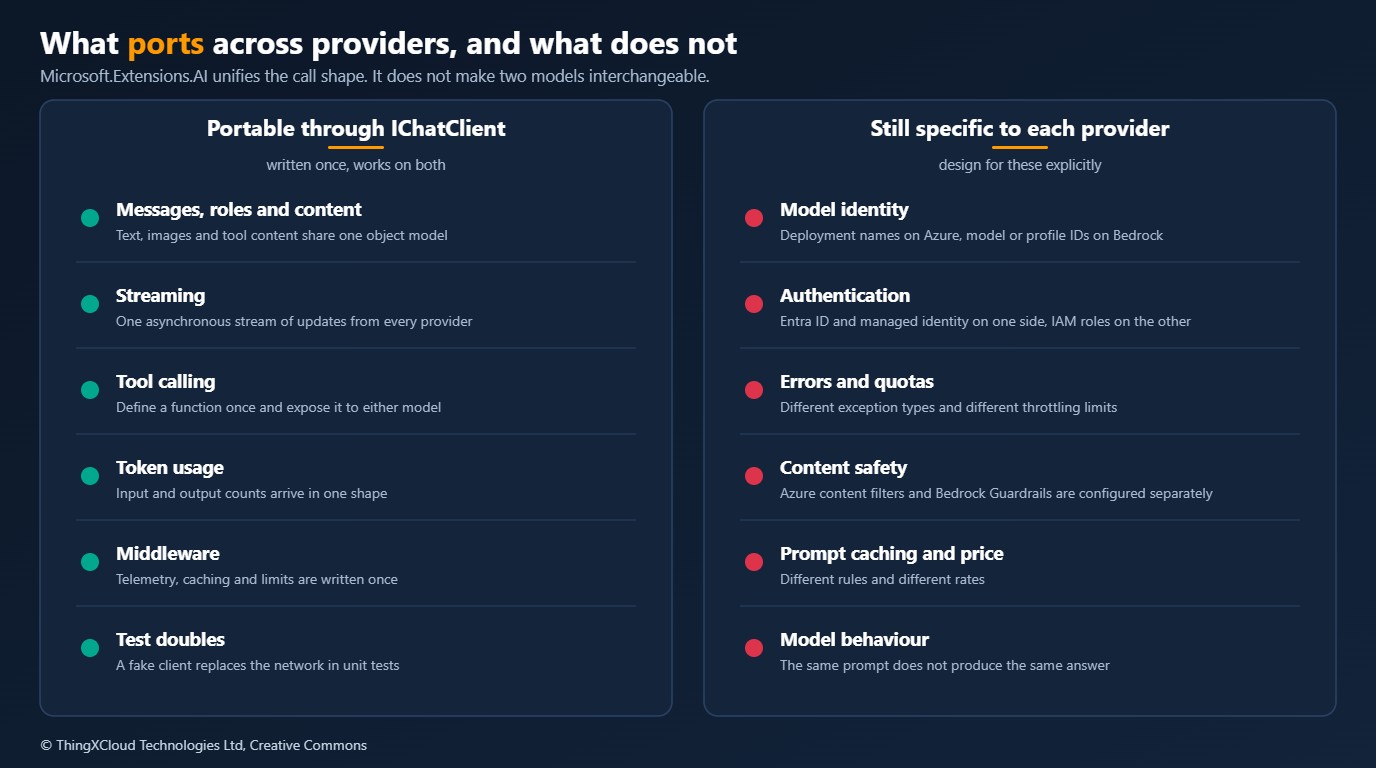
The right-hand column deserves to be read twice. A common interface makes it mechanically easy to send the same request to a different model. It does nothing to make the answer equivalent. Treat provider portability as a property of your plumbing, and treat model substitution as something you establish with evaluation, one prompt at a time.
Target architecture
The design goal is that application code depends on exactly one thing, an IChatClient resolved from dependency injection, and that every provider-specific decision is made in the composition root.
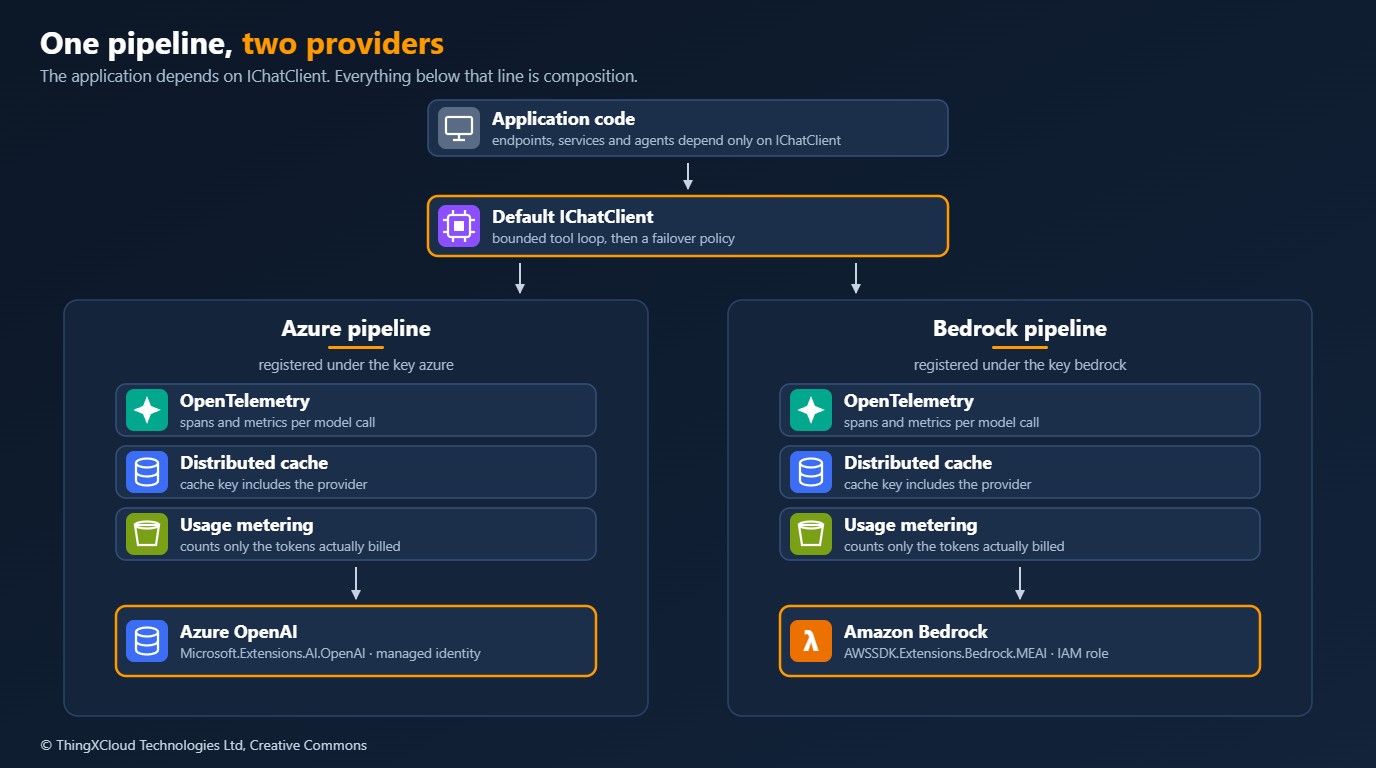
Three decisions shape it:
- One keyed client per provider. Each is registered under a key (
"azure","bedrock") with its own middleware. Code that genuinely needs a specific provider can ask for it by key. - One default client above them. The unkeyed
IChatClientwraps the pair in a failover policy and owns the tool-calling loop. This is what endpoints and services inject. - Identity, not keys. Azure OpenAI is reached with a managed identity through
DefaultAzureCredential. Bedrock is reached with the IAM role of the workload. No API key appears in configuration.
Packages
| Purpose | Package | Notes |
|---|---|---|
| Abstractions and middleware | Microsoft.Extensions.AI | 10.6 at the time of writing. Minor versions have shipped roughly monthly this year. |
| Azure OpenAI adapter | Microsoft.Extensions.AI.OpenAI, Azure.AI.OpenAI, Azure.Identity | AsIChatClient() converts the OpenAI SDK’s chat client. |
| Bedrock adapter | AWSSDK.Extensions.Bedrock.MEAI | AsIChatClient(modelId) on IAmazonBedrockRuntime. Brings in AWSSDK.BedrockRuntime. |
AWS has since renamed the Bedrock adapter to AWS.Bedrock.MEAI and moved it to the aws-dotnet-ai repository. The Amazon.BedrockRuntime namespace and the AsIChatClient call are unchanged, so only the package reference needs updating. The original package name is marked as deprecated on NuGet.
Composition: two providers, one interface
The whole provider story lives in Program.cs. Nothing below this file references Azure or AWS types except the error classifier.
using Amazon.BedrockRuntime;
using Azure.AI.OpenAI;
using Azure.Identity;
using Microsoft.Extensions.AI;
using TwoClouds.Chat;

var builder = WebApplication.CreateBuilder(args);
var config = builder.Configuration;

builder.Services.AddDistributedMemoryCache();   // use Redis once you run more than one instance
builder.Services.AddSingleton<IAmazonBedrockRuntime>(_ => new AmazonBedrockRuntimeClient());
builder.Services.AddSingleton<OrderTools>();

// One keyed client per provider. Model identity and credentials live in configuration
// and in the workload's identity, never in code.
builder.Services
    .AddKeyedChatClient("azure", _ =>
        new AzureOpenAIClient(new Uri(config["Chat:Azure:Endpoint"]!), new DefaultAzureCredential())
            .GetChatClient(config["Chat:Azure:Deployment"]!)
            .AsIChatClient())
    .UseProviderPipeline("azure");

builder.Services
    .AddKeyedChatClient("bedrock", services =>
        services.GetRequiredService<IAmazonBedrockRuntime>()
            .AsIChatClient(config["Chat:Bedrock:ModelId"]!))
    .UseProviderPipeline("bedrock");

// The client the application sees: a bounded tool loop over a failover pair.
string primary = config["Chat:Primary"] ?? "azure";
string secondary = primary == "azure" ? "bedrock" : "azure";

builder.Services
    .AddChatClient(services => new FailoverChatClient(
        services.GetRequiredKeyedService<IChatClient>(primary),
        services.GetRequiredKeyedService<IChatClient>(secondary),
        ProviderErrors.IsTransient,
        services.GetRequiredService<ILogger<FailoverChatClient>>()))
    .UseFunctionInvocation(configure: invoker => invoker.MaximumIterationsPerRequest = 5);

var app = builder.Build();

app.MapPost("/chat", async (ChatRequest request, IChatClient chat, OrderTools tools, CancellationToken cancellationToken) =>
{
    if (string.IsNullOrWhiteSpace(request.Message) || request.Message.Length > 4000)
    {
        return Results.BadRequest(new { message = "message must be between 1 and 4000 characters" });
    }

    ChatResponse response = await chat.GetResponseAsync(
        [
            new ChatMessage(ChatRole.System, "You answer order enquiries briefly. Use the tool for order status."),
            new ChatMessage(ChatRole.User, request.Message),
        ],
        new ChatOptions
        {
            MaxOutputTokens = 800,
            Temperature = 0.2f,
            Tools = [AIFunctionFactory.Create(tools.GetOrderStatus)],
        },
        cancellationToken);

    return Results.Ok(new
    {
        text = response.Text,
        inputTokens = response.Usage?.InputTokenCount,
        outputTokens = response.Usage?.OutputTokenCount,
    });
});

app.Run();

public sealed record ChatRequest(string Message);
The endpoint is the part worth noticing. It has no idea which cloud answered. ChatOptions carries the limits that matter for cost and behaviour (MaxOutputTokens, Temperature) in provider-neutral form, and response.Usage reports tokens in the same shape from either side.
An Azure OpenAI deployment name and a Bedrock model or inference profile ID are different kinds of identifier and both change more often than code. Bind them from configuration per environment. If a caller sets ChatOptions.ModelId, remember that the value is only meaningful to one provider.
The middleware pipeline, and why order matters
A ChatClientBuilder composes clients like ASP.NET Core composes request middleware: each Use call wraps the one after it, so the first call is the outermost layer. The order is a design decision, not a formatting choice.
%%{init: {'theme':'base','themeVariables':{'primaryColor':'#FFF3E0','primaryTextColor':'#232F3E','primaryBorderColor':'#FF9900','lineColor':'#232F3E','clusterBkg':'#F8FAFC','clusterBorder':'#CBD5E1','edgeLabelBackground':'#FFFFFF','nodeTextColor':'#232F3E'}}}%%
flowchart TD
    APP["Endpoint or service"] --> FI["Function invocation
bounded tool loop"]
    FI --> FO["Failover policy"]
    FO --> OT["OpenTelemetry
one span per model call"]
    OT --> DC["Distributed cache
key includes provider"]
    DC --> UM["Usage metering
billed tokens only"]
    UM --> PR["Provider adapter
Azure OpenAI or Bedrock"]
    classDef compute fill:#FFF3E0,stroke:#FF9900,stroke-width:2px,color:#232F3E;
    classDef edge fill:#EBF8FF,stroke:#0073BB,stroke-width:2px,color:#004C74;
    classDef store fill:#F0FFF4,stroke:#1D8102,stroke-width:2px,color:#145202;
    classDef alert fill:#FEF2F2,stroke:#D13212,stroke-width:2px,color:#991B1B;
    classDef mesh fill:#F3E8FF,stroke:#7C3AED,stroke-width:2px,color:#4C1D95;
    class APP edge;
    class FI,FO mesh;
    class OT,DC,UM compute;
    class PR store;
Reading from the top: the tool loop sits outside everything so that each model round-trip inside it can fail over, be traced and be cached independently. Telemetry sits above the cache so that cache hits still produce a span. Metering sits below the cache so that a hit, which costs nothing, records nothing. Move any of these and the numbers you collect mean something different.
using System.ClientModel;
using System.Diagnostics.Metrics;
using Amazon.BedrockRuntime.Model;
using Microsoft.Extensions.AI;

namespace TwoClouds.Chat;

public static class ChatPipelineExtensions
{
    public const string TelemetrySourceName = "TwoClouds.Chat";

    /// <summary>The per-provider pipeline. The first call is the outermost layer.</summary>
    public static ChatClientBuilder UseProviderPipeline(this ChatClientBuilder builder, string provider) =>
        builder
            .UseOpenTelemetry(
                sourceName: TelemetrySourceName,
                configure: telemetry => telemetry.EnableSensitiveData = false)
            // The cache key is built from messages and options. It does not know which
            // provider answered, so add the provider or two clouds will share entries.
            .UseDistributedCache(configure: cache => cache.CacheKeyAdditionalValues = [provider])
            .Use((inner, services) => new UsageMeteringChatClient(
                inner, services.GetRequiredService<IMeterFactory>(), provider));
}

public static class ProviderErrors
{
    /// <summary>Errors worth retrying on another provider. Exception types are not unified by the abstraction.</summary>
    public static bool IsTransient(Exception exception) => exception switch
    {
        ThrottlingException or ServiceUnavailableException or ModelTimeoutException => true,
        ClientResultException { Status: 429 or >= 500 } => true,
        HttpRequestException or TimeoutException => true,
        _ => false,
    };
}The distributed caching client derives its key from the messages and options of a request. With model IDs configured on the clients and not in ChatOptions, an identical prompt produces an identical key on both providers. Point both pipelines at the same Redis instance and an answer generated by one model can be served as if it came from the other. Add the provider, and the model if you run more than one, to CacheKeyAdditionalValues.
Custom middleware: metering what you are billed for
Writing your own layer means deriving from DelegatingChatClient and overriding the two operations. This one records input and output tokens as OpenTelemetry-compatible counters, tagged by provider and model, which is the raw material for cost allocation and budget alerts.
using System.Diagnostics;
using System.Diagnostics.Metrics;
using System.Runtime.CompilerServices;
using Microsoft.Extensions.AI;

namespace TwoClouds.Chat;

/// <summary>
/// Records the tokens each provider actually bills. It sits below the cache, so a cache hit records nothing.
/// </summary>
public sealed class UsageMeteringChatClient : DelegatingChatClient
{
    public const string MeterName = "TwoClouds.Chat.Usage";

    private readonly Counter<long> _inputTokens;
    private readonly Counter<long> _outputTokens;
    private readonly string _provider;

    public UsageMeteringChatClient(IChatClient innerClient, IMeterFactory meterFactory, string provider)
        : base(innerClient)
    {
        Meter meter = meterFactory.Create(MeterName);
        _inputTokens = meter.CreateCounter<long>("chat.tokens.input", unit: "{token}");
        _outputTokens = meter.CreateCounter<long>("chat.tokens.output", unit: "{token}");
        _provider = provider;
    }

    public override async Task<ChatResponse> GetResponseAsync(
        IEnumerable<ChatMessage> messages,
        ChatOptions? options = null,
        CancellationToken cancellationToken = default)
    {
        ChatResponse response = await base.GetResponseAsync(messages, options, cancellationToken)
            .ConfigureAwait(false);
        Record(response.Usage, response.ModelId ?? options?.ModelId);
        return response;
    }

    public override async IAsyncEnumerable<ChatResponseUpdate> GetStreamingResponseAsync(
        IEnumerable<ChatMessage> messages,
        ChatOptions? options = null,
        [EnumeratorCancellation] CancellationToken cancellationToken = default)
    {
        await foreach (ChatResponseUpdate update in base.GetStreamingResponseAsync(messages, options, cancellationToken)
            .ConfigureAwait(false))
        {
            // Providers report streaming usage as a content item, usually on the final update.
            foreach (UsageContent usage in update.Contents.OfType<UsageContent>())
            {
                Record(usage.Details, update.ModelId ?? options?.ModelId);
            }

            yield return update;
        }
    }

    private void Record(UsageDetails? usage, string? modelId)
    {
        if (usage is null)
        {
            return;
        }

        // Keep tags low-cardinality: provider and model, never a user or tenant identifier.
        TagList tags = new() { { "provider", _provider }, { "model", modelId ?? "unknown" } };

        if (usage.InputTokenCount is long input)
        {
            _inputTokens.Add(input, tags);
        }

        if (usage.OutputTokenCount is long output)
        {
            _outputTokens.Add(output, tags);
        }
    }
}
The built-in OpenTelemetry layer already emits spans and token metrics that follow the generative AI semantic conventions. A separate meter is still useful when finance wants one stable metric name that survives changes to those conventions, or when you need to count only billed calls.
Tool calling across providers
Tool calling is where the abstraction earns its keep. A tool is an ordinary method. AIFunctionFactory.Create turns it into a description the model can read, built from the method signature and its Description attributes, and UseFunctionInvocation runs the loop: send the request, execute any function the model asks for, send the result back, repeat until the model produces an answer.
using System.ComponentModel;

namespace TwoClouds.Chat;

public sealed class OrderTools
{
    [Description("Returns the current fulfilment status of an order.")]
    public string GetOrderStatus(
        [Description("The order identifier, for example ORD-10042.")] string orderId) =>
        // Replace with a real lookup. Validate and authorise here: the model chooses the arguments.
        orderId.StartsWith("ORD-", StringComparison.Ordinal) ? "SHIPPED" : "UNKNOWN";
}
%%{init: {'theme':'base','themeVariables':{'actorBkg':'#FFF3E0','actorBorder':'#FF9900','actorTextColor':'#232F3E','actorLineColor':'#FF9900','signalColor':'#0073BB','signalTextColor':'#0F172A','labelBoxBkgColor':'#FFF3E0','labelBoxBorderColor':'#FF9900','labelTextColor':'#232F3E','noteBkgColor':'#FFF8E7','noteBorderColor':'#FF9900','noteTextColor':'#232F3E','sequenceNumberColor':'#FFFFFF'}}}%%
sequenceDiagram
autonumber
participant A as Endpoint
participant P as Function invocation
participant M as Model
participant T as OrderTools
A->>P: GetResponseAsync with tools
P->>M: Messages and tool definitions
M-->>P: Call GetOrderStatus for ORD-10042
P->>T: Invoke method
T-->>P: SHIPPED
P->>M: Messages plus tool result
M-->>P: Final answer
P-->>A: ChatResponse with combined usageTwo controls belong on every tool-calling pipeline. MaximumIterationsPerRequest caps the number of round-trips, which bounds both latency and spend when a model gets stuck calling the same tool. And the tool method itself must validate and authorise its arguments. The model supplies them, and a model can be talked into supplying anything.
Failover: what is safe to automate
With two providers behind one interface, failover is a few lines of middleware. It is also the feature most likely to be oversold, so the implementation below is deliberately narrow: it retries once, on the other provider, and only for errors that are plausibly transient.
using Microsoft.Extensions.AI;

namespace TwoClouds.Chat;

/// <summary>
/// Sends requests to the primary provider and retries once on the secondary when the
/// failure is transient. Streaming calls pass through to the primary unchanged.
/// </summary>
public sealed class FailoverChatClient(
    IChatClient primary,
    IChatClient secondary,
    Func<Exception, bool> isTransient,
    ILogger<FailoverChatClient> logger) : DelegatingChatClient(primary)
{
    public override async Task<ChatResponse> GetResponseAsync(
        IEnumerable<ChatMessage> messages,
        ChatOptions? options = null,
        CancellationToken cancellationToken = default)
    {
        // The sequence may be read twice, so materialise it once.
        IReadOnlyList<ChatMessage> history = messages as IReadOnlyList<ChatMessage> ?? messages.ToList();

        try
        {
            return await base.GetResponseAsync(history, options, cancellationToken).ConfigureAwait(false);
        }
        catch (Exception exception) when (isTransient(exception) && !cancellationToken.IsCancellationRequested)
        {
            logger.LogWarning(exception, "Primary chat provider failed with a transient error. Using the secondary provider.");
            return await secondary.GetResponseAsync(history, ForSecondary(options), cancellationToken)
                .ConfigureAwait(false);
        }
    }

    // A model ID chosen for the primary provider means nothing to the secondary one.
    private static ChatOptions? ForSecondary(ChatOptions? options)
    {
        if (options?.ModelId is null)
        {
            return options;
        }

        ChatOptions copy = options.Clone();
        copy.ModelId = null;
        return copy;
    }
}
Four limits apply, and they should be stated to whoever owns the service level objective:
- Exceptions are not unified. Azure OpenAI failures surface as
ClientResultExceptionwith an HTTP status. Bedrock failures surface as typed AWS exceptions such asThrottlingException. The classifier inProviderErrorsis the one place that has to know both. Confirm in your own tests which types reach your code, because SDK retry policies run first. - Streaming is not covered. Once the first token has reached the user, switching models mid-answer is worse than failing. The sample leaves streaming on the primary. A production version can fail over before the first update and not after.
- Failover inside a tool loop needs testing. Tool calls and results are provider-neutral content types, so a conversation that started on one model can in principle continue on another. Whether the second model handles the first model’s call history gracefully is an empirical question.
- The answer will differ. A different model reads the same prompt differently. For a summarisation feature that may be acceptable. For anything with a regulated or clinical output, an unevaluated fallback model is a change to a validated system, not a resilience feature.
Cost and performance
The abstraction itself is not where time or money goes. Each layer is an in-process method call that maps one object model to another, and it sits in front of a network request to a model that takes hundreds of milliseconds at best. If the pipeline shows up in a profile, a custom layer is doing something it should not.
What the pipeline gives you is control over the things that do cost money. Spend for a provider is input tokens multiplied by the input rate plus output tokens multiplied by the output rate, summed over every call. Four levers act on that sum, and all four are now in one place:
| Lever | Where it lives | Effect | Caveat |
|---|---|---|---|
| Cap output | ChatOptions.MaxOutputTokens | Bounds the most expensive tokens on every call | Too low a cap truncates answers; watch the finish reason |
| Cap the tool loop | MaximumIterationsPerRequest | Bounds the number of model calls per request | A legitimate multi-step task may need more than the default you choose |
| Cache exact repeats | UseDistributedCache | A hit costs nothing and returns immediately | Only identical requests match; savings equal your true repeat rate |
| Meter by provider and model | Custom middleware or the OpenTelemetry layer | Makes spend attributable, which is what makes it governable | Tags must stay low-cardinality |
The cache line is the one teams overestimate. Exact-match caching helps for classification, extraction over repeated documents and canned questions. It does very little for open conversation, where no two requests are the same. If 20% of your requests are true repeats, the saving is 20% of the uncached cost and no more. Provider-side prompt caching is a different mechanism with different rules on each cloud, and the abstraction does not hide those differences.
GetStreamingResponseAsync works the same way against both providers, but the hosting limits around it do not. If the service runs behind Amazon API Gateway or on AWS Lambda, the constraints described in Breaking the 29-Second Wall apply regardless of which model produces the tokens.
Running it in production
- Align package versions.
Azure.AI.OpenAIandMicrosoft.Extensions.AI.OpenAIboth depend on theOpenAIpackage, and the abstractions have moved quickly: 10.4 in March, 10.5 in April, 10.6 in May. Pin versions, upgrade them together and let a build prove the combination before it reaches a release branch. - Telemetry is opt-in at the host.
UseOpenTelemetryonly produces data once the application registers the source name with an OpenTelemetry tracer and meter provider and configures an exporter.EnableSensitiveDatacontrols whether prompts and completions are attached to spans. Leave it off outside a development machine. - Content safety is configured twice. Azure content filters and Amazon Bedrock Guardrails are separate controls with separate policies. A request that one provider blocks may pass the other, which matters most on the failover path.
- Feature parity is not guaranteed. Structured output, image input and reasoning controls are exposed through the common options, but support depends on the adapter and the model. Test each capability on each provider you intend to rely on.
- Keep an escape hatch. When one call needs a provider-only feature,
ChatOptions.RawRepresentationFactoryandAdditionalPropertieslet you pass provider-specific settings, andGetServicecan return the underlying SDK client. Use them sparingly and in one place. - Quotas differ. Azure OpenAI and Bedrock throttle on different units and at different levels. A secondary provider with an untouched default quota will not absorb the traffic of a throttled primary.
Testing without a network
Because the application depends on an interface, unit tests can replace the model with a few lines of code. This is the benefit that pays back first, usually well before anyone switches provider.
using System.Runtime.CompilerServices;
using Microsoft.Extensions.AI;

public sealed class FakeChatClient(string reply) : IChatClient
{
    public Task<ChatResponse> GetResponseAsync(
        IEnumerable<ChatMessage> messages,
        ChatOptions? options = null,
        CancellationToken cancellationToken = default) =>
        Task.FromResult(new ChatResponse(new ChatMessage(ChatRole.Assistant, reply)));

    public async IAsyncEnumerable<ChatResponseUpdate> GetStreamingResponseAsync(
        IEnumerable<ChatMessage> messages,
        ChatOptions? options = null,
        [EnumeratorCancellation] CancellationToken cancellationToken = default)
    {
        await Task.Yield();
        yield return new ChatResponseUpdate(ChatRole.Assistant, reply);
    }

    public object? GetService(Type serviceType, object? serviceKey = null) => null;

    public void Dispose() { }
}
Register it in a test host in place of the default client and the endpoint, the validation and the response mapping can all be exercised deterministically. Middleware such as FailoverChatClient is tested the same way, with one fake that throws and one that answers.
Two providers mean two data processing relationships and two sets of regions. Confirm where inference runs on each side: an Azure deployment type or a Bedrock cross-Region inference profile can route requests beyond the Region you deployed to. A response cache holds prompts and completions, so it inherits the classification of the data in them and needs encryption, access control and a retention period. Keep sensitive data out of telemetry by leaving EnableSensitiveData off. Where output informs a clinical or regulated decision, record which provider and model produced each response, and treat a change of fallback model as a change that needs evaluation and sign-off.
Alternatives and when to choose them
| Approach | Strengths | Weaknesses | Choose it when |
|---|---|---|---|
| Provider SDKs directly | Every feature on day one; nothing between you and the service | Provider types spread through the codebase; cross-cutting concerns written twice | One provider, no plan to change, and you need its newest features |
| Microsoft.Extensions.AI in process | One interface; shared middleware; simple unit tests; no extra infrastructure | .NET only; newest provider features arrive after the adapter catches up | .NET services on one or more providers. The default for most teams |
| Central AI gateway | Policy, quotas and logging enforced for every team and language | Another network hop and another platform to operate | Many teams or languages share models and governance must be uniform |
| Agent framework on top | Agents, memory, orchestration and workflows | More concepts and more surface area than a chat call needs | The product is an agent, not a feature that calls a model |
These are layers more than rivals. Microsoft Agent Framework and Semantic Kernel consume IChatClient, so the composition in this article is also how you would supply a model to them. A gateway sits in front of whichever client you build. The decision is mostly about where to start.
%%{init: {'theme':'base','themeVariables':{'primaryColor':'#FFF3E0','primaryTextColor':'#232F3E','primaryBorderColor':'#FF9900','lineColor':'#232F3E','clusterBkg':'#F8FAFC','clusterBorder':'#CBD5E1','edgeLabelBackground':'#FFFFFF','nodeTextColor':'#232F3E'}}}%%
flowchart TD
    Q1{"Is the service written in .NET?"} -->|"No"| GW["Central AI gateway"]
    Q1 -->|"Yes"| Q2{"Does the hot path need a provider-only feature?"}
    Q2 -->|"Yes"| SDK["Provider SDK for that call
IChatClient everywhere else"]
    Q2 -->|"No"| Q3{"Agents, memory or orchestration?"}
    Q3 -->|"Yes"| AF["Agent framework built on IChatClient"]
    Q3 -->|"No"| ME["Microsoft.Extensions.AI directly"]
    classDef compute fill:#FFF3E0,stroke:#FF9900,stroke-width:2px,color:#232F3E;
    classDef edge fill:#EBF8FF,stroke:#0073BB,stroke-width:2px,color:#004C74;
    classDef store fill:#F0FFF4,stroke:#1D8102,stroke-width:2px,color:#145202;
    classDef alert fill:#FEF2F2,stroke:#D13212,stroke-width:2px,color:#991B1B;
    classDef mesh fill:#F3E8FF,stroke:#7C3AED,stroke-width:2px,color:#4C1D95;
    class Q1,Q2,Q3 edge;
    class GW,SDK compute;
    class AF mesh;
    class ME store;
Key takeaways
- Microsoft.Extensions.AI unifies the call shape across Azure OpenAI and Amazon Bedrock. It does not make their models interchangeable.
- Put every provider-specific decision in the composition root: adapters, identity, model identifiers and the error classifier.
- Pipeline order changes what your telemetry, cache and metering mean. Decide it deliberately and write the reason down.
- A shared response cache needs the provider in its key, or one model’s answers will be served as another’s.
- Automated failover is safe for transient errors on non-streaming calls. Anything broader needs evaluation of the fallback model first.
If you run .NET workloads against both clouds, I would be interested to hear where the abstraction held and where you had to reach past it. Leave a comment below.
Glossary
- Microsoft.Extensions.AI
- A set of .NET libraries that define common abstractions for generative AI services and a middleware pipeline around them.
- IChatClient
- The core abstraction: an interface with one method for a complete chat response and one for a streamed response.
- ChatClientBuilder
- The type that composes an inner client with layers of middleware. The first layer added is the outermost.
- DelegatingChatClient
- A base class for custom middleware that forwards calls to an inner client and lets you override either operation.
- Keyed service
- A dependency injection registration identified by a key, which allows several implementations of one interface to coexist.
- AIFunction
- A description of a callable method, including its name, parameters and documentation, in a form a model can use as a tool.
- Function invocation
- Middleware that runs the tool-calling loop: it executes the functions a model requests and returns their results to the model.
- UsageDetails
- The provider-neutral record of input, output and total token counts for a response.
- Deployment name
- The identifier of a model deployment in Azure OpenAI. It is chosen by the customer and is not the model name.
- Inference profile
- An Amazon Bedrock resource that routes requests to a model, optionally across Regions, and is addressed in place of a model ID.
- DefaultAzureCredential
- An Azure Identity credential that tries a chain of sources, including managed identity in Azure and developer sign-in locally.
- Semantic conventions
- The OpenTelemetry naming rules for generative AI spans and metrics, such as operation names and token usage.
References & Further Reading
- → Use the IChatClient interface— Requests, streaming, tool calling, caching, telemetry, custom middleware and dependency injection.
- → Microsoft.Extensions.AI libraries— Overview of the abstractions and the packages that implement them.
- → ChatClientBuilder class— API reference for building a pipeline and the order in which layers are applied.
- → UseOpenTelemetry method— Parameters for the telemetry layer, including the source name and configuration callback.
- → Quickstart: connect to and prompt an AI model— The Azure OpenAI client setup with DefaultAzureCredential and AsIChatClient.
- → Microsoft.Extensions.AI.OpenAI on NuGet— The OpenAI and Azure OpenAI adapter, with version history.
- → AWSSDK.Extensions.Bedrock.MEAI on NuGet— The Amazon Bedrock adapter for the Microsoft.Extensions.AI abstractions.
- → AWSSDK.BedrockRuntime on NuGet— The Bedrock runtime client and its exception types.
- → AI and Vector Data Extensions are now generally available— The May 2025 general availability announcement.
- → dotnet/extensions on GitHub— Source for the abstractions and middleware, useful for confirming behaviour such as cache key construction.
Discover more from C4: Container, Code, Cloud & Context
Subscribe to get the latest posts sent to your email.