Until late last year the answer to “where do I run my agent on AWS?” was Lambda, more or less by default. It was the serverless compute everyone already knew, and an agent is, after all, a function that calls a model and some tools. Then Amazon Bedrock AgentCore became generally available in October 2025 with a runtime built specifically for agents, and the default stopped being obvious.
Eight months on, there is enough documentation, pricing detail and SDK history to compare the two properly. This article does that by running the same agent on both: one module of agent logic, two thin hosting adapters. The differences that show up are not in the code. They are in isolation, in where conversation state lives, and in what you are billed for while the agent waits for a model to answer.
The short version: AgentCore Runtime is a better technical fit for conversational, I/O-bound agents, and it is cheaper for them only if you manage session lifetime deliberately. Lambda remains the right host for short, event-driven and bursty work, and for teams that want one compute model for everything.
One agent, two hosts
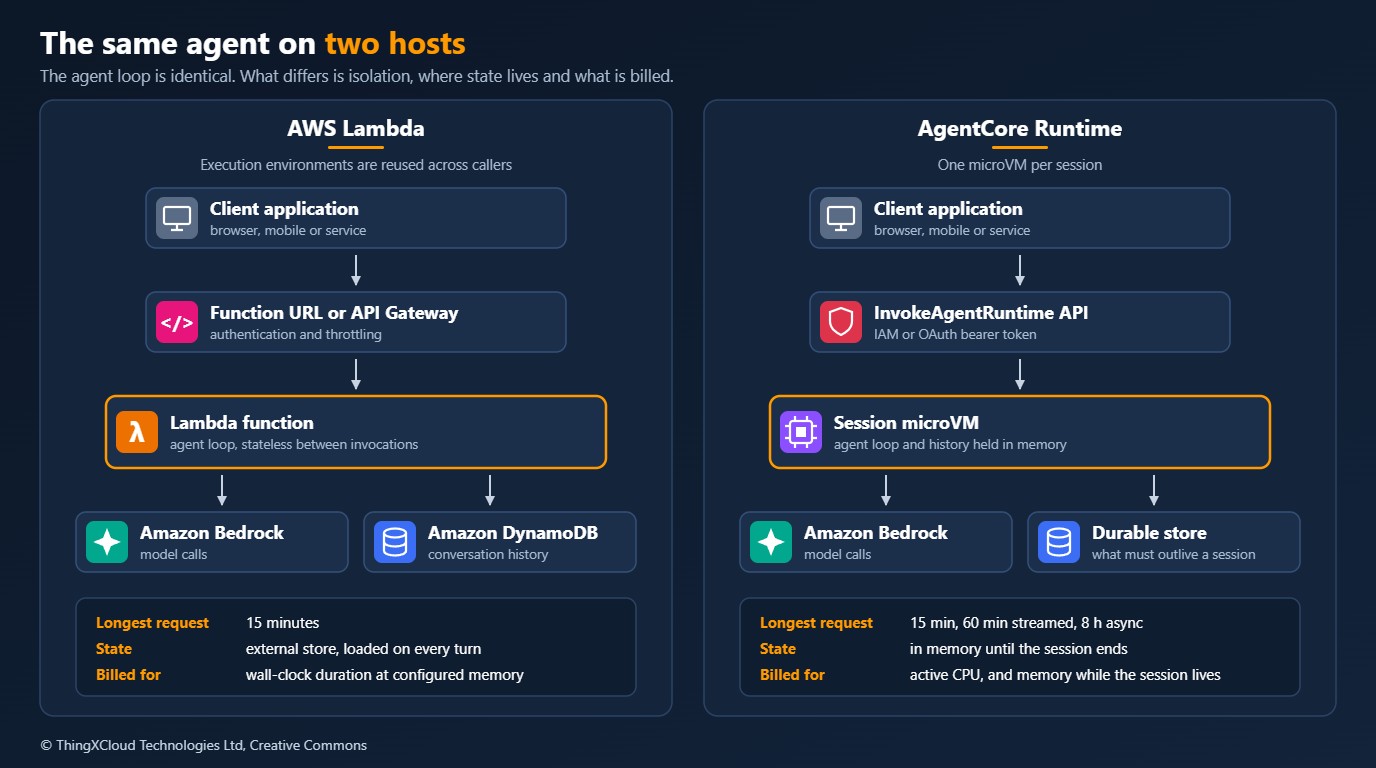
The agent is an order-enquiry assistant with one tool. All of its behaviour lives in a single module that has no idea where it is running. It uses the Bedrock Converse API, which has the same request shape for every model, and a bounded loop: call the model, run any tool it asks for, feed the result back, stop when the model answers or the limit is reached.
"""
agent_core.py
The agent itself: a bounded tool loop over the Amazon Bedrock Converse API.
Nothing in this module knows whether it runs on Lambda or on AgentCore Runtime.
"""
import logging
import os

import boto3
from botocore.config import Config

logger = logging.getLogger(__name__)

MODEL_ID = os.environ["BEDROCK_MODEL_ID"]   # model or inference profile ID, set per environment
MAX_MODEL_CALLS = 6                          # hard stop for a model that keeps asking for tools
MAX_PROMPT_CHARS = 4000

SYSTEM = [{"text": "You answer order enquiries briefly. Use the tool to look up order status."}]
TOOL_CONFIG = {
    "tools": [{
        "toolSpec": {
            "name": "get_order_status",
            "description": "Returns the fulfilment status of an order.",
            "inputSchema": {"json": {
                "type": "object",
                "properties": {"order_id": {"type": "string", "description": "For example ORD-10042"}},
                "required": ["order_id"],
            }},
        }
    }]
}

bedrock = boto3.client(
    "bedrock-runtime",
    config=Config(retries={"mode": "adaptive", "max_attempts": 5}, read_timeout=120),
)


class InvalidRequest(ValueError):
    """The caller sent something the agent will not process."""


def get_order_status(order_id: str) -> dict:
    # Replace with a real lookup. Validate and authorise here: the model chooses the arguments.
    if not isinstance(order_id, str) or not order_id.startswith("ORD-"):
        raise InvalidRequest("order_id must look like ORD-10042")
    return {"order_id": order_id, "status": "SHIPPED"}


TOOLS = {"get_order_status": get_order_status}


def run_turn(history: list, prompt) -> str:
    """Run one user turn. Appends to history in place and returns the answer text."""
    if not isinstance(prompt, str) or not prompt.strip() or len(prompt) > MAX_PROMPT_CHARS:
        raise InvalidRequest(f"prompt must be a non-empty string of at most {MAX_PROMPT_CHARS} characters")

    history.append({"role": "user", "content": [{"text": prompt}]})

    for _ in range(MAX_MODEL_CALLS):
        response = bedrock.converse(
            modelId=MODEL_ID,
            system=SYSTEM,
            messages=history,
            toolConfig=TOOL_CONFIG,
            inferenceConfig={"maxTokens": 1024, "temperature": 0.2},
        )
        message = response["output"]["message"]
        history.append(message)
        logger.info("model call usage=%s stop=%s", response.get("usage"), response["stopReason"])  # counts only

        if response["stopReason"] != "tool_use":
            return "".join(block.get("text", "") for block in message["content"])

        history.append({"role": "user", "content": [_run_tool(b["toolUse"]) for b in message["content"] if "toolUse" in b]})

    raise RuntimeError(f"agent did not finish within {MAX_MODEL_CALLS} model calls")


def _run_tool(tool_use: dict) -> dict:
    try:
        result = TOOLS[tool_use["name"]](**tool_use["input"])
        return {"toolResult": {"toolUseId": tool_use["toolUseId"], "content": [{"json": result}]}}
    except (KeyError, TypeError, InvalidRequest) as exc:
        # Tell the model the call failed so it can recover or apologise. Do not raise.
        return {"toolResult": {"toolUseId": tool_use["toolUseId"], "content": [{"text": str(exc)}], "status": "error"}}
The history list is the only state. Where that list lives between turns is the whole difference between the two hosts.
Host 1: AWS Lambda
A Lambda execution environment is reused for whichever request arrives next, and that request may belong to a different user. Nothing about a conversation can be kept in process memory, so the handler loads the history at the start of every turn and writes it back at the end.
"""
lambda_handler.py
Host 1: AWS Lambda behind a function URL or API Gateway. Execution environments are
reused across callers, so conversation state has to live outside the function.
"""
import json
import os
import re
import time

import boto3
from boto3.dynamodb.conditions import Attr

from agent_core import InvalidRequest, run_turn

table = boto3.resource("dynamodb").Table(os.environ["SESSIONS_TABLE"])
SESSION_ID = re.compile(r"^[A-Za-z0-9-]{33,128}$")
SESSION_TTL_SECONDS = 3600


def handler(event, context):
    try:
        body = json.loads(event.get("body") or "{}")
        session_id = body.get("sessionId", "")
        if not SESSION_ID.match(session_id):
            raise InvalidRequest("sessionId must be 33 to 128 letters, digits or hyphens")

        item = table.get_item(Key={"sessionId": session_id}, ConsistentRead=True).get("Item")
        history = json.loads(item["history"]) if item else []
        version = int(item["version"]) if item else 0

        answer = run_turn(history, body.get("prompt"))

        # Optimistic lock: two concurrent turns on one session must not overwrite each other.
        table.put_item(
            Item={
                "sessionId": session_id,
                "history": json.dumps(history),
                "version": version + 1,
                "expiresAt": int(time.time()) + SESSION_TTL_SECONDS,
            },
            ConditionExpression=Attr("version").not_exists() | Attr("version").eq(version),
        )
        return _response(200, {"answer": answer, "sessionId": session_id})
    except InvalidRequest as exc:
        return _response(400, {"error": str(exc)})
    except json.JSONDecodeError:
        return _response(400, {"error": "request body must be JSON"})
    except table.meta.client.exceptions.ConditionalCheckFailedException:
        return _response(409, {"error": "another request is in progress for this session"})


def _response(status: int, body: dict) -> dict:
    return {"statusCode": status, "headers": {"Content-Type": "application/json"}, "body": json.dumps(body)}
%%{init: {'theme':'base','themeVariables':{'actorBkg':'#FFF3E0','actorBorder':'#FF9900','actorTextColor':'#232F3E','actorLineColor':'#FF9900','signalColor':'#0073BB','signalTextColor':'#0F172A','labelBoxBkgColor':'#FFF3E0','labelBoxBorderColor':'#FF9900','labelTextColor':'#232F3E','noteBkgColor':'#FFF8E7','noteBorderColor':'#FF9900','noteTextColor':'#232F3E','sequenceNumberColor':'#FFFFFF'}}}%%
sequenceDiagram
autonumber
participant C as Client
participant L as Lambda function
participant D as DynamoDB
participant B as Amazon Bedrock
C->>L: POST prompt and sessionId
L->>D: Read history
D-->>L: Prior messages
L->>B: Converse, tool loop
Note over L,B: Function is billed while it waits
B-->>L: Final answer
L->>D: Conditional write of new history
L-->>C: AnswerThis works, and plenty of production agents run this way. It also comes with a list of things you own: a session table with a TTL, a size limit on the stored history (a DynamoDB item tops out at 400 KB), a concurrency rule for two turns arriving at once, and an authentication layer in front of the function. And the function is billed for every second it spends waiting on the model.
Host 2: AgentCore Runtime
AgentCore Runtime changes the unit of compute from the invocation to the session. The caller supplies a runtimeSessionId, and the service provisions a dedicated microVM for it with its own CPU, memory and filesystem. Every later call with the same ID lands on the same microVM until the session ends. When it ends, the microVM is terminated and its memory is sanitised.
The hosting contract is small. Your code is packaged as an ARM64 container, or uploaded directly as a Python or Node.js archive, and must listen on port 8080 with two routes: POST /invocations for work and GET /ping for health. The AgentCore Python SDK implements both, so the adapter is shorter than the Lambda one.
"""
agentcore_app.py
Host 2: Amazon Bedrock AgentCore Runtime. Each session gets its own microVM, so
process memory is session memory for as long as the session lives.
"""
from bedrock_agentcore.runtime import BedrockAgentCoreApp
from starlette.responses import JSONResponse

from agent_core import InvalidRequest, run_turn

app = BedrockAgentCoreApp()

# Safe as a module global only because one microVM serves exactly one session.
# It is gone when the session ends. Persist anything that must outlive it.
_history: list = []


@app.entrypoint
def invoke(payload: dict, context):
    try:
        answer = run_turn(_history, payload.get("prompt"))
    except InvalidRequest as exc:
        return JSONResponse({"error": str(exc)}, status_code=400)

    return {"answer": answer, "sessionId": context.session_id, "messagesInSession": len(_history)}


if __name__ == "__main__":
    app.run()   # serves POST /invocations and GET /ping on 0.0.0.0:8080
There is no session table, no optimistic lock and no serialisation of history. A module-level list would be a serious bug on Lambda. Here it is correct, because nothing else will ever run in this process.
%%{init: {'theme':'base','themeVariables':{'actorBkg':'#FFF3E0','actorBorder':'#FF9900','actorTextColor':'#232F3E','actorLineColor':'#FF9900','signalColor':'#0073BB','signalTextColor':'#0F172A','labelBoxBkgColor':'#FFF3E0','labelBoxBorderColor':'#FF9900','labelTextColor':'#232F3E','noteBkgColor':'#FFF8E7','noteBorderColor':'#FF9900','noteTextColor':'#232F3E','sequenceNumberColor':'#FFFFFF'}}}%%
sequenceDiagram
    autonumber
    participant C as Client
    participant R as AgentCore Runtime
    participant V as Session microVM
    participant B as Amazon Bedrock
    C->>R: InvokeAgentRuntime, new session ID
    R->>V: Provision microVM
    V->>B: Converse, tool loop
    Note over V,B: CPU idle while waiting, memory still held
    B-->>V: Final answer
    V-->>C: Answer
    C->>R: InvokeAgentRuntime, same session ID
    R->>V: Route to the same microVM
    V-->>C: Answer, history already in memory
    Note over V: Idle timeout or StopRuntimeSession ends it
Calling the agent, and ending the session
Clients call the runtime through the InvokeAgentRuntime API with IAM credentials, or over HTTPS with an OAuth bearer token if the runtime is configured with a JWT authorizer. Two details in the client matter more than they look.
"""invoke_client.py - calling the agent on AgentCore Runtime and ending the session."""
import json
import uuid

import boto3

AGENT_RUNTIME_ARN = "arn:aws:bedrock-agentcore:eu-west-1:111122223333:runtime/order_agent-AbCdEf1234"

client = boto3.client("bedrock-agentcore")
session_id = f"order-chat-{uuid.uuid4()}"      # at least 33 characters; one ID maps to one microVM


def ask(prompt: str) -> dict:
    response = client.invoke_agent_runtime(
        agentRuntimeArn=AGENT_RUNTIME_ARN,
        qualifier="DEFAULT",
        runtimeSessionId=session_id,
        payload=json.dumps({"prompt": prompt}).encode(),
    )
    return json.loads(response["response"].read())


def end_conversation() -> None:
    # Without this the microVM idles until the idle timeout and its memory keeps billing.
    client.stop_runtime_session(
        agentRuntimeArn=AGENT_RUNTIME_ARN,
        qualifier="DEFAULT",
        runtimeSessionId=session_id,
)- The session ID is an isolation boundary. It must be at least 33 characters, and whoever presents it reaches that session’s memory. Generate it on the server side per user and conversation. Never derive it from something guessable, and never share one ID across users.
- Somebody has to end the session. By default an idle session lives for 15 minutes before the service terminates it, up to a maximum lifetime of 8 hours. Call
StopRuntimeSessionwhen the conversation is over, and set the idle timeout to suit the workload when you create the runtime.
import boto3

control = boto3.client("bedrock-agentcore-control")

control.create_agent_runtime(
    agentRuntimeName="order_agent",
    roleArn="arn:aws:iam::111122223333:role/OrderAgentRuntimeRole",
    agentRuntimeArtifact={"containerConfiguration": {
        "containerUri": "111122223333.dkr.ecr.eu-west-1.amazonaws.com/order-agent:1.4.0",   # ARM64 image
    }},
    networkConfiguration={"networkMode": "PUBLIC"},      # or VPC, with subnets and security groups
    protocolConfiguration={"serverProtocol": "HTTP"},
    lifecycleConfiguration={
        "idleRuntimeSessionTimeout": 120,   # seconds; the default is 900
        "maxLifetime": 3600,                # seconds; the default is 28800
    },
    environmentVariables={"BEDROCK_MODEL_ID": "REPLACE_WITH_MODEL_OR_INFERENCE_PROFILE_ID"},
)The agent module, both hosts and the client were run against stubbed Bedrock and DynamoDB clients, using version 1.14.1 of the bedrock-agentcore SDK, for the success, tool-call, bad-input, runaway-loop and concurrent-write paths. The API calls were validated against the service model. Nothing here was deployed to a live account, so run it in a sandbox before adopting it.
Side by side
| Dimension | AWS Lambda | AgentCore Runtime |
|---|---|---|
| Unit of compute | One invocation | One session, spanning many invocations |
| Isolation | Execution environments are reused across invocations of the same function | A dedicated microVM per session, terminated and sanitised at the end |
| Longest synchronous request | 15 minutes | 15 minutes |
| Longest streamed response | 15 minutes (the function timeout) | 60 minutes |
| Longest background work | 15 minutes per invocation; longer needs durable functions or Step Functions | Up to 8 hours within a session |
| Request payload | 6 MB synchronous | 100 MB |
| Conversation state | External store, loaded on every turn | In process memory for the life of the session |
| Inbound authentication | IAM on a function URL, or API Gateway authorizers | IAM (SigV4) or OAuth bearer tokens, built in |
| Triggers | Event source mappings, S3, EventBridge, SQS and many more | API invocation only; anything event-driven needs a caller |
| Packaging | Zip or container, x86 or arm64 | ARM64 container, or direct Python or Node.js upload |
| Protocols | HTTP through a function URL or API Gateway | HTTP, MCP, A2A and AG-UI, plus WebSocket streaming |
| Compute billing | Wall-clock duration at configured memory | CPU actually consumed, and memory for as long as the session lives |
What session isolation actually buys you
For a conventional API, reusing an execution environment between users is harmless, because well-written handlers keep nothing between requests. An agent is different in three ways. It holds a conversation in memory. It often writes files, such as a downloaded document or a generated chart. And it executes instructions that were influenced by text the user, or a web page, supplied.
Put those together and environment reuse becomes a real exposure: a leftover file in /tmp, a cached credential, a global variable that a prompt-injected tool call managed to change. A microVM per session removes that class of problem structurally. You do not have to prove that your code cleans up after itself, because the environment is destroyed.
Lambda has an answer for part of this. Its tenant isolation mode, introduced in late 2025, keeps execution environments separate per tenant. That isolates customers from each other. It does not isolate two conversations belonging to the same tenant, and it does not give you session affinity, so state still lives outside the function.
A session ends on the idle timeout, at the maximum lifetime, when it is stopped, or when the platform judges it unhealthy. Everything in process memory goes with it, and a later call with the same session ID starts on a fresh microVM with an empty history. If a conversation has to survive that, write it somewhere durable as you go. Deploying a new version has a related effect: existing sessions keep running the old code until they end.
Cost: the part that is easy to get wrong
The two services bill on different principles, and the difference lines up exactly with how agents behave.
- Lambda charges for wall-clock duration multiplied by configured memory: $0.0000166667 per GB-second on x86 and $0.0000133334 on arm64, plus $0.20 per million requests. A function waiting for a model to respond is running, and is billed.
- AgentCore Runtime charges $0.0895 per vCPU-hour for CPU actually consumed and $0.00945 per GB-hour for memory, per second. AWS states that I/O wait, such as waiting on a model or a tool, is not charged as CPU. Memory is charged for as long as the session exists, including while it is idle.
An agent spends most of its time waiting. So the first half of the AgentCore model is very favourable, and the second half is where the bill can turn against you.
A model you can reproduce
Assume 100,000 sessions a month. Each is a single 60-second interaction on 1 vCPU and 1 GB. Model tokens are excluded because they are identical on both hosts. Free tier is ignored.
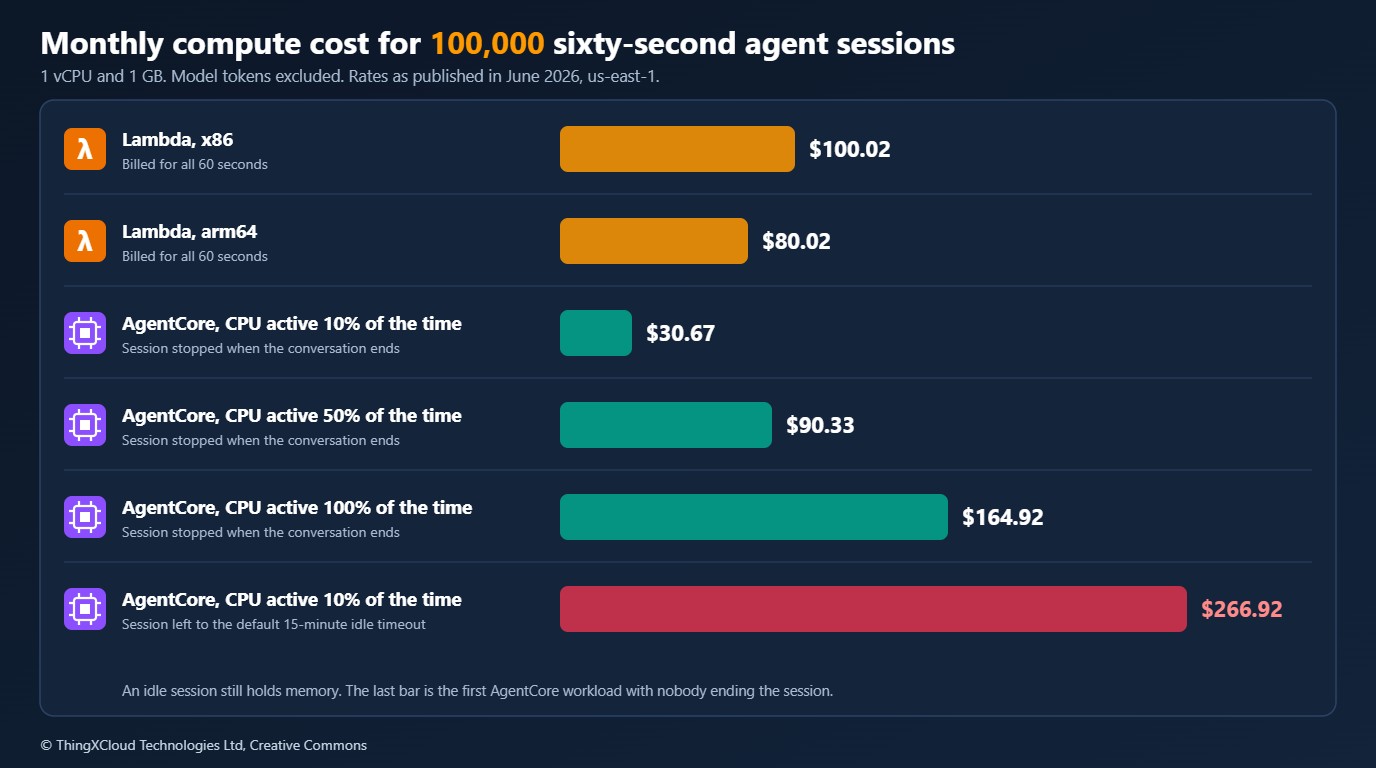
| Scenario | Arithmetic per session | Per 100,000 sessions |
|---|---|---|
| Lambda, x86, 1 GB | 60 GB-s × $0.0000166667 | $100.02 |
| Lambda, arm64, 1 GB | 60 GB-s × $0.0000133334 | $80.02 |
| AgentCore, CPU active 10% of the time, session stopped at the end | 6 vCPU-s × $0.0895/3600 + 60 GB-s × $0.00945/3600 | $30.67 |
| AgentCore, CPU active 50% | 30 vCPU-s and 60 GB-s | $90.33 |
| AgentCore, CPU active 100% | 60 vCPU-s and 60 GB-s | $164.92 |
| AgentCore, CPU active 10%, default 15-minute idle timeout | As the 10% case, plus 900 GB-s of idle memory | $266.92 |
Three things follow from these numbers.
- There is a break-even. At 1 vCPU and 1 GB, AgentCore is cheaper than x86 Lambda while the CPU is busy for less than about 56% of the session, and cheaper than arm64 Lambda below about 43%. A typical tool-calling agent is far below either figure. A session that parses documents or runs analysis code may not be.
- The idle tail dominates. Fifteen minutes of idle memory costs nearly eight times as much as the sixty seconds of work that preceded it. An AgentCore deployment that never stops its sessions and keeps the default timeout is more expensive than Lambda for the same traffic.
- Conversations amortise the tail. The model above is the worst case, one turn per session. A ten-turn conversation pays for one idle tail, not ten, and avoids ten reads and writes of history. The longer and more interactive the session, the better AgentCore looks.
Memory on AgentCore is billed on what the session actually consumes, so an idle process holding less than 1 GB costs proportionally less than shown. Lambda at 1 GB is also generous for an I/O-bound handler, and a smaller setting reduces its bill in proportion. Neither side includes API Gateway requests, DynamoDB, data transfer or container image storage. Treat the table as a way to see the shape of the trade-off, then put your own measurements in.
Since this article was published AWS has added an Instances compute type for AgentCore Runtime, with sessions of up to 14 days on EC2 capacity (August 2026), and a newer platform version with different per-second rates. The figures above use the rates in force in June 2026. Check the current pricing page before reusing them.
Running it in production
- Decide who ends a session. Make it an explicit part of the client flow, and set
idleRuntimeSessionTimeoutas a safety net sized to your users’ real pauses. Two minutes suits a transactional assistant. A research tool that people leave and return to needs longer. - Plan for the cold start you measure. The first call of a session provisions a microVM. Lambda has cold starts too, but only some requests see them. On AgentCore every new session does. Measure it with your own image and decide whether the first response needs a “starting” state in the user interface.
- Long-running work needs a health signal. For background tasks that outlive a request, the
/pingroute reportsHealthyBusyso the platform keeps the session alive. The SDK manages this when you register asynchronous tasks with it. A hand-written/pingthat reports a fresh timestamp on every call will stop idle sessions from ever timing out. - Watch the session quota. Concurrency on AgentCore is counted in active sessions per account and Region, and an idle session is still an active one. Long idle timeouts consume quota as well as money.
- Build for ARM64. Container images must be ARM64. Teams whose pipelines build x86 images by default find this out at deploy time.
- Keep event-driven work on Lambda. AgentCore Runtime is invoked through its API. It has no event source mappings. S3 notifications, queue consumers and schedules still belong on Lambda, which can call the runtime when an agent is needed.
- Carry over the limits from any agent. A cap on model calls per turn, a cap on output tokens and validation inside every tool apply on both hosts. Isolation contains the damage from a bad tool call. It does not prevent one.
The two hosts also combine well. A common shape is an agent on AgentCore Runtime whose tools are Lambda functions: the agent gets session isolation and cheap waiting, and the tools keep per-invocation scaling and the IAM boundaries you already have. If the front door is the harder problem, the streaming and timeout options are covered in Breaking the 29-Second Wall.
Session memory on AgentCore contains the conversation, including any personal data in it, for as long as the session lives. Short idle timeouts are a data minimisation control as well as a cost control. Anything you persist for continuity, in DynamoDB or elsewhere, needs encryption, access control and a retention period on either host. Confirm that the runtime, the model and any cross-Region inference profile all sit in Regions your data residency rules allow: AgentCore is available in fewer Regions than Lambda. For healthcare and financial workloads, record which session, model and tool calls produced an output, and keep prompts and completions out of application logs.
Decision framework
%%{init: {'theme':'base','themeVariables':{'primaryColor':'#FFF3E0','primaryTextColor':'#232F3E','primaryBorderColor':'#FF9900','lineColor':'#232F3E','clusterBkg':'#F8FAFC','clusterBorder':'#CBD5E1','edgeLabelBackground':'#FFFFFF','nodeTextColor':'#232F3E'}}}%%
flowchart TD
    Q1{"Is the work triggered by an event,
not a conversation?"} -->|"Yes"| L["AWS Lambda"]
    Q1 -->|"No"| Q2{"Multi-turn, or longer than 15 minutes?"}
    Q2 -->|"Yes"| A["AgentCore Runtime"]
    Q2 -->|"No"| Q3{"Does the agent run untrusted code
or handle sensitive files?"}
    Q3 -->|"Yes"| A
    Q3 -->|"No"| Q4{"Is the CPU busy for most of the request?"}
    Q4 -->|"Yes"| L
    Q4 -->|"No"| E["Either. Choose on team skills
and Region availability"]
    classDef compute fill:#FFF3E0,stroke:#FF9900,stroke-width:2px,color:#232F3E;
    classDef edge fill:#EBF8FF,stroke:#0073BB,stroke-width:2px,color:#004C74;
    classDef store fill:#F0FFF4,stroke:#1D8102,stroke-width:2px,color:#145202;
    classDef alert fill:#FEF2F2,stroke:#D13212,stroke-width:2px,color:#991B1B;
    classDef mesh fill:#F3E8FF,stroke:#7C3AED,stroke-width:2px,color:#4C1D95;
    class Q1,Q2,Q3,Q4 edge;
    class L compute;
    class A mesh;
class E store;| Workload | Better host | Reason |
|---|---|---|
| Single-shot classification or extraction from a queue | Lambda | Short, event-driven, no session to keep |
| Customer-facing assistant with multi-turn conversations | AgentCore Runtime | State stays in memory; waiting on the model is not billed as CPU |
| Agent that runs generated code or opens user documents | AgentCore Runtime | Per-session microVM contains whatever the session does |
| Research or coding agent that works for an hour | AgentCore Runtime | 60-minute streams and 8-hour sessions without orchestration |
| Agent step inside an existing Step Functions workflow | Lambda, or a direct Bedrock call | The workflow already owns state and retries |
| CPU-heavy processing with little model wait | Lambda | Above the break-even, wall-clock billing is cheaper |
| Workload in a Region without AgentCore | Lambda | Availability decides it |
Key takeaways
- The agent code is the same on both hosts. Keep it in a module that knows nothing about hosting, and the decision stays reversible.
- AgentCore Runtime makes the session the unit of compute: one microVM per session, state in memory, limits measured in hours.
- AgentCore bills CPU only when it is used, which suits agents that mostly wait. It bills memory for the whole life of the session, including idle time.
- End sessions explicitly and shorten the idle timeout. Left at defaults, the idle tail can make AgentCore the more expensive option.
- Lambda remains the right host for event-driven, short and CPU-bound work, and for the tools an agent calls.
If you have moved an agent between these two hosts in either direction, the session lengths and idle patterns you saw would be a useful data point for other readers. Share them in the comments.
Glossary
- AgentCore Runtime
- The Amazon Bedrock AgentCore service that hosts agent code in an isolated microVM per session.
- Runtime session
- The unit of compute on AgentCore Runtime, identified by a runtimeSessionId. All calls with the same ID reach the same microVM until the session ends.
- microVM
- A lightweight virtual machine with its own kernel, CPU, memory and filesystem, used to isolate one session from another.
- Execution environment
- The sandbox in which a Lambda function runs. It is reused for later invocations of the same function.
- Converse API
- The Amazon Bedrock inference API with one request and response shape across models, including tool use.
- Tool use
- The mechanism by which a model asks the application to run a named function and return its result.
- Idle session timeout
- How long AgentCore keeps a session with no activity before terminating it. 15 minutes by default.
- Maximum lifetime
- The longest a session microVM may exist, whatever its activity. 8 hours by default.
- I/O wait
- Time a process spends waiting for a network or disk response, during which it consumes almost no CPU.
- GB-second
- Lambda’s compute billing unit: one second of execution at 1 GB of configured memory.
- Service contract
- The HTTP interface an AgentCore container must expose: POST /invocations and GET /ping on port 8080.
- Tenant isolation mode
- A Lambda setting that keeps execution environments separate for each tenant identifier.
- Inference profile
- A Bedrock resource that routes model requests, optionally across Regions, and is addressed in place of a model ID.
References & Further Reading
- → How AgentCore Runtime works— Sessions, microVM isolation, versions, endpoints, protocols and authentication.
- → HTTP protocol contract— The /invocations and /ping routes, port, ARM64 requirement and health status values.
- → Configure lifecycle settings— Idle timeout and maximum lifetime: defaults, ranges and recommended patterns.
- → AgentCore quotas— Request, streaming, session and payload limits.
- → Direct code deployment for Python— Deploying an agent without building a container image.
- → AgentCore release notes— Month-by-month record of Runtime features.
- → Amazon Bedrock AgentCore pricing— Runtime CPU and memory rates and how each is metered.
- → Amazon Bedrock AgentCore FAQs— Billing of I/O wait, session isolation and supported frameworks.
- → AWS Lambda pricing— Request and duration pricing for x86 and arm64.
- → Amazon Bedrock AgentCore is now generally available— The October 2025 launch announcement.
- → bedrock-agentcore on PyPI— The Python SDK used for the runtime adapter, with release history.
Discover more from C4: Container, Code, Cloud & Context
Subscribe to get the latest posts sent to your email.