
On this page
A chat box that streams text is no longer the interesting part of an AI feature. The interesting part is everything the agent does besides talk: it calls a tool and the result should appear as a proper card, it wants to do something irreversible and a person has to say yes, it fills in a form that the user then edits. That is an agentic UI, and until this autumn a Blazor team had to build all of it by hand.
Two things changed. The AG-UI protocol got a .NET SDK, and ASP.NET Core 11 arrived with a preview package of Blazor components that understand streamed text, tool calls, approvals and shared state. This article builds a small order desk with them on .NET 11: a Blazor Web App in front, an agent service behind it, AG-UI between the two.
It is built to be tested. The model is replaced by a scripted stand-in, so the same conversation produces the same events every time, and four layers of tests run in a pipeline with no keys: 26 xUnit and bUnit tests and nine steps in a real browser. Along the way the tests turned up two things worth knowing before production. An approval can be forged with one hand-written HTTP request unless the server checks it, and an optional field makes the event stream three to four times larger than it needs to be.
The problem
An agent emits more than text. In one turn it can stream words, ask for a tool, wait for the result, change some state the page is showing, and stop to ask permission. A UI that treats all of that as a string ends up parsing markdown for hidden JSON, or polling, or building a private protocol between the page and the server.
The second problem is testing. A component that renders whatever a model says cannot be tested against a model: the output changes, the calls cost money, and a pipeline needs credentials. So the UI goes untested, and the first time anyone finds out what happens when a user clicks Reject is in production.
Both problems have the same answer: a typed stream of events with a defined vocabulary, and a seam where the model can be swapped for something deterministic.
Architecture
%%{init: {'theme':'base','themeVariables':{'primaryColor':'#FFF3E0','primaryTextColor':'#232F3E','primaryBorderColor':'#FF9900','lineColor':'#232F3E','clusterBkg':'#F8FAFC','clusterBorder':'#CBD5E1','edgeLabelBackground':'#FFFFFF','nodeTextColor':'#232F3E'}}}%%
flowchart TD
    B["Browser"] -- "SignalR circuit" --> W["Blazor Web App, interactive server:
UIAgent and Blazor AI components"]
    W -- "IChatClient" --> C["AGUIChatClient"]
    C -- "HTTP POST, run request" --> E["Agent service: AG-UI endpoint"]
    E -- "Server-Sent Events" --> C
    E --> V["Verify approvals against
what this server proposed"]
    V --> P["Chat client pipeline:
function invocation, then the model"]
    P --> T["Tools: get_order, draft_reply,
refund_order (needs approval)"]
    T --> L["Ledger: payment stand-in,
one refund per key"]
    style W fill:#EBF8FF,stroke:#0073BB,stroke-width:2px,color:#004C74
    style E fill:#F3E8FF,stroke:#7C3AED,stroke-width:2px,color:#4C1D95
    style V fill:#F3E8FF,stroke:#7C3AED,stroke-width:2px,color:#4C1D95
    style L fill:#F0FFF4,stroke:#1D8102,stroke-width:2px,color:#145202
Three decisions shape it.
- The agent is a separate service. It owns the model, the tools and the rules. The web app owns rendering. Either can be replaced, and other front ends that speak AG-UI can use the same agent.
- The UI depends on
IChatClient, nothing more specific. In production that is anAGUIChatClientpointed at the agent service. In a component test it is the agent pipeline plugged in directly. The components do not know the difference. - The browser never speaks AG-UI. With the interactive server render mode, the browser holds a SignalR circuit to the Blazor app, and the Blazor app calls the agent service from the server. The browser run confirmed it: the only hosts the page contacted were the web app and its WebSocket. That matters for the approval finding below.
Packages
    <PackageVersion Include="Microsoft.AspNetCore.Components.AI" Version="0.1.0-preview.1.26466.103" />
    <PackageVersion Include="AGUI.Client" Version="1.0.1" />
    <PackageVersion Include="AGUI.Server" Version="1.0.1" />
    <PackageVersion Include="AGUI.Formatting" Version="1.0.1" />
<PackageVersion Include="Microsoft.Extensions.AI" Version="11.0.0" />| Package | What it gives | Status |
|---|---|---|
Microsoft.AspNetCore.Components.AI | UIAgent, AgentBoundary, MessageList, MessageInput, BlockRenderer, approval and state types | Experimental preview, published 16 September 2026. Targets net11.0 only |
AGUI.Client | AGUIChatClient, an IChatClient over the protocol | 1.0.1, published 12 October 2026 |
AGUI.Server, AGUI.Formatting | Turning a run request into a chat request, and chat updates into events written as Server-Sent Events | 1.0.1 |
Microsoft.Extensions.AI | IChatClient, function invocation, ApprovalRequiredAIFunction | 11.0.0, published with .NET 11 on 10 November 2026 |
A floating prerelease version of Microsoft.AspNetCore.Components.AI resolves to 11.0.0-preview.7. That is an older build from the .NET 11 preview train, and it sorts above the current 0.1.0-preview.1 line because 11 is greater than 0. The first restore in this project picked it. Name the exact version.
Microsoft Agent Framework has its own hosting package for AG-UI, with MapAGUIServer. This sample does not use it. The endpoint is built on AGUI.Server directly, which keeps every step visible and avoids a second preview dependency.
Agent pipeline
The agent is a chat client pipeline: a model at the bottom, the loop that runs tool calls above it, and the tools added to every request. This is the seam. Replace ScriptedModel with a real model client and nothing else changes.
    public static IChatClient Create(OrderBook orders, Ledger ledger, TimeSpan wordDelay)
    {
        IList<AITool> serverTools = new DeskTools(orders, ledger).Create();
        return new ChatClientBuilder(new ScriptedModel(orders, wordDelay))
            .ConfigureOptions(options =>
            {
                options.Tools ??= [];
                foreach (AITool tool in serverTools)
                {
                    options.Tools.Add(tool);
                }
            })
            .UseFunctionInvocation()
            .Build();
    }
ScriptedModel reads the conversation and decides the way a simple model would: an order id with the word “refund” becomes a call to refund_order, a tool result becomes a sentence about it, anything else becomes text, streamed a word at a time. Same conversation in, same updates out.
The tools are plain methods. One line makes the refund need a person:
    public IList<AITool> Create() =>
    [
        AIFunctionFactory.Create(GetOrder, GetOrderName, "Look up one order by its id.", s_json),
        // The wrapper is the whole approval mechanism on the server: the function-invoking client
        // asks for approval instead of calling the function, and calls it only when the answer is yes.
        new ApprovalRequiredAIFunction(
            AIFunctionFactory.Create(RefundOrder, RefundOrderName, "Refund an order, in full or in part.", s_json)),
        AIFunctionFactory.Create(DraftReply, DraftReplyName, "Write a draft reply to the customer about an order.", s_json),
    ];
The refund itself does two things that do not depend on any UI. It applies the payment rule, and it records the refund under a key built from the order, so that a repeated approval or a retried request cannot pay twice. The crash and resume article explains why the key comes from the business operation and not from the tool call.
    private RefundResult RefundOrder(string orderId, decimal amount, string reason)
    {
        if (orders.Find(orderId) is not { } order)
        {
            return new("refused", orderId, amount, "No such order.");
        }

        if (amount <= 0 || amount > order.Total)
        {
            return new("refused", order.Id, amount, $"The amount must be between 0.01 and {order.Total:0.00}.");
        }

        // The key comes from what the refund means, not from the tool call, so a repeated
        // approval, a retried request or a second conversation cannot pay twice.
        (Refund stored, bool created) = ledger.Record(new Refund($"refund:{order.Id}", order.Id, amount, reason));
        return new(created ? "refunded" : "already refunded", order.Id, stored.Amount, created ? "Refund recorded." : "This order was refunded earlier; nothing was paid again.");
    }
AG-UI endpoint
The whole server side of the protocol is one endpoint. It binds the run request, turns it into messages and options, runs the pipeline, and writes the updates back as events.
app.MapPost("/agent", (
    [FromBody] RunAgentInput input,
    IOptions<JsonOptions> jsonOptions,
    IChatClient agent,
    WireLog wire,
    PendingApprovals approvals,
    CancellationToken cancellationToken) =>
{
    JsonSerializerOptions json = jsonOptions.Value.SerializerOptions;

    // An approval arrives as a "resume" entry that also carries the tool call to run. Accept it only
    // if this server proposed exactly that call and it has not been answered yet.
    if (verifyResume && !approvals.TryRedeem(input.Resume, out string problem))
    {
        return Results.Problem(problem, statusCode: StatusCodes.Status409Conflict, title: "Approval refused");
    }

    // The result of draft_reply is the new shared state, so it goes out as a STATE_SNAPSHOT event.
    AGUIStreamOptions stream = new AGUIStreamOptions().MapResultAsStateSnapshot(DeskTools.DraftReplyName);
    ChatRequestContext context = input.ToChatRequestContext(json, stream);

    // State the browser sent comes back to the model as part of the conversation.
    if (input.State is { ValueKind: JsonValueKind.Object } state)
    {
        context.Messages.Insert(0, new ChatMessage(ChatRole.System, ScriptedModel.StatePrefix + state.GetRawText()));
    }

    IAsyncEnumerable<ChatResponseUpdate> updates = agent.GetStreamingResponseAsync(context.Messages, context.ChatOptions, cancellationToken);
    IAsyncEnumerable<BaseEvent> events = approvals.WatchAsync(updates.AsAGUIEventStreamAsync(context, cancellationToken), cancellationToken);
    return new EventStreamResult(wire.RecordAsync(input, rawEvents ? events : WithoutRawEvents(events, cancellationToken), json, cancellationToken));
});
Two lines carry the shared state. MapResultAsStateSnapshot says the result of draft_reply is the new state, so it is sent as a state event as well as a tool result. And state arriving from the page is put in front of the model as part of the conversation, which is how a real model would see it too.
Wire format
AG-UI over HTTP is a POST with a JSON body and a response of Server-Sent Events. It can be read with curl. This is the complete response to “Where is order O-1002?”, as the pipeline captured it:
data: {"type":"RUN_STARTED","threadId":"t-curl","runId":"r-curl","protocolVersion":"1.0"}

data: {"type":"TOOL_CALL_START","toolCallId":"call-99c9f6d9","toolCallName":"get_order","parentMessageId":"0a5eccc41fa649f287b86356a96dcddc"}

data: {"type":"TOOL_CALL_ARGS","toolCallId":"call-99c9f6d9","delta":"{\u0022orderId\u0022:\u0022O-1002\u0022}"}

data: {"type":"TOOL_CALL_END","toolCallId":"call-99c9f6d9"}

data: {"type":"TOOL_CALL_RESULT","messageId":"call-99c9f6d9","toolCallId":"call-99c9f6d9","content":"{\u0022id\u0022:\u0022O-1002\u0022,\u0022customer\u0022:\u0022Test Customer Two\u0022,\u0022item\u0022:\u0022Synthetic desk lamp\u0022,\u0022total\u0022:18.25,\u0022status\u0022:\u0022in transit\u0022,\u0022carrier\u0022:\u0022Example Courier\u0022}"}

data: {"type":"TEXT_MESSAGE_START","messageId":"0733b9e835b54b7e88491424f558b4f5","role":"assistant"}

data: {"type":"TEXT_MESSAGE_CONTENT","messageId":"0733b9e835b54b7e88491424f558b4f5","delta":"Here "}

data: {"type":"TEXT_MESSAGE_CONTENT","messageId":"0733b9e835b54b7e88491424f558b4f5","delta":"is "}

data: {"type":"TEXT_MESSAGE_CONTENT","messageId":"0733b9e835b54b7e88491424f558b4f5","delta":"the "}

data: {"type":"TEXT_MESSAGE_CONTENT","messageId":"0733b9e835b54b7e88491424f558b4f5","delta":"order."}

data: {"type":"TEXT_MESSAGE_END","messageId":"0733b9e835b54b7e88491424f558b4f5"}

data: {"type":"RUN_FINISHED","threadId":"t-curl","runId":"r-curl","outcome":{"type":"success"}}
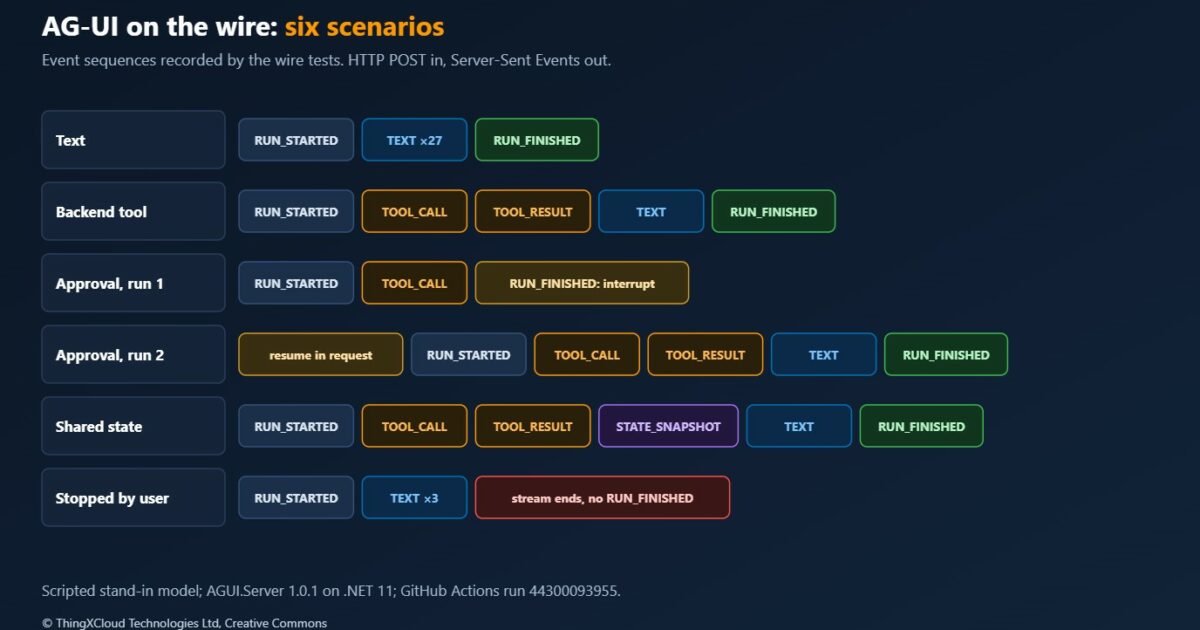
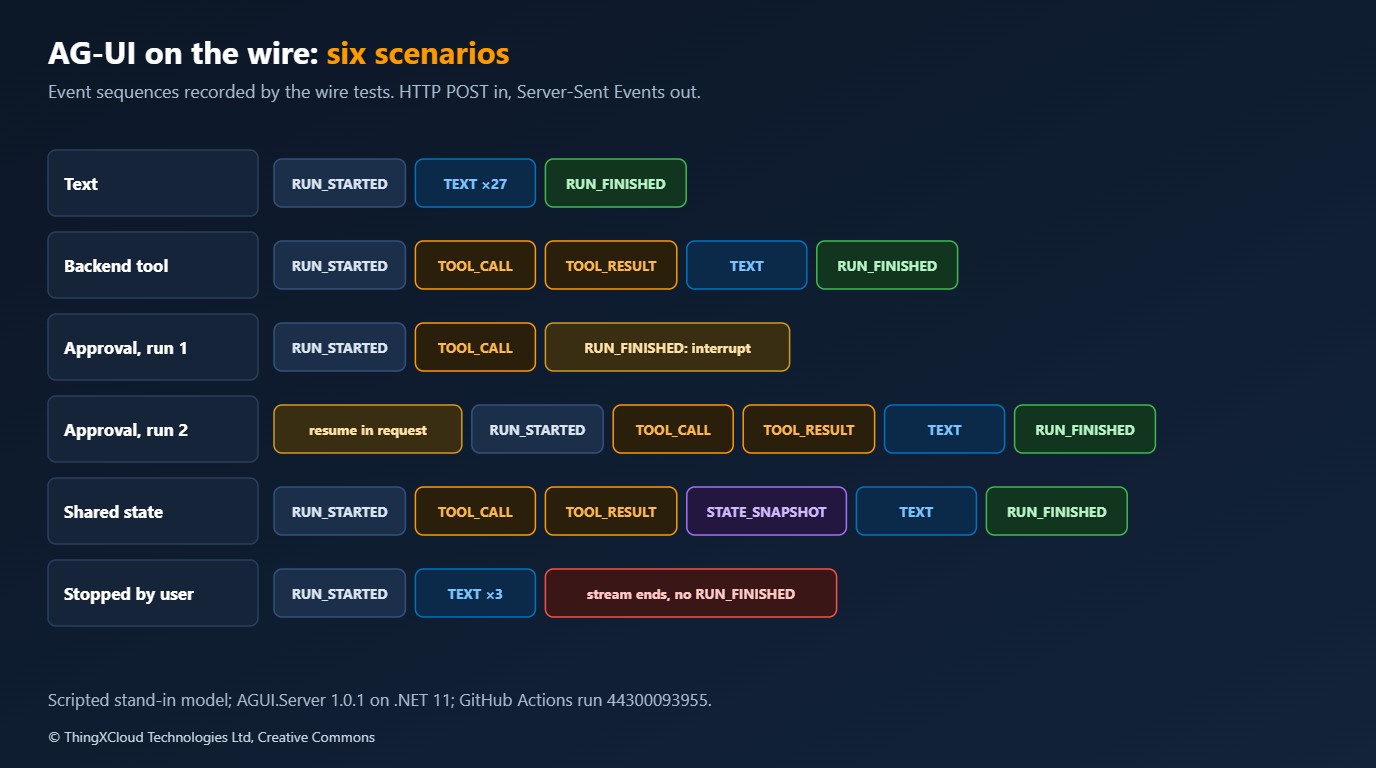
Every scenario in the sample is a variation on that sequence. The tests record them:
| Scenario | Events, in order |
|---|---|
| Text | RUN_STARTED, TEXT_MESSAGE_START, TEXT_MESSAGE_CONTENT ×27, TEXT_MESSAGE_END, RUN_FINISHED |
| Backend tool | RUN_STARTED, TOOL_CALL_START, TOOL_CALL_ARGS, TOOL_CALL_END, TOOL_CALL_RESULT, text message, RUN_FINISHED |
| Approval, first run | RUN_STARTED, TOOL_CALL_START, TOOL_CALL_ARGS, TOOL_CALL_END, RUN_FINISHED with outcome interrupt |
| Approval, second run | RUN_STARTED, the same tool call again, TOOL_CALL_RESULT, text message, RUN_FINISHED |
| Shared state | RUN_STARTED, tool call, TOOL_CALL_RESULT, STATE_SNAPSHOT, text message, RUN_FINISHED |
| Stopped by the user | RUN_STARTED, TEXT_MESSAGE_START, TEXT_MESSAGE_CONTENT ×3, then the stream ends. No RUN_FINISHED |
Two of those rows are worth a closer look. An approval is not a pause inside one request. The first run ends, with an outcome that says why:
{
  "type": "RUN_FINISHED",
  "threadId": "thread_eI2SjtVfSS2feAverxhcUi9h",
  "runId": "run_QH7GcSR1gdEPX1pKTiYZe08x",
  "outcome": {
    "type": "interrupt",
    "interrupts": [
      {
        "id": "ficc_call-4d0f9649",
        "reason": "tool_call",
        "message": "Approval required for tool call: refund_order",
        "toolCallId": "call-4d0f9649",
        "responseSchema": {
          "type": "object",
          "properties": {
            "approved": {
              "type": "boolean"
            }
          },
          "required": [
            "approved"
          ]
        }
      }
    ]
  }
}
The answer is a second, separate request. It carries a resume entry, and that entry contains the decision and the tool call it applies to:
request 2: messages=[user] state=none resume=[{"interruptId":"ficc_call-4d0f9649","status":"resolved","payload":{"approved":true,"toolCall":{"callId":"call-4d0f9649","name":"refund_order","arguments":{"orderId":"O-1003","amount":37.50,"reason":"Requested at the order desk"}}}}]The server holds nothing between the two requests. That is what makes the endpoint easy to scale, and it is also the source of the security finding further down.
The stopped run shows the other thing to plan for. When the user presses Stop, the client drops the connection, the server’s cancellation token fires, and the stream simply ends. A client that waits for RUN_FINISHED before tidying up will wait for ever.
Blazor components
The web app registers one service: a chat client that speaks AG-UI to the agent.
// The UI does not know there is a model. It has a chat client that speaks AG-UI to the agent service.
builder.Services.AddScoped<IChatClient>(services => new AGUIChatClient(
    new AGUIChatClientOptions(services.GetRequiredService<IHttpClientFactory>().CreateClient("agent"), "/agent")));
The page is composed from the lower-level components, so that a Stop button and a side panel can sit inside the same agent boundary:
<div class="desk">
    <AgentBoundary Agent="_agent">
        <section class="sc-ai-root sc-ai-chat-page desk__chat">
            <header class="desk__header">
                <h1>Order desk</h1>
                <StopButton />
            </header>
            <div class="sc-ai-chat-page__body">
                <MessageList>
                    <EmptyContent>
                        <p class="desk__welcome">Ask about an order, for example: Where is order O-1001?</p>
                    </EmptyContent>
                    <ChildContent>
                        @* A get_order call is drawn as a card. Everything else keeps the default rendering,
                           including the Approve and Reject buttons for a tool that needs approval. *@
                        <BlockRenderer TBlock="OrderToolBlock" Context="order">
                            <OrderCard Block="order" />
                        </BlockRenderer>
                    </ChildContent>
                </MessageList>
            </div>
            <div class="sc-ai-chat-page__footer">
                <div class="sc-ai-chat-page__input-container">
                    <MessageInput Placeholder="Ask about an order..." />
                </div>
            </div>
        </section>
    </AgentBoundary>
    <ReplyPanel State="_agent.State" />
</div>
AgentBoundary cascades an AgentContext to everything inside it. MessageList renders the conversation as blocks: text, tool calls, approvals. BlockRenderer replaces the rendering of one block type. MessageInput sends, and disables itself while a run is streaming or an approval is waiting.
A typed tool card. A tool call arrives as a name and a bag of JSON. A source generator turns it into a typed object, filling the argument properties as they stream in and the result property when it arrives:
[ToolBlock("get_order")]
public partial class OrderToolBlock : FunctionInvocationContentBlock
{
    [ToolParameter(Name = "orderId")]
    public string? OrderId { get; set; }

    [ToolResult]
    public OrderInfo? Order { get; set; }
}
The card is then an ordinary component with a loading state and a result state. The contract between the UI and the agent is the JSON of the tool result, not a shared assembly.
Approval. There is no approval code in the page at all. The default rendering of an approval block shows the tool name, its arguments and two buttons, and the buttons call Approve or Reject on the block. Replacing that with a designed dialog is one more BlockRenderer.
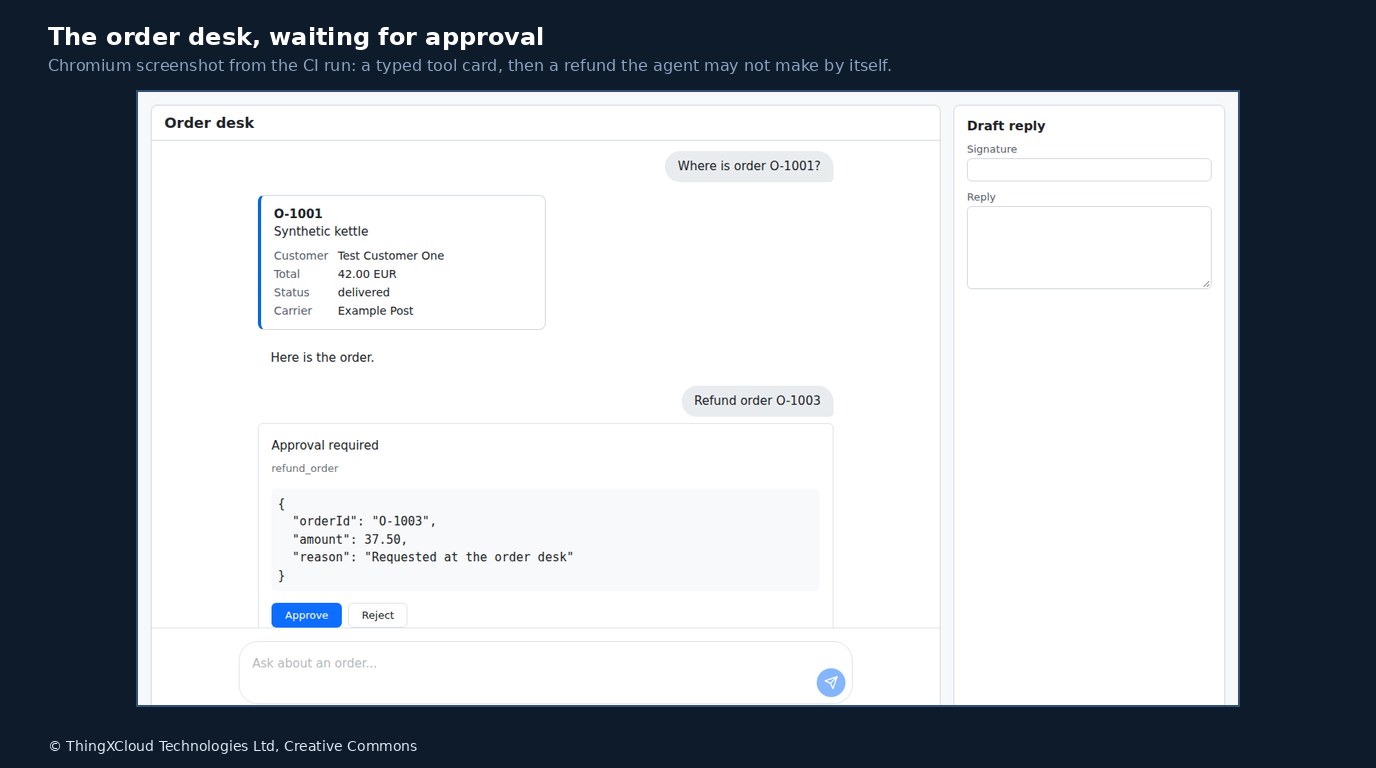
Shared state. The agent is created with a state type. Outbound, each request carries the current state. Inbound, a state snapshot event replaces it:
    protected override void OnInitialized()
    {
        _agent = new UIAgent<CaseState>(ChatClient, options =>
        {
            options.AddGeneratedToolBlocks();

            // Outbound: every request carries the current state, including the user's edits.
            options.ChatOptions = new ChatOptions
            {
                RawRepresentationFactory = _ => new RunAgentInput
                {
                    ThreadId = _threadId,
                    State = JsonSerializer.SerializeToElement(options.State.Value, s_json),
                },
            };

            // Inbound: a STATE_SNAPSHOT event from the agent replaces the state.
            options.StateMapper = context =>
            {
                if (context.Update.RawRepresentation is StateSnapshotEvent snapshot
                    && snapshot.Snapshot.Deserialize<CaseState>(s_json) is { } state)
                {
                    context.SetState(state);
                }
            };
        }, LoggerFactory, new CaseState());
    }
The panel binds to _agent.State and subscribes to its change notification, because the agent changes the state from outside the render cycle. In the browser run the user typed a signature into the panel, asked for a formal draft, and the draft came back signed: state went from page to agent to tool and back.
Stop. Cancelling is one call on the cascaded context:
@implements IDisposable

@if (AgentContext.Status is ConversationStatus.Streaming)
{
    <button type="button" class="desk-stop" @onclick="AgentContext.CancelAsync">Stop</button>
}

@code {
    private IDisposable? _registration;

    [CascadingParameter]
    public AgentContext AgentContext { get; set; } = default!;

    protected override void OnInitialized()
        => _registration = AgentContext.RegisterOnStatusChanged(_ => InvokeAsync(StateHasChanged));

    public void Dispose() => _registration?.Dispose();
}
Approval security
Look again at the resume request. The client sends the decision, and it also sends the tool call: name and arguments. The server kept nothing from the first run, so on the second it rebuilds the call from what the client supplied.
A test asks the obvious question. It posts one request, written by hand, that approves a refund the agent never proposed. A second variant lets the agent propose 37.50 on one order, then approves 42.00 on another under the same interrupt id.
changed after proposal   check off  HTTP 200  refunds in ledger: [O-1001 42.00]
changed after proposal   check on   HTTP 409  refunds in ledger: []
never proposed           check off  HTTP 200  refunds in ledger: [O-1001 42.00]
never proposed           check on   HTTP 409  refunds in ledger: []
With the endpoint as first written, both forged requests returned HTTP 200 and the refund was in the ledger. ApprovalRequiredAIFunction did what it promises: it did not run the function without an approval. The approval was simply not evidence that a person, or this server, had ever seen the call.
%%{init: {'theme':'base','themeVariables':{'primaryColor':'#FFF3E0','primaryTextColor':'#232F3E','primaryBorderColor':'#FF9900','lineColor':'#232F3E','signalColor':'#0073BB','signalTextColor':'#0F172A','actorBkg':'#FFF3E0','actorBorder':'#FF9900','actorTextColor':'#232F3E','noteBkgColor':'#FFF8E7','noteBorderColor':'#FF9900','noteTextColor':'#232F3E'}}}%%
sequenceDiagram
    participant U as Desk user
    participant W as Blazor Server
    participant A as Agent service
    participant L as Ledger
    U->>W: Refund order O-1003
    W->>A: Run 1: user message
    A-->>W: Tool call, then RUN_FINISHED: interrupt
    Note over A: Remembers the proposed call
for this interrupt
    W-->>U: Approve or Reject
    U->>W: Approve
    W->>A: Run 2: resume with decision and tool call
    Note over A: Same call as proposed,
not yet answered: accepted
    A->>L: Refund once, keyed by order
    A-->>W: Tool result and text
The fix is for the server to remember what it proposed. On the way out, a small component watches the event stream and notes each tool call that a run ends on. On the way in, a resume is accepted only if it names a pending interrupt, within a time limit, with exactly the proposed call, and each one is used up when it is answered:
    public bool TryRedeem(IList<AGUIResume>? resume, out string problem)
    {
        problem = "";
        foreach (AGUIResume entry in resume ?? [])
        {
            if (!_pending.TryRemove(entry.InterruptId, out var pending))
            {
                problem = "No approval is pending for this interrupt. It was never asked for, was already answered, or was asked by another server instance.";
                return false;
            }

            if (pending.Expires < clock.GetUtcNow())
            {
                problem = "The approval request has expired.";
                return false;
            }

            if (entry.Payload is not { ValueKind: JsonValueKind.Object } payload
                || !payload.TryGetProperty("toolCall", out JsonElement call)
                || !call.TryGetProperty("name", out JsonElement name)
                || Fingerprint(name.GetString() ?? "", call.TryGetProperty("arguments", out JsonElement arguments) ? arguments : default) != pending.Fingerprint)
            {
                problem = "The tool call in the approval is not the one that was proposed.";
                return false;
            }
        }

        return true;
    }
With the check on, both forged requests get HTTP 409 and the ledger stays empty, the ordinary Approve and Reject paths still pass, and sending the same approval twice is refused the second time.
%%{init: {'theme':'base','themeVariables':{'primaryColor':'#FFF3E0','primaryTextColor':'#232F3E','primaryBorderColor':'#FF9900','lineColor':'#232F3E','clusterBkg':'#F8FAFC','clusterBorder':'#CBD5E1','edgeLabelBackground':'#FFFFFF','nodeTextColor':'#232F3E'}}}%%
flowchart TD
    R["Run request with a resume entry"] --> K{"Interrupt id pending
on this server?"}
    K -- "no" --> X["409: never asked, or already answered"]
    K -- "yes" --> T{"Within the time limit?"}
    T -- "no" --> X2["409: expired"]
    T -- "yes" --> F{"Tool name and arguments
equal what was proposed?"}
    F -- "no" --> X3["409: not the proposed call"]
    F -- "yes" --> OK["Remove from pending,
run the pipeline"]
    OK --> RULES["Tool applies its own rules,
ledger records once per key"]
    style OK fill:#F0FFF4,stroke:#1D8102,stroke-width:2px,color:#145202
    style RULES fill:#F0FFF4,stroke:#1D8102,stroke-width:2px,color:#145202
    style X fill:#FEF2F2,stroke:#D13212,stroke-width:2px,color:#991B1B
    style X2 fill:#FEF2F2,stroke:#D13212,stroke-width:2px,color:#991B1B
style X3 fill:#FEF2F2,stroke:#D13212,stroke-width:2px,color:#991B1BIn this sample the browser cannot send that forged request, because only the Blazor server calls the agent service. That is the arrangement Microsoft’s guidance recommends: do not expose an AG-UI server directly to untrusted clients. With Blazor WebAssembly, or any JavaScript front end calling the agent endpoint itself, the browser is the client and the forged request is one fetch away. Authenticate the endpoint, keep it off the public network where possible, and verify approvals on the server either way. An approval button is a user interface. It is not an authorization check.
Three layers now stand between a request and a payment, and each covers a different failure: the approval check stops calls nobody proposed, the tool’s own rule stops amounts the business would refuse whoever approved them, and the ledger key stops the same refund being paid twice.
Stream size
The first raw capture of the stream was much larger than the one shown above. Each event carried a rawEvent field holding the entire model update it was made from, so a five-character piece of text travelled inside several hundred bytes of JSON. The same two requests, with the field left in and with it removed:
Where is order O-1002?     events  12  without rawEvent   1430 bytes  with rawEvent   4978 bytes  ratio 3.5x
hello                      events  31  without rawEvent   3101 bytes  with rawEvent  12446 bytes  ratio 4.0x
Removing it is one line per event in the endpoint, and every test and browser step passes without it: the Blazor components read the typed event, not the raw copy. Besides the size, the field shows internal structure, including complete tool results, to whoever can read the response. The endpoint in the sample strips it by default.
Testing
The seam at IChatClient gives four places to test, each cheaper than the next one up.
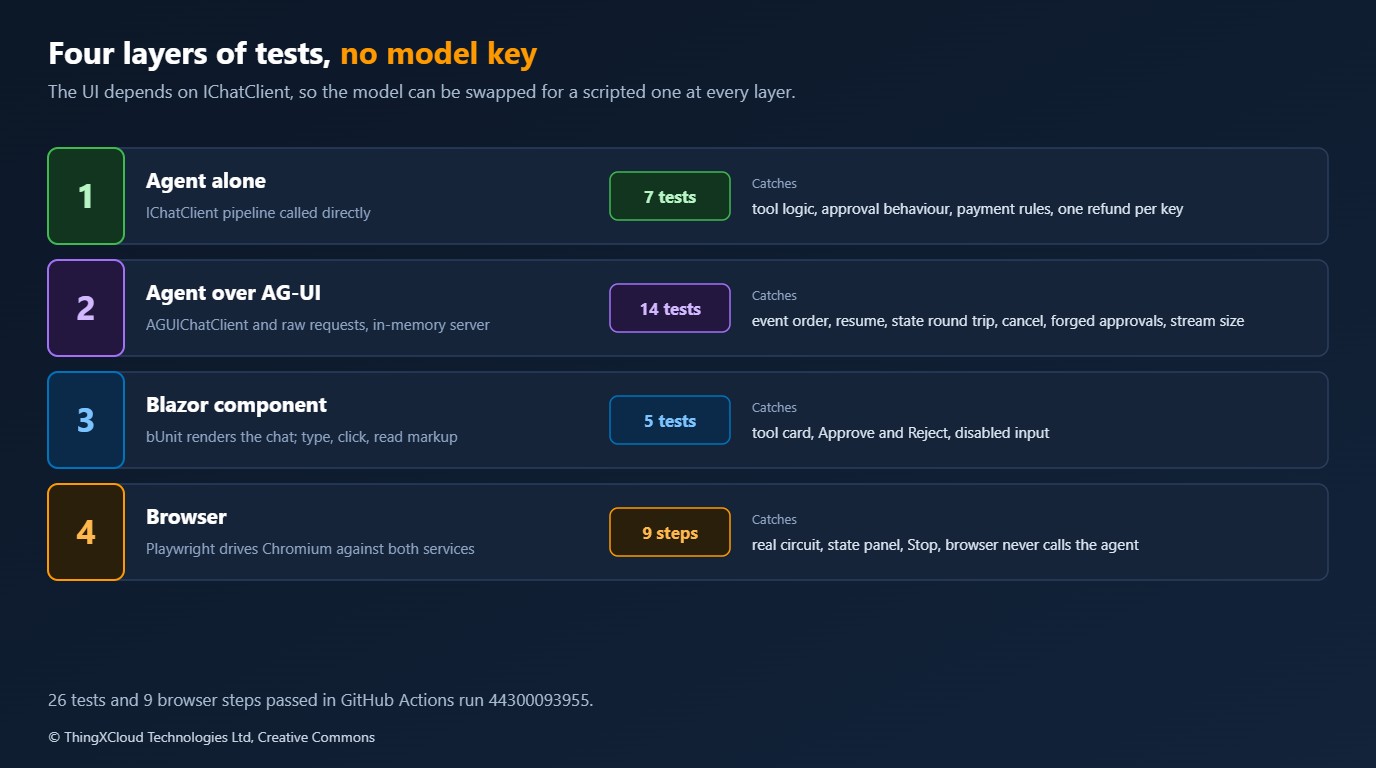
| Layer | How | Count | What it catches |
|---|---|---|---|
| Agent alone | The pipeline called as an IChatClient | 7 tests | Tool logic, approval behaviour, payment rules, idempotency |
| Agent over AG-UI | AGUIChatClient against the real endpoint on an in-memory test server, plus hand-written requests | 14 tests | Event sequences, resume, state round trip, cancellation, forged approvals, stream size |
| Component | bUnit renders the chat with the pipeline plugged in; the test types, clicks and reads markup | 5 tests | Tool card, approval buttons, disabled input, text after Approve and Reject |
| Browser | Playwright drives Chromium against both running services | 9 steps | The real circuit, state panel, Stop, and that the browser never calls the agent |
A component test reads like a description of the feature. No browser and no HTTP are involved, and it runs in milliseconds:
    [Fact]
    public void A_refund_waits_for_a_click_and_pays_after_Approve()
    {
        IRenderedComponent<DeskChat> chat = Ask("Refund order O-1003");

        chat.WaitForElement(".sc-ai-approval", s_wait);
        Assert.Contains("refund_order", chat.Find(".sc-ai-approval__tool-name").TextContent);
        Assert.Equal(0, _ledger.Attempts);

        Button(chat, "Approve").Click();

        chat.WaitForAssertion(() => Assert.Single(_ledger.Refunds), s_wait);
        chat.WaitForAssertion(() => Assert.Contains("The refund is recorded.", chat.Markup), s_wait);
        Assert.Empty(chat.FindAll(".sc-ai-approval__actions"));
    }
The browser run is the only layer that needs both services up. Its transcript:
ok   order card from a backend tool: O-1001 | Synthetic kettle | Customer | Test Customer One | Total | 42.00 EUR | Status | delivered | Carrier | Example Post
ok   refund waits for approval: buttons shown; refund attempts so far: 0
ok   approve pays once: refunds: [('O-1003', 37.5)]
ok   reject pays nothing: refunds: 1, attempts: 1
ok   approving the same refund again pays nothing more: refunds: 1, attempts: 2
ok   state from the agent fills the panel: Hi Test Customer One, good news: order O-1001 (Synthetic kettle) is delivered with Example Post.
ok   state edited by the user reaches the agent: Dear Test Customer One, your order O-1001 (Synthetic kettle) is recorded as delivered with Example Post. Regards, Sam, Order Desk
ok   stop ends the run on the server: server stream ended after 6 events, no RUN_FINISHED
ok   the browser never calls the agent service: hosts the browser talked to: ['127.0.0.1:5100', 'websocket 127.0.0.1:5100']
9 of 9 browser steps passedThe scripted model always makes the sensible choice for a given conversation. A real model can call the wrong tool, call two at once, or answer in text when it should have asked for approval. These tests show that the UI, the protocol and the server rules behave correctly for the events they are given. They say nothing about the quality of a model’s decisions, which needs its own evaluation.
Cost
The agentic UI adds little to what the model already costs. The Blazor side is a circuit per user, as for any interactive server app, plus one outbound HTTP stream per run. The parts that scale with usage are in the stream: a text event per chunk the model produces, and, if left on, the raw copy that multiplied the bytes by 3.5 to 4 in this lab. Approvals add a second request per approved action, and the server-side check adds a short-lived record per pending approval, which wants a shared store once there is more than one instance.
The saving is in the pipeline. All 26 tests and the browser run complete in a few minutes on a hosted runner without a model key, so the agentic parts of the UI can be tested on every commit.
Production considerations
- Treat the Blazor AI package as a preview. It is marked experimental and versioned 0.1.0. Pin it, keep it behind your own components, and expect renames.
- Authenticate the agent endpoint and scope everything by caller. Thread ids, pending approvals and state arrive from the client. None of them is proof of identity.
- Validate state like any other input. The page can send arbitrary JSON as state, and this sample puts it in front of the model. Use a schema and a size limit.
- Keep rules in the tools. The approval check proves the call was proposed. Only the tool can say whether it should be allowed.
- Handle the stream ending without a final event. Stop, a dropped connection and a restarted instance all look the same to the client.
- Decide what a refresh means. The conversation here lives in the circuit. A reload loses it, and a pending approval with it. Persisting threads is a separate design.
- Render tool arguments with care. The default approval block shows raw JSON arguments. For anything a person must judge, show them the way the business would describe the action.
- Trace both sides. The AG-UI client and server packages each expose an activity source. Join them to the model call so one approval can be followed end to end.
An approval is a decision by a named person about a specific action. Record who approved what, with the arguments as proposed and the outcome, in the system that performs the action. The chat transcript is not that record.
Decision framework
| Your situation | Approach | Why |
|---|---|---|
| Blazor app, agent owned by the same team | Interactive server, agent as a separate service, AG-UI between | The browser never reaches the agent endpoint |
| Blazor WebAssembly or a JavaScript front end | Put a trusted backend in front of the agent, authenticate, verify approvals | The browser is the AG-UI client and can send any request |
| Tool does something irreversible | Approval required, verified server-side, with rules and an idempotency key in the tool | Three different failures, three different controls |
| Tool only reads | Typed tool block and a card | No approval needed; the value is in the rendering |
| Agent and user edit the same form | Shared state with snapshots, validated on the way in | One state object, no private protocol |
| No .NET 11 yet | AG-UI client and server run on .NET 8 and later; build the rendering yourself | The Blazor AI components target .NET 11 only |
| Production deadline this quarter | Use the protocol packages now, wrap the preview components | The 1.0 packages are stable; the components are not |
Key takeaways
- An agentic UI is a typed stream of events: text, tool calls, state, and a run that can end by asking for a decision. AG-UI gives that stream a vocabulary, and it is plain HTTP and Server-Sent Events.
- On .NET 11 the experimental Blazor AI components render that stream with little code: a typed tool card is one attribute and one component, approval needs none.
- Depend on
IChatClientin the UI and swap the model for a scripted one in tests. That gave 26 tests and a nine-step browser run with no model key. - An approval travels as a second request that names the tool call. Without a server-side check, one forged request ran a refund nobody proposed. Remember what you proposed and verify it.
- Strip
rawEventunless you need it. It made the stream 3.5 to 4 times larger here.
If you have built on these components with a real model behind them, I would like to hear which of these edges you met first.
Everything above ran in GitHub Actions on a hosted Linux runner with .NET SDK 11.0.100 and runtime 11.0.0, Microsoft.AspNetCore.Components.AI 0.1.0-preview.1.26466.103, AGUI.Client, AGUI.Server and AGUI.Formatting 1.0.1, Microsoft.Extensions.AI 11.0.0, bUnit 2.15.2 and Chromium through Playwright. 26 tests passed: 7 on the agent pipeline, 14 over AG-UI against an in-memory test server, 5 on the Blazor component in bUnit. 9 of 9 browser steps passed against the two running services. The event sequences, the interrupt and resume payloads, the raw stream, the forged-approval results and the stream sizes are copied from that run. The model was a scripted stand-in and all orders are invented. Not run: any language model; Microsoft Agent Framework hosting; Blazor WebAssembly or Auto render modes; authentication; more than one server instance; load. The forged-approval result applies to this endpoint, built on AGUI.Server 1.0.1; other hosting layers were not tested. The run is here.
The complete sample for this article is on GitHub: nithinmohantk/blog-samples-working-repo/agentic-ui-blazor. Clone it with git clone https://github.com/nithinmohantk/blog-samples-working-repo.git and open the agentic-ui-blazor folder. Its README says how to run it and what has been verified.
Glossary
- Agentic UI— A user interface that renders what an agent does, not only what it says: tool calls, approvals and state changes.
- AG-UI— An open protocol for the event stream between an agent and a user interface.
- Run— One request to an agent and the events it produces, from RUN_STARTED to RUN_FINISHED.
- Interrupt— A run that ends by asking for a decision instead of finishing the work.
- Resume— The entry in the next request that answers an interrupt.
- Shared state— A JSON object that both the agent and the page read and change.
- IChatClient— The Microsoft.Extensions.AI abstraction for a chat model, which pipelines and clients both implement.
- Interactive server— The Blazor render mode where components run on the server and the browser holds a SignalR circuit.
- bUnit— A library that renders Blazor components in memory for tests.
- Idempotency key— A value that lets the receiver recognise a repeated request and act once.
References & Further Reading
- → What’s new in ASP.NET Core in .NET 11— Blazor changes, including the experimental AI components package
- → .NET Blog: Build agentic UI with Blazor— Microsoft’s walkthrough of the components with Agent Framework and Foundry
- → .NET Blog: The AG-UI .NET SDK— The protocol packages, the server and client APIs and the renamed Agent Framework methods
- → Agent Framework: Getting started with AG-UI— MapAGUIServer hosting and the client, for comparison with the endpoint built here
- → Agent Framework: AG-UI security considerations— Untrusted clients, state validation, thread ownership and approval state
- → AG-UI .NET SDK source— The packages and the getting-started samples, including approvals and state
- → ASP.NET Core: Components/AI source— The components, their tests and the sample apps they are tested with
- → Sample code for this article— The agent service, the Blazor app, four layers of tests and the pipeline script
Discover more from C4: Container, Code, Cloud & Context
Subscribe to get the latest posts sent to your email.
