
On this page
Paper and scanned forms are still how a large share of clinical information arrives: referral letters, medication charts photographed on a ward, consent forms, insurance cards, questionnaires filled in by hand in a waiting room. Getting fields out of them used to mean a document extraction service with trained models. It can now also mean sending the page to a multimodal language model with a JSON schema and asking for the fields.
Both work on a demo. They differ in what they return beyond the values, and that difference decides how a clinical workflow can check the result. This article compares Azure AI Document Intelligence with a multimodal model, using Gemini on Vertex AI as the example, and proposes a hybrid design in which the evidence for every extracted value reaches a reviewer.
It is the third design article in a set. The abstraction leaks article covers structured output differences between providers, and the clinical content filters article covers why an empty field must never be read as a negative finding. Both apply here.
This is a design article. No document was sent to either service and nothing was measured. Statements about the services come from the documentation pages listed under References. The forms described are invented and no real patient document was used. The design is untested guidance and is not clinically validated.
The problem
Take three invented examples. A two-page GP referral form with printed labels, typed answers and a handwritten note in the margin. A medication administration chart, photographed at an angle, with a table of drugs, doses and times and initials in each cell. A patient questionnaire with tick boxes and short handwritten answers. The fields are the easy part. The hard parts are the handwriting, the tables, the tick boxes, and knowing which values to trust.
In a clinical workflow the extracted values are not the end product. A person accepts them into a record, and that person needs to see where each value came from and how sure the system is. An extraction approach that returns only values pushes all of that checking back onto the reviewer, who then has to re-read the whole form.
Document Intelligence
Document Intelligence is a set of trained extraction models. The current generally available API version is 2024-11-30 (v4.0). Microsoft groups the models as follows.
- Read extracts text lines and words with their locations and detected languages.
- Layout adds tables, including merged cells and column headers, selection marks with their state, paragraphs with roles such as titles and headings, figures and sections. It can return Markdown, with tables rendered as HTML so merged cells survive. An optional key-value pairs feature extracts fields from forms without training.
- Prebuilt models cover specific document types. The health-related one is a model for US health insurance cards; most others are financial, tax, identity and mortgage documents.
- Custom models are trained on labelled samples: custom template for fixed layouts, custom neural for structured and semi-structured documents, composed models that combine several, and custom classification to route document types. Microsoft’s comparison lists a minimum of five labelled samples.
What sets it apart is the evidence attached to each value. Every word, line and selection mark comes with a polygon on the page and a confidence score. Fields extracted by models come with a confidence that Microsoft describes as an estimated probability between 0 and 1. From API version 2024-11-30, custom models also return confidence for tables, rows and cells. Layout flags each text line as handwritten or not, with its own confidence, though Microsoft documents that handwriting classification for Latin scripts only.
Microsoft’s own guidance positions Document Intelligence for high-volume, deterministic extraction, and points scenarios that need generative AI or highly varied templates to Azure Content Understanding, which this article does not cover.
Multimodal model
A multimodal model reads the page as an image or a PDF and answers a prompt. With a response schema, it returns the fields as JSON. Gemini on Vertex AI accepts PDF documents up to 50 MB through the API, with page and file limits that vary by model. Google’s guidance is to place a single PDF before the text of the prompt, split long documents, and prefer PDFs with machine-readable text to scanned images.
Google is also direct about the limits. Its document understanding page says the models are not precise at locating text or objects in PDFs, and that they might hallucinate when interpreting handwritten text. The page read does not describe bounding boxes or confidence scores for extracted values. The schema constraints and their differences between providers, covered in the abstraction article, apply as well.
What a multimodal model offers in return is flexibility. It needs no labelled samples, it can follow instructions about context, and it can read a free-text paragraph and answer a question about it, which a field extractor is not built to do.
Comparison
| Aspect | Document Intelligence | Multimodal model (Gemini on Vertex AI) |
|---|---|---|
| Setup | Prebuilt models, or custom models trained on labelled samples | A prompt and a response schema; no training |
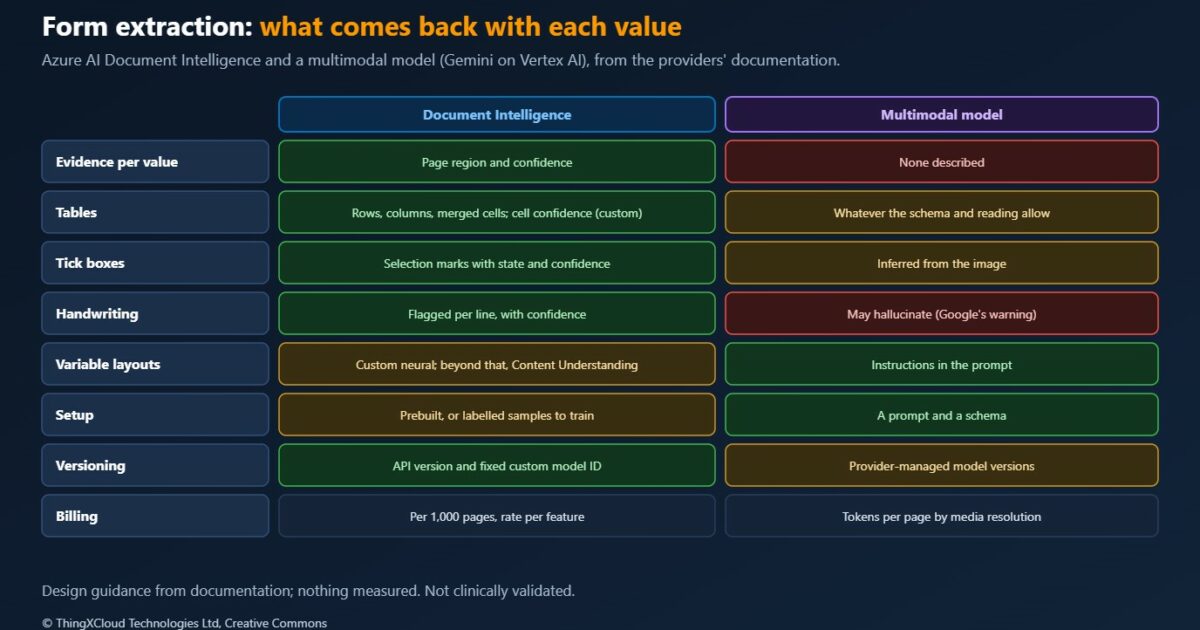
| Evidence per value | Polygon on the page and a confidence score | None described on the page read |
| Words and text | Each word and line with location and confidence | Text as part of the answer |
| Tables | Rows, columns, merged cells, headers; cell confidence for custom models | As far as the schema and the model’s reading allow |
| Tick boxes | Selection marks with state, location and confidence | Inferred from the image |
| Handwriting | Handwritten lines flagged with confidence (Latin scripts) | Google warns of possible hallucination on handwriting |
| Variable layouts | Custom neural for semi-structured documents; Content Understanding beyond that | Handles variation through instructions |
| Versioning | API version and model ID; a custom model is fixed once trained | A model version that changes when the provider updates it |
| Billing unit | Per 1,000 pages, with separate rates per feature | Tokens; pages tokenised according to a media resolution setting |
| Processing location | Region of the resource; input and results kept 24 hours | Depends on the endpoint; the global endpoint gives no residency guarantee |
Confidence and evidence
A confidence score and a polygon change what a reviewer does. With them, a review screen can show the extracted value next to the highlighted region of the scanned page, and only for the values below a threshold. Without them, the reviewer has to find the value on the page themselves, for every value, or trust it.
Microsoft is careful about what the score means. Field confidence for custom models reflects the model’s confidence in the position of the value, and it recommends checking the underlying word or selection mark confidence for a composite view. It gives no numeric threshold, says confidence can decide between automatic acceptance and human review, and recommends custom model accuracy close to 100% for sensitive cases such as medical records. Any threshold is therefore a local decision, calibrated on a sample of the organisation’s own forms and set more strictly for high-risk fields such as drug, dose and allergy.
A multimodal model can be asked to report how sure it is, but a number the model writes in its own answer is a generated value like any other, not a calibrated probability. It should not be used as a review threshold without evidence that it predicts errors on the forms in question.
Handwriting and tables
Handwriting and tables are where clinical forms differ from invoices, and where the two approaches fail differently. Layout marks a line as handwritten and gives each word a confidence, so a low-confidence handwritten dose stands out. A multimodal model returns a fluent answer whether or not it could read the writing, and Google’s own documentation warns that it might hallucinate there. A plausible but wrong dose is the failure to design against.
For tables, Layout returns the grid with row and column spans, so a medication chart’s structure survives even where a cell is hard to read. A multimodal model can return a table that matches the schema with rows merged, shifted or invented, and nothing in the response says so. Where structure carries meaning, as in drug, dose and time, the structure needs its own check.
Proposed design
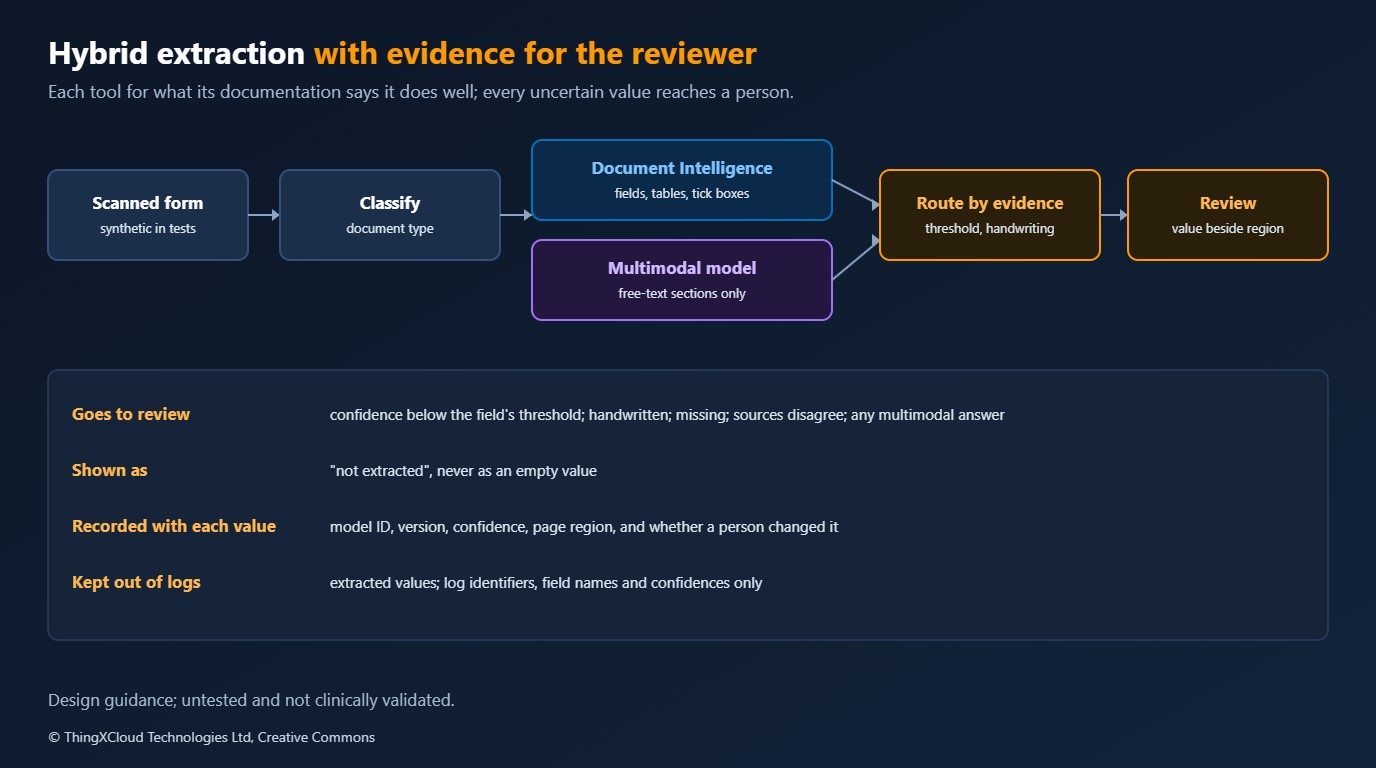
The proposal uses each tool for what its documentation says it does well, and routes every uncertain value to a person with the evidence beside it.
%%{init: {'theme':'base','themeVariables':{'primaryColor':'#FFF3E0','primaryTextColor':'#232F3E','primaryBorderColor':'#FF9900','lineColor':'#232F3E','clusterBkg':'#F8FAFC','clusterBorder':'#CBD5E1','edgeLabelBackground':'#FFFFFF','nodeTextColor':'#232F3E'}}}%%
flowchart TD
    IN["Scanned form"] --> CL["Classify document type"]
    CL --> DI["Document Intelligence:
layout or custom model"]
    DI --> F["Fields with confidence
and page regions"]
    DI --> FT["Free-text sections"]
    FT --> MM["Multimodal model:
schema for free-text questions"]
    F --> R{"Below threshold,
handwritten, or missing?"}
    MM --> R2["Always reviewed:
no calibrated confidence"]
    R -- "yes" --> Q["Review queue:
value beside highlighted region"]
    R -- "no" --> A["Accepted, with source recorded"]
    R2 --> Q
    Q --> A
    A --> REC["Write to the clinical record"]
    style DI fill:#EBF8FF,stroke:#0073BB,stroke-width:2px,color:#004C74
    style MM fill:#F3E8FF,stroke:#7C3AED,stroke-width:2px,color:#4C1D95
    style Q fill:#FFF3E0,stroke:#FF9900,stroke-width:2px,color:#232F3E
style REC fill:#F0FFF4,stroke:#1D8102,stroke-width:2px,color:#145202- Classify first. A custom classification model, or a simple rule where the form carries a code, sends each document type to the extractor trained for it.
- Extract fields with Document Intelligence. Layout with key-value pairs to start, a custom model once a form type has enough labelled samples. Keep the confidence and the polygon with every value.
- Use the multimodal model for the questions a field extractor cannot answer. A free-text reason for referral, summarised against a schema, is a good fit. Its output is always reviewed, because it carries no calibrated confidence.
- Route by evidence. A value goes to review if its confidence is below the threshold for that field, if the line is handwritten, if the field is missing, or if two sources disagree. A missing value is shown as not extracted, never as empty.
- Show the source. The review screen shows each value next to the highlighted region of the page, so the reviewer checks the value, not the whole form.
- Record provenance. The accepted record keeps the model ID, API or model version, confidence, and whether a person changed the value. That is the audit trail when a value is later questioned.
%%{init: {'theme':'base','themeVariables':{'primaryColor':'#FFF3E0','primaryTextColor':'#232F3E','primaryBorderColor':'#FF9900','lineColor':'#232F3E','signalColor':'#0073BB','signalTextColor':'#0F172A','actorBkg':'#FFF3E0','actorBorder':'#FF9900','actorTextColor':'#232F3E','noteBkgColor':'#FFF8E7','noteBorderColor':'#FF9900','noteTextColor':'#232F3E'}}}%%
sequenceDiagram
    participant X as Extraction service
    participant R as Reviewer
    participant C as Clinical record
    X->>R: Dose 5 mg, handwritten, confidence 0.62, region on page 2
    Note over R: Sees the value beside the highlighted region
    R->>X: Corrected to 0.5 mg
    X->>C: Dose 0.5 mg, source page 2, changed by reviewer
    X->>C: Name and date of birth, confidence above threshold, accepted
Cost
No prices are quoted here, because both price lists change and nothing was measured. The structures differ. Document Intelligence bills per 1,000 pages, with separate rates for read, for layout and prebuilt models, for custom extraction, for custom generative extraction and for classification, plus charges for add-on features; neural model training is billed per hour after a free allowance, and commitment tiers trade a monthly fee for a page allowance. A free tier covers 500 pages a month. A multimodal model bills tokens: on Vertex AI, the tokens a PDF page consumes depend on a media resolution setting, and the response schema counts toward input tokens. The design above runs the multimodal model only on the sections that need it, which bounds that part of the cost.
Data residency
Microsoft states that Document Intelligence processes input in the region where the resource was created, keeps input and results in that region for 24 hours, then deletes them, and offers an API to delete a result sooner. Custom model training data stays in the customer’s own blob storage. On Vertex AI, data at rest stays in the chosen location, while the endpoint decides where processing happens: Google states that global endpoints give no data residency guarantee, and regional endpoints keep processing within the jurisdiction of that region. For health data, the endpoint is a compliance decision, set once in configuration and not changed for capacity reasons.
Testing the design
- A synthetic form set. Invented forms for each type, filled in by several people in different handwriting, scanned and photographed, with the correct values recorded. Never real patient documents.
- Measure per field, not per form. Error rates for drug, dose, allergy and date matter more than an overall score. Calibrate each field’s threshold from these results.
- Test the routing without the services. Recorded responses with low confidence, handwriting, missing fields and disagreements, run through the routing and the review screen.
- Rerun on every version change. A new API version, a retrained custom model or a new multimodal model version gets the full form set before it is used.
Production considerations
- Pin versions. Use a specific Document Intelligence API version and custom model IDs, and a specific multimodal model version. Record both on every extracted value.
- Delete results promptly. Call the delete API once results are stored, rather than relying on the 24-hour retention.
- Keep extraction out of logs. Log document identifiers, field names and confidences, not values.
- Put extraction in the clinical safety case. A wrong dose accepted from a form is a hazard with controls: thresholds, review, provenance and testing.
- Plan for the forms that will not extract. Poor scans and unusual layouts will always exist. A route to manual entry, visible in the workflow, is part of the design.
Decision framework
| Your situation | Approach | Why |
|---|---|---|
| Fixed form layouts in volume | Document Intelligence custom template or neural model | Confidence and regions per value, trained on your forms |
| US health insurance cards | The prebuilt health insurance card model | A prebuilt model exists for that document |
| Tables such as medication charts | Document Intelligence layout or custom model | Rows, columns and cells with structure and confidence |
| Handwritten values that matter clinically | Document Intelligence with review of every handwritten value | Handwriting flagged; multimodal models may hallucinate |
| Free-text sections and varied documents | Multimodal model with a schema, always reviewed | Flexible, but no calibrated confidence |
| Strict residency requirements | A regional resource or endpoint, fixed in configuration | The global endpoint gives no residency guarantee |
Key takeaways
- Document Intelligence returns a page region and a confidence with each value; the multimodal model documentation read describes neither.
- Google warns that its models might hallucinate on handwriting and are imprecise at locating text, which matters most for doses and tables.
- Use Document Intelligence for fields, tables and tick boxes, and a multimodal model for free-text questions, with its output always reviewed.
- Route values to review by confidence, handwriting, absence or disagreement, and show the reviewer the region of the page.
- Pin versions, record provenance on every value, and choose processing locations as a compliance decision.
If you have run clinical forms through either approach and measured field-level error rates, I would like to hear how they compared.
This is a design article and nothing was run. Statements about the services come from the documentation pages listed below: Document Intelligence model overview, layout model, accuracy and confidence, model selection guidance, data privacy and pricing; Vertex AI document understanding and data residency. Where a page did not cover a point, for example bounding boxes or confidence for Gemini, the article says so rather than filling the gap. No document was sent to either service, no accuracy or cost was measured, and the forms described are invented. Nothing here is clinically validated.
Glossary
- Document Intelligence— Azure’s service of trained models for extracting text, layout and fields from documents.
- Layout model— The Document Intelligence model that returns text, tables, selection marks and document structure.
- Custom template and neural models— Document Intelligence models trained on labelled samples, for fixed and for semi-structured layouts.
- Selection mark— A tick box or radio button, returned with its state and location.
- Polygon— The coordinates of a region on the page where a word, line or value was found.
- Confidence score— An estimated probability that an extracted value is correct.
- Multimodal model— A language model that accepts images and documents as input as well as text.
- Provenance— The record of where a value came from: source page and region, model, version, confidence and any human change.
References & Further Reading
- → Document Intelligence: Model overview— Read, layout, prebuilt and custom models, API versions and bounding regions
- → Document Intelligence: Layout model— Tables, selection marks, handwriting style, Markdown output and limits
- → Document Intelligence: Accuracy and confidence scores— Field, word, selection mark and table confidence, and human review
- → Document Intelligence: Choose a model— Which model for which document, and when to use Content Understanding
- → Document Intelligence: Data, privacy and security— Processing region, 24-hour retention and deleting results
- → Document Intelligence pricing— Billing per 1,000 pages by feature, free tier and commitment tiers
- → Vertex AI: Document understanding— Supported documents, limits, best practices and known limitations
- → Vertex AI: Data residency— Data at rest, processing location and endpoint types
Discover more from C4: Container, Code, Cloud & Context
Subscribe to get the latest posts sent to your email.
